Key takeaways
- Compare the best gaming trackballs, from thumb-ball Logitech models to finger-ball Kensington and ELECOM picks, with ball size and DPI explained.
A trackball stays in one place while a ball under the thumb or fingers moves the cursor, so the arm does not need to sweep across a desk. That stationary design suits small desks and players who want to rest the wrist during long sessions. Cursor movement comes from rolling a ball rather than moving a whole mouse, so a trackball is a specialist choice rather than a direct replacement for a conventional gaming mouse.
The picks below cover the two main layouts. Thumb-ball models keep the ball under the thumb and the hand in a familiar mouse shape, while finger-ball models place a larger ball in the centre and move it with the index and middle fingers. Both suit strategy, simulation, role-playing, and retro games.
As an Amazon Associate, we earn from qualifying purchases.
Quick answer
For most players, the Logitech MX Ergo S is the strongest premium thumb-ball pick, with an adjustable tilt base and a rechargeable battery. The Logitech ERGO M575S is the budget thumb-ball pick, with a fixed shell and a long-lived AA battery. Finger-ball players should look at the ELECOM HUGE Wireless, the Kensington TB800 EQ, and the Kensington Orbit Wireless.
How to choose
Start with the ball layout. A thumb-ball trackball suits players coming from a standard mouse, since the hand rests in a similar shape and only the thumb moves. A finger-ball trackball suits players who want finer control from the index and middle fingers, and it often uses a larger ball, which can feel steadier. Finger balls in this guide measure 40 mm, 52 mm, or 55 mm.
Sensitivity is given as DPI, and the trackballs here use stepped settings. A low step suits precise aiming, while a higher step suits moving across large or ultrawide displays. Check whether the steps change with a hardware button or through software.
Connectivity should match the setup. Bluetooth suits laptops, a 2.4 GHz receiver suits a dedicated gaming PC, and a wired connection removes pairing and charging from the routine. Some models connect to more than one device, and programmable buttons can carry abilities, weapon switching, or shortcuts. Handedness is a hard limit: most thumb-ball models are right-handed only, while several finger-ball models are ambidextrous.
A finger-ball model with a palm rest needs a wide patch of desk and suits larger hands, while a compact thumb-ball model fits a smaller desk. Finally, pick a tier. Budget covers the basics, mid-range adds a larger ball or more buttons, and premium adds an adjustable tilt base, multi-device switching, or a rechargeable battery.
Logitech MX Ergo S Advanced Wireless Trackball Mouse

The Logitech MX Ergo S is the premium thumb-ball pick, and the most adjustable model here. Its base tilts flat or to 20 degrees, so the hand angle can be changed without lifting the device. The thumb ball sits in a sculpted, right-handed shell for medium to large hands.
Six customizable buttons cover the main clicks, back and forward navigation, and a precision mode that slows the cursor for fine aiming. The sensor adjusts from 512 to 2048 DPI through Logi Options+, and Easy-Switch moves between two paired computers. Connection is by Bluetooth Low Energy or the included Logi Bolt receiver, and charging is by USB-C. The trade-off is the right-handed shape.
- Ball: thumb-operated, tilt base, flat or 20 degrees
- Sensor: Logitech Advanced Optical Tracking, 512 to 2048 DPI
- Buttons: 6 customizable buttons with precision mode
- Connectivity: Bluetooth Low Energy and Logi Bolt receiver, Easy-Switch for 2 devices
- Battery: rechargeable, up to 120 days per charge, USB-C charging
- Tier: premium
- ASIN: B0D6PTR6MP
Logitech ERGO M575S Wireless Trackball Mouse, Graphite Blue Ball

The Logitech ERGO M575S is the budget thumb-ball pick, keeping the same basic idea as the MX Ergo S in a simpler, lighter package. The shell is fixed rather than tilting, and the sculpted shape is described by Logitech as a good fit for most hand sizes. The thumb ball controls the cursor while the hand stays still, and the clicks are quieter than on the earlier M575 model.
Sensitivity runs from 100 to 2000 DPI and is adjusted in Logi Options+. Five buttons include three customizable buttons for shortcuts. Connection is by Bluetooth Low Energy or the included Logi Bolt USB receiver, with a range of up to 10 metres. Power comes from a single AA battery, included and rated for up to 18 months. The limits are the fixed angle and the right-handed shape.
- Ball: thumb-operated, sculpted ergonomic shell
- Sensor: Logitech Advanced Optical Tracking, 100 to 2000 DPI
- Buttons: 5 buttons, including 3 customizable buttons
- Connectivity: Bluetooth Low Energy and Logi Bolt USB receiver, range up to 10 m
- Battery: 1 AA battery included, up to 18 months
- Tier: budget
- ASIN: B0BBQ3ZYNY
ELECOM HUGE Trackball, 2.4GHz Wireless, M-HT1DRBK

The ELECOM HUGE Wireless is the large finger-ball pick, built around a 52 mm red ball rolled with the index and middle fingers. The broad body includes an attached palm rest, so the whole hand is supported while the fingers do the work. Eight programmable buttons and a tilt scroll wheel give room for abilities, inventory commands, and horizontal scrolling, which suits strategy, simulation, and menu-heavy titles.
Sensitivity switches between 500, 1000, and 1500 DPI with a hardware button. The ball runs on artificial ruby bearings. Connection is by a 2.4 GHz wireless USB receiver, and power comes from two AA batteries. ELECOM Mouse Assistant software handles button programming on Windows and macOS. The trade-off is size: the wide, right-handed body needs a generous patch of desk.
- Ball: 52 mm finger-operated red ball, removable for cleaning
- Sensitivity: 500, 1000, and 1500 DPI, hardware switchable
- Buttons: 8 programmable buttons plus tilt scroll wheel
- Connectivity: 2.4 GHz wireless USB receiver
- Power: 2 AA batteries included
- Tier: mid-range
- ASIN: B0735584RM
Kensington Expert Mouse TB800 EQ Wireless Trackball, Red Ball, K72458WW
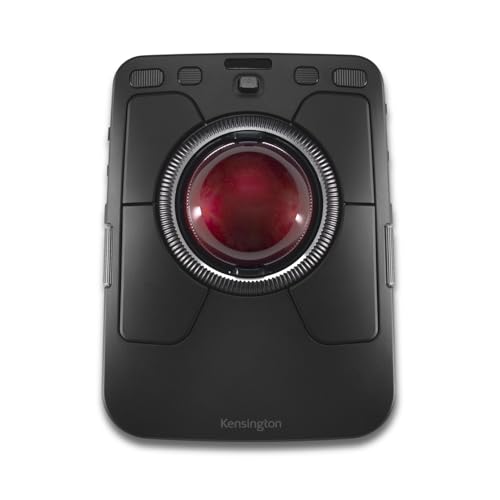
The Kensington Expert Mouse TB800 EQ is the premium finger-ball pick, and the most control-heavy model in this guide. A 55 mm ball sits in the centre of an ambidextrous body, so it can be used by either hand, and the scroll ring around the ball handles vertical scrolling. Two additional side scrolls give extra ways to scroll and zoom without reaching for the keyboard.
Sensitivity steps through 400, 800, 1200, and 1600 DPI, and the polling rate reaches up to 1000 Hz on the wired or 2.4 GHz connection. Four connections are available: two Bluetooth channels, one 2.4 GHz wireless channel, and one wired USB-C connection, so up to four devices can be paired. The rechargeable battery is rated for up to four months per charge. The trade-off is the footprint: this large, heavy device demands its own space.
- Ball: 55 mm finger-operated ball, ambidextrous design
- Sensitivity: 400, 800, 1200, and 1600 DPI
- Polling rate: up to 1000 Hz on wired or 2.4 GHz connection
- Controls: adjustable scroll ring plus two customizable side scrolls
- Connectivity: 2 Bluetooth channels, 2.4 GHz receiver, and wired USB-C, up to 4 devices
- Battery: rechargeable, up to four months per charge
- Tier: premium
- ASIN: B0G2L19JPY
Kensington Orbit Wireless Trackball with Scroll Ring, Black-Red, K70990WW

The Kensington Orbit Wireless is the mid-range, ambidextrous finger-ball pick, and the simplest Kensington model in this guide. A 40 mm red ball sits in the centre of a symmetrical body, and a scroll ring around the ball spins through web pages and long documents. The detachable wrist rest supports the wrist during long sessions, and the two buttons can be customized through Kensington software.
Sensitivity steps through 400, 800, 1200, and 1600 DPI, changed with a button on the underside. Connection is by 2.4 GHz wireless or Bluetooth LE. Power comes from two AA batteries, included in the box, and Kensington rates battery life at up to 12 months. The trade-off is the button count: with only two buttons, players who map many abilities will rely on the keyboard more.
- Ball: 40 mm finger-operated ball, ambidextrous design
- Sensitivity: 400, 800, 1200, and 1600 DPI
- Buttons: 2 programmable buttons, customizable through Kensington software
- Connectivity: 2.4 GHz wireless and Bluetooth LE, 128-bit AES encryption
- Power: 2 AA batteries included, up to 12 months
- Tier: mid-range
- ASIN: B09DGMYVPP
Who should skip
A trackball is not the right pick for every player. Players who mainly play fast first-person shooters should skip this category, because flick aiming and rapid turning are harder with a ball than with a conventional mouse, and the sensitivity ceilings here are lower than on dedicated gaming mice. Players who need many programmable buttons for MMOs will find only the ELECOM HUGE and the TB800 EQ offer a wide control layout.
Left-handed players should skip the Logitech thumb-ball models and the ELECOM HUGE, since all three are right-handed only, and look instead at the ambidextrous Kensington models. Players with very small hands or very small desks should also skip the large finger-ball models. Finally, anyone who dislikes a learning period should stay with a conventional mouse.
FAQ
Are trackballs good for gaming?
Trackballs suit some game types well and others poorly. They work well for strategy, simulation, role-playing, and retro games, where steady cursor control matters. They suit fast first-person shooters poorly, because flick aiming is harder with a ball than with a conventional mouse.
Is a thumb ball or a finger ball better for gaming?
Neither layout is better in every case. A thumb ball suits players coming from a standard mouse, since the hand shape is familiar and only the thumb moves. A finger ball suits players who want finer control from the index and middle fingers, and it often uses a larger ball. Finger-ball models are also more likely to be ambidextrous, while the thumb-ball models here are right-handed only.
What DPI should a gaming trackball have?
The right setting depends on the display and the game. A low step, around 400 to 800 DPI, suits precise aiming. A higher step, around 1200 to 2000 DPI, suits moving across large or ultrawide displays. All five picks use stepped settings, changed with a hardware button or through software.
Do trackballs need a lot of desk space?
It depends on the model. Thumb-ball models stay compact and fit a small desk, since the body does not move at all. Finger-ball models need more room, especially the ELECOM HUGE and the Kensington TB800 EQ, which have wide bodies and palm rests. No mouse mat sweep area is needed, since the device itself never moves.
Final verdict
For most players, the Logitech MX Ergo S is the pick to start with, because the adjustable tilt base, the rechargeable battery, and the two-device switching cover the widest range of setups. The Logitech ERGO M575S offers the same thumb-ball idea for less, with a simpler shell and a long-lived AA battery. Finger-ball players should choose the ELECOM HUGE Wireless for a large ball and many buttons, the Kensington TB800 EQ for the most scrolling and connection options, or the Kensington Orbit Wireless for an ambidextrous, mid-range option. Match the ball layout to the hand first, then the size to the desk, and the rest follows.
FAQ
Are trackballs good for gaming?
Is a thumb ball or a finger ball better for gaming?
What DPI should a gaming trackball have?
Do trackballs need a lot of desk space?
More from Amazon
Programs that pair well with the guide above. Offers and eligibility are set by Amazon and may change.
Free shipping on eligible items, Prime Video and more. Eligible new members can start with a free trial.
Start a Prime free trialAd-free music streaming. Eligible new subscribers can start with a free trial.
Try Music Unlimited freeA Prime membership for ages 18-24 with a trial period. Eligibility is set by Amazon.
See Prime for Young AdultsAudiobooks and podcasts to listen to on the go. Eligible new members can start with a free trial.
Try Audible freeAs an Amazon Associate we earn from qualifying purchases.