Key takeaways
- Find the best Ethernet switches for gaming, from budget five-port gigabit models to premium 2.5-gigabit switches, with port, speed and setup guidance.
A wired connection is still the most reliable way to play online games. Wi-Fi can add jitter, drop packets, or slow down when another device starts a large download. Most routers have only a few wired ports, and a gaming PC, a console, a streaming box, and a network drive can fill them quickly. A switch adds ports without adding a second router or a settings page to manage.
This guide compares five switches for gaming desks and living-room setups, across budget, mid-range, and premium tiers. The focus is on port count, port speed, switching capacity, and build. All five are wired desktop switches with RJ45 ports that work with standard Cat5e or Cat6 cables. None replaces a router or a modem, and none creates a Wi-Fi network.
As an Amazon Associate, we earn from qualifying purchases.
Quick answer
For most gamers, the NETGEAR GS308 is the safest starting point, with eight gigabit ports, a fanless metal case, and no configuration. Choose the TP-Link TL-SG108 for a similar eight-port setup at a budget tier, the NETGEAR MS308 for 2.5-gigabit ports, or the TP-Link TL-SG105 and NETGEAR GS305 when five ports are enough for a small desk.
How to choose
Start by counting devices. One port is used for the uplink to the router, so a five-port switch serves four local devices and an eight-port switch serves seven. Count the gaming PC, every console, the television or streaming box, and any network storage before choosing a size. Buying a switch with one spare port is sensible, because adding a device later is much easier than replacing a full switch.
Next, look at port speed. A gigabit port moves data at up to one gigabit per second, which is enough for online gaming, game downloads, and 4K streaming on most home internet plans. A 2.5-gigabit port matters most for large transfers inside the home, such as moving games to a network drive or backing up a PC to a fast NAS. It only helps when the device at the other end also supports 2.5-gigabit Ethernet. For online play alone, a gigabit switch is not the bottleneck in most homes.
Switching capacity is the total throughput a switch can handle when several ports are busy at once. An eight-port gigabit switch with a 16 Gbps capacity can run every port at full speed in both directions, and a five-port gigabit switch with a 10 Gbps capacity does the same for its smaller port count. A 2.5-gigabit eight-port switch needs a 40 Gbps capacity to match that pattern.
An unmanaged switch is plug and play: connect the uplink, connect the devices, and it forwards traffic with no login, no app, and no settings to change. That is the right choice for most gaming setups. A managed switch adds features such as VLANs, traffic priority, and port monitoring, which suit a home lab or a shared network with devices that should be kept apart.
A fanless switch runs silently, which suits a desk, a bedroom, or a living room, and a metal case helps with heat and durability. A switch does not improve a bad cable, and a damaged or very old cable can limit a gigabit link to a slower speed. Use Cat5e or Cat6 cables, and test each link after setup by checking the link speed reported by the PC or console.
NETGEAR GS308

The NETGEAR GS308 is the best overall pick in this guide. It is an eight-port gigabit unmanaged switch, so it adds seven usable device ports once the router uplink is connected. That is enough for a gaming PC, two consoles, a television, a streaming box, and network storage, with room to spare. Its published switching capacity is 16 Gbps, which matches eight gigabit ports running at full speed in both directions.
The GS308 uses a fanless metal case, so it runs silently on a desk or mounted on a wall. It is plug and play, with auto-negotiation on every port and Auto-MDI and MDIX support, so standard cables work without crossover cables. It supports IEEE 802.3az Energy Efficient Ethernet, which lowers power use on idle ports, and its maximum power consumption is published as 3.04 watts.
- Ports: 8 x 10/100/1000 Mbps RJ45
- Switching capacity: 16 Gbps
- Management: Unmanaged, plug and play
- Case: Fanless metal, desktop or wall mount
- Dimensions: 158 x 101 x 29 mm
- Power: 3.04 watts maximum
- ASIN: B07PFYM5MZ
TP-Link TL-SG108

The TP-Link TL-SG108 is the budget eight-port pick, and the closest rival to the GS308 on port count. It also provides eight gigabit RJ45 ports with auto-negotiation and Auto-MDI and MDIX support, and a published switching capacity of 16 Gbps. That makes it a straightforward budget alternative to the GS308.
Its case is fanless metal with shielded ports, which helps with durability and with interference in a busy desk setup. TP-Link lists traffic optimisation, quality of service support, and IGMP snooping among its features, and the switch is plug and play. The case measures 158 by 101 by 25 millimetres, and the published maximum power draw is 2.77 watts.
- Ports: 8 x 10/100/1000 Mbps RJ45
- Switching capacity: 16 Gbps
- Management: Unmanaged, plug and play
- Case: Fanless metal with shielded ports
- Dimensions: 158 x 101 x 25 mm
- Power: 2.77 watts maximum
- ASIN: B00A121WN6
NETGEAR MS308

The NETGEAR MS308 is the premium pick for gamers who want faster wired speeds inside the home. It provides eight ports that auto-negotiate between 100 Mbps, 1 Gbps, and 2.5 Gbps, so a gaming PC with a 2.5-gigabit adapter, a fast NAS, or a multi-gig router can use the faster link while older gigabit devices still connect normally. Its published switching capacity is 40 Gbps, which matches eight 2.5-gigabit ports running at full speed in both directions.
The MS308 is unmanaged and plug and play, with a fanless metal case for silent operation. It works with existing Cat5e or Cat6 cables, so upgrading to 2.5-gigabit ports does not require new cabling in most homes. Its published maximum power consumption is 7.98 watts. It also supports jumbo frames up to 9,720 bytes. Choose it for large local transfers, such as moving game libraries, rather than for online play alone.
- Ports: 8 x 100 Mbps, 1 Gbps, and 2.5 Gbps RJ45
- Switching capacity: 40 Gbps
- Management: Unmanaged, plug and play
- Case: Fanless metal, desktop or wall mount
- Jumbo frames: Up to 9,720 bytes
- Power: 7.98 watts maximum
- ASIN: B0D54STHFZ
TP-Link TL-SG105
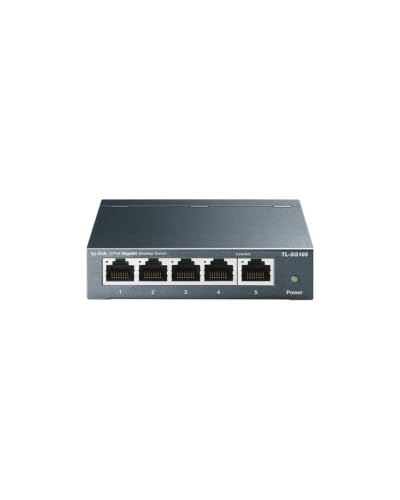
The TP-Link TL-SG105 is the budget five-port pick for a small gaming desk. It provides five gigabit RJ45 ports with auto-negotiation and Auto-MDI and MDIX support, and a published switching capacity of 10 Gbps. Once the router uplink is connected, four ports remain for local devices, which covers a gaming PC, one console, a television, and one spare device in many setups.
Its case is fanless metal, and it is small enough to sit beside a monitor or behind a television. TP-Link lists quality of service support and IGMP snooping among its features, and the switch is plug and play. The case measures 99.8 by 98 by 25 millimetres. If a second console, a streaming box, and network storage all need wired ports, an eight-port switch is the better fit.
- Ports: 5 x 10/100/1000 Mbps RJ45
- Switching capacity: 10 Gbps
- Management: Unmanaged, plug and play
- Case: Fanless metal, desktop or wall mount
- Dimensions: 99.8 x 98 x 25 mm
- Features: Quality of service and IGMP snooping
- ASIN: B00A128S24
NETGEAR GS305

The NETGEAR GS305 is the compact five-port pick, and the smaller sibling of the GS308. It provides five gigabit RJ45 ports with auto-negotiation and Auto-MDI and MDIX support, and a published switching capacity of 10 Gbps. Once the router uplink is connected, four ports remain, which suits a gaming PC, a console, and a television in a small room.
The GS305 uses a fanless metal case, so it runs silently on a desk or mounted on a wall. It is plug and play, with no login and no settings to change, and it supports IEEE 802.3az Energy Efficient Ethernet for lower power use on idle ports. NETGEAR lists a three-year limited hardware warranty for this model. Choose it when five ports are enough and a compact, quiet switch is the priority.
- Ports: 5 x 10/100/1000 Mbps RJ45
- Switching capacity: 10 Gbps
- Management: Unmanaged, plug and play
- Case: Fanless metal, desktop or wall mount
- Energy: IEEE 802.3az Energy Efficient Ethernet
- Warranty: Three-year limited hardware warranty
- ASIN: B07S98YLHM
Who should skip
Skip a new switch if your router already has enough free wired ports for every device you own. A switch adds ports, and it cannot make a slow internet plan faster or fix a weak Wi-Fi signal in another room. Skip a 2.5-gigabit switch if none of your devices has a 2.5-gigabit port, because the faster ports will simply negotiate down to gigabit speed. Skip a five-port switch if you already have four wired devices plus a router uplink, because the next device will force a replacement. Skip a managed switch if you do not want to configure VLANs or traffic rules.
FAQ
Do I need a managed switch for gaming?
No, for most gaming setups an unmanaged switch is enough. Online games need a stable, low-latency wired link, and an unmanaged switch provides that with no configuration. A managed switch adds VLANs, traffic priority, and monitoring, which suit a home lab, but those features do not make a game run faster on a normal home network.
How many ports should a gaming switch have?
Count every wired device, then add one port for the router uplink and one spare port for the next device. A five-port switch serves four local devices, and an eight-port switch serves seven. A gaming PC, a console, and a television fit on a five-port switch, while a second console, a streaming box, and network storage push the count toward eight ports.
Will a 2.5-gigabit switch make online games faster?
Not on its own. Online play uses far less bandwidth than a gigabit link provides, so the limit is usually the internet plan or the game server, not the switch. A 2.5-gigabit switch helps with large transfers inside the home, such as moving games to a fast NAS, where both ends support the faster speed.
Do I need new cables for a 2.5-gigabit switch?
No, in most homes Cat5e or Cat6 cables already support 2.5-gigabit links up to normal room distances. Check that each cable is undamaged and fully seated, and confirm the link speed reported by the PC or console after setup. If a link negotiates below its rated speed, try a different cable.
Final verdict
For most gamers, the NETGEAR GS308 is the best Ethernet switch in this guide. Its eight gigabit ports, 16 Gbps switching capacity, fanless metal case, and plug-and-play design cover a gaming PC, consoles, and streaming gear without any configuration. If eight ports are needed at a budget tier, the TP-Link TL-SG108 is the closest alternative. For faster local transfers, the NETGEAR MS308 is the premium pick, with eight 2.5-gigabit ports and a 40 Gbps capacity. For a small desk, the TP-Link TL-SG105 and the NETGEAR GS305 are both sound five-port choices. Count your devices, match the port speed to your hardware, and leave one spare port.
FAQ
Do I need a managed switch for gaming?
How many ports should a gaming switch have?
Will a 2.5-gigabit switch make online games faster?
Do I need new cables for a 2.5-gigabit switch?
More from Amazon
Programs that pair well with the guide above. Offers and eligibility are set by Amazon and may change.
Free shipping on eligible items, Prime Video and more. Eligible new members can start with a free trial.
Start a Prime free trialAd-free music streaming. Eligible new subscribers can start with a free trial.
Try Music Unlimited freeA Prime membership for ages 18-24 with a trial period. Eligibility is set by Amazon.
See Prime for Young AdultsAudiobooks and podcasts to listen to on the go. Eligible new members can start with a free trial.
Try Audible freeAs an Amazon Associate we earn from qualifying purchases.