Key takeaways
- Learn how to choose a gaming mouse that fits your hand, grip and games. Compare sensors, shapes, weight and wireless options in this clear November 2026 guide.
As an Amazon Associate we earn from qualifying purchases.
Picking a gaming mouse sounds simple until you hold three of them and realise how different they feel. One shell fills your palm, another leaves your fingertips searching for support, and a third feels quick in a flick but tiring after an hour. The sensor, the shape, the weight, and the connection all pull in different directions, so the right choice is less about finding a single best mouse and more about finding the one that matches the way you play.
This guide is written for competitive shooter players who want steadier aim, MMO and strategy players who need more buttons within easy reach, casual players who want comfort during long evenings, and first-time buyers who want to avoid paying for features they will never use. You will learn how to read sensor and DPI figures without getting lost in them, how to judge shape and grip from measurements and hand size, and how to narrow a long list of mice down to two or three candidates.
How to Choose
Sensor and DPI: What the Numbers Actually Change
A modern optical sensor tracks movement by imaging the surface beneath it thousands of times a second, working out how far and how fast the mouse has moved. Clean tracking means your crosshair goes where your hand intended, in a fast flick or a slow adjustment. DPI, or dots per inch, sets how far the cursor moves for each inch of hand movement, so higher DPI makes the same motion cover more screen. Most players settle in the middle range, often between 400 and 1600 DPI, because very high settings turn tiny hand tremors into visible wobble. Choose a sensor that holds tracking at the speed you play at, and treat a huge maximum DPI figure as marketing.
Shape and Grip: Match the Shell to Your Hand
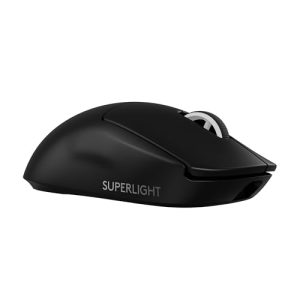
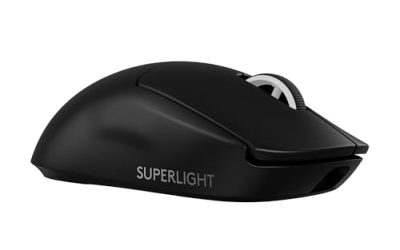
Shape decides where your fingers rest and how much of your palm touches the mouse. Palm grip players rest the whole hand on the shell and usually prefer a taller, longer body with a gentle hump toward the back. Claw grip players arch their fingers, with the palm lightly touching the rear, and often suit a medium-height shell with a defined hump. Fingertip players hold the mouse with only their fingertips, keeping the palm clear, and tend to favour shorter, lighter shells they can lift and reposition easily. Measure your hand from the base of the palm to the tip of the middle finger, then compare that length with the listed length of each mouse.
Weight: Light, Heavy, and the Middle Ground
Weight changes how a mouse starts, stops, and lifts, and the right amount depends on your grip and your games. A lighter mouse needs less effort to flick across the pad and is easier to lift and reset during low-sensitivity play. A heavier mouse can feel steadier for slow, deliberate aiming, and some players find that extra mass stops them overshooting small targets. The middle ground suits most people: heavy enough to feel planted, light enough to move without strain over a long session. Pay attention to balance as well as total weight, since a mouse that is heavy at the front or back will feel awkward even if the number on the box looks reasonable.
Wired or Wireless: Latency, Charging, and Desk Setup
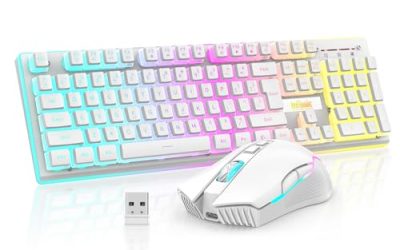
Wireless mice have closed the gap on wired models in recent years, and for most players the difference in response time is now too small to notice in normal play. A wireless mouse frees your desk from cable drag, which matters most if you play at low sensitivity and sweep the mouse across a wide pad. The trade-off is a battery to manage: some models run for weeks on a charge, others need charging far more often, and a dead battery in the middle of a match is a real annoyance. A wired mouse never needs charging, usually costs less for the same sensor, and adds a cable that can be managed with a bungee or careful routing.
Which One Fits Your Situation
For Fast FPS Play
Shooter players should start with shape, sensor, and weight, in that order. Pick a shell that lets your usual grip stay relaxed during flicks, a sensor that tracks cleanly at your sensitivity, and a weight you can lift and reset without thinking about it. Fewer side buttons usually means fewer accidental presses. Set your in-game sensitivity first, then adjust DPI to match, rather than chasing the highest DPI number available.
For MMO and Strategy Games
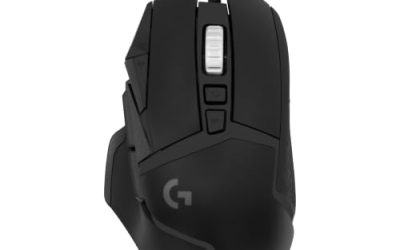
Players who juggle abilities, camera controls, and menus benefit from extra buttons the thumb can reach without shifting grip. A larger shell works well here, giving room for a thumb grid or a row of side buttons while still supporting the palm. Weight matters less than in fast shooters, so comfort over a long session should lead. Check that the software lets you remap each button, since extra buttons are only useful if each one does something you need.
For Smaller Hands
Smaller hands need a shorter, narrower shell, or the fingers will stretch to reach the main buttons. Look for a length close to your hand measurement, a slimmer width, and a hump under the middle of the palm. Light weight helps, because a small hand has less leverage to move a heavy shell quickly. Avoid wide shapes built for large palms, and long mice that force an unintended fingertip grip.
For Larger Hands
Larger hands suit a longer, wider shell with a higher hump that fills the palm and keeps fingers from curling past the front buttons. A narrow mouse feels cramped, and a short one leaves the palm unsupported. Extra length gives the ring and little fingers somewhere to rest instead of dragging on the pad. Palm grip players should favour a taller ergonomic shape; claw players need a long shell with a mid hump, and side buttons within thumb reach.
DPI and Polling Rate, Explained Without the Jargon
DPI and polling rate are the two figures most often quoted about gaming mice, and they are also the two most often misunderstood, so it helps to separate what each one actually controls. DPI sets sensitivity: at 800 DPI, moving the mouse one inch moves the cursor 800 pixels on screen, while at 1600 DPI the same inch covers twice the distance. That sounds like a reason to pick the highest number, but in practice most experienced players use a modest DPI combined with an in-game sensitivity setting, because that combination gives fine control for small adjustments and still allows fast turns when the hand moves further. A very high DPI amplifies every small tremor in the hand, so the cursor can feel nervous and hard to keep still on a distant target. Start near the middle of the range, play a few rounds, and move the setting up or down in small steps until small corrections feel natural rather than jumpy.
Polling rate is different: it sets how often the mouse reports its position to the computer, measured in hertz. At 1000 hertz, the mouse sends an update every millisecond, which is already fast enough that most players will never feel a delay. Higher rates send updates more often, which can make movement feel slightly smoother on a high-refresh monitor, but they also use more processor time and more battery power in a wireless mouse. For most players, a 1000 hertz polling rate is a sensible default, and the money spent chasing a higher figure is usually better spent on a shape that fits. What matters far more than either headline number is whether the sensor keeps tracking cleanly when you move fast, whether it recovers quickly after a lift, and whether it behaves the same on your mousepad as it does on a desk.
Testing a setting properly takes a little patience, and it is worth doing in a real game rather than on the desktop. Desktop movement feels different because the operating system applies its own acceleration and scaling, while most games read raw input directly. Load a practice range or a quiet match, set the DPI you want to try, and spend at least twenty minutes with it before judging. Pay attention to three things: whether small adjustments land where you intended, whether fast flicks stop on target instead of overshooting, and whether your wrist or forearm feels tired at the end. If one of those three is wrong, change only one variable at a time, either DPI or in-game sensitivity, and try again. Changing both at once makes it impossible to know which one helped.
A useful way to think about the whole process is to treat DPI as a coarse adjustment and in-game sensitivity as the fine one. Pick a DPI that gives you a comfortable range across your usual hand movement, then tune the in-game setting until a full sweep of your mousepad turns your character by the amount you expect. Many shooter players aim for a full pad sweep to turn roughly a half circle, while strategy and MMO players often prefer a shorter sweep for quicker camera movement. Neither is correct in the abstract; the right answer is the one that lets you reach the targets you need without lifting the mouse constantly or straining your wrist. Write down the combination that works, so you can return to it after a software update or a change of mouse without starting from scratch.
Finally, remember that DPI and polling rate are settings, not qualities of a mouse on their own. A mouse with a modest maximum DPI and a clean, consistent sensor will serve most players better than a mouse with an enormous DPI ceiling and a shape that fights their hand. The figures are worth understanding because they stop you paying for numbers you will never use, and because they give you a language for comparing mice, but they should never outrank fit, comfort, and the way the mouse feels after an hour of play. When the numbers and the shape both make sense, the choice usually becomes obvious, and the mouse fades into the background while the game takes over.
Common Mistakes
- Chasing the highest DPI: A very high DPI makes tiny hand movements cover large distances, so aim becomes twitchy and small corrections overshoot. Start in the middle range and tune in-game sensitivity instead.
- Ignoring hand size: A mouse that is too long or too wide forces a stretched grip and tired fingers, while one that is too small leaves the palm unsupported. Measure your hand and compare it with the listed dimensions first.
- Buying for extra buttons you will not use: A row of side buttons looks useful, but each one needs a job, a comfortable reach, and a habit to use it. Unused buttons add weight and invite accidental presses.
- Forgetting the mousepad: A rough or worn pad, or a glossy desk surface, can make a good sensor behave badly. Pair the mouse with a clean, flat pad of the right size for your sensitivity and sweep.
- Changing everything at once: Swapping the mouse, the DPI, and the in-game sensitivity in the same session hides which change helped. Change one thing, play with it for a while, then judge the result.
Frequently Asked Questions
What DPI should I use for gaming?
There is no single best DPI, because the right setting depends on your sensitivity, your mousepad size, and the games you play. A common starting point is 800 DPI for shooters and 1200 to 1600 DPI for strategy and general use. Try a setting for several rounds before judging it, and change only one variable at a time so you know what actually helped.
Is a wireless gaming mouse as fast as a wired one?
For most players, yes. Modern wireless mice report movement as often as wired models, and the delay is small enough that it rarely affects play. The practical differences are elsewhere: wireless mice need charging and can cost more, while wired mice never run flat and keep the desk tethered. Choose based on your desk setup and how much you dislike cable drag.
How do I know which grip style I use?
Watch your hand during a normal game, or take a photo of it resting on the mouse. If the whole palm touches the shell, you use a palm grip; if the fingers arch with the palm lightly touching the rear, you use a claw grip; if only the fingertips touch, you use a fingertip grip.
How long should a gaming mouse last?
A well-made gaming mouse often lasts several years of regular play, though switches, cables, and feet wear out first. Clicks that double-register, a scroll wheel that skips, or a cable that only works at certain angles are signs that wear has set in. Keeping the mouse clean, storing it flat, and avoiding hard drops will extend its working life noticeably.
FAQ
What DPI should I use for gaming?
Is a wireless gaming mouse as fast as a wired one?
How do I know which grip style I use?
How long should a gaming mouse last?
More from Amazon
Programs that pair well with the guide above. Offers and eligibility are set by Amazon and may change.
Free shipping on eligible items, Prime Video and more. Eligible new members can start with a free trial.
Start a Prime free trialAd-free music streaming. Eligible new subscribers can start with a free trial.
Try Music Unlimited freeA Prime membership for ages 18-24 with a trial period. Eligibility is set by Amazon.
See Prime for Young AdultsAudiobooks and podcasts to listen to on the go. Eligible new members can start with a free trial.
Try Audible freeAs an Amazon Associate we earn from qualifying purchases.