Our Top Picks
Pros & cons
- 11 programmable buttons add extensive control customization
- Adjustable weights let you fine-tune balance and feel
- LIGHTSYNC RGB syncs lighting with other Logitech gear
- Wired connection limits cable-free desk setups
- Heavier than typical lightweight esports mice at 0.27 pounds
 Razer DeathAdder Essential Ergonomic Wired Gaming Mouse5.01 x 2.86 x 1.69 inches0.3 poundsCheck on Amazon
Pros & cons
- Up to 250 hours of play on a single AA battery
- Lightweight 3.4-ounce body aids fast, precise movement
- Built-in receiver storage keeps the dongle from getting lost
- Relies on a AA battery rather than a built-in rechargeable cell
- Endurance mode trade-off needed to stretch battery life further


Choosing a black gaming mouse is less about the color and more about what the black shell hides: the sensor, the button layout, the weight, and the way the shape fits your hand over a long session. A mouse that looks right on a dark desk can feel wrong after an hour, and a plain-looking one can track better than a flashier model. The three mice in this guide all come in black, but they solve different problems, from a button-heavy wired workhorse to a light wireless option running months on one battery.
This guide is for players who want a black mouse that matches a dark setup without giving up performance, whether you play fast shooters, long strategy sessions, or a mix of games and everyday work. Each mouse below was chosen from its Amazon listing, using the sensor, button count, and connection type shown there, so you can compare the three on the same facts and pick the one that fits your hand and your games.
Quick Picks
As an Amazon Associate we earn from qualifying purchases
| Product | Best for | Key spec from title |
|---|---|---|
| Logitech G502 HERO | Button-heavy play across many game types | HERO 25K sensor, 25,600 DPI, 11 buttons |
| Razer DeathAdder Essential | A simple wired setup for right-handed players | 6,400 DPI optical sensor, 5 programmable buttons |
| Logitech G305 LIGHTSPEED | Wireless play with very long battery life | HERO 12K sensor, 12,000 DPI, 250-hour battery |
How to Choose
Match the sensor to your games
The sensor decides how reliably the mouse follows your hand, and the headline DPI number is only part of the story. A sensor that tracks cleanly at low sensitivity matters more for shooters than a huge maximum DPI you will never use, while a wide DPI range helps if you switch between slow aiming and fast turns. Look at the sensor name and the DPI range on the listing, then check whether the mouse holds its tracking when you move it quickly across the pad. A mouse that stutters during a fast flick will cost you more rounds than a slightly lower maximum DPI ever will.
Count the buttons you will actually use
Extra buttons help only when they sit where your thumb can reach them without shifting your grip. Five buttons cover the basics for most players: two main clicks, a scroll wheel click, and two thumb buttons for reloading or switching weapons. Eleven buttons suit players who juggle many commands in strategy games or work software, but they add weight and a learning curve. Before you buy, picture your most-played game and count the commands you want on the mouse itself. If that number is three or fewer, a simpler layout will feel cleaner and last longer in your hand.
Weigh the mouse and the way it connects
Weight changes how a mouse feels far more than most buyers expect. A heavier mouse can feel steady for slow, precise aiming, while a lighter one is easier to lift and reposition during fast play. Wired mice never need charging and usually cost less, but the cable can drag if your desk is cramped. Wireless mice remove that drag and travel better, yet they need charging or a fresh battery on a schedule you must remember. Decide which trade-off you will notice every day, then check the listed weight and battery life before you commit.
Check the shape against your grip and hand size
A mouse that fits a large palm can feel like a brick in a small hand, and a narrow mouse can cramp a wide palm during long sessions. Palm grip players rest the whole hand on the mouse and need length and a high back, claw grip players arch their fingers and need a shorter body, and fingertip players touch only the buttons and need a light shell. Right-handed ergonomic shapes support the thumb but do not suit left-handed players, while symmetrical shapes work for either hand. Measure your hand from wrist to middle fingertip and compare it with the listed dimensions.
The 3 Best Options
Logitech G502 HERO

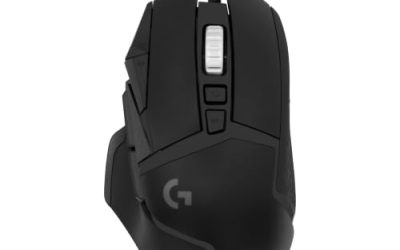
The G502 HERO is the pick for players who want one black mouse to cover many kinds of play. Its eleven programmable buttons handle weapon swaps, abilities, and work shortcuts without reaching for the keyboard, and the dual-mode scroll wheel switches between precise steps and free spinning. The tunable weight system lets you add or remove small weights until the balance suits your grip, which matters when a mouse this capable is also fairly heavy. It is a wired mouse, so there is no battery to watch, and the onboard memory keeps your settings when you move between computers.
Specs
- HERO 25K sensor with up to 25,600 DPI
- 11 programmable buttons
- Dual-mode hyper-fast scroll wheel
- Adjustable weight system with five 3.6g weights
- Onboard memory for saved profiles
- RGB lighting
- Wired connection
- Color: Black
- Weight: 4.3 ounces
- Dimensions: 1.57 x 2.95 x 5.2 inches
- Model number: 910-005469
Best for: Players who want many buttons, adjustable weight, and one mouse for games and work.
Watch out for: The shape is right-handed and fairly large, so check your hand size before buying.
Razer DeathAdder Essential
The DeathAdder Essential is the straightforward choice in this group, and that simplicity is its strength. Its right-handed ergonomic shape has carried the DeathAdder line for years, with a raised back that supports the palm during long sessions. Five programmable buttons cover the commands most players actually use, and the optical sensor adjusts on the fly through dedicated DPI buttons, so you can slow down for aiming and speed up for movement without opening software. Rubber side grips keep the mouse steady when your hands get warm, and the wired connection means it is ready the moment you plug it in.
Specs
- 6,400 DPI optical sensor
- 5 programmable buttons
- Mechanical switches rated for up to 10 million clicks
- Rubber side grips
- Wired USB connection
- Right-handed ergonomic shape
- On-the-fly DPI adjustment through dedicated buttons
- Color: Black
Best for: Right-handed players who want a simple, comfortable wired mouse at a modest outlay.
Watch out for: It has no onboard memory, so your button settings live in software rather than on the mouse.
Logitech G305 LIGHTSPEED
The G305 LIGHTSPEED is the wireless pick for players who hate cables and hate charging even more. Its HERO sensor covers 200 to 12,000 DPI, which is more than enough for competitive play, and the LIGHTSPEED link reports at 1 ms, so the mouse feels as responsive as a wired one. One AA battery powers it for up to 250 hours, which means months of ordinary play before you think about a replacement, and the receiver stores inside the mouse when you travel. Six programmable buttons and onboard memory round out a compact design that suits smaller hands and claw grips well.
Specs
- HERO 12K sensor, 200 to 12,000 DPI
- LIGHTSPEED wireless with 1 ms report rate
- 6 programmable buttons
- Up to 250 hours of battery life on one AA battery
- Onboard memory for saved profiles
- Lightweight design
- Color: Black
- Model number: 910-005280
Best for: Players who want wireless freedom, long battery life, and a compact mouse for travel or small hands.
Watch out for: It runs on a single AA battery, so keep a spare nearby if you play in long sessions.
Which One Fits Your Situation
You want the most buttons for many games and work
Pick the Logitech G502 HERO. Its eleven programmable buttons cover abilities, weapon swaps, and work shortcuts in one layout, and the adjustable weights let you tune the balance to your grip. The onboard memory keeps those settings when you switch computers, which suits players who use the same mouse at a desk and on a laptop.
You want a simple wired mouse for a first setup
Pick the Razer DeathAdder Essential. Its familiar ergonomic shape suits long sessions, five buttons cover the basics, and the wired connection works the moment you plug it in. There is no battery to charge and no wireless setup to manage, which makes it an easy first gaming mouse for a right-handed player.
You want wireless freedom and months of battery life
Pick the Logitech G305 LIGHTSPEED. The wireless link feels as quick as a wired connection, and a single AA battery lasts up to 250 hours, so charging never interrupts a session. Its compact shape also travels well, with the receiver stored inside the mouse when you pack it away. That long life also means you can leave the spare battery at home on short trips.
You play on a dark desk and want a mouse that blends in
Any of the three fits a black setup, but the DeathAdder Essential is the most discreet, with a plain black shell and a single-color glow that stays subtle. The G502 HERO adds RGB lighting if you want the mouse to stand out instead, while the G305 keeps a clean, low-profile look that suits a tidy desk.
Common Mistakes
- Choosing by maximum DPI alone instead of checking how cleanly the sensor tracks at the sensitivity you actually use.
- Buying a right-handed ergonomic mouse without checking whether your hand and grip suit its shape.
- Paying for eleven buttons when you only use three, and carrying the extra weight for nothing.
- Ignoring battery life on a wireless mouse until it dies in the middle of a match.
- Picking a mouse for its color and forgetting to check the button count, weight, and connection type first.
Frequently Asked Questions
Do black gaming mice show wear more than lighter ones?
Black shells can show dust, fingerprints, and shiny worn spots on the grip areas over time, especially on smooth plastic. The effect is cosmetic and does not change how the sensor or buttons work. Wiping the mouse with a dry cloth once a week keeps it looking fresh, and textured grips hide wear better than glossy ones.
Is a wired mouse faster than a wireless one?
A wired connection has no battery or wireless link to manage, but modern wireless mice with a 1 ms report rate feel just as responsive in normal play. The difference most players notice is practical, not speed: wired mice never need charging, while wireless mice remove cable drag. Either choice works well for competitive games.
How much DPI do I actually need?
Most players use between 400 and 3,200 DPI, and very few go above 8,000 in regular play. A higher maximum gives you room to experiment, but it does not make you more accurate on its own. Set the DPI so one comfortable sweep of your hand crosses the screen, then adjust in small steps until aiming feels natural.
Can I use these mice on a Mac as well as a PC?
The G502 HERO and G305 LIGHTSPEED list PC and Mac compatibility on their Amazon listings, and the DeathAdder Essential works as a standard USB mouse on both systems. Some button-mapping software is Windows-only, so check the software support for your system before you rely on custom profiles.
FAQ
Do black gaming mice show wear more than lighter ones?
Is a wired mouse faster than a wireless one?
How much DPI do I actually need?
Can I use these mice on a Mac as well as a PC?
More from Amazon
Programs that pair well with the guide above. Offers and eligibility are set by Amazon and may change.
Free shipping on eligible items, Prime Video and more. Eligible new members can start with a free trial.
Start a Prime free trialAd-free music streaming. Eligible new subscribers can start with a free trial.
Try Music Unlimited freeA Prime membership for ages 18-24 with a trial period. Eligibility is set by Amazon.
See Prime for Young AdultsAudiobooks and podcasts to listen to on the go. Eligible new members can start with a free trial.
Try Audible freeAs an Amazon Associate we earn from qualifying purchases.