Key takeaways
- Compare the best Glorious gaming mouse options by shape and grip: Model O 2 Wireless, Model O Wireless, Model O- wired and Model D Wireless, with listing specs, pros and cons.
If you have already decided on Glorious, the hard part is not the brand. It is the shape. Glorious built its name on light mice with simple, fast shapes, and its range now splits into a few clear families. The Model O line is symmetrical and ambidextrous in outline, aimed at claw and fingertip grips and at players who move the mouse with quick, flat swipes. The Model D line keeps much of the same hardware idea but bends the shell into a right-handed ergonomic shape, with a higher, contoured side for a palm that wants support. Inside each family there is then a size choice, a wired or wireless choice, and a sensor generation choice.
That is why a single recommendation does not work here. A small-handed fingertip player and a medium-handed palm player can both be shopping for the best Glorious gaming mouse and need completely different shells. This guide keeps the comparison inside the Glorious range, uses only the specifications published in the Amazon listings for each model, and explains who each shape actually suits. Read the Quick Picks first for the short answer, then check the grip and size notes in How to Choose before you order, because with Glorious mice the dimensions and weight matter more than the headline sensor number.
A note on naming before we start: Glorious reuses similar names across generations. Model O, Model O Wireless and Model O 2 Wireless are three different products, and Model O- — pronounced Model O Minus — is the smaller version of the original wired Model O, not a lesser version of the newer mice. Always match the full model name and the listing title, not just the letter.
Disclosure: As an Amazon Associate, we earn from qualifying purchases made through links in this article, at no extra cost to you.
Quick Picks
- Best overall Glorious mouse: Glorious Model O 2 Wireless — the newest symmetrical wireless model in this list, with the BAMF 2.0 sensor, hybrid 2.4GHz and Bluetooth connection, and a 68 gram weight.
- Best value wireless Glorious mouse: Glorious Model O Wireless — the original wireless Model O shape at 69 grams, with 2.4GHz wireless and up to 71 hours of battery life stated in the listing.
- Best for small hands and fingertip grip: Glorious Model O- (Minus) Wired — the compact 58 gram wired original, with a Pixart 3360 sensor and a flexible paracord-style cable.
- Best ergonomic Glorious mouse: Glorious Model D Wireless — a right-handed contoured shell at 69 grams for palm and relaxed claw players who find symmetrical mice flat.
1. Glorious Model O 2 Wireless — Best Overall

The Model O 2 Wireless is the current version of the idea that made Glorious popular: a symmetrical, low-profile shell that stays light without asking you to change how you aim. The listing describes it as a 68 gram superlight mouse with hybrid wireless, meaning it can connect over 2.4GHz for gaming or over Bluetooth for everyday use, switched from the underside of the mouse. That dual mode is genuinely useful if the same mouse lives on a gaming PC and a laptop, because Bluetooth removes the receiver from the equation for the second machine.
Inside, the listing names the BAMF 2.0 optical sensor with up to 26,000 DPI, six buttons, PTFE feet and RGB lighting. The battery figure in the listing is up to 210 hours of average battery life, which reflects the efficiency of turning lighting down or off and using the mouse in lighter-duty modes; competitive players running the faster connection full time should expect less, and should treat the figure as a maximum rather than a promise. The shape remains ambidextrous in outline, although the side buttons sit on the left side, so in practice it suits right-handed claw and fingertip players best, plus palm players with medium hands who like a flatter shell.
For FPS players this is the Glorious mouse to start with. The weight is low enough for fast target switching, the shell is long enough for a stable claw grip, and there is no cable drag in wireless mode. It also avoids the open honeycomb shell of the first generation, which some players disliked because dust and crumbs could get inside.
Specifications (from the listing):
- Weight: 68 g
- Sensor: BAMF 2.0 optical, up to 26,000 DPI
- Connection: 2.4GHz wireless and Bluetooth
- Buttons: 6
- Feet: PTFE
- Lighting: RGB
- Battery life: up to 210 hours stated in the listing
- Shape: symmetrical, ambidextrous outline
- Model number: GLO-MS-OWV2-MB (black version in the listing checked)
View the Glorious Model O 2 Wireless on Amazon
Pros:
- Newest sensor and wireless package in the Model O family here
- Bluetooth as a second connection for a laptop or second PC
- Light 68 gram weight suits fast, low-sensitivity swipes
- Six buttons cover the needs of most shooter and MOBA players
Cons:
- Symmetrical shell gives palm players less support than the Model D shape
- Maximum battery figure depends on settings, so heavy wireless use will drain it sooner
- Side buttons are positioned for right-handed use despite the ambidextrous outline
2. Glorious Model O Wireless — Best Value Wireless
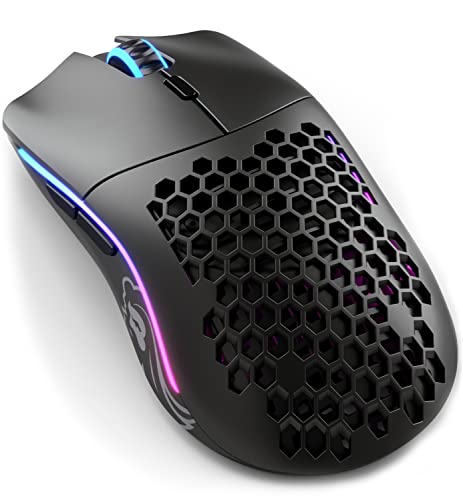
The original Model O Wireless took the wired Model O shape and cut the cord, and it remains a sensible buy for players who want that proven shape in wireless form. The listing describes a 69 gram superlight mouse with a honeycomb design, RGB lighting, an ambidextrous outline and lag-free 2.4GHz wireless, with up to 71 hours of battery life. That battery figure is more modest than the newer model, and it is the honest trade-off for choosing the older generation: you get the same basic handling idea, with a shorter interval between charges.
The sensor in this generation is Glorious’s BAMF optical sensor, the predecessor to the 2.0 version in the Model O 2. In practical gaming terms, the difference shows up in maximum DPI and in newer sensor features rather than in everyday tracking for most players, because both sensors are designed for flawless tracking at the speeds human hands actually move a mouse. If you play at common competitive sensitivities, shape and weight will shape your aim far more than the gap between these two sensor generations.
Choose this model if you find it as the simpler, proven option and you do not need Bluetooth. It pairs well with a single gaming PC, it keeps the familiar Model O dimensions that many players already know from the wired original, and its honeycomb shell is part of how it reaches its weight. Players who eat at their desk or who dislike open shells should look at the Model O 2 Wireless instead.
Specifications (from the listing):
- Weight: 69 g
- Sensor: BAMF optical
- Connection: 2.4GHz wireless
- Battery life: up to 71 hours stated in the listing
- Design: honeycomb shell, RGB lighting
- Shape: ambidextrous
- Buttons: 6, as listed for the Model O Wireless family
- Model number: GLO-MS-OW-MB (matte black version in the listing checked)
View the Glorious Model O Wireless on Amazon
Pros:
- Proven Model O shape in a wireless format
- Light 69 gram weight for claw and fingertip grips
- Simple single-receiver setup for one gaming PC
- Honeycomb shell keeps weight down
Cons:
- No Bluetooth connection for a second device
- Shorter stated battery life than the Model O 2 Wireless
- Open honeycomb shell can collect dust over time
3. Glorious Model O- (Minus) Wired — Best for Small Hands

The Model O- is the compact member of the original wired family. The listing describes a 58 gram superlight wired mouse with a honeycomb design, RGB lighting, a Pixart 3360 sensor, Omron switches and an ambidextrous shape, in a glossy black finish for the version checked. Glorious’s own description in the listing puts the pair side by side: the Model O weighs 67 grams and the O Minus weighs 58 grams, with the smaller shell aimed at smaller hands and at fingertip and claw players who want the mouse to disappear under their fingers.
The Pixart 3360 is a well-known optical sensor, and the listing gives a maximum sensitivity of 12,000 DPI, six buttons and a polling rate of 1,000Hz in the product description, with a lift-off distance of less than 0.7mm. Those are the numbers that matter for a wired competitive mouse: consistent tracking, a fast report rate and a low lift-off so the cursor does not wander when you reposition. The flexible paracord-style cable described for this family reduces drag compared with a stiff braided cable, although a mouse bungee still helps if you play at very low sensitivity.
This is the Glorious mouse to pick if your hands are on the smaller side, if you use a fingertip grip, or if you simply prefer wired reliability and never want to think about charging. It is also a good first Glorious mouse, because it shows exactly what the brand’s shape philosophy feels like without the extra cost of wireless hardware.
Specifications (from the listing):
- Weight: 58 g stated in the title, 59 g in the item weight field
- Sensor: Pixart 3360 optical, up to 12,000 DPI
- Connection: wired USB
- Switches: Omron
- Buttons: 6
- Polling rate: 1,000Hz, as stated in the product description
- Shape: ambidextrous, compact size
- Model number: GOM-GBLACK (glossy black version in the listing checked)
View the Glorious Model O- (Minus) on Amazon
Pros:
- Smallest and lightest Glorious option in this guide
- Wired connection means no charging and no receiver to manage
- Pixart 3360 sensor has a long, proven record in competitive mice
- Compact shell suits fingertip grip and smaller hands
Cons:
- Too small for many palm players and for large hands
- Cable still needs management compared with wireless models
- Glossy finish shows fingerprints and can feel slippery for some grips
4. Glorious Model D Wireless — Best Ergonomic Glorious

The Model D Wireless is the answer for players who like Glorious’s weight and sensor approach but do not like flat symmetrical shells. The listing describes a 69 gram superlight wireless mouse with lag-free 2.4GHz wireless, up to 71 hours of battery life, RGB lighting, a BAMF sensor, six buttons and an ergonomic shape. That last word is the point of the D family: the right side of the shell is sculpted to support a right hand, the hump sits where a palm or relaxed claw grip wants support, and the thumb side is shaped for a more settled hold during long sessions.
In shooters, that shape tends to suit players who aim with a mix of arm and wrist and who keep a fuller grip on the mouse, rather than steering it with fingertips alone. In MOBA, MMO and everyday use, the contoured shell is simply less demanding to hold for hours, because your hand rests on the mouse instead of pinching it. The weight stays in the same class as the Model O Wireless, so moving to the ergonomic shape does not mean accepting a heavy mouse.
The trade-offs are handedness and grip range. This is a right-handed mouse, full stop, and fingertip players who like to curl their fingers around a small symmetrical shell will find the D shape pushes them toward a fuller grip than they may want. Check the exact colour version in the listing before ordering, because Model D Wireless listings exist in more than one finish and the details can differ by version.
Specifications (from the listing):
- Weight: 69 g
- Sensor: BAMF optical
- Connection: 2.4GHz wireless
- Battery life: up to 71 hours stated in the listing
- Buttons: 6
- Lighting: RGB
- Shape: right-handed ergonomic
- Design: superlight construction as described in the listing
View the Glorious Model D Wireless on Amazon
Pros:
- Contoured right-handed shape supports palm and relaxed claw grips
- Same light weight class as the Model O Wireless
- Wireless freedom with a long stated battery life
- Six buttons suit both shooters and longer MMO sessions
Cons:
- Right-handed only, with no left-handed version in this family
- Fuller ergonomic shape is less agile for pure fingertip play
- No Bluetooth for a second device
How to Choose a Glorious Gaming Mouse
Start with shape, not sensor. Every mouse in this guide tracks well enough for competitive play at normal sensitivities. The difference you will feel every minute is the shell. Symmetrical Model O shapes suit claw and fingertip grips and players who lift and reset the mouse often. The ergonomic Model D shape suits palm and relaxed claw grips and players who rest their hand on the mouse.
Match the size to your hand. The Model O- exists because the regular Model O is too long for some hands. If your fingers overshoot the front of a standard mouse or you cannot reach the side buttons without stretching, go smaller. If a compact mouse makes your palm hover and your fingers curl tightly, go up a size or choose the D shape.
Decide wired versus wireless honestly. Wireless Glorious mice remove cable drag and desk clutter, and modern 2.4GHz connections are built for gaming. Wired models remove charging, receivers and battery weight concerns, and they cost less in complexity. Bluetooth, offered on the Model O 2 Wireless here, is a convenience for a second machine, not a gaming connection to choose for fast play.
Treat weight as a preference. Lighter mice reduce the effort of starting and stopping a swipe, which many FPS players prefer. Some players, especially in slower tactical games, prefer a touch more weight for control. The range in this guide runs from 58 grams to 69 grams, so the real decision is shape first and weight second.
Check the listing details before ordering. Confirm the full model name, the colour and finish, whether the mouse is wired or wireless, and what the listing says is included. Glorious names are close enough across generations that a quick check prevents the most common buying mistake with this brand.
FAQs
What is the difference between Model O and Model O-?
The Model O- is the smaller version of the original Model O. The listing description gives 67 grams for the Model O and 58 grams for the O Minus, in a more compact shell aimed at smaller hands and fingertip or claw grips. The core idea — a light, symmetrical wired mouse with a Pixart 3360 sensor in the original family — is the same.
Is the Model O 2 Wireless better than the Model O Wireless?
It is newer. The Model O 2 Wireless listing adds the BAMF 2.0 sensor with up to 26,000 DPI, Bluetooth alongside 2.4GHz, and a longer stated battery life, in a 68 gram shell. The original Model O Wireless remains a good choice if you want the proven honeycomb shape, a single gaming PC setup and no need for Bluetooth.
Should palm grip players buy a Model O or a Model D?
Most palm players should start with the Model D shape, because its right-handed ergonomic shell is built to support a resting hand. A Model O can work for palm players with medium hands who prefer a flatter shell, but it asks more of your fingers to keep the mouse controlled.
Are Glorious mice good for FPS games?
The models in this guide are built around the things FPS players ask for: low weight, optical sensors designed for accurate tracking, PTFE feet on the newer wireless model, and shapes that suit claw and fingertip grips. Your grip fit will matter more than the maximum DPI figure, so choose the shell that matches your hand first.
Do these Glorious mice work without software?
The listings describe hardware features such as DPI, buttons and lighting, and Glorious mice can be used when plugged in or connected. Software is where deeper customisation usually lives, so check the listing and the maker’s current support pages for the exact model if onboard profiles or button remapping matter to you.
Conclusion
For most players, the Glorious Model O 2 Wireless is the best Glorious gaming mouse to buy first: the newest symmetrical design here, two connection modes, and a 68 gram weight suited to fast play. Choose the original Model O Wireless for the proven honeycomb shape, the Model O- for smaller hands or a compact wired mouse, and the Model D Wireless if a contoured right-handed shell fits your grip. Match the shape to your hand, confirm the full model name in the listing, and the rest follows.
FAQ
What is the difference between Model O and Model O-?
Is the Model O 2 Wireless better than the Model O Wireless?
Should palm grip players buy a Model O or a Model D?
Are Glorious mice good for FPS games?
Do these Glorious mice work without software?
More from Amazon
Programs that pair well with the guide above. Offers and eligibility are set by Amazon and may change.
Free shipping on eligible items, Prime Video and more. Eligible new members can start with a free trial.
Start a Prime free trialAd-free music streaming. Eligible new subscribers can start with a free trial.
Try Music Unlimited freeA Prime membership for ages 18-24 with a trial period. Eligibility is set by Amazon.
See Prime for Young AdultsAudiobooks and podcasts to listen to on the go. Eligible new members can start with a free trial.
Try Audible freeAs an Amazon Associate we earn from qualifying purchases.