Our Top Picks
 Corsair Scimitar Elite RGB Wireless MMO Gaming MouseStandard4.69 x 2.89 x 1.66 inches0.25 poundsCheck on Amazon
Pros & cons
- 11 programmable buttons add extensive control customization
- Adjustable weights let you fine-tune balance and feel
- LIGHTSYNC RGB syncs lighting with other Logitech gear
- Wired connection limits cable-free desk setups
- Heavier than typical lightweight esports mice at 0.27 pounds
 Razer Basilisk V3 Customizable RGB Wired Ergonomic GamingMouse2.96 x 5.12 x 1.67 inches0.2 poundsCheck on Amazon

Path of Exile asks more of a mouse than most games on your drive. A single mapping session can mean hundreds of right-clicks, a flask rotation that never really stops, movement skills on demand and loot filtering at speed, all repeated for hours. A mouse that is perfect for a shooter can feel empty here, while a button-heavy mouse that shines in an MMO can feel clumsy if its shape fights your grip.
This guide is for exiles who want their build’s key skills, flasks and utility buttons under one hand, whether you play a one-button mapper or a piano-flask build with a full bar. Every mouse below was chosen from its Amazon listing for ARPG-relevant traits the listing itself states, including programmable button counts, macro-capable software and wheel design, and nothing about durability or performance is claimed beyond what those listings support.
Quick Picks
As an Amazon Associate we earn from qualifying purchases.
| Product | Best for | Key spec from title |
|---|---|---|
| Razer Naga V2 Pro | Flask-heavy and multi-skill builds that need a full grid | 19+1 programmable buttons, swappable 2, 6 and 12 button plates |
| Corsair Scimitar Elite Wireless | Wireless players who want a 12 button panel that adjusts | 16 programmable buttons, 26,000 DPI, up to 150 hours of battery |
| Logitech G502 HERO | The classic middle ground of buttons, wheel and price tier | 11 programmable buttons, HERO 25K sensor, adjustable weights |
| Razer Basilisk V3 | One-button builds that still want a clutch and a smart wheel | 11 programmable buttons, Focus+ 26K sensor, HyperScroll tilt wheel |
How to Choose
Decide how many skills your build really puts on the mouse
Start from your actual build, not from a button count contest. A one-button mapper needs a comfortable right click, a good wheel and one or two side keys for a movement skill and a guard skill. A minion, trap or flask-heavy build can justify a full grid. List the binds you use in a normal map, count them honestly, and then choose the smallest mouse that holds them, because every extra row of side buttons is weight and bulk you carry through every click of a long session.
Macros live in the software, so check what the listing promises
Path of Exile players lean on software for flask arrangements, DPI shifts and profile switching between characters. That makes the configuration suite part of the product: look for listings that name their software, mention onboard memory or saved profiles, and confirm the suite supports your operating system. A mouse whose buttons cannot be remapped on your system is just a heavier ordinary mouse. Also remember that game rules govern what automation is allowed, so use software for legitimate remapping and single-action binds rather than chained sequences.
The scroll wheel is a working tool in this game
Exiles scroll constantly: through stash tabs, vendor inventories, the passive tree and chat. A free-spinning or tilt wheel, like the HyperScroll designs in these listings, turns those chores into flicks instead of drags, and a notched mode keeps weapon swaps and zoom deliberate. When you compare listings, treat the wheel description as a core specification rather than a footnote. A mouse with a basic wheel can still be excellent for combat, but you will feel the difference every time you reorganise a stash after a mapping session.
Shape and weight decide whether the mouse survives a long session
ARPG sessions run long, and the repetitive clicking load lands on the same fingers for hours. An ergonomic shell that supports your palm spreads that load better than a small esports shape, while a very heavy grid mouse can tire a low-sensitivity player who also flicks to loot. Match the mouse to your grip and session length first, then to your button ambitions. If you already feel wrist strain, that is a shape problem to solve before it is a button problem to add to.
The 4 Best Options
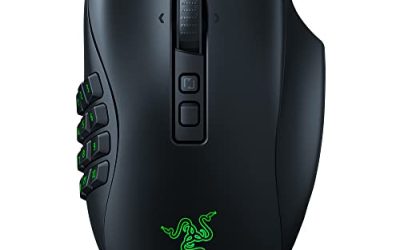
Razer Naga V2 Pro

For a build that genuinely uses a full bar, the Naga V2 Pro is the most capable tool here: its listing states 19+1 programmable buttons and three swappable side plates, so the twelve button plate carries flasks and skills during a league, while the two button plate keeps the same mouse comfortable in other games. A Focus Pro 30K sensor, Gen-3 optical switches and up to 300 hours of battery round out the listing. It suits exiles who play several builds per league and want one mouse reconfigured for each rather than a different device per character.
Specs
- Buttons: 19+1 programmable
- Side plates: 3 swappable magnetic plates, 2, 6 and 12 button layouts
- Sensor: Razer Focus Pro 30K optical
- Switches: Razer Optical Mouse Switches Gen-3
- Scroll wheel: HyperScroll Pro
- Battery: up to 300 hours
- Model: RZ01-04400100-R3U1
Best for: Exiles running flask-heavy or many-button builds who want the grid without giving up other genres.
Watch out for: The grid takes a week or two of mapping before your thumb trusts it, and the extra plates are easy to misplace; players on simple builds will use a fraction of what this mouse offers.
ASIN: B0BGJTLFN5
Corsair Scimitar Elite Wireless
The Scimitar Elite Wireless brings the MMO grid to a cable-free ARPG desk: its listing states 16 programmable buttons, a sensor up to 26,000 DPI and up to 150 hours of battery, with iCUE handling the remapping and profiles. The family’s signature adjustable side panel carries over, letting the twelve button grid sit where your thumb actually rests. That matters in Path of Exile, where the difference between hitting a flask and hitting a portal scroll is one misjudged key. It fits exiles who want grid capacity without a cable dragging across the mousepad.
Specs
- Buttons: 16 programmable
- Sensor: up to 26,000 DPI optical
- Battery: up to 150 hours
- Software: Corsair iCUE for remapping and profiles
- Connection: wireless, with wired option
- Model: CH-9314311-NA
Best for: Exiles who want a full thumb grid, wireless freedom and long battery life in one mouse.
Watch out for: Do not confuse it with the wired Scimitar RGB Elite, which lists 17 buttons under a different ASIN; confirm the wireless model name and model code on the listing before ordering.
ASIN: B0CCVYHZ9N
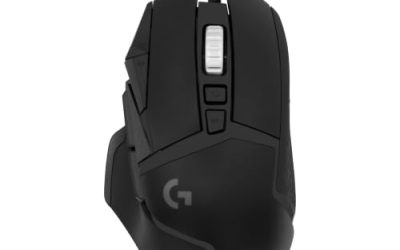
Logitech G502 HERO

The G502 HERO is the mouse many exiles already own, and the listing explains why: 11 programmable buttons cover a main skill, movement, guard and flask shortcuts for most builds, the HERO 25K sensor is more than sufficient for isometric play, and the wheel switches between notched and free-spinning for stash work. Adjustable weights and onboard memory for saved profiles appear in the listing too, so your binds travel between machines. It suits the player whose build needs more than a shooter mouse offers but who has no use for a twelve key phone pad under the thumb.
Specs
- Buttons: 11 programmable
- Sensor: HERO 25K, up to 25,600 DPI
- Weights: adjustable weight system included
- Profiles: onboard memory for saved settings
- Scroll wheel: dual-mode, notched and free-spinning
- Model: 910-005469
Best for: Exiles who want enough buttons for a typical build, a great stash wheel and proven ergonomics.
Watch out for: It is a wired, weight-forward design even before the optional weights go in, so fingertip players may find it heavy over a long session; the Lightspeed wireless sibling is a separate listing and ASIN.
ASIN: B07GBZ4Q68
Razer Basilisk V3
Not every exile needs a grid. The Basilisk V3 offers 11 programmable buttons in a sculpted ergonomic shell, including the multi-function trigger that works naturally as a momentary clutch for a movement skill or a precision loot pick-up. Its listing highlights the Focus+ 26K sensor and the HyperScroll tilt wheel, which tilts for horizontal scrolling through wide stash layouts and spins freely for long lists. For the huge share of builds that live on one main skill plus utilities, this shape will feel better across a long session than any grid mouse in this guide.
Specs
- Buttons: 11 programmable
- Sensor: Razer Focus+ 26K optical
- Scroll wheel: HyperScroll tilt wheel with free-spin mode
- Trigger: multi-function paddle for a clutch or extra bind
- Lighting: Chroma RGB underglow
- Model: RZ01-04000100-R3U1
Best for: Exiles on focused builds who want ergonomic comfort, a few smart binds and an excellent wheel.
Watch out for: It is wired only, and its eleven buttons will not stretch to a genuine piano-flask setup; if your build needs twelve thumb keys, the two grid mice above are the honest answer.
ASIN: B09C13PZX7
Which One Fits Your Situation
Your build runs five flasks and a full skill bar
Take one of the grid mice. The Naga V2 Pro adds swappable plates for when the league ends and other games begin, while the Scimitar Elite Wireless keeps the twelve button panel and drops the cable. Either way, bind flasks in a single row your thumb can learn, and give the layout a week of low-tier maps before judging it.
You play one main skill and value comfort above all
Choose the Razer Basilisk V3. Its ergonomic shell supports the hand through long sessions, the paddle gives you one perfectly placed extra bind, and the tilt wheel earns its keep in the stash. You give up grid capacity your build never uses and gain a mouse that disappears under your hand.
You want the safe, proven option most exiles already trust
The Logitech G502 HERO is that mouse. Eleven buttons cover the binds a typical build needs, the dual-mode wheel handles both combat and inventory, and onboard memory keeps your setup intact across PCs. It is rarely the wrong answer, which is exactly why it stays on desks for years and across entire leagues without ever feeling dated.
You play on a laptop and move between rooms
The Scimitar Elite Wireless fits a mobile setup best. The quoted battery life stretches across many sessions, the grid means your whole build travels with the mouse, and there is no cable to coil between rooms. Keep the receiver close to the pad for the most stable connection while mapping.
Common Mistakes
- Buying a twelve button grid for a one-button build, then carrying its weight and bulk for no benefit.
- Setting up chained multi-action macros that cross the game’s automation rules instead of simple one-action remaps.
- Ignoring the scroll wheel when comparing mice, even though stash and inventory work fills half an exile’s session.
- Binding flasks to keys your thumb cannot identify by touch, which causes deaths that get blamed on the build.
- Confusing wired and wireless versions of the same mouse family and ordering the wrong ASIN.
Frequently Asked Questions
How many buttons does a Path of Exile mouse need?
Most builds are comfortable with eight to eleven programmable buttons, which covers a main skill, a movement skill, a guard skill and the flasks you press most. Genuinely layered builds can use a twelve button thumb grid. Count the binds in your current setup first, because the right number is the one your build already asks for, not the largest number on a box.
Are macros allowed for flasks in Path of Exile?
The safe approach is to keep software binds to one action per press, which is how the remapping features in these listings are normally used, and to check the game’s current terms before building anything more elaborate. Mouse software is useful for moving an action to a comfortable key. It should not be used to chain several game actions into a single press.
Is a heavy mouse a problem for long mapping sessions?
It can be, because the same hand repeats small movements and clicks for hours. An ergonomic shape and a supported palm usually matter more than raw weight, which is why this guide includes shaped mice alongside the grids. If your wrist aches after a session, change the shape or your desk height before you change your build or your sensitivity.
Wired or wireless for an ARPG?
Both work well at this level. Wireless models here quote battery figures that cover many sessions between charges, and they keep a laptop setup tidy. Wired models cost less and never need charging mid-league. Pick based on your desk and habits, and confirm the exact connection on the listing, since several families sell near-identical mice in both forms.
FAQ
How many buttons does a Path of Exile mouse need?
Are macros allowed for flasks in Path of Exile?
Is a heavy mouse a problem for long mapping sessions?
Wired or wireless for an ARPG?
More from Amazon
Programs that pair well with the guide above. Offers and eligibility are set by Amazon and may change.
Free shipping on eligible items, Prime Video and more. Eligible new members can start with a free trial.
Start a Prime free trialAd-free music streaming. Eligible new subscribers can start with a free trial.
Try Music Unlimited freeA Prime membership for ages 18-24 with a trial period. Eligibility is set by Amazon.
See Prime for Young AdultsAudiobooks and podcasts to listen to on the go. Eligible new members can start with a free trial.
Try Audible freeAs an Amazon Associate we earn from qualifying purchases.