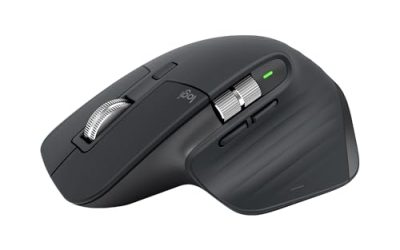
Key takeaways
- Four gaming mice with 16 to 20 programmable buttons compared, from swappable side plates to fixed thumb grids, with picks for MMO, MOBA and hybrid players.
A gaming mouse with lots of buttons is not really about the button count. It is about whether your thumb can learn a grid by touch and reach twelve skills without looking down, whether the software remembers your profiles, and whether the extra keys stay out of the way in a shooter. The wrong grid feels like a phone keypad glued to a mouse, and many players abandon it within a week.
This guide is for MMO and MOBA players who run out of comfortable keybinds, for ARPG players mapping a full skill bar, and for anyone whose keyboard hand is already overloaded. Every pick below was chosen from its Amazon listing, and the button counts quoted are the programmable totals the maker states there, so a 20 button mouse and a 17 button mouse are compared on the same basis.
Quick Picks
As an Amazon Associate we earn from qualifying purchases.
| Product | Best for | Key spec from title |
|---|---|---|
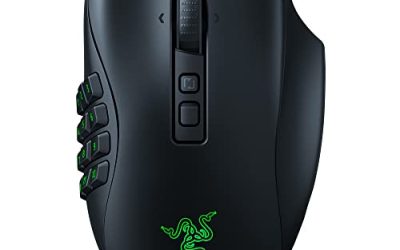
| Razer Naga V2 Pro | Players who switch between MMO, MOBA and shooter layouts | 19+1 programmable buttons, 3 swappable side plates |
| Logitech G600 | MMO players who want the largest fixed thumb grid | 20 programmable buttons, 12 button thumb panel, G-Shift |
| Corsair Scimitar RGB Elite | Players who want a sliding thumb panel that fits their hand | 17 programmable buttons, 12 mechanical side buttons on a Key Slider |
| Redragon M908 Impact | Budget-minded MMO players who still want a full grid | 18 programmable buttons, 12 side buttons, 12,400 DPI |
How to Choose
Count programmable buttons, and check what the grid really offers
Listings quote the total programmable count, which includes the main clicks, wheel and DPI keys, not just the thumb panel. A 20 button mouse like the G600 carries twelve keys under the thumb, while a 17 button rival may reach its total differently. Read the listing for the side panel size specifically, because that grid is what you are actually buying. Also check whether the side buttons are mechanical and individually shaped, since identical flat keys are far harder to tell apart by touch during a fight.
Decide between a fixed grid and swappable side plates
Fixed grids commit you to one layout: twelve keys, learned once, used for years. Swappable plates, as on the Naga V2 Pro, let you run a two button plate for shooters, six for MOBAs and twelve for MMOs on the same mouse. That flexibility costs more and adds small parts to lose, but it solves the common problem of owning an MMO mouse that feels wrong in every other genre. Decide honestly how many genres you play, because most players settle on one plate and never swap again.
Software decides whether the buttons earn their space
A dozen extra keys are only useful if the configuration software is stable, stores profiles where you need them and supports the macros your game allows. Check the listing for onboard memory: mice that save profiles internally carry your binds to another PC without an account or a download. Also confirm the software supports your operating system, because several gaming suites are Windows-only, which strands the extra buttons on a Mac or Linux setup even though the mouse itself still clicks and scrolls fine.
Weight and shape change once a grid is added
Button-heavy mice are bigger and heavier than esports mice, and no listing here pretends otherwise. The thumb grid also narrows where your thumb can rest, which some players find tiring in long sessions. If you split time between an MMO and a shooter, consider whether one heavy mouse for everything beats a lighter second mouse for aim games. Players with smaller hands should be especially careful: a twelve key panel that sits too far forward leaves the back row effectively unusable, whatever the spec sheet promises.
The 4 Best Options
Razer Naga V2 Pro

The Naga V2 Pro solves the genre problem directly: its listing describes three magnetic side plates with 2, 6 and 12 button layouts, so the same mouse covers shooters, MOBAs and a full MMO skill bar. The stated total is 19+1 programmable buttons, backed by a Focus Pro 30K sensor, Gen-3 optical switches, a HyperScroll Pro wheel and up to 300 hours of battery. It is the most complete button mouse here, aimed at players who refuse to keep two mice on the desk and want one device that changes shape with the game.
Specs
- Buttons: 19+1 programmable (HyperShift adds a second layer)
- Side plates: 3 swappable magnetic plates, 2, 6 and 12 button layouts
- Sensor: Razer Focus Pro 30K optical
- Switches: Razer Optical Mouse Switches Gen-3
- Scroll wheel: HyperScroll Pro
- Battery: up to 300 hours
- Model: RZ01-04400100-R3U1
Best for: Multi-genre players who want one mouse whose thumb panel adapts to each game.
Watch out for: The flexibility is the expensive option here, and the extra plates are small parts that need a home in your desk drawer; players who only ever play one genre pay for plates they will never fit.
ASIN: B0BGJTLFN5
Logitech G600 MMO Gaming Mouse

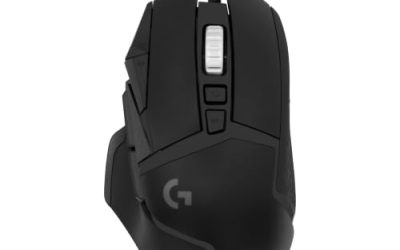
The G600 is the long-running benchmark for a fixed MMO grid: its listing states 20 programmable buttons, with twelve of them in the sculpted thumb panel, plus a G-Shift key that doubles the panel’s assignments while held. Each thumb key is shaped so your thumb can learn positions by touch rather than by sight. It is a wired mouse from an earlier generation, which keeps the design simple and the setup free of batteries and dongles. For a dedicated MMO player who wants the most thumb keys in a single fixed layout, it remains the reference point.
Specs
- Buttons: 20 programmable
- Thumb panel: 12 buttons, sculpted for touch
- Modifier: G-Shift key doubles thumb assignments
- Lighting: customisable RGB on the thumb panel
- Connection: wired USB
Best for: Dedicated MMO players who want the biggest fixed thumb grid and a modifier key on top.
Watch out for: It is wired and built on an older platform, so there is no wireless mode and no modern high-end sensor story; check the listing variant carefully, because this long-lived model appears in several near-identical listings.
ASIN: B0086UK7IQ
Corsair Scimitar RGB Elite

The Scimitar RGB Elite takes a different approach to the grid problem: its twelve mechanical side buttons sit on Corsair’s Key Slider, so the whole panel can be repositioned to sit exactly under your thumb. The listing states 17 programmable buttons and a PixArt PMW3391 sensor at 18,000 DPI, tuned through iCUE. That adjustability matters more than it sounds, because a fixed grid that sits a few millimetres too far forward wastes its back row. It suits MMO and MOBA players whose hands did not match the fixed panels on rival mice.
Specs
- Buttons: 17 programmable
- Side panel: 12 mechanical side buttons on an adjustable Key Slider
- Sensor: PixArt PMW3391 optical, 18,000 DPI
- Software: Corsair iCUE for remapping and macros
- Connection: wired USB
- Model: CH-9304211-NA
Best for: MMO players who need the thumb grid to move to their hand instead of the other way round.
Watch out for: It is wired only, and there is a separate wireless Scimitar model with a different button count and ASIN, so make sure the listing you open is the RGB Elite wired version described here.
ASIN: B082LRMY53
Redragon M908 Impact RGB LED MMO Mouse

The M908 Impact brings the full MMO layout to a much lower tier of the market: its Amazon listing’s specification fields state 18 programmable buttons with twelve along the side, a sensor up to 12,400 DPI, five memory profiles and adjustable weights. The wired design keeps things simple, and the software handles remapping and macros for the grid. It is the sensible entry point for a player who is not yet sure a button grid suits them, because the layout lesson it teaches is the same one the expensive mice teach, at a fraction of the commitment.
Specs
- Buttons: 18 programmable (per the listing’s specification fields)
- Side buttons: 12
- Sensor: up to 12,400 DPI
- Profiles: 5 memory profiles
- Weights: adjustable weight tuning set
- Connection: wired USB
Best for: New MMO players who want to learn a thumb grid before spending on a flagship.
Watch out for: Marketing text for this model sometimes quotes a higher button total than the specification table, so trust the spec fields; also confirm you are on the Amazon US listing, since the UK store uses a different ASIN for the same mouse.
ASIN: B07HC4NBQ8
Which One Fits Your Situation
Your main game is an MMO with a full skill bar
Start with the Logitech G600 or the Corsair Scimitar RGB Elite. Both give you twelve thumb keys in a fixed grid you can learn once and keep for years. Pick the G600 for its G-Shift layer and sculpted keys, or the Scimitar if your thumb never quite landed on a fixed panel and the sliding Key Slider sounds like the fix.
You split your week between an MMO and a shooter
The Razer Naga V2 Pro was built for exactly this split. Run the twelve button plate on raid nights and the two button plate when you switch to a shooter, and the same sensor and shape carry across both. It costs the most here, but it replaces two mice rather than competing with one.
You are trying a button grid for the first time
Learn on the Redragon M908 Impact. Its twelve side buttons teach the same thumb discipline as the flagships, and if the layout clicks for you, an upgrade later keeps the same basic arrangement. If it does not, you have spent little to find out, and the mouse still works as a spare.
Your hands are smaller and grids usually feel stretched
Look hardest at the Scimitar RGB Elite. The Key Slider moves the twelve button panel to meet your thumb, which rescues the back row that smaller hands usually cannot reach on fixed panels. Set the position once, tighten it down, and the grid effectively becomes a size option rather than a gamble.
Common Mistakes
- Reading the headline button total and assuming every one of those buttons sits under your thumb.
- Binding all twelve side keys on day one instead of learning the grid in rows over the first week.
- Forgetting to check whether the configuration software supports your operating system before buying.
- Buying a heavy grid mouse as your only mouse when half your play time is in aim-heavy shooters.
- Mixing up near-identical listings, such as wired and wireless versions of the same mouse family with different ASINs.
Frequently Asked Questions
How many buttons do you actually need for an MMO?
Twelve thumb buttons cover a full action bar for most players, and every mouse here offers that many on the side panel. A modifier such as G-Shift or HyperShift doubles the grid without extra keys. More important than the count is whether the keys feel distinct by touch, because a grid you must look at is a grid you will stop using.
Are button-grid mice bad for shooters?
They are heavier and their thumb panels leave less resting room, which most aim-focused players dislike. That is why the Naga V2 Pro’s two button plate exists, and why many hybrid players keep a lighter second mouse. A grid mouse will not ruin casual shooter play, but it is rarely the tool a competitive FPS player would choose first.
Do these mice store profiles without the software running?
It depends on the model, so check the listing for onboard memory or memory profiles before assuming. The Redragon here lists five memory profiles, and the flagship suites generally let you save settings to the device. Saved profiles matter if you play on more than one PC or attend events where installing software is not an option.
Wired or wireless for a button-heavy mouse?
Wireless removes cable drag and desk clutter, and the Naga V2 Pro shows battery life is no longer a serious objection. Wired models like the G600 and Scimitar cost less, never need charging and suit a fixed desk. Choose by setup rather than habit, and confirm which connection the exact listing in front of you actually offers.
FAQ
How many buttons do you actually need for an MMO?
Are button-grid mice bad for shooters?
Do these mice store profiles without the software running?
Wired or wireless for a button-heavy mouse?
More from Amazon
Programs that pair well with the guide above. Offers and eligibility are set by Amazon and may change.
Free shipping on eligible items, Prime Video and more. Eligible new members can start with a free trial.
Start a Prime free trialAd-free music streaming. Eligible new subscribers can start with a free trial.
Try Music Unlimited freeA Prime membership for ages 18-24 with a trial period. Eligibility is set by Amazon.
See Prime for Young AdultsAudiobooks and podcasts to listen to on the go. Eligible new members can start with a free trial.
Try Audible freeAs an Amazon Associate we earn from qualifying purchases.