Key takeaways
- Four gaming keyboard and mouse combos with Mac compatibility stated on the listing, compared by connection, switch feel, software support and adapter caveats.
Buying a gaming keyboard and mouse combo for a Mac is mostly a compatibility decision disguised as a shopping decision. Plenty of combos light up beautifully on a Windows desk and then lose their software, their remapping and half their extra keys the moment they meet macOS. The listings that matter are the ones that state Mac support in plain language, and even then the details decide what actually works.
This guide is for Mac players who want one box that covers keyboard and mouse, whether for a MacBook docked at a desk or an iMac that doubles as a gaming machine. Every combo below is a genuine keyboard and mouse set whose Amazon listing states Mac or macOS compatibility, and the notes under each pick call out the limits the listing itself admits, such as adapter requirements or reduced feature support.
Quick Picks
As an Amazon Associate we earn from qualifying purchases.
| Product | Best for | Key spec from title |
|---|---|---|
| Logitech G715 + G705 Combo | Mac players who want one premium combo for desk and travel | LIGHTSPEED and Bluetooth, PC/Mac stated, GX switches |
| Redragon S155-PRO Combo | Players who need configuration software that supports Mac | Bluetooth, 2.4GHz and USB-C wired, software for Win and MAC |
| MageGee V560 Combo | Mac laptop players who want a simple rechargeable 2.4GHz set | 2.4GHz wireless, RGB backlit, listed for Mac, laptop and PC |
| RedThunder K10 Combo | Players who want a full-size backlit board and long battery claims | Rechargeable 3800mAh, RGB backlit, Mac OS listed with caveats |
How to Choose
Confirm Mac compatibility in the listing, not in the comments
Treat the product page as the contract. The combos here state their Mac support in the title, the compatibility fields or the bullet points, and that wording is what you can rely on if something does not work. Note how the support is described: a combo that names macOS among its supported systems is a different promise from one that merely works as a basic keyboard and mouse. Also check whether support covers your specific setup, because a MacBook with only USB-C ports changes what plug and play really means.
Understand what the software does on macOS
Basic typing and clicking work on almost anything, but remapping, macros, DPI profiles and lighting control live in the maker’s software, and that software is often Windows-first. One listing in this guide states its software supports both Windows and Mac, which is rare enough to be a deciding factor. Another admits that only most of its features are adapted to Mac. Read those lines carefully: if you plan to remap keys for a specific game, software support matters more than switch type or lighting zones.
Pick the connection that suits a Mac desk
Mac setups punish cable clutter and reward flexibility. Combos here connect by 2.4GHz receiver, Bluetooth, USB-C wired modes, or a mix of all three. Bluetooth is the cleanest route on a MacBook because it needs no receiver and no adapter, while a 2.4GHz dongle usually means a USB-A receiver and therefore an adapter on modern Macs. Tri-mode combos give you both, plus a wired fallback for firmware updates or a flat battery. Match the combo’s connection list to the ports your Mac actually has.
Check the keyboard layout and switch feel
Gaming combos range from full-size boards with numpads to compact 75 percent layouts that leave room for wide mouse movement, which suits a Mac desk that is rarely huge. Switch feel matters just as much: true mechanical switches, low-profile tactile switches and mechanical-feel membrane keys all appear in these listings, and they sound and feel very different in a shared room. Also look for Mac-friendly legends or at least a layout that will not fight macOS shortcuts, since a Windows-only legend set makes everyday shortcuts slower to relearn.
The 4 Best Options
Logitech G Wireless Gaming Combo (G715 Keyboard and G705 Mouse)
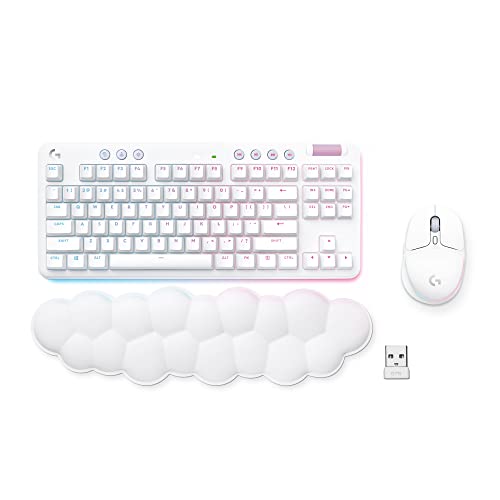
This is the only combo here built entirely from a major gaming line: the listing pairs the G715 tenkeyless keyboard with the G705 mouse and states PC and Mac compatibility outright. Both devices connect over LIGHTSPEED wireless or Bluetooth, so a MacBook pairs without a receiver while a desktop can use the dongle. The keyboard uses GX mechanical switches, in this variant the linear red version, with LIGHTSYNC RGB and a cloud-soft palm rest in the box. It suits Mac players who want one matched set that feels designed rather than bundled.
Specs
- Keyboard: G715 tenkeyless, GX Red linear mechanical switches in this variant
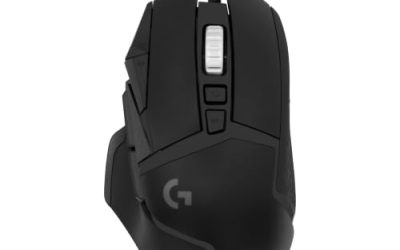
- Mouse: G705 wireless gaming mouse included
- Connectivity: LIGHTSPEED wireless and Bluetooth
- Compatibility: PC/Mac, as stated in the listing title
- Lighting: LIGHTSYNC RGB on both devices
- Extras: cloud-soft palm rest included
Best for: Mac gamers who want a matched, premium wireless set that pairs over Bluetooth with no adapter drama.
Watch out for: Confirm the switch variant before ordering, because tactile and clicky versions of this combo are separate listings; the mouse is a compact shape that larger hands may find small for long sessions.
ASIN: B0B6WXT3K3
Redragon S155-PRO Wired and Wireless Combo
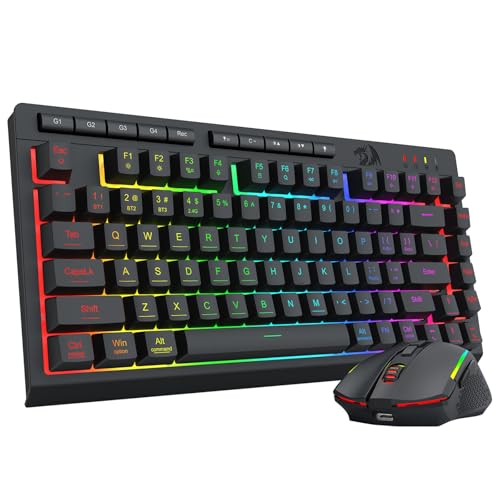
The S155-PRO stands out in this guide for one line in its listing: the software is stated to support both Windows and Mac, which means the remapping and lighting controls are not reserved for another operating system. The combo itself is tri-mode, running over Bluetooth, 2.4GHz or a USB-C wired link, with an RGB backlit 75 percent keyboard and a mouse rated up to 12,800 DPI. The compact keyboard leaves generous room for mouse movement on a small desk. It fits Mac players who actually intend to customise their setup rather than just plug in and play.
Specs
- Keyboard: 75 percent layout, RGB backlit
- Mouse: up to 12,800 DPI
- Connectivity: Bluetooth, 2.4GHz wireless and USB-C wired
- Software: stated to support Windows and MAC
- Compatibility: Mac support stated in the listing
Best for: Mac players who want working configuration software alongside tri-mode connectivity.
Watch out for: Verify the software claim against the current listing before relying on advanced macros, and note the 75 percent layout drops the numpad and function row spacing that some players use for game binds.
ASIN: B0FDG55BPG
MageGee V560 Wired and Wireless Gaming Combo

The V560 is the straightforward option: its listing describes an RGB backlit keyboard and mouse set that connects over 2.4GHz, is rechargeable, and is aimed squarely at Mac laptop and PC gamers, with the Mac mention carried in the product name itself. A practical detail from the listing is that the receiver lives inside the mouse, so the set travels as one tidy unit. There is no software story to untangle and no cable to manage at the desk. It suits a MacBook player who wants to open one box, plug in one receiver and start playing.
Specs
- Keyboard and mouse set, RGB backlit
- Connectivity: 2.4GHz wireless, receiver stored in the mouse
- Battery: rechargeable
- Compatibility: listed for Mac laptop and PC gamers
- Style: mechanical-feel keyboard design
Best for: MacBook players who want an uncomplicated rechargeable combo for a small desk.
Watch out for: The listing describes 2.4GHz as the connection mode, so a MacBook without USB-A ports needs an adapter for the receiver; it is a mechanical-feel keyboard rather than true mechanical switches, so set expectations accordingly.
ASIN: B0D1MGVRR8
RedThunder K10 Wireless Gaming Combo

The K10 is the full-size, big-battery entry: its listing describes a rechargeable 3800mAh keyboard with RGB backlighting, a mechanical-feel anti-ghosting layout and a 7D gaming mouse adjustable to 3200 DPI, with Mac OS named among the supported systems. Unusually, the listing is also honest about the Mac experience, noting that a USB-C adapter is required and that most, not all, features are adapted to Mac. That candour makes it a reasonable buy for a Mac player who mostly needs typing, backlighting and solid basic gaming input rather than deep software customisation.
Specs
- Keyboard: full-size, RGB backlit, mechanical-feel, anti-ghosting
- Battery: rechargeable, 3800mAh
- Mouse: 7D gaming mouse, up to 3200 DPI
- Compatibility: Mac OS listed among supported systems
- Mac note from listing: USB-C adapter required, most features adapted
Best for: Mac players who want a full-size board and can accept the adapter and feature caveats.
Watch out for: Budget for the USB-C adapter the listing says a Mac needs, and do not count on every Windows feature carrying over; if full software support on macOS is essential, the Redragon above states it more strongly.
ASIN: B0BTT2VCRR
Which One Fits Your Situation
You want the most polished Mac gaming desk setup
Choose the Logitech G combo. Bluetooth pairing keeps a MacBook setup cable-free, LIGHTSPEED covers a desktop dock, and the keyboard and mouse share one design language and one lighting system. It is the set least likely to feel like a compromise, provided the compact mouse shape suits your hand and your desk sees as much work as it does play.
You plan to remap keys and build macros on macOS
The Redragon S155-PRO is the safer bet, because its listing explicitly extends the software to Mac instead of leaving support ambiguous. Tri-mode connectivity also means you can keep the keyboard wired over USB-C while you experiment with settings, then switch back to wireless for play. That combination of stated software support and connection choice is rare at this level of the combo market.
Your gaming happens on a MacBook at a small desk
Take the MageGee V560. The receiver stores in the mouse, the set is rechargeable, and nothing about it demands desk space or software installation. Just confirm you have an adapter or hub for the USB receiver if your MacBook only carries USB-C ports. Packed away, the whole set travels in a laptop bag without loose parts to lose or cables to untangle.
You prefer a full-size keyboard and type as much as you play
The RedThunder K10 gives you the complete board with a numpad and the largest battery in this guide. Read its Mac notes before ordering so the adapter requirement and partial feature adaptation are expectations rather than surprises, and it will serve a mixed work and play desk well. The mouse’s modest DPI ceiling matters little outside fast-paced shooters and precision editing work.
Common Mistakes
- Assuming a combo works fully on Mac because the keyboard types and the mouse moves in a quick test.
- Forgetting that a USB-A wireless receiver needs an adapter on a MacBook with only USB-C ports.
- Buying for the lighting and layout, then discovering the remapping software is Windows-only.
- Confusing a mechanical-feel keyboard with true mechanical switches when switch feel matters to you.
- Ordering a switch or colour variant of a combo without checking that its listing still states Mac compatibility.
Frequently Asked Questions
Do gaming keyboard and mouse combos really work on Mac?
The ones in this guide state Mac or macOS compatibility on their listings, and basic input works as described. The variation is in the extras: software support, macro depth and feature adaptation differ by brand, and two listings here describe those limits openly. Decide which extras you actually need, then match the listing’s wording to that list.
Is Bluetooth or a 2.4GHz receiver better on a Mac?
Bluetooth is the cleanest option on a modern Mac because it needs no receiver and no adapter, and the Logitech combo here offers it alongside LIGHTSPEED. A 2.4GHz receiver can feel more responsive and avoids pairing menus, but on a USB-C-only MacBook it usually means carrying an adapter, which slightly defeats the point of a wireless set.
Will I be able to remap keys and record macros on macOS?
Only where the maker supports it. The Redragon S155-PRO listing states its software supports Mac, which is the exception rather than the rule in this category. Elsewhere, expect solid basic function with limited customisation. If a specific macro matters to your game, verify it against the listing and the maker’s support pages before buying, not after.
What should I check before ordering a combo for a MacBook?
Three things: the ports, because a USB-A receiver needs an adapter; the stated compatibility, because Mac support should appear in the listing itself; and the keyboard size, because a full-size board plus a mouse can crowd a small desk. Checking those three points against the product page takes minutes and prevents most returns in this category.
FAQ
Do gaming keyboard and mouse combos really work on Mac?
Is Bluetooth or a 2.4GHz receiver better on a Mac?
Will I be able to remap keys and record macros on macOS?
What should I check before ordering a combo for a MacBook?
More from Amazon
Programs that pair well with the guide above. Offers and eligibility are set by Amazon and may change.
Free shipping on eligible items, Prime Video and more. Eligible new members can start with a free trial.
Start a Prime free trialAd-free music streaming. Eligible new subscribers can start with a free trial.
Try Music Unlimited freeA Prime membership for ages 18-24 with a trial period. Eligibility is set by Amazon.
See Prime for Young AdultsAudiobooks and podcasts to listen to on the go. Eligible new members can start with a free trial.
Try Audible freeAs an Amazon Associate we earn from qualifying purchases.