Key takeaways
- A specification-based review of the Pulse Red Xbox Wireless Controller, covering PC connections, remapping, headset support and compatibility unknowns.
This review analyzes published product information. We have not performed detailed research of this unit.
As an Amazon Associate, we earn from qualifying purchases.
A PC controller with several connection paths
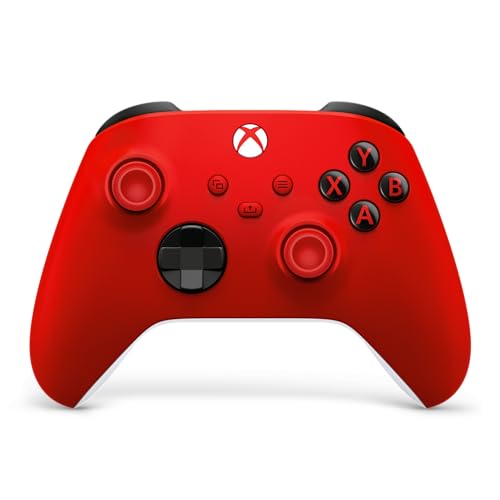
The Pulse Red Xbox Wireless Controller offers three listed connection options: USB-C, Xbox Wireless and Bluetooth. For a PC buyer, that flexibility is more useful than the cosmetic distinction: it creates a choice between a wired setup and supported wireless connections. The important qualification is that the listing does not establish identical functionality across those connections, particularly for audio and software features.
This review evaluates the supplied retailer specifications, not detailed research. It covers the Pulse Red variant of the Xbox Wireless Controller; the color does not make it a separate controller family. Its strongest documented attractions are connection flexibility, a hybrid D-pad, textured contact areas and button remapping. Its main buying uncertainty is how completely those features will work with your particular computer and connection method.
The listed hardware at a glance
| Specification | Supplied detail |
|---|---|
| Product and variant | Xbox Wireless Controller, Pulse Red |
| Connections | USB-C, Xbox Wireless and Bluetooth |
| Explicit wired support | USB-C plug-and-play on console and PC, according to the listing |
| Directional control | Hybrid D-pad |
| Textured surfaces | Triggers, bumpers and back case |
| Additional control | Share button for content capture and sharing |
| Headset connection | 3.5mm jack for compatible headsets |
| Customization | Button remapping and personalized profiles through Xbox Accessories |
| Listed dimensions | 6.91 × 5.61 × 2.76 inches |
| Listed weight | 0.85 pounds |
The measurements are retailer-listed figures. The published listing information does not clarify whether they describe the controller alone or a packaged item, so they are not a firm basis for judging hand fit or comparing in-hand weight.
Choosing a connection for your PC
USB-C has the clearest PC-specific support statement: the seller describes it as plug-and-play on PC and console. That makes a wired connection the most straightforward starting point supported by this evidence. However, the listing does not identify an included cable, cable length or the connector needed at the computer end. Check the package contents and your available ports rather than assuming every necessary accessory is supplied.
Bluetooth and Xbox Wireless provide the advertised wireless alternatives. The seller also describes pairing and switching between supported devices, which could suit someone sharing a controller across different systems. The evidence does not explain the switching procedure, how many devices it remembers or any limitations when moving between connection types.
For a wireless PC setup, establish what your computer supports before choosing a connection. The listing does not say whether additional hardware is required for Xbox Wireless, nor does it provide Bluetooth requirements or an operating-system support matrix. It also supplies no latency or range measurements. There is therefore no basis here to rank these connections by responsiveness or promise an equally complete experience with each.
Controls, texture and what the layout leaves unanswered
The documented directional control is a hybrid D-pad. That is relevant if your games use directional inputs for menus, movement or commands, but the description alone cannot establish its feel. There is no published listing information about actuation force, diagonal-input behavior or noise. Players choosing primarily for demanding directional-input games should treat those as open questions rather than accept the seller’s accuracy language as a measured result.
Texture is specifically listed on the triggers, bumpers and back case. Those are useful contact-area details, giving a clearer picture than a general grip claim. The seller also promotes sculpted surfaces and revised geometry for comfort and control. Whether that shape suits your hands over a long session remains personal and untested here; textured surfaces do not guarantee comfort.
A dedicated Share button adds a documented capture-related control. The seller associates it with screenshots, recordings and sharing, but does not explain PC software requirements or behavior in individual applications. Likewise, the supplied text is not a complete layout diagram: it does not enumerate every button or describe stick placement. Buyers comparing control arrangements should confirm the full layout rather than infer it from the family name.
Remapping and headset support need separate checks
The Xbox Accessories app is the listed route to button remapping and personalized profiles. That offers a documented customization path for players who want to change assignments. However, the evidence does not identify which buttons can be reassigned, how many profiles are supported or whether profiles are stored on the controller. It also does not promise macros or advanced input adjustments.
The 3.5mm jack is another practical inclusion for compatible headsets. Crucially, its presence is not proof that headset audio and voice chat work through every advertised connection. The listing does not provide that connection-by-connection detail. If controller-connected audio is essential, verify support for your intended PC setup before making the jack a deciding feature.
Power information is also absent: the supplied evidence gives no battery type, charging behavior or runtime. Do not interpret a USB-C port as confirmation of rechargeable batteries or charging functionality. These omissions matter most when planning a wireless setup, because they leave the power routine and any required extras unresolved.
Verdict: flexible connections, with compatibility homework
The Pulse Red Xbox Wireless Controller is worth considering for a PC setup that values several connection choices, textured controls and app-based remapping. USB-C has the most explicit PC support in the supplied listing. Wireless requirements, headset routing and power details need confirmation before purchase. If button arrangement is your main concern, our GameCube-style controller guide provides a separate starting point for exploring that preference.
Sources: This specification-based assessment uses the supplied retailer listing for the Pulse Red Xbox Wireless Controller. Advertised benefits are seller claims, not independently measured results.
Check the exact product and current offer on Amazon