Key takeaways
- Compare three PS4-ready keyboard and mouse combos by layout, adapter, and fit, then pick the set that suits your console, desk, and play style.
A PlayStation 4 setup changes the keyboard and mouse question in a practical way. A controller works for almost every game, yet some players want a keypad under one hand and a mouse under the other for aiming, building, or navigating menus, and that preference only works when the whole set talks to the console. Buying a keyboard and a mouse separately can leave you with two devices that each need their own connection, while a combo built around a console adapter keeps the pair working as one system from the start.
This guide is for PS4 players who want that paired setup without guessing about compatibility, for people setting up a shared living-room console, and for players moving between console and PC who want one set to cover both. Every option below was chosen from its Amazon title and listing details, and every combo in this article states PS4 compatibility in its listing.
Quick Picks
As an Amazon Associate we earn from qualifying purchases
| Product | Best for | Key spec from title |
|---|---|---|
| GameSir VX2 AimSwitch | A compact keypad and mouse set with a console adapter | 36-key keypad with TTC Red switches |
| GameSir VX2 AimSwitch second listing | A backup listing of the same VX2 set if the first is unavailable | Console adapter set for PS4, Xbox, Switch, and PC |
| ZIYOU LANG T60 Pro | A full small keyboard and honeycomb mouse pairing | 60 percent 62-key keyboard with 6400 DPI honeycomb mouse |
How to Choose
Check PS4 compatibility in the listing itself
Compatibility is the first filter for a PS4 combo, and it has to come from the listing rather than from a general claim about keyboards working with consoles. A set that names PS4 alongside other platforms gives you a clear starting point, while a set that only mentions PC or laptop use leaves the console question open. Read the compatibility line before you look at switches, lighting, or layout, because a well-made keyboard that the console does not recognise will not help you in a match. The three combos in this guide all state PS4 compatibility in their listings, which is why they made the shortlist.
Decide between a keypad and a full small keyboard
A keypad puts a small cluster of keys under your left hand and leaves more room for mouse movement, which suits a tight desk or a tray in front of a sofa. A 60 percent keyboard keeps a more familiar typing layout with extra keys for menus, chat, and shortcuts, at the cost of a wider footprint. Think about where your hands rest during a long session and how much desk space sits beside the console. If your play area is narrow, the keypad route is the easier fit, and if you type often or want a layout closer to a normal keyboard, the small full keyboard is the better match.
Look at how the set connects through its adapter
Some PS4 combos rely on a console adapter to translate keyboard and mouse input into signals the console accepts, and that adapter is part of the product rather than an extra purchase. Check whether the listing describes the set as a keypad plus mouse plus adapter, because that tells you the three pieces are meant to work together. Also consider cable length and where the adapter will sit, since a living-room setup often places the console further from the player than a desk setup does. A set with its adapter included keeps the setup simpler and avoids a last-minute search for a separate part.
Match the mouse to your hand and your surface
A honeycomb mouse and a standard mouse feel different in the hand, and the difference matters more during long sessions than any single specification on a box. A lighter shell with cutouts can suit players who lift the mouse often, while a solid shell can suit players who prefer a steadier feel. Consider the surface you play on as well, because a smooth desk, a cloth pad, and a wooden table each change how a mouse glides. Choose the mouse shape and weight style that fits your grip and your surface, and treat the keyboard layout as the second decision rather than the first.
The 3 Best Options
GameSir VX2 AimSwitch
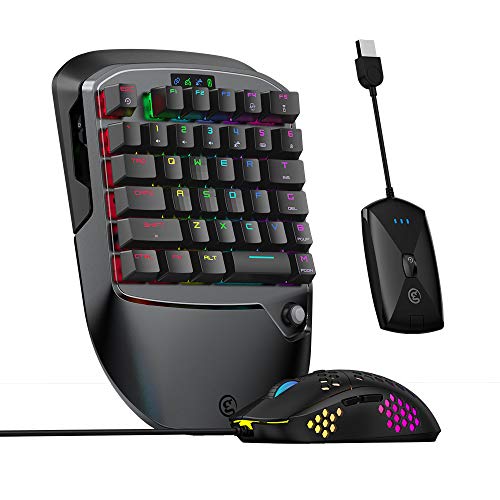
The GameSir VX2 AimSwitch suits a PS4 player who wants a compact keypad on one side and a mouse on the other, with a console adapter tying the two together. Its 36-key layout keeps the keys you reach for most within a short distance, so your left hand does not have to travel across a full keyboard during a fast exchange. The TTC Red switches give the keypad a consistent press, and the included adapter is the piece that lets the set work across PS4, Xbox, Switch, and PC. That range makes it useful for console play and occasional computer sessions.
Specs
- 36-key keypad plus mouse plus console adapter in one set
- TTC Red switches
- Compatible with PS4, Xbox, Switch, and PC
Best for: PS4 players who want a compact keypad and mouse set with an adapter included.
Watch out for: Check the adapter placement and cable reach in your room before you settle on a seating position, since console setups vary more than desk setups.
GameSir VX2 AimSwitch second listing

This second listing covers the same GameSir VX2 AimSwitch set, and it earns a place here as a practical alternative when the first listing is out of stock or unavailable. The listing states compatibility with PS4, Xbox, Switch, and PC, so it meets the same console test as the first entry, and it is presented as a keyboard and mouse combo set rather than as separate parts. Players who have already decided on the VX2 layout can use this listing as a fallback without changing their plan.
Specs
- Keyboard and mouse combo set sold as one set
- Compatible with PS4, Xbox, Switch, and PC
Best for: Players who want the VX2 set and need a second listing to check when the first one is unavailable.
Watch out for: One mirror recorded OutOfStock for this ASIN, so confirm availability by hand before you rely on it.
ZIYOU LANG T60 Pro

The ZIYOU LANG T60 Pro suits a PS4 player who would rather have a small keyboard than a keypad, with a honeycomb mouse to match. Its 60 percent layout holds 62 keys, which leaves room for game controls and menu shortcuts without taking up the space of a full-size board. The honeycomb mouse pairs with that keyboard at 6400 DPI, and the listing states compatibility with Laptop, Mac, PS4, PC, and Xbox, so the set is framed as a multi-platform pairing rather than a PC-only combo. That combination works well for a player who wants a familiar keyboard shape and a light mouse in a single purchase.
Specs
- 60 percent 62-key keyboard plus 6400 DPI honeycomb mouse
- Listing states compatible with Laptop, Mac, PS4, PC, and Xbox
Best for: PS4 players who prefer a small full keyboard over a keypad and want a honeycomb mouse in the same set.
Watch out for: Measure the keyboard footprint against your desk or tray, since a 62-key board is wider than a keypad and needs its own clear space.
Which One Fits Your Situation
You play in a small space and want the smallest footprint
Choose the GameSir VX2 AimSwitch in the first listing. Its 36-key keypad takes up far less room than a keyboard, which leaves more space for mouse movement on a narrow desk or a lap tray. The adapter keeps the keypad and mouse working as one set on PS4, so you do not need extra parts to get started.
You have decided on the VX2 and the first listing is unavailable
Choose the second GameSir VX2 AimSwitch listing. It describes the same set and the same PS4, Xbox, Switch, and PC compatibility, so your setup plan does not have to change. That makes it a practical backup rather than a different purchase, and it keeps your layout, adapter, and seating plan the same. Check availability by hand first, because one mirror recorded OutOfStock for this ASIN.
You want a keyboard shape closer to normal typing
Choose the ZIYOU LANG T60 Pro. Its 62-key layout gives you more keys than a keypad, which helps with menus, shortcuts, and chat, while still staying compact enough for a console setup. It also leaves room for extra controls without moving to a full-size board. The honeycomb mouse keeps the pairing light, and the listing states PS4 compatibility directly.
You switch between PS4 and another platform
Choose either GameSir VX2 listing or the ZIYOU LANG T60 Pro, based on layout, because all three state compatibility across PS4 and other platforms. That shared compatibility means one purchase can cover the console in the living room and the computer on the desk. Pick the keypad if space is tight, and pick the 62-key keyboard if you want a more familiar layout for the other platform as well.
Common Mistakes
- Buying a keyboard and mouse separately and assuming both will work with PS4 without checking the listing for console compatibility.
- Choosing a full-size keyboard for a living-room setup, then finding there is no room left for the mouse to move.
- Ignoring the console adapter, and only realising after delivery that the set needs that piece to connect to PS4.
- Picking a mouse by its sensor number alone, without considering hand size, grip, and the surface it will glide on.
- Ordering a combo for one platform and expecting it to work the same way on another without reading the compatibility line first.
Frequently Asked Questions
Can a keyboard and mouse combo work on PS4?
A combo can work on PS4 when its listing states PS4 compatibility and the set includes the connection method the console needs, often a console adapter. The combos in this guide all state PS4 compatibility in their listings. Check that compatibility line on the listing you buy from, and confirm the adapter and cables reach your seating position before you start playing.
Is a keypad better than a small keyboard for PS4?
A keypad is better when space is tight and you want your left hand close to a small cluster of keys, while a small keyboard is better when you want more keys for menus and shortcuts. The GameSir VX2 uses a 36-key keypad, and the ZIYOU LANG T60 Pro uses a 62-key layout. Choose by the size of your play area and how often you type during a session.
Do I need a console adapter for a PS4 keyboard and mouse set?
Some sets need a console adapter to translate keyboard and mouse input for PS4, and the GameSir VX2 set includes one. A set that lists an adapter as part of the package is telling you that piece is part of the intended setup. Read the listing to see whether the adapter is included, and keep it in place once the set is connected.
Can I use the same combo on PS4 and PC?
The combos in this guide state compatibility across PS4 and other platforms, including PC, so the same set can cover both in principle. The GameSir listings name PS4, Xbox, Switch, and PC, and the ZIYOU LANG listing names Laptop, Mac, PS4, PC, and Xbox. Check the listing for the exact platforms you use, and expect the feel to change with desk height and seating.
FAQ
Can a keyboard and mouse combo work on PS4?
Is a keypad better than a small keyboard for PS4?
Do I need a console adapter for a PS4 keyboard and mouse set?
Can I use the same combo on PS4 and PC?
More from Amazon
Programs that pair well with the guide above. Offers and eligibility are set by Amazon and may change.
Free shipping on eligible items, Prime Video and more. Eligible new members can start with a free trial.
Start a Prime free trialAd-free music streaming. Eligible new subscribers can start with a free trial.
Try Music Unlimited freeA Prime membership for ages 18-24 with a trial period. Eligibility is set by Amazon.
See Prime for Young AdultsAudiobooks and podcasts to listen to on the go. Eligible new members can start with a free trial.
Try Audible freeAs an Amazon Associate we earn from qualifying purchases.