Key takeaways
- Five 5V 3-pin ARGB extension cables for PC lighting — 1-to-1 extenders, SM adapters and 1-to-4 and 1-to-5 splitters — with connector and length facts.
A motherboard ARGB header sits in one corner of the board, and the fan or light strip that needs it sits in the opposite corner of the case. A short lead leaves builders with two bad options: route the cable across the middle of the case, or give up on syncing that device with the rest of the build. A 5V 3-pin ARGB extension cable adds reach between the header and the device without changing the signal or adding a controller. This guide covers five extension cables that do exactly that job, plus the splitter versions that let one header feed several devices.
Disclosure: As an Amazon Associate, we earn from qualifying purchases made through links in this article, at no extra cost to you.
Quick Picks
| Product | Best for | ASIN |
|---|---|---|
| OPSFALCON ARGB Extension Cable 2-Pack | Plain 1-to-1 reach for two devices | B0B5X4NYMH |
| Jstincal 1-to-1 ARGB Extension Cable 3-Pack | A three-pack for multi-fan builds | B0CJ7THMTG |
| GINTOOYUN 3-Pin to SM 3-Pin ARGB Extension Cable 4-Pack | SM-connector fans and strips | B0CHP7SWSX |
| Cooler Master 1-to-5 ARGB Splitter Cable | One header feeding five devices | B083X1W5G4 |
| ELFJMZP 1-to-4 ARGB Splitter Extension Cable | The longest reach in the guide | B0FRG3TTWB |
How to Choose
Every pick in this guide works with the 5V 3-pin addressable RGB header found on modern motherboards from ASUS, MSI, GIGABYTE and ASRock. That header carries 5V, a data line and ground, with one pin position left blank. It is a different connector from the older 12V 4-pin RGB header, which carries 12V and three colour lines and has no blank pin. The two are not interchangeable, and every cable in this guide is built for the 5V 3-pin header only. Plugging a 5V cable into a 12V header can damage the LEDs it feeds, so check the header label on the board before ordering anything.
Length is the first decision. Most plain extension cables in this class measure 30 cm, which crosses a mid-tower case from a header at the bottom edge to a fan at the top. A 50 cm or 55 cm cable saves a second join when the run must reach a rear exhaust fan from a header on the far side of the board.
Connector type is the second decision. A standard motherboard ARGB header uses a 3-pin connector with 2.54 mm spacing, and many fans and light strips use the same connector, so a plain 1-to-1 extension simply adds length between two identical ends. Other devices, especially budget fans and some LED strips, use a JST SM 3-pin connector instead. That connector looks different and will not mate with a motherboard header without an adapter.
Splitters are the third decision. A splitter takes one motherboard header and feeds two, four or five devices from it. The signal is shared, so every device on a splitter shows the same lighting pattern, which is what most builders want for a matched set of fans. The limit to respect is current: a single motherboard ARGB header typically supplies up to 3 amps, and each fan or strip draws a share of that.
Pack size is the last practical point. A builder wiring three front fans and a rear fan needs four cables, so a four-pack is the sensible buy. A builder who only needs to reach one distant strip should buy the smallest pack. None of the cables in this guide carries lighting of its own; they are plain signal carriers, and the lighting comes from the fan or strip at the end of the chain.
OPSFALCON ARGB Extension Cable 2-Pack

Specs
- Length: 30 cm (11.8 inches) per cable
- Connectors: 3-pin female to 3-pin female
- Voltage: 5V DC
- Conductor material: copper cores
- Pack contents: 2 extension cables, 4 loose 3-pin connectors
- Model number: OP-ARGBExtensionCable
- First available: April 17, 2023
The OPSFALCON two-pack is the plainest pick in this guide, and that is its appeal. Each cable is a straight 1-to-1 extension with a 3-pin female connector on both ends, 30 cm long, built around copper cores. There is no splitter function, no adapter end and no extra hardware beyond four loose 3-pin connectors in the box, which cover the common case where a fan lead arrives without its own mating connector. The listing states plainly that the cable only supports a 3-pin 5V addressable header and does not support a 4-pin 12V header.
This is the pick for a builder who needs to reach one or two devices and wants nothing else in the way. A single front intake fan whose lead falls a few inches short of the header, or a light strip mounted along the top edge of a case, are the classic jobs. One caution: the crawled copy of this listing is around a year old.
Best for: builders who need plain 1-to-1 reach for one or two devices.
Jstincal 1-to-1 ARGB Extension Cable 3-Pack

Specs
- Length: 30 cm (11.8 inches) per cable
- Connector A: 3-pin female
- Connector B: JST SM 3-pin female
- Voltage: 5V
- Conductor material: copper core
- Pack contents: 3 extension cables
- Function: extends the cable between a motherboard and a computer fan
The Jstincal three-pack is the multi-fan pick. Each cable runs 30 cm from a standard 3-pin female connector on the motherboard side to a JST SM 3-pin female connector on the device side, which is the connector found on many budget ARGB fans and LED strips. The listing describes the cable as a 1-to-1 extension for connecting addressable RGB lights or fans to a single source, and it repeats the compatibility warning twice: it only supports a 5V 3-pin digital addressable header, and it is not compatible with a 12V 4-pin header.
Three cables in the box matches the common three-fan front intake setup, where each fan lead needs the same extra reach to get back to the header or to a hub. Buyers should check which connector their fans use before choosing between this cable and the plain OPSFALCON pick; a fan with a JST SM lead needs this cable, while a fan with a standard 3-pin lead needs the plain version. The crawled copy of this listing showed no live offer line, so check the live listing before ordering.
Best for: three-fan front intake setups where the fans use JST SM connectors.
GINTOOYUN 3-Pin to SM 3-Pin ARGB Extension Cable 4-Pack

Specs
- Length: 30 cm (11.8 inches) per cable
- Connector A: 3-pin female
- Connector B: SM 3-pin female
- Voltage: 5V
- Connector gender: female-to-female
- Pack contents: 4 extension cables, 4 loose 3-pin male sockets
- Model: GINTOOYUN-RGB-EXT-0.98FT
- Manufacturer: FENGQLONG
The GINTOOYUN four-pack covers the same SM-connector job as the Jstincal three-pack, with two differences that matter in practice. First, the box holds four cables instead of three, which suits a build with three front fans plus a rear fan, or a build with two strips and two fans. Second, the box includes four loose 3-pin male sockets alongside the cables, so a fan lead that arrives with a bare connector housing can be finished on the spot. The listing notes that only 5V 3-pin digital addressable motherboard connectors are supported.
This is the pick for a builder wiring a full set of SM-connector devices in one pass. The four-pack covers the whole case in a single order, and the spare sockets are genuinely useful rather than filler, since loose SM leads are common on the budget fans that use this connector. As with the other SM pick, the crawled copy of this listing showed no live offer line, so confirm the live listing before ordering.
Best for: builds with four SM-connector fans or strips to wire in one pass.
Cooler Master 1-to-5 ARGB Splitter Cable

Specs
- Length: 50 cm
- Split: 1 input to 5 outputs
- Connector type: 3-pin ARGB
- Voltage: 5V
- Listed wattage: 40 watts
- Weight: 60 grams
- Model number: MFX-AWHN-1NNN5-R1
- Compatibility: ASUS, MSI, GIGABYTE and ASRock motherboards
The Cooler Master splitter is the only brand-name pick in this guide, and it is also the longest splitter here at 50 cm. One input plugs into a single motherboard ARGB header and five outputs feed five devices, all showing the same lighting pattern from the motherboard software. The listing names the four major motherboard makers as compatible, and the 50 cm length gives enough slack to route the splitter body to a central point in the case and then run each output to its fan or strip.
This is the pick for a builder who wants five fans or strips on one header with a single cable purchase. A five-fan case — three intake, one rear exhaust, one top exhaust — is the textbook use, and the 50 cm run reaches the farthest fan without a second join. The shared-signal behaviour is worth stating plainly: all five devices mirror each other, so this cable suits matched sets rather than devices that need independent patterns.
Best for: feeding five matched fans or strips from a single motherboard header.
ELFJMZP 1-to-4 ARGB Splitter Extension Cable
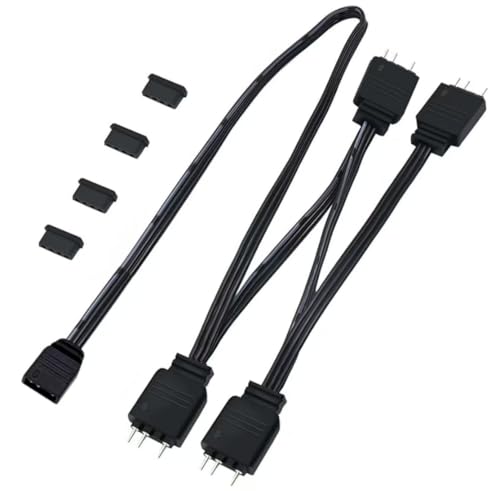
Specs
- Length: 55 cm (21.6 inches)
- Split: 1 input to 4 outputs
- Connector pitch: 2.54 mm, 4P-3pin
- Wire gauge: 24 AWG
- Current figure: 1 amp
- Material: flexible PVC
- Weight: 0.03 lbs
- First available: September 17, 2025
The ELFJMZP splitter is the longest cable in this guide at 55 cm, and the only one that publishes a wire gauge, at 24 AWG. One female input takes the motherboard header, and four male outputs feed four devices, with the listing describing a segmented splitter layout that keeps each branch separate rather than bundling the wires into a single thick trunk.
This is the pick for a large case where the header sits far from the devices, or for a build where the splitter needs to run from a header at the bottom of the board up to fans mounted at the top. The four-way split covers a three-fan intake plus one exhaust, or two fans and two strips, and the 24 AWG wire is the thickest conductor stated anywhere in this guide. The listing publishes a 1-amp current figure for the cable, which is the number to compare against the total draw of the devices on the far end. The crawled copy of this listing showed no live offer line, so confirm the live listing before ordering.
Best for: large cases where the longest reach and a four-way split are both needed.
FAQ
Can I plug a 5V 3-pin ARGB cable into a 12V 4-pin RGB header?
No. The 5V 3-pin header and the 12V 4-pin header use different connectors, different voltages and different pin layouts, and they are not interchangeable. Every cable in this guide is built for the 5V 3-pin header only. Check the label printed next to the header on the motherboard before connecting anything.
Do ARGB splitters make each fan show a different lighting pattern?
No. A splitter shares one signal across every device connected to it, so all devices on the same splitter show the same pattern at the same time. That is the intended behaviour for a matched set of fans. Devices that need independent patterns must sit on separate headers or separate controller channels.
How many devices can one motherboard ARGB header feed?
The limit is current, not device count. A single motherboard ARGB header typically supplies up to 3 amps, and each fan or strip draws a share of that. Count the LEDs on the devices being connected and keep the total comfortably inside the header’s stated limit. A five-way splitter full of high-LED-count fans can approach the limit, so check the numbers before loading a header to its maximum.
Do I need a 1-to-1 cable or a splitter?
Buy a 1-to-1 cable when a single device needs more reach to get to the header, and buy a splitter when several devices need to share one header. A build with three front fans that all need to reach the same header is a splitter job. A build with one distant strip and everything else already connected is a 1-to-1 job.
Conclusion
An ARGB extension cable is a small purchase that fixes a common build problem: the header is in one place and the device is in another. The OPSFALCON two-pack covers plain 1-to-1 reach, the Jstincal three-pack and the GINTOOYUN four-pack cover SM-connector fans and strips, and the Cooler Master 1-to-5 and ELFJMZP 1-to-4 splitters let one header feed a whole set of matched devices. Match the connector on the device, measure the run, count the devices per header, and the right cable picks itself.
FAQ
Can I plug a 5V 3-pin ARGB cable into a 12V 4-pin RGB header?
Do ARGB splitters make each fan show a different lighting pattern?
How many devices can one motherboard ARGB header feed?
Do I need a 1-to-1 cable or a splitter?
More from Amazon
Programs that pair well with the guide above. Offers and eligibility are set by Amazon and may change.
Free shipping on eligible items, Prime Video and more. Eligible new members can start with a free trial.
Start a Prime free trialAd-free music streaming. Eligible new subscribers can start with a free trial.
Try Music Unlimited freeA Prime membership for ages 18-24 with a trial period. Eligibility is set by Amazon.
See Prime for Young AdultsAudiobooks and podcasts to listen to on the go. Eligible new members can start with a free trial.
Try Audible freeAs an Amazon Associate we earn from qualifying purchases.