Key takeaways
- Replace a frayed mic cord with the right USB cable. Five mic-ready cables for Blue Yeti, Yeti X, Nano and more, compared by connector, length and build.
A USB microphone lives or dies by its cable. The mic itself may be fine, yet a frayed cord, a loose connector, or a cable that is six inches too short for a boom arm can end a stream before it begins. The cable that ships in the box is often the first part to wear out, and most people replace it with whatever cord happens to be lying in a drawer. That shortcut fails more often than it works, because many everyday USB cables carry power only and move no audio data at all.
This guide covers five cables made for USB microphones. Every pick names the microphones it fits, the connector on the mic end, and the length on offer, so you can match the cable to your mic instead of guessing. Mini-B, Micro-B, and USB-C mic ends all appear here, because the streaming mics people actually own span all three.
Disclosure: As an Amazon Associate, we earn from qualifying purchases made through links in this article, at no extra cost to you.
Quick Picks
| Product | Best for | ASIN |
|---|---|---|
| ienza Blue 10FT Yeti Cord | Long reach for boom arms | B08JG1SNB7 |
| Cable Matters 2-Pack 6FT Mini USB | Everyday spare pair | B007NLUI1U |
| AGVEE Braided Mini USB 6.6FT | Braided Mini-B cable | B0DQDJ2FX9 |
| UGREEN Mini USB to USB-C 3FT | USB-C host ports | B079L5YFJY |
| Geekria Micro USB 9FT | Yeti X, Nano, and MV7 | B0C6PJ5K2F |
How to Choose
Match the mic-side connector first. The original Blue Yeti and the Blue Snowball iCE use a Mini-B port. The Blue Yeti X and Yeti Nano use Micro-B, while newer mics such as the Elgato Wave 3 and the Razer Seiren V3 Mini use USB-C. A cable with the wrong mic-side plug simply does not fit, so check the port on your mic before anything else. Each section below names the connector in plain terms.
Buy a data cable, never a charge-only cord. A USB microphone needs a cable that moves audio data as well as power. Charge-only cords look identical from the outside and will light up a mic without ever passing a signal to the computer. Every cable in this guide is a data cable: the listings describe data transfer, and the USB 2.0 specification behind them calls for 480 Mbps. If a listing never mentions data transfer, treat that silence as a warning and keep looking.
Pick the length for the desk, not the drawer. The cable in the box with most USB mics runs about six feet, which suits a mic sitting on its own desk stand next to a tower. A boom arm changes the math, because the cable must travel down the arm, across the desk, and to the computer. A nine or ten foot cable gives that slack without pulling on the mic port.
Look at the jacket and the shielding. A braided jacket resists abrasion where a cable rubs against a desk edge or a boom arm joint, while a plain PVC jacket is lighter and more flexible. Either works on a fixed desk. Shielding matters more than jacket material for audio: a cable with a braided shield and foil layer picks up less interference from a monitor or a power brick sitting nearby.
One cable or a pack. A single long cable is the right buy when one mic needs a longer reach. A two or three pack is the better buy when a household runs more than one USB mic, or when a spare in the drawer is worth more than a second trip to the store.
ienza Blue 10FT Yeti Cord

Specs
- Length: 10 ft (3.05 m), USB Type-A to Mini-B
- Fits: Blue Yeti USB microphone and Blue Snowball iCE mic
- Data transfer: USB-IF specification, 480 Mbps
- Maximum voltage: 5 volts
- Color: Blue and black
- Model number: IENZA-USB10-BSICE-BY
The ienza cord is the long-reach pick in this guide, and its length is the whole point. Ten feet is enough to run a Blue Yeti on a boom arm with slack to spare, where the six foot cable from the box would pull taut at the mic end. The listing names the two mics it fits, the Blue Yeti and the Snowball iCE. It ships coiled in protective tubing, which keeps the cord from kinking in transit.
One honest limit deserves attention. The listing states that this cord is not compatible with other Blue Yeti models, and that matters because the Yeti family now spans three different ports. The Yeti X and Yeti Nano use Micro-B, not Mini-B, so this cord does not fit them. Buy this one for the original Yeti or the Snowball iCE only. The crawl behind this listing is about 270 days old, so a quick look at the live listing is wise at publish time.
Best for: Blue Yeti and Snowball iCE owners who moved the mic onto a boom arm and need real slack.
Cable Matters 2-Pack 6FT Mini USB
Specs
- Length: 6 ft per cable, two cables in the pack
- Connectors: USB Type-A to Mini-B, USB 2.0
- Data transfer: 480 Mbps
- Fits: Blue Yeti USB microphone and Blue Snowball iCE USB microphone
- Model number: 200003-6×2
- Part number: 200003
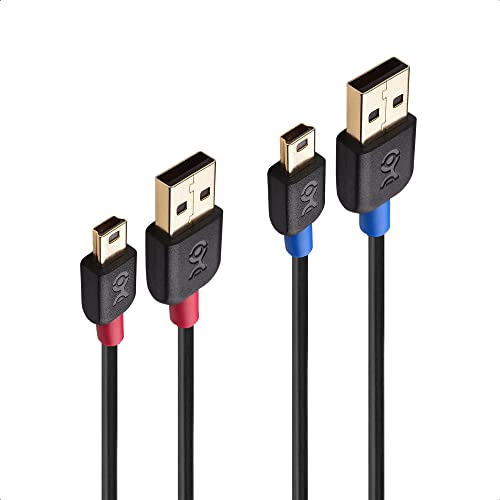
The Cable Matters two pack is the everyday spare pair, and it earns its place by being exactly as long as the cable that came in the box. Six feet suits a mic on its own desk stand next to a tower, and two cables in the pack mean one can live in the drawer as a spare while the other runs the mic. The listing names the Blue Yeti and the Snowball iCE on the front, and it also lists Canon cameras among the compatible devices, which is a useful sign that the cable is a proper data cable rather than a charge-only cord.
Cable Matters adds an important note of its own: check that your equipment uses USB 2.0 Mini-B and not Micro-B. The two connectors look similar in a dim room, and the wrong one will not seat. The listing also repeats the data figure of 480 Mbps, which is far above the roughly 1.5 Mbps a Yeti needs for uncompressed stereo audio at 48 kHz. The crawl behind this listing is about 206 days old, the freshest in this guide, so a stock glance is still prudent.
Best for: Anyone who wants a matching spare pair at the standard six foot length.
AGVEE Braided Mini USB 6.6FT

Specs
- Length: 6.6 ft, braided jacket, dark gray
- Connectors: USB-A to Mini-B, 10-pin
- Data transfer: 480 Mbps
- Fits: Blue Yeti microphone and Blue Snowball iCE USB
- Model number: CMNG-GBB36
- First available: December 13, 2024
The AGVEE cable is the braided Mini-B pick, and the braid is the reason to choose it over a plain PVC cord. A braided jacket stands up better where a cable crosses a desk edge or wraps around a boom arm joint, and the dark gray weave is easy to tell apart from the black charging cords in the same drawer. At 6.6 feet it runs a little longer than the standard six foot cable, which is a small but real help when the computer sits on the floor beside the desk rather than on it.
The listing names the Blue Yeti and the Snowball iCE among its compatible devices, alongside cameras, GPS units, and game controllers, and it states a data transfer figure of 480 Mbps. That breadth of compatibility is normal for a Mini-B cable: the connector was the standard data port on a whole generation of devices.
Best for: Streamers who want a tougher jacket on a Mini-B cable without paying for a longer run.
UGREEN Mini USB to USB-C 3FT

Specs
- Length: 3 ft, PVC jacket, black
- Connectors: USB-C male to Mini-B male
- Data transfer: 480 Mbps
- Fits: Mini-B devices including the Blue Yeti
- Model number: 50445JP
- First available: July 25, 2017
The UGREEN cable solves a different problem from the rest of this guide: it connects a Mini-B microphone to a USB-C port on the host side. Many newer laptops and small form factor PCs carry USB-C ports only, and a standard USB-A cable needs an adapter to reach them. This cable removes the adapter from the chain entirely, with a USB-C plug on one end and a Mini-B plug on the other. The listing states a data transfer figure of 480 Mbps and describes the cable as a sync cable, which is the right language for a mic connection.
Three feet is short, and that is both the strength and the limit of this pick. A short cable keeps the run between a mic and a laptop tidy, and it suits a mic on a desk stand beside a laptop. It does not suit a boom arm, where the cable must travel much further. One flag to note: the crawled copy of this listing showed no featured offers available, so check the live listing first at publish time.
Best for: Laptop streamers whose only free port is USB-C and whose mic sits close by.
Geekria Micro USB 9FT

Specs
- Length: 9 ft (2.8 m), USB-A to Micro-B
- Fits: Blue Yeti X, Blue Yeti Nano, Shure MV7, and BONAOK microphones
- Model number: YCX3-02
- Use: Recording and broadcasting
- Note: Microphone cord only, device not included
The Geekria cable is the Micro-B pick, and it covers the mics the Mini-B cables in this guide cannot touch. The Blue Yeti X and Yeti Nano both use Micro-B ports, as does the Shure MV7, and the listing names all three alongside a range of BONAOK karaoke microphones. Nine feet gives the same boom arm slack as the ienza pick, but for the newer mic generation. The listing describes the cable as a studio-quality cord for connecting mics to mixers, preamps, audio interfaces, and recorders.
This listing comes from the Canadian storefront, so confirm the listing region before ordering. The crawl behind it is about 196 days old, the freshest in this guide. Note the connector carefully: Micro-B and Mini-B differ by a fraction of an inch, yet a Micro-B plug will not seat in a Mini-B port and a Mini-B plug will not seat in a Micro-B port.
Best for: Yeti X, Yeti Nano, and Shure MV7 owners who need a long Micro-B cable.
FAQ
What USB cable does a Blue Yeti use?
The original Blue Yeti uses a USB 2.0 cable with a Mini-B connector on the mic end and a USB-A connector on the computer end. The cable must carry data as well as power, because a charge-only cord will light the mic without passing audio. The Yeti X and Yeti Nano are different: both use Micro-B ports, so they need a Micro-B cable instead.
Can I use any USB cable with a USB microphone?
No. Three things must line up: the mic-side connector must match the port on the mic, the cable must be a data cable rather than a charge-only cord, and the host-side plug must fit a free port on the computer. A cable that fails any one of those three will not work, even if it looks right at a glance.
How long should a USB microphone cable be?
Six feet suits a mic on its own desk stand next to the computer, and it is the length most mics ship with. Nine or ten feet suits a mic on a boom arm, where the cable must travel down the arm and across the desk. Shorter than six feet only works when the mic sits beside a laptop. Longer than ten feet is rarely needed on a desk, and a cable that is too long leaves slack to manage.
Will a USB-C cable work with a Mini-B microphone?
Yes, with a cable that has a Mini-B plug on one end and a USB-C plug on the other, like the UGREEN pick in this guide. The USB-C end goes to the computer and the Mini-B end goes to the mic. The cable still needs to be a data cable, and it will not work with Thunderbolt 2 ports, which the UGREEN listing notes.
Conclusion
The right USB microphone cable is the one that matches your mic’s port, carries data, and reaches your computer without pulling taut. The ienza ten foot cord covers the original Yeti and Snowball iCE on a boom arm, the Cable Matters two pack covers everyday spares at six feet, the AGVEE braided cable covers a tougher Mini-B run, the UGREEN cable covers USB-C host ports, and the Geekria nine foot cord covers the Yeti X, Yeti Nano, and Shure MV7. Check the port on the base of your mic and confirm the listing is live before ordering.
FAQ
What USB cable does a Blue Yeti use?
Can I use any USB cable with a USB microphone?
How long should a USB microphone cable be?
Will a USB-C cable work with a Mini-B microphone?
More from Amazon
Programs that pair well with the guide above. Offers and eligibility are set by Amazon and may change.
Free shipping on eligible items, Prime Video and more. Eligible new members can start with a free trial.
Start a Prime free trialAd-free music streaming. Eligible new subscribers can start with a free trial.
Try Music Unlimited freeA Prime membership for ages 18-24 with a trial period. Eligibility is set by Amazon.
See Prime for Young AdultsAudiobooks and podcasts to listen to on the go. Eligible new members can start with a free trial.
Try Audible freeAs an Amazon Associate we earn from qualifying purchases.