Key takeaways
- Find the right 4K home projector for your room: five models compared on brightness, throw distance, streaming, and gaming lag.
A 4K home projector is a room decision before it is a gadget decision. The real question is whether your room can go dark enough, whether you have the wall space for a 100-inch image or larger, and whether the projector can sit far enough back to fill that wall without landing in the middle of the seating. Get those three answers right and a projector turns an ordinary living room into a cinema; get them wrong and even a sharp 4K image looks washed out, small, or awkwardly placed.
This guide is for people setting up a first home cinema in a living room or a spare room, and for anyone replacing a television with a much larger projected image for films, sport, and games. Every projector below is a 4K home model chosen from its name and listed specifications on its Amazon product page, so the brightness, resolution, and features you read here are the ones the listing itself states.
Quick Picks
As an Amazon Associate we earn from qualifying purchases.
| Product | Best for | Key spec from title |
|---|---|---|
| Epson Home Cinema 2350 | A bright living room that needs streaming built in | 4K PRO-UHD, 2,800 lumens, Android TV |
| Optoma UHD55 | A large, bright image for films and games in a living room | 4K Ultra HD DLP, built-in speaker |
| XGIMI HORIZON Ultra | A living room setup with no extra boxes or speakers | 4K, Dolby Vision, 2300 ISO lumens, 2 x 12W Harman Kardon speakers |
| BenQ TK710 | Low-lag big-screen gaming with a laser light source | 4K laser, 3200 lumens, 4ms response time, 240Hz refresh rate |
| ViewSonic PX701-4K | Fast-paced games and sport on a big screen | 4K UHD, 3200 lumens, 240Hz, 4.2ms input lag |
How to Choose
Brightness and Room Light
Brightness decides whether a 4K image survives your room, and the number to compare is lumens on the listing. A projector rated around 2,200 lumens works best in a room you can darken with curtains or blinds, while a model rated at 3,200 lumens or above holds up far better when lamps stay on or daylight leaks around the edges. Do not assume a bigger screen is always better: doubling the image area spreads the same light over twice the surface, so a 150-inch picture needs far more brightness than a 100-inch one. Match the lumens to your room first, then choose the screen size.
Throw Distance and Placement
Throw distance is the gap between the lens and the wall, and it decides where the projector physically lives. A long-throw model needs several metres of clear floor between the projector and the screen, which usually means a shelf behind the sofa or a ceiling mount. A short-throw model sits much closer, which suits a small room but leaves less flexibility about furniture. Before choosing, measure the wall, mark where seating goes, and check the throw ratio and zoom range on the listing. A projector with lens shift and a 1.3x zoom forgives a shelf that is a little off-centre; one without it demands exact placement.
Resolution: Native 4K or Pixel-Shifting
Not every projector sold as 4K builds its image the same way. Some use a native 4K imaging chip, while others use pixel-shifting, which flashes a lower-resolution chip several times per frame to create a 4K image on screen. Both can look sharp from a normal sofa distance, and the Epson model in this guide uses the pixel-shifting approach under the 4K PRO-UHD name. What matters is reading the listing carefully: look for the stated on-screen resolution, and do not confuse 4K input support with a 4K image. A projector that accepts a 4K signal and shows it at 1080p is not a 4K projector.
Sound, Streaming, and Gaming Lag
A projector is only half a cinema without sound and a source. Some models in this guide carry built-in streaming, such as Android TV, so films start with one remote and no extra box. Others expect a streaming stick, console, or disc player on an HDMI port, which is fine if you already own one. Built-in speakers suit casual viewing, but a soundbar or receiver is the upgrade that makes dialogue clearer at volume. For gaming, check input lag and refresh rate on the listing: a 4.2ms lag at 1080p with a 240Hz refresh rate keeps fast games responsive, while a cinema-first projector with slower lag suits films better.
The 5 Best Options
Epson Home Cinema 2350

The Home Cinema 2350 is the most living-room-friendly projector here because it behaves like a television that happens to throw a huge image. Android TV is built in, so streaming apps open without a stick, and the 2,800-lumen output keeps the picture watchable when the room is not fully dark. The 3-chip 3LCD design is built for colour brightness, which helps films and sport look vivid rather than washed out. Vertical lens shift and keystone correction make it forgiving to place on a shelf. It is a sensible first 4K projector for a shared family room.
Specs
- 4K PRO-UHD resolution
- 3-chip 3LCD
- 2,800 lumens
- HDR10 and HLG
- Android TV with streaming capability
- 10 W speaker
- Bluetooth
Best for: A family living room where the projector must work with some light in the room and stream without extra boxes.
Watch out for: It reaches its 4K image with pixel-shifting rather than a native 4K panel, and a dedicated dark room rewards a dimmer cinema-first projector more.
Optoma UHD55

The UHD55 is the straightforward big-screen choice: a true 4K DLP projector with a bright output that suits rooms where the lights are not always off. Its low input lag makes it a natural fit for a console beside the sofa, and the built-in speaker covers casual viewing without extra hardware. HDR and HLG support help films hold detail in bright highlights and dark shadows. Placement is flexible, with zoom and vertical lens shift to square the image up from a shelf or ceiling mount. It covers films, sport, and games in one box.
Specs
- 4K Ultra HD resolution
- DLP home theater and gaming projector
- 3,600 lumens
- HDR and HLG compatible
- Built-in speaker
Best for: A living room that hosts films, sport, and console games on one large screen.
Watch out for: It is a lamp-based projector, so the lamp is a consumable that will need replacing after many hours of use.
XGIMI HORIZON Ultra

The HORIZON Ultra is the neatest all-in-one in this guide. It pairs a 4K image with Dolby Vision, a dual-light LED and laser source, and two 12W Harman Kardon speakers, so a film night needs nothing beyond the projector and a wall. Automatic focus and keystone correction square the picture up within seconds of moving it, which suits a projector that gets carried between rooms. Android TV is built in, and the optical zoom keeps the image sharp at different distances. It is the pick for buyers who want the fewest boxes and cables.
Specs
- 4K resolution with Dolby Vision
- 2,300 ISO lumens
- Dual Light LED and laser light source
- 2 x 12W Harman Kardon speakers
- Android TV 11
- WiFi and Bluetooth
- Active 3D
- Up to 200-inch image
Best for: A living room where the projector is the whole system — screen, speakers, and streaming in one unit.
Watch out for: Its brightness sits below the brightest lamp models here, so a fully darkened room shows it at its best.
BenQ TK710

The TK710 is the gaming pick, built around a laser light source that stays bright and needs no lamp changes. Its 4ms response time and 240Hz refresh rate keep fast console and PC games responsive on a huge screen, and the 3,200-lumen output holds the picture up when the room is not pitch dark. HDR10 and HLG support add depth to films as well, so it is not a one-trick machine. Vertical lens shift, 3D keystone, and a 1.3x zoom make placement forgiving. For a household where games share the big screen with films, it is the most versatile choice here.
Specs
- 4K laser projector
- 3,200 lumens
- 4ms response time
- 240Hz refresh rate
- HDR10 and HLG
- ARC/eARC support
- Vertical lens shift
- 3D keystone
- 1.3x zoom
Best for: Big-screen console or PC gaming in a room that also hosts film nights.
Watch out for: It uses pixel-shifting to produce its 4K image rather than a native 4K chip, and its gaming modes matter most if you actually play fast-paced games.
ViewSonic PX701-4K
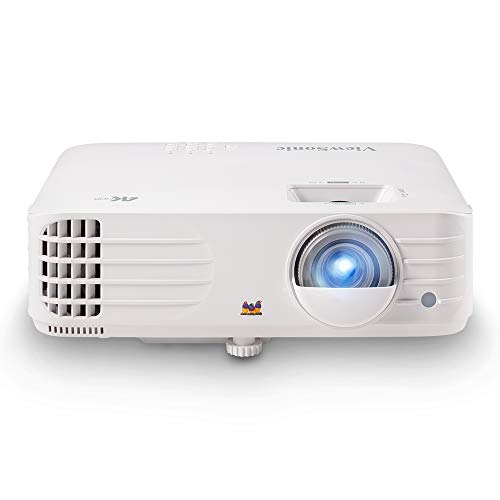
The PX701-4K is the value route into a bright 4K image. Its 3,200-lumen output and 240Hz refresh rate with 4.2ms input lag make it a strong match for sport and fast games, where motion stays smooth and the picture stays watchable with some light in the room. Dual HDMI inputs cover a console and a streaming stick at once, and auto keystone correction speeds up setup when the projector moves. It is a lamp-based model, so it trades the long life of a laser for a lower entry point. For a first big-screen setup on a tighter plan, it covers the essentials well.
Specs
- 4K UHD (3840 x 2160) resolution
- 3,200 lumens
- 240Hz refresh rate
- 4.2ms input lag
- HDR support
- Auto keystone correction
- Dual HDMI inputs
- 1.1x optical zoom
Best for: Sport and fast-paced games on a big screen in a room that is not fully dark.
Watch out for: It is lamp-based, so budget for a replacement lamp over time, and it has no built-in streaming platform.
Which One Fits Your Situation
A dark, dedicated movie room
Pick the XGIMI HORIZON Ultra. In a dark room its Dolby Vision image and built-in Harman Kardon speakers do their best work, and the dual-light source keeps colours rich without a lamp to replace. Add a fixed screen and the room becomes a proper cinema with a single box doing the work.
A bright living room that doubles as a cinema
Pick the Optoma UHD55 or the ViewSonic PX701-4K. Both push enough light to keep films and sport watchable when lamps are on or curtains are thin. The Optoma suits a household that mixes films and games, while the ViewSonic is the sharper choice when sport and fast games dominate the schedule.
A setup with no extra boxes, speakers, or streaming sticks
Pick the XGIMI HORIZON Ultra, with the Epson Home Cinema 2350 as the alternative. The XGIMI carries streaming, speakers, and automatic setup in one unit, so a film starts with a single remote. The Epson adds Android TV and a brighter image if the room has more light, though its speakers are more modest.
Big-screen gaming on a console or PC
Pick the BenQ TK710 first, with the ViewSonic PX701-4K close behind. The BenQ pairs a laser source with a 4ms response time and a 240Hz refresh rate, which keeps fast games responsive at large sizes. The ViewSonic matches the refresh rate and lag figures at a lower entry point, and its dual HDMI ports keep a console and a streaming stick connected at once.
Common Mistakes
- Buying for screen size before measuring throw distance and seating, then finding the projector cannot fill the wall from where it must sit.
- Judging a projector only by lumens without checking whether the room can go dark, so a bright-room model is wasted in a blacked-out room or a dim model is lost in daylight.
- Assuming every listing that mentions 4K shows a native 4K image — check whether the listing states pixel-shifting or only 4K input support.
- Forgetting sound: built-in speakers suit casual viewing, but dialogue at volume needs a soundbar or receiver.
- Placing the projector off-centre without checking lens shift or keystone range, then living with a skewed image.
Frequently Asked Questions
Do I need a screen, or can I project onto a wall?
A smooth, matte white or light-grey wall works well for a first setup, and many buyers start there. A dedicated screen gives a flatter surface, better contrast, and a fixed frame that makes the image look finished. If the wall has texture, bumps, or a strong colour, a screen is the upgrade that makes the biggest visible difference.
How dark does the room need to be for a 4K projector?
It depends on brightness. A projector rated around 2,200 lumens needs curtains or blinds to look its best, while a model rated at 3,200 lumens or above stays watchable with lamps on. Even a bright projector looks better in a darkened room, because black levels and contrast improve as ambient light falls.
Is a pixel-shifting 4K projector a real 4K projector?
The image it puts on screen measures 3840 x 2160 pixels, so it counts as a 4K image for viewing. The difference is how it gets there: a pixel-shifting chip flashes a lower-resolution panel several times per frame, while a native 4K chip shows every pixel at once. From a normal sofa distance, most viewers find the two hard to tell apart.
Can I use a 4K home projector for gaming?
Yes, if the listing states low input lag and a high refresh rate. The BenQ TK710 and the ViewSonic PX701-4K in this guide both list a 240Hz refresh rate with input lag around 4ms, which keeps fast games responsive. Cinema-first projectors with slower lag still work for casual play, but competitive games feel noticeably delayed.
FAQ
Do I need a screen, or can I project onto a wall?
How dark does the room need to be for a 4K projector?
Is a pixel-shifting 4K projector a real 4K projector?
Can I use a 4K home projector for gaming?
More from Amazon
Programs that pair well with the guide above. Offers and eligibility are set by Amazon and may change.
Free shipping on eligible items, Prime Video and more. Eligible new members can start with a free trial.
Start a Prime free trialAd-free music streaming. Eligible new subscribers can start with a free trial.
Try Music Unlimited freeA Prime membership for ages 18-24 with a trial period. Eligibility is set by Amazon.
See Prime for Young AdultsAudiobooks and podcasts to listen to on the go. Eligible new members can start with a free trial.
Try Audible freeAs an Amazon Associate we earn from qualifying purchases.