Our Top Picks

A narrow webcam frames one face and cuts off everyone else in the room, so a group call turns into a game of squeezing together or passing the laptop around. A wide-angle webcam solves that problem at the lens: a field of view of 90 degrees or more fits two or three people side by side, shows a whiteboard behind the speaker, or captures a whole desk setup for a stream without a second camera.
This guide is for people who share their frame with others: small teams in a huddle room, teachers and presenters, families on group calls, and streamers who want their room in shot. The five webcams below were chosen from names and specs on Amazon pages, and every one of them offers a wide field of view of at least 90 degrees, with real differences in resolution, focus, microphones, and framing controls.
Quick Picks
As an Amazon Associate we earn from qualifying purchases.
| Product | Best for | Key spec from title |
|---|---|---|
| Logitech Brio 505 | Adjustable framing on work calls | 90 degree adjustable field of view |
| Anker PowerConf C200 | Sharper 2K group calls | 95 degree adjustable field of view |
| NexiGo N60 | A wide frame on a tight budget | 110 degree wide angle lens |
| Elgato Facecam 4K | 4K streaming with a wide view | 90 degree field of view |
| EMEET C960 | Simple plug-and-play wide calls | 90 degree wide angle lens |
How to Choose
Match the field of view to the room
Field of view is the number that decides how much of the room lands in frame, and it is measured diagonally on most listings. A 90 degree view fits two people sitting close together or one person with a desk and whiteboard behind them. A 110 degree view fits three or four people around a small table, but it bends straight lines near the edges, so faces at the far sides can look stretched. Some cameras let you switch between narrower and wider views in software, which is handy when the same webcam serves a solo call in the morning and a group call in the afternoon.
Resolution matters more than the lens
A wide lens spreads its pixels across a larger scene, so resolution decides whether distant faces stay readable. A 1080p webcam is enough for everyday calls, since most meeting apps compress video anyway, while a 2K or 4K sensor keeps text on a whiteboard and faces at the back of a table sharper. Frame rate matters too: 30 frames per second is smooth enough for calls, and 60 frames per second helps fast hand movements during a demo or a stream look natural instead of choppy.
Autofocus or fixed focus
Autofocus keeps a moving speaker sharp, which suits presenters who stand up, lean in, or hold objects up to the camera. Fixed focus is simpler and cheaper, and it works well when everyone stays at a steady distance from the desk, but it turns soft if someone sits much closer or farther than the camera expects. Check the focus range on the listing: a fixed-focus camera that is sharp from about a foot to ten feet covers most desks, while a short range can leave a person at the far end of a table out of focus.
Microphones, privacy, and the mount
Most wide-angle webcams have built-in microphones, but quality varies a lot, and a camera-first model may have none at all, so plan for a separate mic if your calls matter. A physical privacy shutter or cover is worth having in a shared room, since it blocks the lens without unplugging anything. Finally, look at the mount: a clip that grips a monitor is standard, while a tripod thread opens up desk and shelf placement, and a long cable gives you room to position the camera away from the screen.
The 5 Best Options
Logitech Brio 505

The Brio 505 is the most flexible meeting webcam here because its field of view is adjustable rather than fixed. You can switch between 65, 78, and 90 degrees, so the same camera frames one person tightly for a solo call and opens up for a group without moving the mount. Autofocus and a 4x digital zoom keep speakers sharp when they lean in, and the RightSight auto-framing feature recenters people as they move around the room.
Specs
- 1080p Full HD video at up to 60 fps
- Adjustable diagonal field of view: 65, 78, and 90 degrees
- 4 megapixel sensor with autofocus and 4x digital zoom
- Dual microphones with a built-in privacy shutter
- Attached USB-C cable, 1.5 m long, with a removable monitor mount
- RightSight auto-framing and Show Mode for desk demonstrations
- Certified for Microsoft Teams, Zoom, and Google Meet
Best for: Work calls where the framing changes between solo and group meetings.
Watch out for: RightSight auto-framing and Show Mode need the Logi Tune app, which is not available on ChromeOS, and the USB-C cable needs an adapter for USB-A-only computers.
ASIN: B0BMQQQHC2
Anker PowerConf C200

The PowerConf C200 is the sharpest all-rounder in this lineup, recording in 2K where the others stop at 1080p, which keeps faces at the edge of a wide frame readable instead of soft. Its field of view switches between 65, 78, and 95 degrees in the AnkerWork app, so you choose how much of the room shows. Autofocus tracks the speaker, dual microphones filter background noise, and a built-in privacy cover slides over the lens between calls.
Specs
- 2K video at up to 30 fps, 2560 x 1440 resolution
- Adjustable field of view: 65, 78, and 95 degrees
- Autofocus with low-light correction
- Dual microphones with AI noise reduction
- Built-in privacy cover and monitor clip mount
- USB-C connection, model A3369
Best for: Group calls where you want sharper video than a standard 1080p webcam delivers.
Watch out for: The field-of-view switch lives in the AnkerWork app, so install it before the first call, and 2K mode tops out at 30 frames per second rather than 60.
ASIN: B09MFMTMPD
NexiGo N60
The NexiGo N60 is the widest camera here for the least money, with a 110 degree lens that fits a whole small table in one shot. It records 1080p video at 30 frames per second through a 3.6 mm glass lens, and the fixed focus is tuned for distances from about 20 inches to 13 feet, which covers most desks and meeting tables. Dual stereo microphones sit on either side of the lens, and a privacy cover attaches over the front when the call ends.
Specs
- 1080p Full HD video at 30 fps with a 2 megapixel CMOS sensor
- 110 degree diagonal field of view with a 3.6 mm glass lens
- Fixed focus, optimized for 19.6 inches to 13 feet
- Dual stereo microphones with noise reduction
- Privacy cover included, digital zoom through NexiGo software
- USB 2.0 plug-and-play connection
Best for: Fitting three or four people into one frame without buying a second camera.
Watch out for: The 110 degree lens bends straight lines near the edges, so faces at the far sides can look stretched, and fixed focus means nobody should sit much closer than the listed minimum distance.
ASIN: B088TSR6YJ
Elgato Facecam 4K

The Facecam 4K is the camera for streamers and creators who want a wide frame with genuinely premium image quality. Its large 1/1.8 inch Sony STARVIS 2 sensor records true 4K at 60 frames per second, and the 90 degree lens covers a desk and a second person without cropping. Manual controls in the Camera Hub app cover exposure, white balance, and framing, and a 49 mm filter thread on the front accepts ND and diffusion filters.
Specs
- True 4K video at 60 fps, plus 1080p at 60 fps
- 90 degree field of view with a fixed-focus lens
- 1/1.8 inch Sony STARVIS 2 CMOS sensor
- 49 mm lens filter thread, HDR support, uncompressed video
- No built-in microphone, USB-C cable 200 cm long
- Camera Hub software with DSLR-style manual controls
- Measures 116 x 38 x 79 mm and weighs 240 g without the mount
Best for: Streaming and recording where image quality matters more than a built-in mic.
Watch out for: There is no built-in microphone at all, so you need a separate mic, and fixed focus suits a seated streamer at a steady distance rather than someone who moves around the room.
ASIN: B0DVZG36J8
EMEET C960
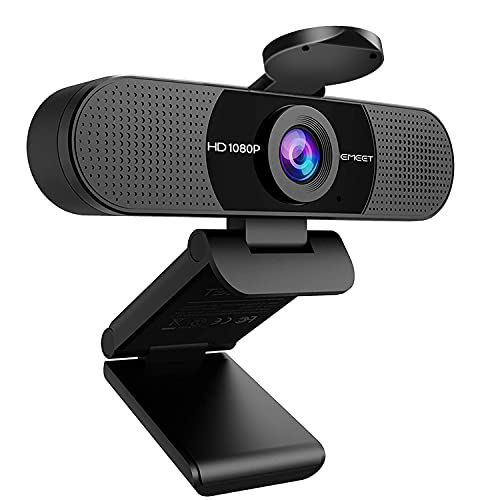
The EMEET C960 is the simplest camera in this guide: plug it in and it works, with no app to install and no settings to learn. Its 90 degree lens fits two people or a wide desk in frame, and the fixed focus stays sharp across a range of about 12 to 118 inches, which covers a laptop on a desk and a small meeting table alike. A five-layer anti-glare lens keeps the image clear in bright rooms, and dual noise-reduction microphones pick up voices from both sides of the camera.
Specs
- 1080p Full HD video at 30 fps
- 90 degree wide-angle lens with a 5-layer anti-glare coating
- Fixed focus, sharp from 11.8 to 118.1 inches
- Dual noise-reduction microphones
- Privacy cover included, foldable clip mount
- Plug-and-play USB connection, no driver needed
- Item model number 960
Best for: Anyone who wants a wide frame with zero setup on shared or borrowed computers.
Watch out for: Fixed focus and 30 frames per second are fine for calls but less suited to fast movement, and there is no software to narrow the frame when you want a tighter solo shot.
ASIN: B07M6Y7355
Which One Fits Your Situation
You run team calls in a small room
Pick the NexiGo N60. Its 110 degree lens is the widest here, so it fits a whole table without a second camera, and the fixed focus covers the distances people actually sit at. The Anker PowerConf C200 is the backup if you want sharper 2K video and a switchable frame.
You present and move around on camera
Pick the Logitech Brio 505. Autofocus follows you when you lean in or hold something up, RightSight recenters the frame as you move, and the adjustable field of view lets you tighten the shot for a solo segment and open it for a group. The privacy shutter and dual microphones cover the basics, so nothing else needs to be added to the desk.
You stream or record video
Pick the Elgato Facecam 4K. True 4K at 60 frames per second and the large Sony sensor give you the cleanest image in this group, and the manual controls suit a fixed desk setup. The 49 mm filter thread accepts ND and diffusion filters for a polished look, and Camera Hub gives you manual control over exposure and white balance. Just budget for a separate microphone, since this camera has none built in.
You want the cheapest wide frame that just works
Pick the EMEET C960. It plugs in and works on any computer with no app, its 90 degree lens covers two people comfortably, and the privacy cover and dual microphones handle the basics without any extra gear or setup. The fixed focus stays sharp across the distances a laptop desk actually uses, so it suits shared desks and borrowed computers alike.
Common Mistakes
- Buying a webcam by resolution alone and ignoring the field of view, which decides who actually fits in frame.
- Choosing a 110 degree lens for solo calls, where the wide frame leaves you small in the middle and shows an empty room.
- Forgetting to check whether the camera has a microphone, since camera-first models like the Facecam 4K ship with none.
- Sitting outside the fixed-focus range and wondering why the image looks soft.
- Mounting the camera too low, which films chins and ceilings instead of faces at eye level.
Frequently Asked Questions
What field of view counts as wide angle for a webcam?
A field of view of 90 degrees or wider counts as wide angle for a webcam. A 90 degree lens fits two people sitting close together, while a 110 degree lens fits three or four around a small table. Narrower lenses around 60 to 78 degrees frame one person and cut off anyone beside them.
Does a wider field of view make video quality worse?
A wider lens spreads the same number of pixels across a larger scene, so faces farther from the camera can look softer on a 1080p sensor. A 2K or 4K camera holds up better at wide angles because it has more pixels to share across the frame, which is why resolution matters more as the field of view grows.
Do wide-angle webcams work with Zoom and Teams?
Yes, all five webcams here connect over standard USB and work with Zoom, Teams, Google Meet, and other meeting apps without special drivers. Some features, like switching the field of view or auto-framing, need the maker’s own app, so install it before an important call if you plan to use those controls.
Should I pick autofocus or fixed focus?
Pick autofocus if you move around, lean in, or hold objects up to the camera, since it keeps you sharp at changing distances. Pick fixed focus if everyone stays at a steady distance from the desk, since it is simpler and cheaper, but check the listed focus range first so nobody sits outside it.
FAQ
What field of view counts as wide angle for a webcam?
Does a wider field of view make video quality worse?
Do wide-angle webcams work with Zoom and Teams?
Should I pick autofocus or fixed focus?
More from Amazon
Programs that pair well with the guide above. Offers and eligibility are set by Amazon and may change.
Free shipping on eligible items, Prime Video and more. Eligible new members can start with a free trial.
Start a Prime free trialAd-free music streaming. Eligible new subscribers can start with a free trial.
Try Music Unlimited freeA Prime membership for ages 18-24 with a trial period. Eligibility is set by Amazon.
See Prime for Young AdultsAudiobooks and podcasts to listen to on the go. Eligible new members can start with a free trial.
Try Audible freeAs an Amazon Associate we earn from qualifying purchases.