Key takeaways
- Compare five 720p webcams for budget video calls, with clear microphones, simple USB setup, and steady 30fps video for daily online work meetings.
A 720p webcam is the cheapest way to look present on a video call, and for most daily meetings it is enough. The real decision is not the resolution number on the box. It is whether the camera keeps your face bright in a dim room, whether the microphone carries your voice without a headset, and whether the mount sits steady on your monitor. Pay for those three things and a 720p camera can carry a full workday of calls.
This guide is for remote workers, students, and job seekers who need a dependable camera for interviews, classes, and team standups without spending on features they will never use. We picked five 720p webcams from names and specs on Amazon pages, all with built-in microphones and USB plug-and-play setup. Each one below is a different answer to the same call: clear face, clear voice, no fuss.
Quick Picks
As an Amazon Associate we earn from qualifying purchases
| Product | Best for | Key spec from title |
|---|---|---|
| Logitech C270 | First webcam for daily work calls | 720p/30fps, 55-degree field of view |
| Logitech C310 | Calls plus sharper still photos | 720p/30fps, 5MP still photos |
| Microsoft LifeCam HD-3000 | Windows-first basic Skype and Teams calls | 720p/30fps, TrueColor |
| Logitech B525 | Portable calls from any desk | 720p/30fps, autofocus |
| Microsoft LifeCam HD-5000 | Presenting while moving around | 720p/30fps, autofocus and face tracking |
How to Choose
Resolution and Frame Rate
720p means 1280 by 720 pixels, and 30 frames per second keeps motion smooth enough for talking heads. That combination is the baseline for every camera in this guide, and it matches what most meeting apps send by default. A higher resolution helps only when the other side watches on a large screen or records the call. For a laptop window, a steady 720p feed with good light beats a shaky higher-resolution feed every time. Check that the listing states 720p at 30fps, not just HD in the title.
Microphone Quality
A webcam microphone decides whether people hear you or strain to hear you. Look for a noise-reducing or noise-cancelling mic in the listing, and expect it to pick up your voice clearly from about an arm’s length away. Beyond that distance, room echo and keyboard noise creep in. Every camera here has a built-in mic, but they are not equal: stereo mics and noise reduction help in shared rooms. If you take calls all day, pair any of these with a headset and keep the camera mic as a backup.
Focus and Field of View
Fixed focus keeps everything from about an arm’s length to the back of the room acceptably sharp, which suits a desk setup where you sit in one place. Autofocus follows you when you lean in to show a document or move around, but it can hunt for focus in dim light. Field of view matters too: a 55-degree lens frames one person tightly, while a 68-degree lens fits a second person beside you. Pick the wider lens only if someone else joins your calls from the same desk.
Mounting and Compatibility
A clip mount that grips the top of a monitor and folds flat for a shelf covers most desks, and a swivel base helps when the camera needs to point at a whiteboard. All five cameras here connect over USB 2.0 and work without extra software on Windows, Mac, and Chrome OS, because they use the standard USB video drivers built into those systems. Confirm the listing names your operating system, and check the cable reaches from the monitor to a free USB port without pulling tight.
The 5 Best Options
Logitech C270 HD Webcam
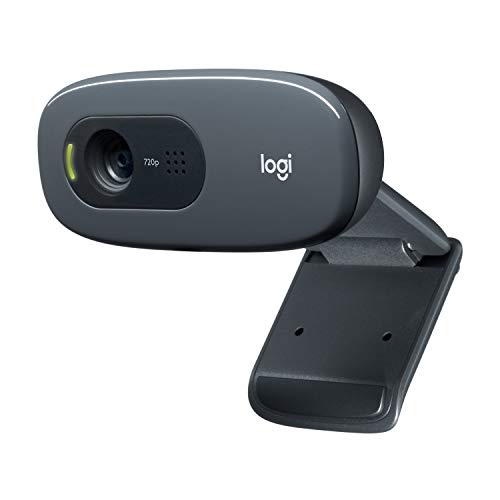
The C270 is the plain, dependable pick in this guide. Its 720p video at 30 frames per second stays smooth on a normal home connection, and the 55-degree lens frames one person without pulling in the whole room behind them. RightLight 2 brightens the image when the room light is weak, and the noise-reducing microphone keeps your voice clear from about a metre and a half away. The universal clip grips a monitor or folds flat for a shelf, and setup is plug-and-play on Windows, Mac, and Chrome OS. It is the camera to buy when calls are the job and fuss is not welcome.
Specs
- Video capture resolution: 720p at 30fps
- Field of view: 55 degrees diagonal
- Microphone: noise-reducing, picks up voice up to 1.5 metres
- Light correction: RightLight 2
- Photo capability: 3MP still photos
- Mount: adjustable universal clip for monitor or shelf
- Connection: USB 2.0; Windows 7 or higher, macOS 10.10 or higher, Chrome OS
Best for: first webcam for daily work calls on a tight budget.
Watch out for: fixed focus and no privacy shutter, so frame yourself once and cover the lens when done.
Logitech C310 HD Webcam
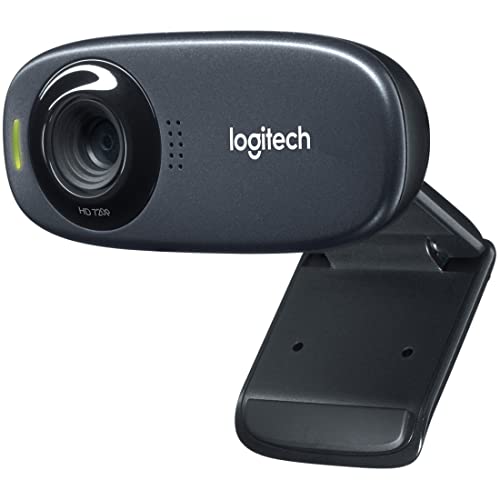
The C310 takes the same 720p video calling formula as the C270 and adds sharper still photos, which suits anyone who also snaps a quick picture for a profile or a document. Its 60-degree lens frames a little more of the desk, and the noise-reducing microphone and automatic light correction keep calls clear in ordinary rooms. The universal clip fits laptops, LCD screens, and monitors, and the camera works with Skype, FaceTime, and Hangouts without extra software. It is the step up for callers who want slightly better photos from the same simple setup.
Specs
- Video capture resolution: 720p at 30fps
- Field of view: 60 degrees
- Still photos: 5MP
- Microphone: built-in noise-reducing mic
- Light correction: automatic light correction
- Focus: fixed focus
- Mount: universal clip for laptop, LCD, or monitor
- Connection: USB 2.0; Windows, Mac, Chrome OS
Best for: callers who also want sharper still photos from the same camera.
Watch out for: this model is sold under more than one listing, so confirm the model number and the exact listing before buying.
Microsoft LifeCam HD-3000

The LifeCam HD-3000 is Microsoft’s no-frills answer to the same problem: a small camera that makes a desktop ready for Skype and Teams calls. Its true 720p video runs at 30 frames per second in a 16:9 widescreen format, and TrueColor keeps colours bright when the room light is uneven. The universal attachment base clips to a monitor, laptop, or notebook, and the built-in microphone cancels background noise so your voice stays forward. A 4x digital zoom helps when you need to tighten the frame, though the fixed focus range suits a seated caller best.
Specs
- Video capture resolution: 720p at 30fps
- Field of view: 68.5 degrees diagonal
- Still photos: 1MP
- Zoom: 4x digital zoom
- Focus: fixed focus, 0.3 to 1.5 metres
- Microphone: built-in, noise-cancelling
- Colour: TrueColor automatic image adjustment, 24-bit colour depth
- Mount: universal attachment base for monitor, laptop, or notebook
- Connection: USB 2.0; Windows
Best for: Windows-first basic calls on Skype and Teams.
Watch out for: fixed focus suits a seated caller; this model is sold in business and consumer versions, so check the exact listing before buying.
Logitech B525 HD Webcam

The B525 is the travel pick: a fold-and-go webcam that packs flat and swivels a full 360 degrees, so it aims at you, a colleague, or a whiteboard without moving the laptop. Its autofocus keeps the image sharp when you lean in to show a document, and the built-in stereo microphones pick up voices around a small table. The 720p video at 30 frames per second is the same budget baseline as the rest of this guide, and the camera is certified for Skype for Business and tuned for Lync, Jabber, and WebEx. It is the camera for callers who work from more than one desk.
Specs
- Video capture resolution: 720p at 30fps
- Sensor: 2MP
- Focus: autofocus
- Microphone: built-in stereo microphones
- Design: fold-and-go, 360-degree swivel
- Mount: clip mount
- Connection: USB 2.0, plug and play
- Weight: 88 g
- Compatibility: Skype for Business certified; Lync, Jabber, WebEx
Best for: portable calls from hotel desks, shared offices, and home setups.
Watch out for: autofocus can hunt in dim light, and the newest listing evidence for this model is old, so confirm the current listing before buying.
Microsoft LifeCam HD-5000

The LifeCam HD-5000 adds autofocus and face tracking to the 720p baseline, which suits callers who move around while they talk. Its TrueColor technology adjusts for bright and low light, and the 16:9 widescreen format fills a meeting window without black bars. The camera is plug-and-play over USB with the standard video drivers, so it works on Windows 10 and Linux without hunting for old installer discs. The built-in microphone covers a solo caller at a desk, though a separate mic still sounds better for long meetings. It is the pick for active presenters on a budget.
Specs
- Video capture resolution: 720p at 30fps
- Focus: autofocus with face tracking
- Colour: TrueColor technology
- Format: 16:9 widescreen
- Microphone: built-in microphone
- Connection: USB, plug and play with standard USB video drivers
- Compatibility: Windows 10, Linux
Best for: presenters who move around while talking.
Watch out for: the bundled software is dated, so use the standard drivers; the built-in mic is basic for long meetings.
Which One Fits Your Situation
First Webcam for Daily Work Calls
Pick the Logitech C270 when calls fill your calendar and you want the simplest possible setup. Its 720p video, light correction, and noise-reducing mic cover the three things that matter, and the clip mount works on any monitor. Spend the money you save on a lamp for your desk, which does more for a 720p image than any extra feature.
Calls Plus Occasional Photos
Pick the Logitech C310 when you also need still photos for a profile picture or a quick document shot. The 5MP stills are the clearest in this guide, and the wider 60-degree lens fits a little more of the desk. Everything else stays simple: the same 720p video, the same clip mount, and the same plug-and-play setup as the C270.
A Webcam That Travels With You
Pick the Logitech B525 when your calls happen from more than one place. It folds flat into a laptop bag, swivels a full circle to frame a colleague or a whiteboard, and the autofocus keeps documents sharp when you hold them up. The stereo microphones suit a small table better than a single mic. It is the only camera here built to be carried daily.
Close-Ups and Moving Around
Pick the Microsoft LifeCam HD-5000 when you present while standing or lean in and out of frame. Autofocus plus face tracking keeps you sharp as you move, and TrueColor steadies the image when the light changes. The LifeCam HD-3000 is the cheaper Microsoft option when you sit still and want the same 720p baseline without the tracking features.
Common Mistakes
- Buying on resolution alone: a 720p camera with good light and a decent mic beats a higher-resolution camera in a dark room.
- Sitting too close to a fixed-focus camera, so your face fills the frame and the background disappears.
- Forgetting the light: sitting with a bright window behind you turns your face into a silhouette on any 720p camera.
- Ordering the wrong variant: business and consumer versions of the same model share a name, so check the model number and ASIN on the listing.
- Expecting the built-in mic to carry a group call: it covers one person at a desk, not a whole room.
Frequently Asked Questions
Is 720p good enough for Zoom and Teams calls?
Yes, for most daily calls. Meeting apps show each person in a small window, where 720p at 30 frames per second looks clear as long as the light is decent. The image only looks soft when the call is shown full screen on a large monitor or recorded for later viewing. If that is your setup, step up to a 1080p camera instead.
Do these webcams need extra software?
No. All five connect over USB and use the standard video drivers built into Windows, Mac, and Chrome OS, so they work as soon as you plug them in. The makers offer optional software for zoom and effects, but you can skip it for ordinary calls. If a listing asks you to install a driver from a disc, use the built-in drivers instead.
Why does my 720p image look dark or grainy?
Low light is the usual cause. A 720p sensor has less room to gather light than a larger camera, so a dim room makes the image noisy. Put a lamp in front of you, not behind you, and keep bright windows out of the frame. Light correction in the camera helps, but it cannot replace a lamp on your desk.
Can I use a 720p webcam for streaming?
You can, for casual streams where the camera sits in a corner of the screen. The 720p image stays smooth at 30 frames per second, and autofocus models keep you sharp while you move. For a full-screen camera shot, though, 720p looks soft next to a 1080p game capture, so streamers who show their face large should pick a higher-resolution camera.
FAQ
Is 720p good enough for Zoom and Teams calls?
Do these webcams need extra software?
Why does my 720p image look dark or grainy?
Can I use a 720p webcam for streaming?
More from Amazon
Programs that pair well with the guide above. Offers and eligibility are set by Amazon and may change.
Free shipping on eligible items, Prime Video and more. Eligible new members can start with a free trial.
Start a Prime free trialAd-free music streaming. Eligible new subscribers can start with a free trial.
Try Music Unlimited freeA Prime membership for ages 18-24 with a trial period. Eligibility is set by Amazon.
See Prime for Young AdultsAudiobooks and podcasts to listen to on the go. Eligible new members can start with a free trial.
Try Audible freeAs an Amazon Associate we earn from qualifying purchases.