Key takeaways
- The current-generation webcams you can actually buy new today, from a 4K60 flagship to a 1440p value pick, compared by sensor, frame rate, and framing.
The real decision when buying a webcam today is not which model is famous. It is whether the camera on the listing in front of you is a current-generation model or an older design being cleared out by resellers at yesterday’s reputation. The lineups that brands actually ship now look different from the classics: 4K at sixty frames per second, larger sensors, AI framing, and settings that live on the camera itself. A current model also means current firmware, a warranty that starts when you buy, and software that is still being updated.
This guide is for streamers replacing an aging camera, remote workers who live on video calls, presenters and teachers who move around, and creators who record as much as they stream. Every pick below is a model from the current lineups of its brand, chosen from the names and specifications on its Amazon product page, and each one is sold new today rather than surviving through leftover stock.
Quick Picks
As an Amazon Associate we earn from qualifying purchases.
| Product | Best for | Key spec from title |
|---|---|---|
| Elgato Facecam 4K | Creators who record and want maximum detail | 4K60 studio webcam |
| Insta360 Link 2 | Presenters who move while they talk | PTZ 4K with AI tracking |
| Insta360 Link 2C | Seated workers who want framing help | 4K with auto framing |
| Elgato Facecam MK.2 | Streamers whose platforms cap at 1080p | Uncompressed 1080p60 HDR |
| Razer Kiyo V2 X | Buyers stepping up from 1080p on a budget | 1440p at 60 FPS |
How to Choose
Confirm it is the current model before anything else
Webcam names recycle for years, and a familiar name on a listing can hide an old camera sold by a third party. Check three things on the product page: the model name matches the brand’s current lineup, the seller is the brand’s own store or a major retailer, and the listing describes the current feature set rather than a previous generation’s. If the page mixes photos or specs from two generations, treat that as a stop sign and find the listing that matches the model you actually want.
Match the resolution and frame rate to today’s apps
Current models split into clear tiers. The newest flagships record 4K at sixty frames per second, most 4K cameras still run at thirty, and a newer middle tier offers 1440p at sixty. Calling apps compress your feed hard, so for meetings the practical gain from 4K is cropping room, not a sharper call. For recording and streaming, the frame rate matters more than the badge: sixty frames keeps hand movements and gameplay reactions smooth. Read the listing’s format list rather than the headline, because the highest frame rate often applies only at lower resolutions.
Decide between a gimbal and digital auto-framing
Tracking now comes in two forms. A motorized gimbal physically pans and tilts to follow you, which keeps full sensor resolution on your face wherever you stand. Digital auto-framing instead crops into a wide, high-resolution image and moves the crop window, which is simpler and silent but throws away pixels as it zooms. If you teach, demonstrate products, or pace during calls, the gimbal earns its desk space. If you sit in one chair all day, digital framing does the same job with no moving parts to wear out.
Check the software and connection fine print
Several current cameras unlock their best tricks only inside the maker’s app: bokeh, desk and whiteboard modes, saved presets, and exposure control. That is fine on your own machine and a problem on a locked-down work laptop, so check whether the features you want need an install. Connections have mostly moved to USB-C, though a few new models still ship a fixed USB-A cable. Also check the listing’s compatibility notes, since some current models exclude ARM-based Windows machines or skip Windows Hello face login entirely.
The 5 Best Options
Elgato Facecam 4K

Elgato’s current flagship is the camera for buyers who record video and want the sharpest feed a webcam sold today can produce. It captures 4K at sixty frames per second without compression, pairs a Sony STARVIS 2 sensor with Elgato’s Prime Lens, and accepts standard 49mm lens filters, so diffusion or neutral-density filters screw on the way they would on a DSLR. Settings tuned in the Camera Hub app save to flash memory on the camera itself. There is deliberately no built-in microphone, so plan on a separate mic or headset for audio.
Specs
- Video: 4K at 60 fps, uncompressed
- Sensor: Sony STARVIS 2 CMOS, 1/1.8-inch
- Lens: Elgato Prime Lens with 49mm filter thread
- Image: HDR support, cinematic effects in Camera Hub
- Settings: saved to built-in flash memory
- Microphone: none built in
- Connection: USB-C
Best for: Creators and streamers who record, crop, and want a flagship that behaves like a small studio camera.
Watch out for: Filters are sold separately, and with no built-in microphone the listing only makes sense if you already own a mic or headset.
ASIN: B0DVZG36J8
Insta360 Link 2

The Link 2 is the current tracking pick for people who present standing up. Its two-axis gimbal physically follows you around the room while the 1/2-inch sensor and fast phase-detection autofocus keep your face sharp, and gesture control lets you start tracking or zoom without walking back to the keyboard. DeskView and Whiteboard modes cover the two things presenters actually show besides their face. An AI noise-canceling microphone is built in, which matters when you are too far from the desk for a headset mic to help. It is the moving-presenter answer in today’s lineup.
Specs
- Video: 4K at 30 fps, 1080p at 60 fps
- Sensor: 1/2-inch, f/1.8 aperture
- Movement: 2-axis gimbal with AI tracking
- Focus: phase detection autofocus
- Image: HDR support
- Microphone: AI noise-canceling mic built in
- Controls: gesture control, DeskView and Whiteboard modes
- Connection: USB-C
Best for: Teachers, coaches, and presenters who move, gesture, and show a desk or board while they talk.
Watch out for: The tracking modes and framing options run through Insta360’s Link Controller software, so confirm you can install it on the computer you present from.
ASIN: B0DDTH3HX8
Insta360 Link 2C

The Link 2C takes the same sensor idea as its gimbal sibling and removes the motors. You still get a 1/2-inch sensor, HDR, and phase-detection autofocus, but framing is handled digitally: the camera zooms and re-crops to keep you, or a small group, centered. For a seated worker that trade is usually the right one, because there is nothing to wear out, knock out of alignment, or listen to while it hunts. A physical privacy switch blocks the camera between calls. Gesture control and the whiteboard and desk modes carry over, most of them through the Link Controller app.
Specs
- Video: 4K, with HDR
- Sensor: 1/2-inch CMOS
- Framing: AI auto framing with digital zoom
- Focus: phase detection autofocus (PDAF)
- Microphone: AI noise-canceling mic built in
- Controls: gesture control, physical privacy switch
- Modes: natural bokeh, DeskView, and Whiteboard via Link Controller
- Connection: USB-C
Best for: Remote workers who sit still but want the camera to keep them framed and correctly exposed on its own.
Watch out for: The listing notes it is not compatible with ARM-based Windows systems and does not support Windows Hello, so check your laptop before ordering.
ASIN: B0DDTGY8FG
Elgato Facecam MK.2

Not every current buyer needs 4K, and the Facecam MK.2 is the current model built for the 1080p majority. It sends an uncompressed 1080p feed at sixty frames per second over USB 3.0, which keeps motion cleaner than the compressed streams most webcams produce, and its fixed focus range means the picture never hunts while you talk. HDR helps when a window sits behind you. Settings save to onboard memory, so the camera behaves the same on any computer you plug it into. Like its bigger sibling, it has no built-in microphone, so your audio needs its own solution.
Specs
- Video: 1080p at 60 fps uncompressed over USB 3.0, 720p at 120 fps
- Sensor: Sony STARVIS CMOS
- Lens: 24mm equivalent, 84-degree field of view
- Focus: fixed focus, 30 to 120 cm range
- Image: HDR enabled
- Settings: saved to onboard flash memory
- Microphone: none built in
- Privacy: built-in shutter
- Connection: USB-C
Best for: Streamers and callers whose platforms cap at 1080p and who want a clean, stable picture with zero focus hunting.
Watch out for: The uncompressed modes need a USB 3.0 connection; on a USB 2.0 port the camera falls back to compressed video at lower frame rates.
ASIN: B0CW1S7XP5
Razer Kiyo V2 X
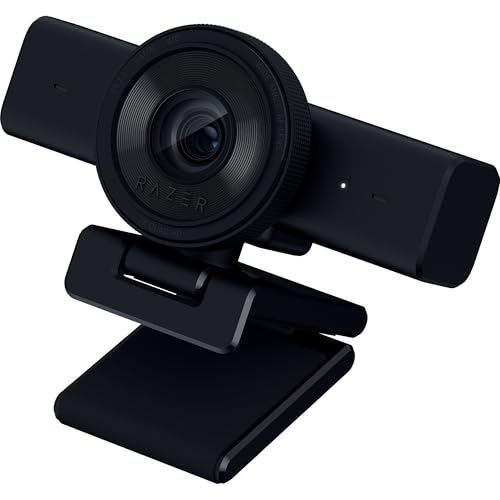
Razer’s newest mainstream camera stakes out the middle ground that used to be empty: 1440p at sixty frames per second, sharper than 1080p without the cost or bandwidth of 4K. Autofocus, a wide 80-degree lens, a built-in microphone, and a twist-to-close privacy shutter cover the everyday checklist, and AI auto-framing is available through Razer’s software. It is a straightforward upgrade for someone whose old 1080p camera is the weakest part of their setup. The compromises are connection-era ones: the cable is USB-A and fixed, and the deeper image controls live in Razer Synapse on Windows.
Specs
- Video: 1440p at 60 fps
- Sensor: 3.7 MP
- Field of view: 80 degrees
- Focus: autofocus
- Framing: AI auto-framing via Razer software
- Microphone: built-in microphone
- Privacy: integrated privacy shutter
- Connection: USB-A, fixed cable
Best for: Streamers and meeting regulars who want visibly more detail than 1080p without buying into a 4K setup.
Watch out for: Check the format table on the listing for the exact resolution and frame rate combinations, and note the fixed USB-A cable if your laptop only has USB-C ports.
ASIN: B0FNBLG4SD
Which One Fits Your Situation
You teach or present while standing up
Choose the Insta360 Link 2. A fixed camera forces you to perform inside a rectangle, while the gimbal follows you to a whiteboard or workbench and keeps the full sensor on your face. Gesture control means you can start tracking or zoom mid-lesson without returning to the keyboard, and the built-in noise-canceling mic still hears you from across the room.
You stream games or record videos every week
Choose the Elgato Facecam 4K if you record and crop your footage, since its uncompressed 4K60 feed holds detail through edits and zooms. Choose the Facecam MK.2 instead if your platform streams at 1080p anyway; its uncompressed 1080p60 feed is the cleaner input for that pipeline, and the fixed focus never hunts during a match. Either way, budget your audio separately, because neither camera includes a microphone.
You work from a desk and just want to look right
Choose the Insta360 Link 2C. Its auto framing keeps you centered when you lean, shift, or share the frame with a second person, and HDR keeps a bright window from washing out your face. There are no motors to set up or maintain, and the physical privacy switch ends the day with the lens blocked rather than merely off in software.
Your laptop camera is the problem and funds are limited
Choose the Razer Kiyo V2 X. It is the current-generation step up that fixes the two things people actually notice on calls, softness and choppy motion, with 1440p resolution at sixty frames per second. It includes a microphone and a privacy shutter, so it is a complete replacement in one box. Just confirm your laptop has a USB-A port or that you own an adapter.
Common Mistakes
- Buying a famous older model from a third-party listing at a collector’s price, when the brand’s current model is sold new by the brand’s own store.
- Mixing up sibling models, such as the Link 2 and Link 2C or the Facecam MK.2 and Facecam 4K, and ordering the one without the feature you wanted.
- Assuming a 4K badge means sixty frames per second, when most 4K webcams still record at thirty and only drop to sixty at 1080p.
- Forgetting that some current flagships ship without a microphone on purpose, then discovering the gap on your first call.
- Plugging an uncompressed 4K or 1080p60 camera into an old USB 2.0 hub and blaming the camera for the compressed, lower-rate feed that follows.
Frequently Asked Questions
Are the older webcam classics still worth buying today?
Some are still sold new and remain fine for basic calls, but they are previous-generation designs: smaller sensors, compressed video, and software that updates rarely. Buy one only when its listing is genuinely new stock from a reputable seller. If the price sits anywhere near a current model, the current model is the better buy, because its sensor, framing features, and firmware support are all newer.
Do I need 4K for Zoom and Teams calls?
No. Calling platforms compress your video heavily, and most meetings are sent at 720p or 1080p regardless of your camera. A 4K model still helps in two ways: the larger sensors in current 4K cameras handle poor room light better, and the extra resolution lets auto-framing crop in without going soft. If neither applies to you, a current 1080p or 1440p camera covers calls completely.
What is the difference between the Insta360 Link 2 and Link 2C?
The Link 2 sits on a motorized two-axis gimbal that physically turns to follow you, keeping full resolution on your face anywhere in the room. The Link 2C is fixed and reframes digitally by cropping its 4K image, which is simpler and silent but loses detail as it zooms. Both share the 1/2-inch sensor, HDR, and gesture control. Movers want the gimbal; seated workers rarely miss it.
Why do some new webcams have no microphone?
Creator-focused brands now assume a separate microphone or headset, so they spend the whole budget on the sensor and lens and leave audio out entirely. The Elgato models in this guide work that way. If your calls rely on the webcam’s mic, pick a model that lists one, such as the Insta360 or Razer picks above, and confirm it on the product page before ordering.
FAQ
Are the older webcam classics still worth buying today?
Do I need 4K for Zoom and Teams calls?
What is the difference between the Insta360 Link 2 and Link 2C?
Why do some new webcams have no microphone?
More from Amazon
Programs that pair well with the guide above. Offers and eligibility are set by Amazon and may change.
Free shipping on eligible items, Prime Video and more. Eligible new members can start with a free trial.
Start a Prime free trialAd-free music streaming. Eligible new subscribers can start with a free trial.
Try Music Unlimited freeA Prime membership for ages 18-24 with a trial period. Eligibility is set by Amazon.
See Prime for Young AdultsAudiobooks and podcasts to listen to on the go. Eligible new members can start with a free trial.
Try Audible freeAs an Amazon Associate we earn from qualifying purchases.