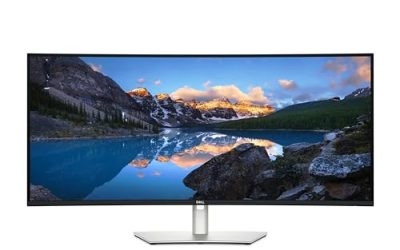
The best monitors for a MacBook Air are 27-inch 4K displays with USB-C input and at least 65 W of power delivery, so one cable carries video and charges the laptop. The Dell S2725QC is the best-value pick, the Dell U2725QE is the pick if you want a Thunderbolt hub, and the Apple Studio Display is the premium choice for matching macOS scaling. A MacBook Air draws far less power than a MacBook Pro, so 65 W is enough.
Our top picks
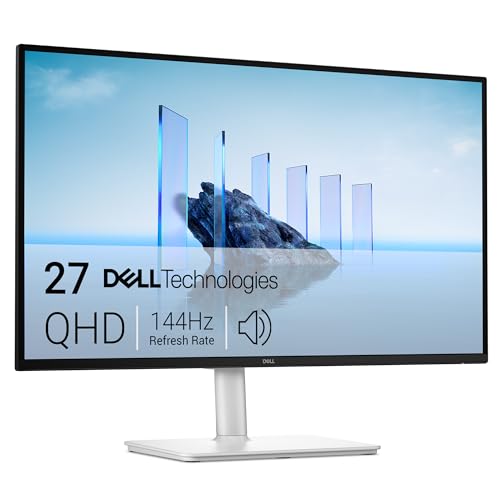 Dell 27 Plus QHD USB-C Monitor
- Elevated entertainment: The QHD resolution and 1500:1 contrast…
- Hear the audio difference: Immerse yourself in sound…
- Eye comfort: Prioritize visual comfort with this 4-star…
 InnoView Portable Monitor
- [Portable Monitor Laptop] InnoView laptop screen extender is…
- [Plug and Play] The travel monitor for laptop…
- [IPS FHD USB C Monitor] 15.6 inch portable…
 cocopar Portable Monitor 15.6 Inch 1080P FHD
- Portable Monitor for Laptops: Cocopar laptop screen extender…
- Plug and Play USB-C Monitor: Cocopar portable laptop…
- FHD Portable Monitor VESA Mountable: Featuring a 1080P…
As an Amazon Associate we earn from qualifying purchases at no extra cost to you.
Quick comparison
| Pick | Best for | Size / resolution / refresh | USB-C power | Main trade-off |
|---|---|---|---|---|
| Dell S2725QC | Best value | 27 in, 4K, up to 120 Hz | 65 W | Basic stand, no Thunderbolt hub |
| Dell U2725QE | Best docking monitor | 27 in, 4K, 120 Hz, IPS Black | Up to 140 W over Thunderbolt 4 | Higher cost |
| LG 27UP850K | Color and USB-C on a budget | 27 in, 4K, 60 Hz | 96 W class | 60 Hz only |
| BenQ MA270U | Mac color matching and design work | 27 in, 4K, 60 Hz | Up to 90 W | Fewer extras than gaming screens |
| Apple Studio Display | Best match for macOS | 27 in, 5K, 60 Hz | 96 W | Premium cost, stand options extra |
Specifications follow manufacturer pages; confirm the exact model and port list before purchase, as variants differ by region.
What your MacBook Air can drive
According to Apple’s specifications, MacBook Air models with M2 and M3 chips support one external display up to 6K at 60 Hz with the lid closed, and some configurations support two displays only with the lid closed. M4 MacBook Air models support up to two external displays with the lid open, each up to 6K at 60 Hz. Check Apple’s support page for your exact chip and year, because the limit depends on the generation.
Best value: Dell S2725QC
This 27-inch 4K IPS panel offers a 120 Hz refresh rate with USB-C input and 65 W power delivery. On a Mac, 120 Hz makes cursor movement and scrolling smoother, although the MacBook Air’s USB-C output must support the bandwidth. The panel is plenty sharp at 4K, which scales to a 1440p-equivalent working space on macOS with HiDPI.
Best docking monitor: Dell U2725QE
The U2725QE has a Thunderbolt 4 upstream port, a USB hub, Ethernet and daisy-chain output. Plug the MacBook Air in once and you get charging, display, wired network and a keyboard and mouse connection. The IPS Black panel gives deeper contrast than ordinary IPS.
Best color on a budget: LG 27UP850K
A 4K IPS panel with broad color coverage, USB-C power delivery and an ergonomic stand. It is limited to 60 Hz, which is fine for office work and video.
Best for designers: BenQ MA270U
BenQ tunes this model for macOS, including M-Book color mode, which aims to match the Mac’s built-in screen appearance. It suits photo and design work more than fast games.
Best premium match: Apple Studio Display
The Studio Display uses a 5K panel at 218 pixels per inch, matching the MacBook’s sharpness. It includes a 12 MP camera and speakers and charges the laptop over one Thunderbolt cable. It is the most seamless option, but you pay for it.
Worked example: why 4K at 27 inches works on macOS
macOS looks sharpest when the display is “Retina”, with around 220 pixels per inch. A 27-inch 4K monitor is about 163 pixels per inch, and a 27-inch 5K monitor is about 218. At 4K, macOS scales to a 1920×1080 or 2560×1440 equivalent. Using the 2560×1440 equivalent gives you a workspace with more room than the Air’s own screen while text stays readable. A 27-inch 1440p monitor (about 109 PPI) looks noticeably softer on a Mac because macOS cannot use HiDPI scaling cleanly at that resolution.
Bandwidth check: 4K at 60 Hz with 8-bit color needs about 12.5 Gbps, which fits in a USB-C DisplayPort connection. 4K at 120 Hz needs about 25 Gbps, which needs DisplayPort 1.4 with compression, so confirm that your Mac supports it before expecting 120 Hz.
Setup steps
- Connect the monitor with a certified USB-C cable rated for video and the power you need.
- Open System Settings, then Displays, and select the monitor to set the scaled resolution.
- Choose “Default for display” or the 2560×1440 equivalent for a balance of space and legibility.
- Set refresh rate to the highest option the monitor offers.
- Arrange displays to match physical positions, and decide whether the Air’s lid stays open.
Decision matrix
| You want | Choose |
|---|---|
| One cable for charging and display, limited budget | Dell S2725QC |
| Dock features and Ethernet | Dell U2725QE |
| Photo or design work | BenQ MA270U |
| Sharpest text, best Mac integration | Apple Studio Display |
Frequently Asked Questions
Can a MacBook Air run two external monitors?
It depends on the chip. According to Apple, M4 MacBook Air models support two external displays with the lid open, while earlier models are more limited. Check your model’s tech specs.
How much power delivery does a MacBook Air need?
A 65 W monitor charges a MacBook Air comfortably, even under load. Higher wattage helps only for MacBook Pro models.
Is 4K necessary for a MacBook Air monitor?
For a 27-inch screen it is the practical minimum. Lower resolution looks soft because macOS handles scaling poorly at 1440p on large screens.
Does 120 Hz matter on a Mac?
It makes scrolling and cursor movement smoother, but it is optional for office work. Verify that your Mac and cable support it.
HDMI or USB-C for a MacBook Air?
USB-C carries video and power in one cable, which is simpler. HDMI needs a separate charger and can limit refresh rate depending on the HDMI version.
FAQ
Can a MacBook Air run two external monitors?
How much power delivery does a MacBook Air need?
Is 4K necessary for a MacBook Air monitor?
Does 120 Hz matter on a Mac?
HDMI or USB-C for a MacBook Air?
More from Amazon
Programs that pair well with the guide above. Offers and eligibility are set by Amazon and may change.
Free shipping on eligible items, Prime Video and more. Eligible new members can start with a free trial.
Start a Prime free trialAd-free music streaming. Eligible new subscribers can start with a free trial.
Try Music Unlimited freeA Prime membership for ages 18-24 with a trial period. Eligibility is set by Amazon.
See Prime for Young AdultsAudiobooks and podcasts to listen to on the go. Eligible new members can start with a free trial.
Try Audible freeAs an Amazon Associate we earn from qualifying purchases.