Key takeaways
- Compare the best privacy screens for gaming laptops, from magnetic 15.6 and 16-inch filters to a compact 14-inch pick, with fit and mounting advice.
A gaming laptop rarely stays in a locked room. It travels to LAN events, dorm desks, shared apartments, coffee shops and airport gates, and every one of those seats puts your screen in someone else’s line of sight. A privacy screen is a thin filter that sits over the display and narrows the readable viewing angle, so the person next to you sees a dark panel while you keep a clear picture from straight on. For gamers that matters beyond passwords: it hides a minimap, a draft screen, a strategy document or a work file opened between matches.


The catch is fit. Privacy filters are sold by diagonal size, but they only work when the filter’s width and height match your panel’s visible area and aspect ratio. A 15.6-inch 16:9 filter will not sit correctly on a 16-inch 16:10 laptop, and a magnetic model needs a bezel layout that gives the magnets something to hold. This guide compares five filters across the sizes gaming laptops actually use: 14-inch, 15.6-inch 16:9 and 16-inch 16:10.
Disclosure: As an Amazon Associate, we earn from qualifying purchases made through links in this article, at no extra cost to you.
Quick Picks
Our Short List of 3
- Best for: 15.6-inch 16:9 gaming laptops that travel to LANs, dorms and shared desks.
- Screen size: 15.6 inches, 16:9 aspect ratio
- Filter dimensions: 345 × 194 mm visible area (13 9/16 × 7 5/8 in)
- Attachment: magnetic suction with four single-sided adhesive magnets included
- Listed privacy angle: ±30° from center
- Best for: 16-inch 16:10 gaming laptops that split time between home and public spaces.
- Screen size: 16 inches, 16:10 aspect ratio
- Filter dimensions: 13.56 × 8.49 in (344.5 × 215.6 mm)
- Attachment: patented magnetic snap-on design (U.S. Patents 9,829,669 and D844,012)
- Multi-layered film that blacks out side views while staying clear straight on
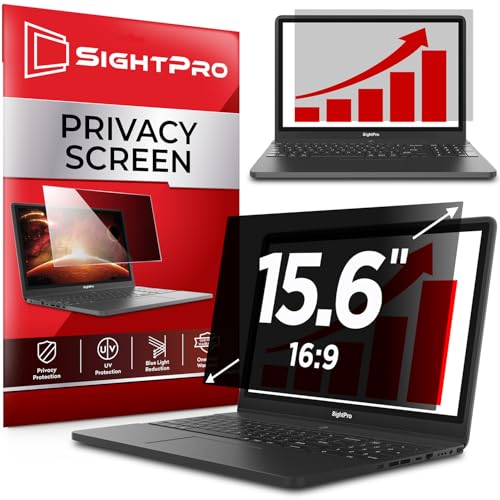
- Best for: 15.6-inch gaming laptops that stay in one shared space and need always-on privacy.
- Screen size: 15.6 inches, 16:9 aspect ratio
- Filter dimensions: 13 9/16 × 7 5/8 in (345 × 194 mm)
- Attachment options: clear adhesive strips or slide mount tabs, two sets of each included
- Multi-layered film that blacks out side views while staying clear straight on
All 4 Picks at a Glance
| Product | Specs | Action |
|---|---|---|
| Peslv Magnetic Laptop Privacy Screen 15.6 Inch |
| Check price on Amazon |
| SightPro Magnetic Laptop Privacy Screen 16 Inch 16:10 |
| Check price on Amazon |
| SightPro 15.6 Inch Laptop Privacy Screen Filter |
| Check price on Amazon |
 IPROKKO Laptop Privacy Screen 15.6 Inch |
| Check price on Amazon |
How to Choose a Privacy Screen for a Gaming Laptop
Measure the visible area, not the diagonal. Every listing here states a filter width and height, such as 345 by 194 mm for a 15.6-inch 16:9 panel. Measure your screen’s lit area — edge to edge of the picture, not the bezel — and match those two numbers. Diagonal size alone cannot confirm a fit, because two laptops with the same diagonal can use different panel shapes.
Match the aspect ratio. Most older gaming laptops use 16:9 panels, while many current 16-inch models use taller 16:10 panels. A 16:9 filter on a 16:10 screen leaves an uncovered band, and a 16:10 filter on a 16:9 screen overhangs. Check the ratio in your display settings before ordering.
Pick an attachment style for how you travel. Magnetic filters snap onto the top bezel and lift off in seconds, suiting a laptop that moves between a desk and a bag daily. Adhesive strips hold a filter flush and permanent, better for a machine that stays in one shared room. Slide mount tabs sit between the two: the tabs stick to the frame, and the filter slides in and out as needed.
Understand the privacy angle. Most filters here narrow the clear view to about 30 degrees either side of center, written as ±30°. Beyond that angle the image darkens until it is unreadable, which blocks side glances from a neighbor at a LAN table or on a train. It does not block someone standing directly behind you, because that view is the same clear view you get.
Expect a brightness trade-off. A privacy filter always dims the picture a little, and matte finishes soften it further in exchange for glare control. Raise the brightness slider a notch to compensate, and prefer a glossy or reversible filter if you play in a dim room.
Check touch and lid behavior. Most film filters are not optimized for touchscreens, so touch input can feel less accurate under one. Some magnetic filters also keep a lid from closing completely flat. If your laptop has a touch panel, confirm both points on the listing before you commit.
The 5 Best Privacy Screens for Gaming Laptops
Peslv Magnetic Laptop Privacy Screen 15.6 Inch
- Best for: 15.6-inch 16:9 gaming laptops that travel to LANs, dorms and shared desks.
- Screen size: 15.6 inches, 16:9 aspect ratio
- Filter dimensions: 345 × 194 mm visible area (13 9/16 × 7 5/8 in)
- Attachment: magnetic suction with four single-sided adhesive magnets included
- Listed privacy angle: ±30° from center
15.6-inch 16:9 gaming laptops that travel to LANs, dorms and shared desks.
The Peslv magnetic model is the easiest recommendation for the most common gaming laptop format: a 15.6-inch 16:9 panel. The filter holds itself against the display with magnetic suction, and the four included adhesive magnets give it anchor points on bezels that are not magnetic on their own. Press it on and it seats; lift a corner and it comes away cleanly, then drops into the included storage clip so it can ride in the laptop bag without getting bent or dusty.
Peslv says its microlouver layer was tuned through repeated angle corrections so sight lines beyond 30 degrees to either side are shielded, while the straight-on view stays readable. The matte face also cuts reflected light, which helps under the bright lighting of a tournament hall. One limit is shared by every two-way filter here: it guards the sides only, so a person directly behind you still sees the screen.
SightPro Magnetic Laptop Privacy Screen 16 Inch 16:10
- Best for: 16-inch 16:10 gaming laptops that split time between home and public spaces.
- Screen size: 16 inches, 16:10 aspect ratio
- Filter dimensions: 13.56 × 8.49 in (344.5 × 215.6 mm)
- Attachment: patented magnetic snap-on design (U.S. Patents 9,829,669 and D844,012)
- Multi-layered film that blacks out side views while staying clear straight on
16-inch 16:10 gaming laptops that split time between home and public spaces.
Sixteen-inch gaming laptops from recent generations mostly use 16:10 panels, and that taller shape rules out the standard 15.6-inch filters. This SightPro model is cut for exactly that format, with a filter area of 344.5 by 215.6 mm. Its magnetic system is the brand’s patented snap-on design: place the filter along the top of the display and the magnets take hold, with the included stickers helping on lids that need extra grip.
Because it lifts off in one motion, it suits a laptop that doubles as a home machine — filter on for a train ride, filter off at your own desk so the panel runs at full brightness for gaming. The bundle is also the most complete in this guide, adding a webcam cover and a storage folder. Like the other magnetic picks, it is not optimized for touchscreen use, so skip it if your 16-inch panel is a touch model.
PYS Magnetic Laptop Privacy Screen 14 Inch
Specs
- Screen size: 14 inches, 16:9 aspect ratio
- Filter dimensions: 12.2 × 6.9 in
- Model number: PYS-CXFK14-16:9
- Attachment: magnetic, removable and detachable with no adhesive on the screen
- Matte anti-glare surface with blue light filtering
- Listed compatibility: HP, Dell, Acer, Lenovo, Samsung and ASUS 14-inch 16:9 laptops
Compact 14-inch gaming laptops are built to be carried everywhere, which makes them the machines most often opened in crowded places. The PYS filter is sized for that class, covering a 12.2 by 6.9 inch visible area on 14-inch 16:9 panels. It attaches magnetically, so there is no adhesive on the display and nothing to peel off when you want the panel bare again.
The matte surface does double duty on a small laptop: it darkens the side view for privacy and tames reflections when you are gaming near a window or under office lights. PYS also builds blue light filtering into the layer. Fit matters most at this size, because 14-inch panels vary more between brands than the bigger formats — compare your visible width and height against the listed 12.2 by 6.9 inches before ordering.
Best for: 14-inch gaming laptops used in lectures, cafés and other crowded seats.
SightPro 15.6 Inch Laptop Privacy Screen Filter
- Best for: 15.6-inch gaming laptops that stay in one shared space and need always-on privacy.
- Screen size: 15.6 inches, 16:9 aspect ratio
- Filter dimensions: 13 9/16 × 7 5/8 in (345 × 194 mm)
- Attachment options: clear adhesive strips or slide mount tabs, two sets of each included
- Multi-layered film that blacks out side views while staying clear straight on
15.6-inch gaming laptops that stay in one shared space and need always-on privacy.
Not every gaming laptop needs a filter that comes off daily. If your machine lives on a desk in a shared room, a filter that mounts once and stays put is the simpler answer. This SightPro panel gives you two ways to fix it: clear adhesive strips for a flush, permanent fit, or slide mount tabs on the display frame so the filter can still slide out when a teammate needs to see your screen.
The package includes two sets of each mounting option, so you can switch from tabs to strips later. SightPro builds this filter from its multi-layered blackout film, the same approach as its magnetic line. It remains a 16:9-only, non-touch pick, so confirm your panel shape first.
IPROKKO Laptop Privacy Screen 15.6 Inch
- Best for: 15.6-inch owners who game in both bright and dim rooms and want one filter that adapts.
- Screen size: 15.6 inches, 16:9 aspect ratio
- Filter dimensions: 13.6 × 7.6 in (345 × 194 mm)
- Listed privacy range: side views blocked across a 30–60° anti-peep span
- Reversible build: matte side for glare control, glossy side for a sharper picture and stronger privacy effect
15.6-inch owners who game in both bright and dim rooms and want one filter that adapts.
The IPROKKO filter’s party trick is its reversible build. One face is matte, which softens reflections and suits bright rooms; flip it over and the glossy face gives a crisper picture with a stronger privacy effect, suiting dim rooms and evening gaming. Both faces carry an anti-scratch layer, so flipping does not punish the side facing out.
IPROKKO describes an anti-peep span of 30 to 60 degrees, meaning the picture fades as a viewer moves off center and is fully dark well before a full side view. Installation takes the familiar two routes — slide mount tabs for a removable fit or adhesive strips for a fixed one.
FAQ
Do privacy screens hurt picture quality for gaming?
A filter always dims the panel slightly, and a matte face softens the image a little in exchange for glare control. Raising the brightness slider compensates for most of it. If you play in a dim room, a glossy or reversible filter keeps more of the panel’s punch; under bright lights, matte is usually the better trade.
How do I measure my laptop for a privacy filter?
Measure the lit part of the screen only — width and height, not including the bezel — then check the aspect ratio in your display settings. Compare both measurements with the filter dimensions on the listing. The diagonal size on your laptop’s box is not enough on its own, because panels with the same diagonal can have different shapes.
Magnetic or adhesive: which attachment suits a gaming laptop better?
Magnetic filters win for laptops that travel, because they lift off in seconds and leave nothing on the screen. Adhesive strips and slide tabs win for a laptop that stays in one shared room, because the filter sits flush and never gets knocked loose. Slide tabs are the middle path: fixed mounts, but the filter still slides out.
Will a privacy screen stop the person sitting behind me?
No. Standard laptop filters narrow the view from the left and right only, so someone directly behind you shares your clear straight-on view. If over-the-shoulder viewing is your main concern, look for a four-way filter, which also limits views from above and below — though it will dim the picture more than a two-way model.
Conclusion
For most gaming laptops, the decision comes down to panel shape and how often the filter needs to come off. Owners of 15.6-inch 16:9 machines who travel should take the Peslv magnetic filter; 16-inch 16:10 owners get their exact fit from the SightPro magnetic model; 14-inch owners are covered by the PYS. If the laptop rarely leaves a shared desk, the tab-and-strip SightPro 15.6 filter is the set-and-forget option, and the reversible IPROKKO suits players who move between bright and dark rooms.
More from Amazon
Programs that pair well with the guide above. Offers and eligibility are set by Amazon and may change.
Free shipping on eligible items, Prime Video and more. Eligible new members can start with a free trial.
Start a Prime free trialAd-free music streaming. Eligible new subscribers can start with a free trial.
Try Music Unlimited freeA Prime membership for ages 18-24 with a trial period. Eligibility is set by Amazon.
See Prime for Young AdultsAudiobooks and podcasts to listen to on the go. Eligible new members can start with a free trial.
Try Audible freeAs an Amazon Associate we earn from qualifying purchases.