Key takeaways
- Find the best quiet mechanical keyboards for gaming and typing, with silent linear switches, tactile options, and low-profile designs compared.
Introduction
A mechanical keyboard does not have to announce every keystroke to the whole room. The best quiet mechanical keyboards pair the crisp, reliable feel of mechanical switches with designs that keep typing noise low, so late-night gaming sessions, shared offices, and voice calls stay undisturbed. The trick is knowing which parts of a keyboard actually make noise and which switches are built to stay hushed.

Switch choice matters more than anything else. Silent linear switches, such as Cherry MX Silent Red and Razer Yellow, use small dampeners on the stem to soften both the downstroke and the return, which removes the harsh bottom-out sound without changing the smooth, straight travel that gamers like. Low-profile linear switches, like the GL Linear switches in the Logitech G915 TKL, shorten the travel distance, so there is less distance for the key to build up noise. Tactile switches without a click mechanism, such as Gateron G Pro Brown, HyperX Aqua, and GL Brown, give a small bump of feedback as the key actuates and stay far quieter than clicky switches, which are built to make an audible click on every press. If a listing mentions clicky switches, that board is not a quiet pick, no matter how good the rest of the design looks.
Layout and connection matter too. Tenkeyless boards dominate this guide because removing the number pad leaves more room for the mouse and puts the hands in a more natural position, and a smaller case has less empty space to echo. Wireless boards add flexibility for living-room and shared-desk setups, while wired boards keep things simple and remove battery worries entirely. Hot-swappable boards let you change switches later without soldering, which is the most direct way to make a board even quieter over time by swapping in silent switches.
At a Glance
| Keyboard | Layout | Switches | Connection | Standout Feature |
|---|---|---|---|---|
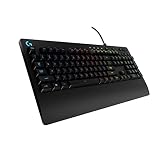
| Razer BlackWidow V3 TKL (Yellow Switch) | Tenkeyless | Razer Yellow, linear and silent | Wired USB | Sound-dampened linear switches with dedicated media keys |
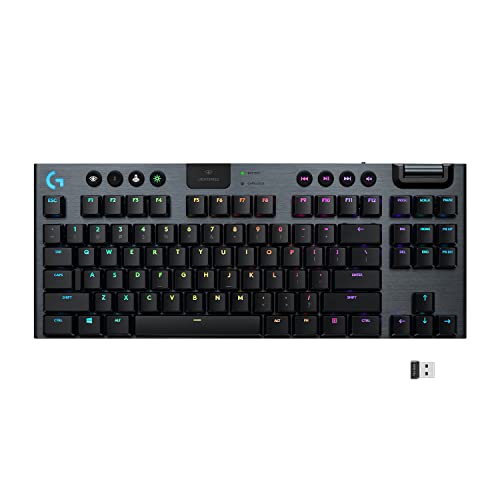
| Logitech G915 TKL (Linear) | Tenkeyless | GL Linear, low profile | LIGHTSPEED wireless, Bluetooth, wired | Low-profile wireless board with per-key RGB lighting |
| Logitech G915 X TKL (GL Brown Tactile) | Tenkeyless | GL Brown, low-profile tactile | LIGHTSPEED wireless, Bluetooth, wired | Double-shot PBT keycaps with tri-mode connectivity |
| Keychron K8 Pro (Gateron G Pro Brown) | Tenkeyless | Gateron G Pro Brown, tactile | Bluetooth 5.1, wired USB-C | Hot-swappable switches with QMK and VIA programming |
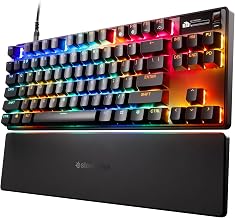
| HyperX Alloy Origins Core (Aqua) | Tenkeyless | HyperX Aqua, tactile | Wired USB-C | Aircraft-grade aluminum body with three tilt angles |
Razer BlackWidow V3 TKL — Yellow Switch
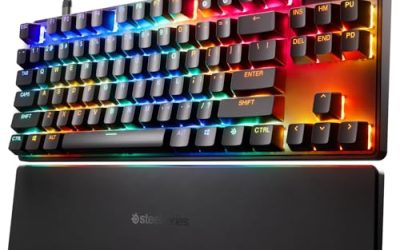
The Razer BlackWidow V3 TKL with Yellow switches is the most direct answer to the quiet keyboard question in this guide, because its switches were designed around silence from the start. Razer Yellow switches are linear, which means the key travels straight down with no bump and no click, and they include sound dampeners that soften the already low sound profile of the switch. Actuation happens at 1.2 mm, so keys register with a very short press, which suits fast-paced games where reaction time matters.
The tenkeyless layout drops the number pad and keeps the board compact, which leaves more desk space for mouse movement. Doubleshot ABS keycaps are molded with the legend running through two layers of plastic, so the legends stay legible through heavy use. Razer Chroma RGB lighting runs through the keycaps with per-key control through Razer Synapse software, where you can also program macros and remap keys.
Dedicated media keys sit above the number row, with a multi-function digital dial for volume and playback control. The aluminum construction gives the board a solid, planted feel on the desk, and the switches are built for up to 80 million keystrokes. A detachable wrist rest is included in the box for longer sessions.
Considerations: the Yellow switches are very light, so fast typists may find they press keys accidentally until they adjust to the short actuation point. The board is wired only, so it needs a USB port and cable space on the desk. The full-size version of this keyboard uses the same Yellow switches if you need a number pad, but this listing is the tenkeyless model.
Logitech G915 TKL — Linear
The Logitech G915 TKL in its Linear configuration takes a different route to quiet typing: low-profile GL Linear switches that cut the height of every key in half compared with a standard mechanical switch. Shorter travel means less distance for the key to cover and less energy at the bottom of each press, and the linear design removes both the click and the tactile bump, so the sound that remains is a soft, low thud rather than a sharp clack.
Connectivity is the strongest part of this keyboard. LIGHTSPEED wireless delivers pro-grade wireless performance with a 1 ms report rate, Bluetooth pairs with a second device, and a wired mode works over USB while charging the battery at the same time. Battery life runs up to 40 hours of continuous use on a full charge.
LIGHTSYNC RGB lighting is customizable per key, and it can react to in-game action, audio, and screen color through Logitech G HUB software. The aluminum alloy top plate keeps the board rigid, while the tenkeyless layout saves desk space. Dedicated media controls sit along the top edge for quick volume and playback changes.
Considerations: low-profile keycaps use a different shape from standard keycaps, so replacement keycap sets are harder to find than for full-height boards. The slim keys take a short adjustment period if you are used to tall mechanical switches. This listing is the Linear switch version; the same board is also sold with clicky and tactile GL switches, so confirm the switch type in the listing before ordering.
Logitech G915 X TKL — GL Brown Tactile
The Logitech G915 X TKL with GL Brown switches is the newer generation of Logitech’s low-profile wireless board, and the tactile Brown switches make it the best fit here for people who want feedback from every keypress without the noise of a clicky switch. GL Brown switches give a small tactile bump as the key actuates, so you can feel the exact moment a press registers, and the low-profile design keeps travel short and typing noise soft.
The board carries the same tri-mode connectivity as the original G915 TKL: LIGHTSPEED wireless, Bluetooth, and wired data mode, switchable at the touch of a button. Battery life runs up to 42 hours of continuous use, and the board recharges in about 4 hours over USB. The G915 X upgrades the keycaps to double-shot PBT, which resists shine and wear better than the ABS keycaps on the earlier model.
Per-key RGB lighting is fully programmable through Logitech G HUB, and every key can be remapped or assigned a macro. The tenkeyless layout keeps the board compact at only 0.9 inches high, and the board works with both Mac and PC, with alternate key legends included for macOS layouts.
Considerations: the tactile bump on GL Brown switches is subtle compared with full-height tactile switches, so typists who want a strong bump may find it light. The low-profile keycaps are not interchangeable with standard-height sets. Like the original G915 TKL, this board is also sold with clicky and linear GL switches, so check that the listing names the GL Brown tactile version.
Keychron K8 Pro — Gateron G Pro Brown

The Keychron K8 Pro is the only board in this guide you can make quieter after you buy it, because its switches are hot-swappable. The board ships with pre-lubed Gateron G Pro Brown switches, which give a soft tactile bump without a click, and the sockets accept almost any 3-pin or 5-pin MX-style switch, including Cherry, Gateron, and Kailh. If the stock switches are still louder than you want, you can pull them out by hand and press in silent linear switches without touching a soldering iron. Foam layers inside the case and screw-in stabilizers on the larger keys also help keep the sound low and even.
QMK and VIA support sets this board apart for people who like to customize. Every key can be remapped, macros can be created, and shortcuts can be layered through the Keychron Launcher web app or VIA software, with the layout stored on the board itself. The tenkeyless layout has 87 keys, and the double-shot PBT keycaps use an OSA profile that resists shine. Bluetooth 5.1 pairs with up to three devices, and a USB-C cable covers wired use. The 4,000 mAh battery lasts up to 72 hours of typing.
The aluminum frame gives the board real weight, which keeps it from sliding around during fast typing. The board works with macOS, Windows, and Linux, and it ships with alternate keycaps for both Mac and Windows layouts in the box.
Considerations: there is no 2.4 GHz wireless dongle, so wireless use runs over Bluetooth only, which is fine for typing and casual play but not the lowest-latency option for competitive gaming. Key remapping through VIA requires a wired connection.
HyperX Alloy Origins Core — Aqua
The HyperX Alloy Origins Core with Aqua switches is a wired tenkeyless board built around a simple idea: a rigid aluminum body and a tactile switch with no click mechanism. HyperX Aqua switches are tactile, so each key gives a small bump as it actuates, and they have a short travel time with a low actuation force. The switches are built for 80 million keypresses, and the full aluminum body keeps the board stable and free of the hollow flex that makes cheaper plastic boards sound louder than they are.
The tenkeyless design frees up desk space for mouse movement, and the detachable USB-C cable makes the board easy to pack away or move between computers. Two-step keyboard feet give three tilt angles, so you can set the typing angle to whatever feels best for your wrists. Per-key RGB lighting runs through exposed LEDs on the switches, and the HyperX NGENUITY software handles lighting effects, macros, and Game Mode settings. Onboard memory stores lighting and macro profiles on the board itself.
Considerations: the board is wired only, with no wireless option, so it needs a free USB port and cable routing on the desk. The Aqua switches are tactile rather than silent, so they are quieter than clicky switches but not as hushed as the dampened linear switches in the Razer picks. The listing is sold with Red, Aqua, and Blue switch options, so confirm the Aqua tactile version before ordering.
How to Choose a Quiet Mechanical Keyboard
Start with the switch, because it decides most of the sound. Silent linear switches are the quietest option and the best fit for shared rooms, late-night sessions, and voice calls. Low-profile linear switches are nearly as quiet and add a slim, portable design. Soft tactile switches such as Brown and Aqua give feedback you can feel without the click, which suits people who type as much as they game. Avoid clicky switches entirely if quiet typing is the goal; the click is built into the switch and no case or keycap change removes it.
Next, look at what else in the board adds or removes noise. Foam inside the case, pre-lubed stabilizers, and thicker PBT keycaps all soften the sound of each keypress. A heavy aluminum case tends to sound deeper and less hollow than a light plastic case. Hot-swappable boards are worth a close look if you want control over the final sound, since swapping in silent switches is the single most effective change you can make.
Layout decides how the board fits your desk. Tenkeyless boards are the most popular choice for gaming because they leave more room for the mouse and keep the hands closer together. Full-size boards add a number pad that helps with spreadsheets and data entry. Wireless boards add freedom for shared desks and living-room setups, while wired boards are simpler and never need charging.
Finally, check the switch variant in the listing before ordering. Many keyboards are sold in several switch options under one listing, and the wrong variant can turn a quiet board into a loud one. The listing title or the switch selector should name the exact switch: Yellow, GL Linear, GL Brown, G Pro Brown, or Aqua for the boards in this guide.
Fit and Installation Considerations
Measure your desk before choosing a layout. A tenkeyless board needs roughly 14 inches of width, while a full-size board needs closer to 18 inches, and a wrist rest adds another few inches of depth. Leave space on the right side for the mouse, since a board that is too wide pushes the mouse into an awkward angle and strains the shoulder over long sessions.
Setting up any of these boards takes a few minutes. Wired boards connect over USB and work immediately on Windows and macOS, with optional software for lighting and macros. Wireless boards need a first charge and a pairing step: plug in the receiver or pair over Bluetooth, then let the board finish charging before a long session. Download the maker’s software only if you want to change lighting, remap keys, or set up macros.
Keycap and switch compatibility is worth checking if you plan to customize later. The HyperX and Keychron boards use standard MX-style mounts that accept a wide range of replacement keycaps and switches. Low-profile Logitech boards use their own keycap shape, so replacement sets are limited. Hot-swappable boards make switch changes easy, while soldered boards need tools and experience to change switches.
Think about your room as well. A quiet board helps most in a shared bedroom, a dorm, an open office, or any space where a microphone picks up background sound. Pairing a quiet board with a soft desk mat absorbs more of the remaining vibration, and keeping the board on a stable, flat surface stops it from rattling against the desk.
Frequently Asked Questions
Are quiet mechanical keyboards really quieter than regular mechanical keyboards?
Yes, when the quiet design is built into the switch itself. Silent linear switches use dampeners that soften the impact at the bottom and top of each keypress, and low-profile switches shorten the travel so there is less energy in each press. A board with silent switches, foam in the case, and thick keycaps is noticeably quieter than a board with clicky switches in a hollow plastic case. No mechanical keyboard is completely silent, but the difference in a shared room is easy to hear.
What is the quietest switch type for a mechanical keyboard?
Silent linear switches are the quietest common switch type. Cherry MX Silent Red and Razer Yellow are the best-known examples, and both use dampeners to soften the sound of each press. Low-profile linear switches are close behind because of their short travel. Soft tactile switches such as Brown and Aqua are quieter than clicky switches but louder than silent linear switches.
Can I make my current mechanical keyboard quieter?
If your board is hot-swappable, swapping in silent linear switches is the most effective change, and it needs no soldering. Adding foam inside the case, lubricating the stabilizers, and switching to thicker PBT keycaps also help. O-ring dampeners fitted under keycaps can soften the bottom-out sound on some boards. If the board is soldered and uses clicky switches, the click is built into the switch itself, so changing switches takes soldering work or a new board.
Do quiet mechanical keyboards feel different to type on?
Silent linear switches feel smooth and light, with no bump and no click, which some typists love and others find too easy to press by accident. Tactile quiet switches add a small bump that marks the actuation point without the noise. Low-profile switches feel shallower and faster than full-height switches.
Conclusion
The best quiet mechanical keyboard is the one that matches your switch preference and your room. The Razer BlackWidow V3 TKL with Yellow switches is the simplest choice for silence, with factory-dampened linear switches, dedicated media controls, and a compact layout. The Logitech G915 TKL in Linear and the G915 X TKL in GL Brown bring low-profile designs and full wireless freedom, with the Linear version for the quietest typing and the Brown version for typists who want feedback. The Keychron K8 Pro is the pick for people who want to tune the sound themselves, thanks to hot-swappable switches and deep QMK and VIA customization. The HyperX Alloy Origins Core with Aqua switches rounds out the list as a solid wired board with a rigid aluminum body and a tactile feel that stays far quieter than any clicky board.
As an Amazon Associate, we earn from qualifying purchases.
FAQ
Are quiet mechanical keyboards really quieter than regular mechanical keyboards?
What is the quietest switch type for a mechanical keyboard?
Can I make my current mechanical keyboard quieter?
Do quiet mechanical keyboards feel different to type on?
More from Amazon
Programs that pair well with the guide above. Offers and eligibility are set by Amazon and may change.
Free shipping on eligible items, Prime Video and more. Eligible new members can start with a free trial.
Start a Prime free trialAd-free music streaming. Eligible new subscribers can start with a free trial.
Try Music Unlimited freeA Prime membership for ages 18-24 with a trial period. Eligibility is set by Amazon.
See Prime for Young AdultsAudiobooks and podcasts to listen to on the go. Eligible new members can start with a free trial.
Try Audible freeAs an Amazon Associate we earn from qualifying purchases.