Our Top Picks
 Logitech G Pro X Superlight 2 Lightspeed WirelessClassic1.57 x 2.5 x 4.92 inches0.1 poundsCheck on Amazon
Pros & cons
- 95-hour battery life reduces how often you need to charge
- 60-gram weight suits fast, low-effort mouse movement
- HERO 2 sensor tracks up to 44,000 DPI with no smoothing
- POWERPLAY wireless charging pad is sold separately
- Premium features add a more complex setup than basic mice
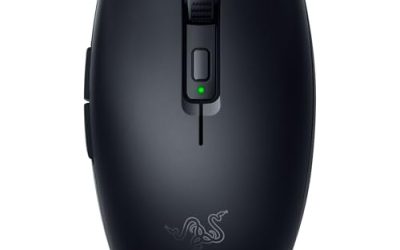
 Razer DeathAdder V3 Pro Wireless Gaming Mouse1000 Hz5.01 x 2.65 x 1.69 inches0.1 poundsCheck on Amazon
Pros & cons
- Up to 250 hours of play on a single AA battery
- Lightweight 3.4-ounce body aids fast, precise movement
- Built-in receiver storage keeps the dongle from getting lost
- Relies on a AA battery rather than a built-in rechargeable cell
- Endurance mode trade-off needed to stretch battery life further
Disclosure: As an Amazon Associate, we may earn from qualifying purchases made through links on this page, at no additional cost to you.
Ask what DPI to use for Fortnite and you will get a dozen confident, conflicting answers. The honest answer is a range, a method and a mouse that can hold the setting you choose. Fortnite rewards two kinds of aim in the same fight: wide, fast turns for building and editing, and small, controlled tracking for the shot that ends it. Your DPI, multiplied by your in-game sensitivity, decides how much hand movement produces each of those motions, and the right balance is the one that lets you turn fully without lifting the mouse twice while still landing piece-control edits cleanly.
This guide works through the settings first — the DPI ranges Fortnite players actually use, how eDPI works, and how X and Y sensitivity, targeting sensitivity and polling rate fit together — then compares four gaming mice whose DPI adjustment is precise and stable enough to build those settings on, using the specifications from their Amazon product pages. Every mouse below offers wide, adjustable DPI ranges and software or onboard controls for locking a value in.
Quick Picks
Our Short List of 3
- Best for: players who tune horizontal and vertical sensitivity separately.
- Independent X and Y DPI adjustment in G HUB
- HERO 2 sensor rated to 44,000 DPI with 888 IPS
- Up to 8 kHz report rate and 95 hours of battery life
- Onboard memory keeps DPI stages on the mouse
- Best for: palm and relaxed claw players who play long Fortnite sessions.
- Focus Pro 30K sensor with wide, staged DPI adjustment
- Ergonomic shape built for long sessions at 63 grams
- Up to 90 hours of battery life
- Optical switches rated for fast, consistent actuation

- Best for: players who want two reliable DPI stages and nothing to overthink.
- 200 to 12,000 DPI range covers every sensible Fortnite setting
- Dedicated DPI button cycles programmed stages instantly
- Up to 250 hours on a single AA battery
- LIGHTSPEED wireless with a 1 ms report rate
All 3 Picks at a Glance
| Product | Specs | Action |
|---|---|---|
| Logitech G PRO X Superlight 2 (ASIN: B09NBWL8J5) |
| Check price on Amazon |
| Razer DeathAdder V3 Pro (ASIN: B0B6XZLNHQ) |
| Check price on Amazon |
| Logitech G305 Lightspeed (ASIN: B07CMS5Q6P) |
| Check price on Amazon |
Razer Viper V3 Pro (ASIN: B0CW25XR5R)
For a settings-focused guide, the Viper V3 Pro’s standout specification is not its 35,000 DPI ceiling but its floor-level control: the Focus Pro 35K Optical Sensor Gen-2 adjusts in 1-DPI steps. If your ideal setting is 820 rather than 800, this mouse can be set to exactly 820, and your sensitivity stays identical if you ever move to another mouse with the same feature. Razer Synapse stores DPI stages, and the sensor tracks at 750 IPS with 70 G acceleration, so fast build turns never outrun it.
The rest of the package supports the settings: a 54 gram symmetrical shell that is easy to move at low sensitivity, HyperSpeed wireless with true polling up to 8,000 Hz through the included HyperPolling dongle, optical switches rated at 90 million clicks, and up to 95 hours of battery life at 1,000 Hz. Six programmable buttons keep the layout focused. For Fortnite players who tune sensitivity in small increments and test each change, this is the most precise DPI platform in the guide.
Highlights
- DPI adjustable in exact 1-DPI steps
- Focus Pro 35K Gen-2 sensor with 750 IPS tracking
- Up to 8,000 Hz polling for smooth reporting at any DPI
- 54 gram shell suits the large movements of low-sensitivity play
Considerations
- Symmetrical shape will not suit players who want ergonomic palm support
- Fine DPI steps reward players who actually test settings methodically
- Highest polling rates shorten battery life
Best for: players who fine-tune sensitivity in small steps and want the setting to be exact.
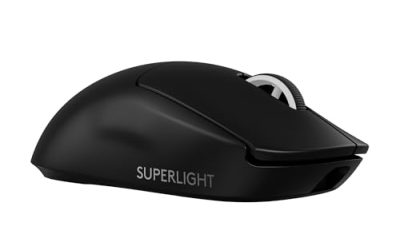
Logitech G PRO X Superlight 2 (ASIN: B09NBWL8J5)
- Best for: players who tune horizontal and vertical sensitivity separately.
- Independent X and Y DPI adjustment in G HUB
- HERO 2 sensor rated to 44,000 DPI with 888 IPS
- Up to 8 kHz report rate and 95 hours of battery life
- Onboard memory keeps DPI stages on the mouse
players who tune horizontal and vertical sensitivity separately.
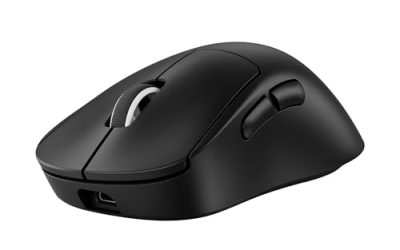
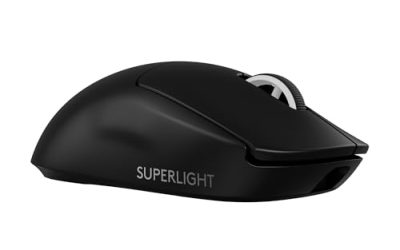
The Superlight 2 approaches DPI differently: G HUB allows independent X and Y axis DPI values, so horizontal turning speed and vertical look speed can be tuned separately at the hardware level before you touch Fortnite’s own X and Y sliders. The HERO 2 sensor ranges up to 44,000 DPI with 888 IPS and 88 G acceleration, and sub-micron tracking keeps low-DPI movements clean, which is where most Fortnite settings live.
At 60 grams with up to 8 kHz LIGHTSPEED reporting and up to 95 hours of battery life, it is built for the wide arm movements of low-sensitivity building and editing. LIGHTFORCE hybrid switches give a consistent click for edit confirmations and shots. Onboard memory stores your DPI stages so the settings travel with the mouse. If you play on more than one setup, or you like separating your turn speed from your vertical aim speed, this is the most configurable option here.
Highlights
Considerations
Razer DeathAdder V3 Pro (ASIN: B0B6XZLNHQ)
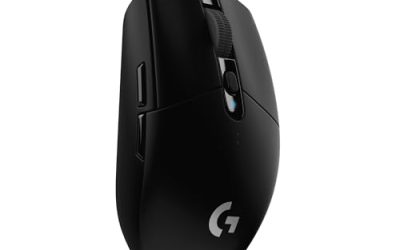
- Best for: palm and relaxed claw players who play long Fortnite sessions.
- Focus Pro 30K sensor with wide, staged DPI adjustment
- Ergonomic shape built for long sessions at 63 grams
- Up to 90 hours of battery life
- Optical switches rated for fast, consistent actuation
palm and relaxed claw players who play long Fortnite sessions.
The DeathAdder V3 Pro is the ergonomic route to a serious Fortnite setting. Its Focus Pro 30K optical sensor provides a wide DPI range with staged adjustment through Razer Synapse, 750 IPS tracking and 70 G acceleration, and the 63 gram right-handed shell supports the palm through long sessions of building, editing and farming where lighter symmetrical mice can leave a fingertip grip aching.
HyperSpeed wireless keeps the desk clear for wide sweeps, HyperPolling up to 8,000 Hz is available with the dongle configuration, and battery life runs to 90 hours. Optical Switches Gen-3 handle the constant click load of edit courses. For players whose Fortnite sensitivity is moderate — neither extreme low nor high — and whose first requirement is that the mouse disappears during a three-hour session, the DeathAdder’s shape is the feature that protects the setting.
Highlights
Considerations
Logitech G305 Lightspeed (ASIN: B07CMS5Q6P)
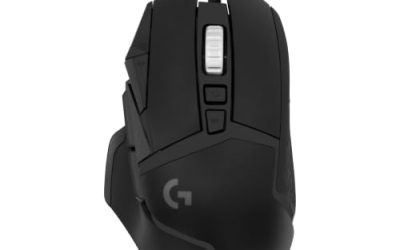
- Best for: players who want two reliable DPI stages and nothing to overthink.
- 200 to 12,000 DPI range covers every sensible Fortnite setting
- Dedicated DPI button cycles programmed stages instantly
- Up to 250 hours on a single AA battery
- LIGHTSPEED wireless with a 1 ms report rate
players who want two reliable DPI stages and nothing to overthink.
The G305 is the straightforward option: a HERO sensor adjustable from 200 to 12,000 DPI, a dedicated DPI button on top that cycles through your programmed stages, and onboard memory for one profile. For Fortnite, that top button is a practical tool — set two stages, one for general play and one lower stage for scoped or long-range moments, and switch deliberately between them rather than mid-fight.
LIGHTSPEED wireless reports at 1 ms, the 99 gram shell is compact and travel-friendly, and a single AA battery runs up to 250 hours in Performance mode, so the mouse is always ready for a session. Six programmable buttons cover the essentials. It lacks the flagship features above — no per-axis DPI, no 1-DPI steps, no 8 kHz polling — but for the 800 DPI setting most Fortnite players actually use, its sensor is accurate, its stages are stable, and its simplicity keeps the focus on the game.
Highlights
Considerations
How to Choose
Choose your setting before you choose your mouse. The working range for Fortnite is 400 to 1,600 DPI, with 800 DPI the most common anchor. Multiply DPI by your in-game sensitivity percentage to get eDPI: 800 DPI at 8 percent X sensitivity gives an eDPI of 64, a middle-of-the-road figure that balances build speed and aim control. Most competitive settings land between an eDPI of roughly 30 for deliberate, low-sensitivity aimers and roughly 100 for fast, high-sensitivity builders.
Then pick the mouse that supports how you tune. If you test settings in tiny increments, 1-DPI steps matter. If you separate turn speed from vertical aim, per-axis DPI or at least in-game X and Y sliders matter. If you are a set-and-forget player, a stable staged mouse such as the G305 is honestly enough, and shape comfort over long sessions — the DeathAdder case — will do more for your aim than any settings feature.
Whatever you choose, the mouse must hold the setting without drift: onboard memory or reliable software profiles, a sensor with tracking headroom far above your hand speed, and no forced smoothing or acceleration in the signal path. All four mice here meet that bar.
Key Specifications Explained
DPI is the hardware sensitivity of the sensor: counts reported per inch of mouse movement. In-game sensitivity is a multiplier applied on top. eDPI, the product of the two, is the only number that lets you compare settings between players using different mice. Two setups with the same eDPI move the view the same amount for the same hand movement, assuming the same field of view settings.
X and Y sensitivity in Fortnite scale horizontal and vertical look speed separately. Many players run Y slightly lower than X to keep vertical aim steadier during builds. Targeting and scope sensitivity multipliers apply when aiming down sights and deserve their own, lower values, because scoped views magnify every movement.
Polling rate is how often the mouse reports position: 1,000 Hz is the long-standing gaming standard, and 8,000 Hz options on the Razer and Logitech flagships report eight times as often. Higher polling smooths fast movement on high-refresh monitors but does not change your eDPI or make a bad setting good. IPS and acceleration ratings describe the sensor’s tracking ceiling; at 750 IPS and above, the sensor will never be the reason a fast build turn loses tracking.
Setup and Settings Tips
Start at 800 DPI with X and Y sensitivity at 8 percent, play several matches, then adjust in steps of half a percent, not five. Change one variable at a time and give each setting a full session; sensitivity is a motor skill and snap judgements measure novelty, not quality. Turn off Windows pointer acceleration and any vendor-software angle snapping so the path from hand to screen stays 1:1.
Set targeting sensitivity lower than your look sensitivity — many players land around half — and do the same for scoped sensitivity, because magnified views amplify shake. If your mouse supports onboard memory, store the final profile on the mouse so a new PC or a software update cannot reset you mid-season.
Keep polling at 1,000 Hz unless your system and monitor genuinely support more, and place wireless receivers close to the mouse. A stuttering connection feels exactly like a sensitivity problem and sends players tuning settings that were never wrong.
Common Mistakes to Avoid
Copying a professional player’s eDPI without their hours is the classic error. Pro settings are tuned to pro muscle memory; a borrowed setting that is far from your natural range will feel wrong for weeks. Use pro ranges as a starting bracket, then tune to your own hand.
The second mistake is chasing high DPI because the number looks advanced. Very high DPI with tiny in-game sensitivity can feel granular and twitchy on the desktop and offers no tracking advantage at Fortnite distances; the sensors here are most comfortable in the ranges real players use. Third, avoid changing sensitivity after every bad fight. Variance is part of the game, and constant changes guarantee you never finish learning any setting. Finally, do not stack adjustments — per-axis DPI in software, X and Y sliders in game, and a DPI shift habit all at once makes your aim impossible to diagnose when it feels off.
FAQ
What DPI do most Fortnite players use?
Most use between 400 and 1,600 DPI, with 800 DPI the most common single choice. Combined with in-game sensitivity, that produces eDPI figures roughly between 30 and 100, balancing fast building turns against controlled aim.
How do I calculate my Fortnite eDPI?
Multiply your mouse DPI by your in-game X sensitivity as a percentage. At 800 DPI and 8 percent sensitivity, eDPI is 64. Use eDPI to compare your setup with other players and to reproduce your setting on a different mouse.
Should X and Y sensitivity be the same in Fortnite?
They do not have to be. Many players set Y slightly lower than X for steadier vertical control while building and editing. Change Y in small steps and test in creative edit courses before taking a new value into ranked play.
Does polling rate change how DPI feels?
Polling rate does not change eDPI, but higher rates report movement more often, which can make fast turns feel smoother on high-refresh monitors. It is a refinement: set your DPI and sensitivity first, then experiment with polling.
Is it bad to switch DPI mid-game?
Deliberate switching between two practised stages, such as a lower stage for scoped shots, can work and is what DPI buttons are for. Random or frequent switching is harmful, because your muscle memory never settles on either setting.
Final Verdict
Set 800 DPI and a considered sensitivity, tune in small steps, and then stop tuning — that method matters more than any hardware. When you do choose hardware for it, the Viper V3 Pro offers the finest DPI control with 1-DPI steps, the Superlight 2 adds per-axis tuning, the DeathAdder V3 Pro protects long sessions with its ergonomic shape, and the G305 keeps two honest stages one button away. Pick the mouse that fits your hand and your tuning style, lock the setting in, and let practice compound.
FAQ
What DPI do most Fortnite players use?
How do I calculate my Fortnite eDPI?
Should X and Y sensitivity be the same in Fortnite?
Does polling rate change how DPI feels?
Is it bad to switch DPI mid-game?
More from Amazon
Programs that pair well with the guide above. Offers and eligibility are set by Amazon and may change.
Free shipping on eligible items, Prime Video and more. Eligible new members can start with a free trial.
Start a Prime free trialAd-free music streaming. Eligible new subscribers can start with a free trial.
Try Music Unlimited freeA Prime membership for ages 18-24 with a trial period. Eligibility is set by Amazon.
See Prime for Young AdultsAudiobooks and podcasts to listen to on the go. Eligible new members can start with a free trial.
Try Audible freeAs an Amazon Associate we earn from qualifying purchases.