Our Short List of 3

- Connection: Bluetooth and Razer HyperSpeed wireless, two wireless modes
- Sensor: Razer 5G advanced optical sensor, up to 18,000 DPI as listed
- Battery life: Up to 950 hours on Bluetooth and up to 425 hours on HyperSpeed wireless as listed
- Power: One AA or AAA battery, as described in product material

- Connection: Bluetooth and Razer HyperSpeed wireless
- Sensor: Razer 5G advanced optical sensor, up to 18,000 DPI as listed
- Controls: Nine programmable controls as listed
- Battery life: Up to 535 hours on Bluetooth and up to 285 hours on HyperSpeed wireless as listed

- Connection: LIGHTSPEED wireless and Bluetooth connectivity, as listed
- Sensor: Up to 8,200 DPI as described in product material
- Lighting: LIGHTSYNC RGB lighting
- Shape: Compact, contoured shape aimed at smaller hands, in White Mist in this listing
All 3 Picks at a Glance
| Product | Specs | Action |
|---|---|---|
| 1. Razer Orochi V2 |
| Check price on Amazon |
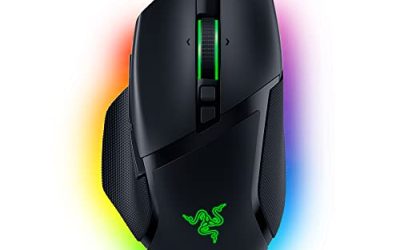
| 2. Razer Basilisk V3 X HyperSpeed |
| Check price on Amazon |
| 4. Logitech G705 |
| Check price on Amazon |
Our Top Picks
- Razer Orochi V2 Wireless Gaming Mouse4.26 x 1.52 inch (Pack of 1)4.26 x 1.52 x 2.47 inches0.13 poundsCheck on Amazon
- Razer Basilisk V3 X HyperSpeed Customizable Wireless GamingStandard5.12 x 2.96 x 1.67 inches0.2 poundsCheck on Amazon
A gaming mouse for an iPad has to clear a hurdle that a gaming mouse for a PC never faces. An iPad has no place for a traditional gaming receiver setup as its main connection, and iPadOS is built around Bluetooth accessories. That single fact reshapes the whole category. The fastest gaming mouse in the world is the wrong mouse for an iPad if it only connects through a USB receiver, because the connection iPad gaming actually depends on is Bluetooth. Every mouse in this guide therefore offers Bluetooth as a real connection mode, not as an afterthought, alongside the sensor performance and battery life that make it a gaming mouse rather than a basic travel mouse.
It also helps to set expectations about what a mouse does on an iPad. Since iPadOS added full pointer support, a Bluetooth mouse gives you a proper cursor for menus, strategy and simulation games, cloud gaming interfaces, remote desktop sessions and the growing set of iPad titles that respond well to pointer input. It also turns the iPad into a far more comfortable light workstation between games, which for many owners is half the reason for buying one. What it does not do is turn every iPad game into a PC shooter. Many touch-first games never use a mouse at all, and support varies by title. The right buying mindset is to choose a mouse that pairs reliably over Bluetooth, lasts a long time between charges or battery changes, and still performs as a proper gaming mouse when you connect it to a PC or laptop through its faster wireless mode.
Quick Picks
- Best overall gaming mouse for iPad: Razer Orochi V2 — Ultra-lightweight and compact, with Bluetooth and HyperSpeed wireless, an 18K DPI optical sensor and up to 950 hours of battery life in Bluetooth mode as listed.
- Best ergonomic pick for long sessions: Razer Basilisk V3 X HyperSpeed — A right-handed ergonomic shape with nine programmable controls, Bluetooth and HyperSpeed wireless, and up to 535 hours in Bluetooth mode as listed.
- Best for battery simplicity: SteelSeries Rival 3 Wireless — Dual 2.4GHz and Bluetooth 5.0 wireless, an 18,000 CPI TrueMove Air sensor and more than 400 hours of battery life as listed, powered by AAA batteries.
- Best compact pick for smaller hands: Logitech G705 — A compact contoured wireless gaming mouse with LIGHTSPEED wireless and Bluetooth connectivity, LIGHTSYNC RGB lighting and an 8,200 DPI sensor as listed in product material.
1. Razer Orochi V2
- Connection: Bluetooth and Razer HyperSpeed wireless, two wireless modes
- Sensor: Razer 5G advanced optical sensor, up to 18,000 DPI as listed
- Battery life: Up to 950 hours on Bluetooth and up to 425 hours on HyperSpeed wireless as listed
- Power: One AA or AAA battery, as described in product material
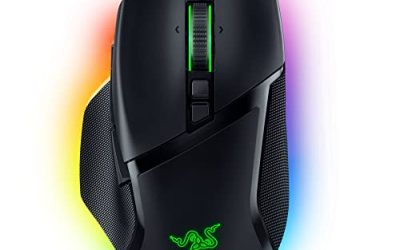
The Orochi V2 was designed for exactly the job this keyword describes: gaming on the move, with more than one machine in your life. Razer lists it as a mobile wireless gaming mouse with two wireless modes, Bluetooth and HyperSpeed wireless. On an iPad, you use the Bluetooth mode, pair once in the iPad Bluetooth settings, and the mouse then behaves as an iPadOS pointer for compatible apps and games. At a desk with a PC or laptop, the HyperSpeed mode and its stored USB receiver give you the lower-latency connection that competitive play prefers. Switching the mouse between tablet and computer life is a mode change, not a new purchase.
The shape is compact and symmetrical, at under 60 grams in its lightest configuration as described in product material, with a 5G advanced optical sensor rated up to 18,000 DPI and second-generation mechanical mouse switches rated for 60 million clicks. In practice, the sensor numbers are well beyond what iPad pointer use needs, which is the point: the same mouse that feels precise and calm on a tablet still has proper gaming headroom on a PC. Small-handed players and fingertip and claw grip users will find the short, light shell easiest to live with. Strict palm-grip players with large hands may find it small during long desk sessions, and that is the main reason to consider the Basilisk below instead.
For iPad owners specifically, the Orochi V2 is the easiest recommendation in this guide. It is light enough to live in the same sleeve as the tablet, frugal enough to forget about power, and serious enough that it does not feel like a compromise mouse when the iPad is docked next to a computer.
Specifications
Pros
Cons
Check the Razer Orochi V2 on Amazon
2. Razer Basilisk V3 X HyperSpeed
- Connection: Bluetooth and Razer HyperSpeed wireless
- Sensor: Razer 5G advanced optical sensor, up to 18,000 DPI as listed
- Controls: Nine programmable controls as listed
- Battery life: Up to 535 hours on Bluetooth and up to 285 hours on HyperSpeed wireless as listed
If the Orochi V2 is the travel answer, the Basilisk V3 X HyperSpeed is the desk answer. This is a larger, right-handed ergonomic gaming mouse with the sculpted shape and thumb support that the Basilisk line is known for, built for players who rest their whole hand on the mouse and play for hours. It connects by Bluetooth and by HyperSpeed wireless, so the iPad story is the same as the Orochi: pair over Bluetooth for tablet use, then use the faster wireless mode with a computer when you sit down at a desk.
Choose the Basilisk V3 X HyperSpeed if your hand is medium to large and you prefer an ergonomic shape. Leave it aside if you travel light, because its size suits a desk, not a tablet sleeve.
Specifications
Pros
Cons
Check the Razer Basilisk V3 X HyperSpeed on Amazon
3. SteelSeries Rival 3 Wireless
The Rival 3 Wireless takes a different route to the same destination, and for some iPad owners it will be the most practical route of all. SteelSeries describes Quantum 2.0 dual wireless technology with two connection types: 2.4GHz wireless through its micro dongle and Bluetooth 5.0. The Bluetooth side is what the iPad uses, and Bluetooth 5.0 pairing with iPadOS is a standard, receiver-free process. The 2.4GHz side keeps the mouse ready for a laptop or PC, where the dongle can live in a port or in a hub at a desk.
Power is where this mouse makes its case. The listing describes more than 400 hours of battery life and a design that runs on AAA batteries, with two AAA batteries included in the box contents described in product material. There is no charging cable routine at all. When the batteries eventually run down, a swap takes seconds and the mouse is back in use, which suits an iPad that lives on a coffee table, in a classroom or in a work bag rather than at a single desk with a charger always nearby. Owners who prefer rechargeable devices on principle should weigh that preference honestly, because this mouse commits fully to replaceable cells.
For iPad gaming centred on strategy, simulation, cloud services and everyday pointer use, the Rival 3 Wireless offers the calmest ownership story in this guide: pair it once, use it for months, and change two small batteries when needed.
Specifications
- Connection: 2.4GHz wireless through a micro dongle and Bluetooth 5.0, as listed
- Sensor: TrueMove Air optical sensor, up to 18,000 CPI as listed
- Battery life: More than 400 hours as described in the listing
- Power: AAA batteries, with two AAA batteries listed in the box contents
- Switches: Rated for 60 million clicks as described in the listing title
- Box contents in product material: Rival 3 Wireless mouse, batteries, micro dongle and installation guide
Pros
- Bluetooth 5.0 pairs with an iPad without any receiver
- Very long battery life with a quick battery swap when power runs out
- Neutral symmetrical shape suits many hand sizes and shared use
- Dongle mode keeps it ready for laptop and PC gaming
Cons
- Replaceable batteries will not suit owners who want a rechargeable mouse
- No RGB lighting, for buyers who want a lit desk setup
- Symmetrical shape offers less palm and thumb support than an ergonomic mouse
Check the SteelSeries Rival 3 Wireless on Amazon
4. Logitech G705
- Connection: LIGHTSPEED wireless and Bluetooth connectivity, as listed
- Sensor: Up to 8,200 DPI as described in product material
- Lighting: LIGHTSYNC RGB lighting
- Shape: Compact, contoured shape aimed at smaller hands, in White Mist in this listing
The G705 brings a different personality to an iPad setup. It is a compact wireless gaming mouse from Logitech G Aurora Collection, with a contoured shape designed for smaller hands, LIGHTSYNC RGB lighting, LIGHTSPEED wireless and Bluetooth connectivity. The Bluetooth connection is the one the iPad uses, and it makes the G705 a natural partner for an iPad that already lives in a soft, portable setup: a tablet on a stand, a compact keyboard for longer sessions, and a small mouse that does not dominate the bag or the table.
Product material describes an 8,200 DPI sensor for this mouse. That figure is lower than the headline numbers on the Razer and SteelSeries mice above, and for iPad use it is not a practical limitation. Pointer movement on a tablet screen needs smooth, predictable tracking far more than extreme sensitivity, and 8,200 DPI provides a wide adjustment range for both tablet and computer use. Where the G705 asks for a trade-off is endurance: as a rechargeable LIGHTSYNC mouse with lighting, it is built around regular charging rather than the multi-hundred-hour battery stories of the AA and AAA mice in this guide. Owners who already charge an iPad and a keyboard will find one more cable routine easy to accept, while owners who hate charging should choose the Orochi V2 or the Rival 3 Wireless instead.
Choose the G705 if your hands are smaller, your iPad setup is compact and design matters alongside function. Choose one of the battery mice above if the iPad travels for weeks at a time without a charger nearby.
Specifications
Pros
Cons
Check the Logitech G705 on Amazon
How to Choose a Gaming Mouse for iPad
Begin with the connection, and be strict about it. For an iPad, Bluetooth is the essential mode, because iPadOS pointer support is built around Bluetooth accessories and there is no standard USB port for a gaming receiver on most iPad setups. A mouse that lists only a 2.4GHz receiver connection should be treated as a computer mouse, not an iPad mouse, whatever its gaming credentials are. Every mouse in this guide lists Bluetooth clearly, and that is the first line to verify on any listing you consider outside this guide.
Next, think about how the iPad is actually used. A travel iPad in a sleeve rewards a compact, light mouse with very long battery life, because the mouse is carried constantly and used in short sessions. A desk-based iPad on a stand rewards an ergonomic shape, because sessions are longer and comfort compounds. A shared household iPad rewards a simple symmetrical mouse that anyone can pick up. Match the shape to the setting before comparing sensor numbers, because you will feel the shape in every session and the sensor ceiling in almost none.
Then set honest expectations for games. Check whether the iPad games you play support a pointer well. Strategy, simulation, point-and-click and many cloud gaming and remote play interfaces respond nicely to a mouse. Touch-first arcade and rhythm titles may ignore it entirely. iPadOS settings for pointer speed, scrolling direction and button assignments through AssistiveTouch are worth exploring after pairing, because small adjustments there change the feel of any mouse more than a model swap usually does. Finally, if the mouse will also serve a PC or laptop, confirm that its faster wireless mode and software support match that machine, so the dual-purpose promise in the listing becomes true in your home.
FAQs
Can any gaming mouse work with an iPad?
No. An iPad gaming mouse needs Bluetooth, because iPadOS pointer support works with Bluetooth accessories. A mouse that connects only through a USB receiver is designed for a computer. Always confirm that Bluetooth appears in the connection specifications on the listing before buying a mouse for an iPad.
How do I pair a Bluetooth gaming mouse with an iPad?
Put the mouse in its Bluetooth mode and into pairing mode following its instructions, then open the iPad Bluetooth settings and select the mouse when it appears. Once paired, the iPad shows a pointer when the mouse moves. Pointer speed and related options can be adjusted in the iPad settings, and additional button behaviour can be explored through AssistiveTouch.
Will a mouse make iPad games play like PC games?
Not by itself. A mouse gives you a precise pointer for games and apps that support it, including many strategy, simulation and cloud gaming experiences. Games designed only for touch may not use a mouse at all. The mouse improves the titles that welcome it and makes general iPad navigation more comfortable, but support always depends on the individual game.
Is Bluetooth responsive enough for gaming on an iPad?
For the kinds of gaming an iPad does well, yes. Bluetooth pointer input on iPadOS is designed for everyday interaction and suits strategy, simulation, adventure and cloud gaming interfaces. Players who also game on a PC should use the mouse faster 2.4GHz mode there, which is why every mouse in this guide offers both connections.
Should I choose a rechargeable mouse or one with replaceable batteries?
Choose replaceable batteries for the longest runtime and the least charging discipline, which suits travel and shared iPads. Choose a rechargeable mouse if you prefer not to keep spare batteries and your iPad already charges at a regular desk or bedside spot. Both approaches are well proven, so let your routine decide.
Conclusion
The best gaming mouse for iPad is a Bluetooth gaming mouse first and a spec sheet second. The Razer Orochi V2 is the strongest all-round choice, pairing compact travel size with Bluetooth, a serious gaming sensor and battery life measured in hundreds of hours. The Razer Basilisk V3 X HyperSpeed suits larger hands and longer desk sessions shared between an iPad and a PC. The SteelSeries Rival 3 Wireless offers the simplest long-life battery story with Bluetooth 5.0 and a neutral shape. The Logitech G705 is the compact, design-led pick for smaller hands and a tidy tablet setup. Pair the mouse you choose in the iPad Bluetooth settings, adjust the pointer speed to taste, and check that your favourite games support pointer input before expecting a PC-style experience from them.
As an Amazon Associate, we earn from qualifying purchases.
FAQ
Can any gaming mouse work with an iPad?
How do I pair a Bluetooth gaming mouse with an iPad?
Will a mouse make iPad games play like PC games?
Is Bluetooth responsive enough for gaming on an iPad?
Should I choose a rechargeable mouse or one with replaceable batteries?
More from Amazon
Programs that pair well with the guide above. Offers and eligibility are set by Amazon and may change.
Free shipping on eligible items, Prime Video and more. Eligible new members can start with a free trial.
Start a Prime free trialAd-free music streaming. Eligible new subscribers can start with a free trial.
Try Music Unlimited freeA Prime membership for ages 18-24 with a trial period. Eligibility is set by Amazon.
See Prime for Young AdultsAudiobooks and podcasts to listen to on the go. Eligible new members can start with a free trial.
Try Audible freeAs an Amazon Associate we earn from qualifying purchases.