Our Short List of 3

- Best for: Desktop gamers who also want one premium mouse paired to a laptop over Bluetooth.
- Sensor: Razer Focus Pro 30K optical sensor, tracks on glass
- Connectivity: Razer HyperSpeed 2.4 GHz, Bluetooth and wired USB-C
- Switches: Razer Optical Mouse Switches Gen-3, rated for 90 million clicks
- Scroll wheel: HyperScroll tilt wheel with free-spin and tactile modes

- Best for: Players who swap daily between a gaming desktop and a work or study laptop.
- Sensor: HERO 25K optical sensor, up to 25,600 DPI
- Connectivity: LIGHTSPEED 2.4 GHz USB receiver and Bluetooth
- Switches: LIGHTFORCE hybrid optical-mechanical switches
- Battery: 1 AA battery, 300+ hours of continuous use

- Best for: Laptop gamers and travellers who want a real gaming mouse that disappears into a bag.
- Sensor: Razer 5G Advanced optical sensor, up to 18,000 DPI
- Connectivity: Razer HyperSpeed 2.4 GHz and Bluetooth
- Weight: under 60 g excluding the battery
- Battery: 1 AA or AAA battery, up to 950 hours on Bluetooth and up to 425 hours on HyperSpeed
All 4 Picks at a Glance
| Product | Specs | Action |
|---|---|---|
| Razer Basilisk V3 Pro |
| Check price on Amazon |
| Logitech G309 LIGHTSPEED |
| Check price on Amazon |
| Razer Orochi V2 |
| Check price on Amazon |
 Razer Basilisk V3 X HyperSpeed |
| Check price on Amazon |
Our Top Picks
- Razer Orochi V2 Wireless Gaming Mouse4.26 x 1.52 inch (Pack of 1)4.26 x 1.52 x 2.47 inches0.13 poundsCheck on Amazon
- Razer Basilisk V3 X HyperSpeed Customizable Wireless GamingStandard5.12 x 2.96 x 1.67 inches0.2 poundsCheck on Amazon
Buying a Bluetooth gaming mouse is really a decision about how you connect, not how fast the sensor is. Most wireless gaming mice still ship with a USB dongle only, so the moment you want to pair with a laptop, tablet or handheld that has no free port, they are useless. The real question is whether Bluetooth will be your main link, or a second mode while a 2.4 GHz receiver does the serious gaming work.
This guide is for laptop gamers who play away from a desk, desk users who split one mouse between a gaming PC and a work machine, and anyone tired of giving up a USB port to a receiver. Every pick below was chosen from Amazon listings that state Bluetooth in their connectivity details, and every specification quoted comes from those product pages.
Quick Picks
As an Amazon Associate we earn from qualifying purchases.
| Product | Best for | Key spec from title |
|---|---|---|
| Razer Basilisk V3 Pro | Full-featured gaming plus a Bluetooth second device | Focus Pro 30K sensor, 3 connection modes |
| Logitech G309 LIGHTSPEED | Moving between a gaming PC and a laptop | HERO 25K sensor, 300+ hour battery life |
| Razer Orochi V2 | Travel and smaller hands | Under 60 g, up to 950 hours on Bluetooth |
| SteelSeries Rival 3 Wireless | Simple dual wireless with very long battery life | TrueMove Air 18,000 CPI, 400+ hour battery |
| Razer Basilisk V3 X HyperSpeed | Ergonomic shape on a replaceable battery | 5G Advanced 18K sensor, up to 535 hours on Bluetooth |
How to Choose
Decide whether Bluetooth is the main link or the backup
Bluetooth and 2.4 GHz wireless behave differently, and a good purchase starts with knowing which one you will actually game on. A USB receiver connection polls far more often and feels identical to a wired mouse in shooters. Bluetooth polls less frequently, which most players notice as a slight softness in fast flicks, but it needs no dongle and pairs with almost anything. If your laptop is your only machine, Bluetooth can carry casual and mid-paced games happily. If you play competitive titles, treat Bluetooth as the convenience mode and the receiver as the gaming mode.
Look for a genuine second mode, not Bluetooth alone
The strongest picks in this category are dual-mode or tri-mode mice: a low-latency 2.4 GHz receiver for the gaming PC, Bluetooth for the laptop or tablet, and on some models a wired USB-C mode that also charges the battery. One mouse then covers your whole setup and never leaves you stuck when a battery dies mid-session. A Bluetooth-only mouse can still make sense for travel, but check the listing carefully, because plenty of mice advertised as wireless have no Bluetooth at all and cannot pair with a tablet or a port-starved ultrabook.
Match the battery system to your routine
Battery design quietly decides how a mouse fits your life. Rechargeable models with USB-C are convenient at a fixed desk but need a cable routine. Mice that run on a single AA or AAA cell trade that convenience for enormous runtimes, often hundreds of hours in Bluetooth mode, and a dead battery becomes a ten-second swap instead of a charging break. Note that the headline battery figure almost always belongs to Bluetooth mode; the faster receiver mode drains the same battery noticeably sooner, so compare like-for-like figures between listings.
Keep gaming standards for sensor, switches and shape
Bluetooth on the box does not excuse office-grade hardware underneath. Check that the listing names a gaming sensor with high tracking speed, switches with a stated click lifespan, and enough programmable buttons for your games. Shape matters just as much: a compact travel mouse that suits a fingertip grip will cramp a large palm-grip hand over a long session, and a big ergonomic shell feels clumsy in a laptop bag. Match the shell size and grip style to your hand first, then let the connection options settle the final choice.
The 5 Best Options
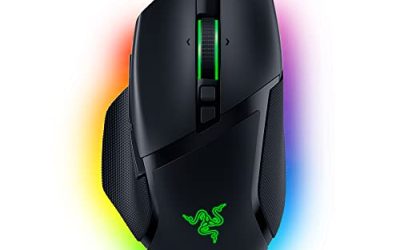
Razer Basilisk V3 Pro
- Best for: Desktop gamers who also want one premium mouse paired to a laptop over Bluetooth.
- Sensor: Razer Focus Pro 30K optical sensor, tracks on glass
- Connectivity: Razer HyperSpeed 2.4 GHz, Bluetooth and wired USB-C
- Switches: Razer Optical Mouse Switches Gen-3, rated for 90 million clicks
- Scroll wheel: HyperScroll tilt wheel with free-spin and tactile modes
Desktop gamers who also want one premium mouse paired to a laptop over Bluetooth.
The highest polling rates need a separate HyperPolling dongle or dock, and the big shell is a poor match for small hands.
The Basilisk V3 Pro is the pick for players who want Bluetooth as one mode inside a complete flagship package rather than as the whole product. Its tri-mode setup covers a gaming PC on HyperSpeed, a laptop on Bluetooth and a wired USB-C connection for charging while you play. The Focus Pro 30K sensor tracks even on glass, the HyperScroll wheel switches between free-spin and tactile steps, and the thumb cluster suits players who bind a lot of abilities. It is a large right-handed mouse, so it rewards palm and claw grips on medium to large hands.
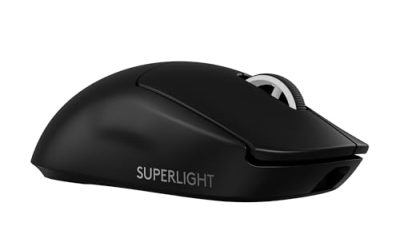
Logitech G309 LIGHTSPEED
- Best for: Players who swap daily between a gaming desktop and a work or study laptop.
- Sensor: HERO 25K optical sensor, up to 25,600 DPI
- Connectivity: LIGHTSPEED 2.4 GHz USB receiver and Bluetooth
- Switches: LIGHTFORCE hybrid optical-mechanical switches
- Battery: 1 AA battery, 300+ hours of continuous use
Players who swap daily between a gaming desktop and a work or study laptop.
There is no wired mode, so a flat battery means a battery swap, and the POWERPLAY mat that enables battery-free use is sold separately.
The G309 exists for the two-computer desk. Leave the LIGHTSPEED receiver in your gaming PC, pair Bluetooth to your laptop, and a switch on the underside moves the mouse between them in a second. The HERO 25K sensor is a genuine gaming sensor rather than a travel-mouse compromise, and the LIGHTFORCE hybrid switches pair optical actuation with a mechanical click feel. Because it runs on a single AA battery, it stays light and runs for months, and a POWERPLAY mat removes the battery from the equation entirely.
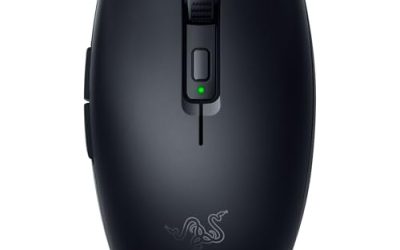
Razer Orochi V2
- Best for: Laptop gamers and travellers who want a real gaming mouse that disappears into a bag.
- Sensor: Razer 5G Advanced optical sensor, up to 18,000 DPI
- Connectivity: Razer HyperSpeed 2.4 GHz and Bluetooth
- Weight: under 60 g excluding the battery
- Battery: 1 AA or AAA battery, up to 950 hours on Bluetooth and up to 425 hours on HyperSpeed
Laptop gamers and travellers who want a real gaming mouse that disappears into a bag.
The small shell will feel cramped for palm grips and large hands, and there is no wired fallback if the battery dies.
The Orochi V2 is built around the laptop bag. It weighs under 60 grams before the battery goes in, pairs over Bluetooth with whatever machine you open at a cafe or on a train, and still carries a HyperSpeed receiver in its shell for proper low-latency play when you sit down to game. Battery life is its headline trick: a single AA or AAA cell lasts up to 950 hours over Bluetooth, so it can go months between swaps. The compact symmetrical shape suits fingertip and claw grips and smaller hands best.
SteelSeries Rival 3 Wireless
The Rival 3 Wireless keeps the formula simple: two wireless modes, a gaming-grade TrueMove Air sensor and battery life measured in hundreds of hours. Quantum 2.0 wireless handles gaming through the USB receiver, Bluetooth 5.0 covers laptops and tablets, and the mouse remembers which job each connection is for. It skips the extra buttons and lighting zones of flagship models, which keeps things simple. For players who want one dependable mouse for a PC and a second device without configuring much, this is the straightforward option.
Specs
- Sensor: TrueMove Air optical sensor, 18,000 CPI
- Connectivity: Quantum 2.0 Wireless 2.4 GHz and Bluetooth 5.0
- Battery life: 400+ hours
- Switches: mechanical switches rated for 60 million clicks
- Model: 62521
Best for: Players who want long battery life and dual wireless without flagship complexity.
Watch out for: There is no wired mode and the button count is basic, so heavy macro users should look at the Basilisk models instead.
ASIN: B08GB2PF71
Razer Basilisk V3 X HyperSpeed
- Best for: Palm-grip players who want a full-size ergonomic mouse for gaming and a second device.
- Sensor: Razer 5G Advanced optical sensor, up to 18,000 DPI
- Connectivity: Razer HyperSpeed 2.4 GHz and Bluetooth
- Switches: Razer Mechanical Mouse Switches Gen-2
- Controls: 9 programmable controls with Chroma RGB
Palm-grip players who want a full-size ergonomic mouse for gaming and a second device.
It cannot be used wired, and the AA battery makes it heavier than rechargeable rivals of a similar size.
The Basilisk V3 X HyperSpeed takes the ergonomic Basilisk shape and strips it back to the essentials: dual-mode wireless, a proven 18K sensor and a single AA battery that lasts up to 535 hours on Bluetooth. You keep the thumb rest, the extra programmable controls and the right-handed shape that make the family comfortable for long sessions, but you give up the tilt wheel and the rechargeable battery of the Pro model. It suits palm-grip players who want a full-size mouse for both a gaming rig and a laptop, with no charging cable in the routine.
Which One Fits Your Situation
You game on a desktop and work on a laptop
Choose between the Basilisk V3 Pro and the G309. Both keep a low-latency receiver in the gaming PC and hold a Bluetooth pairing for the laptop, so switching machines takes one button press. The Razer brings more buttons, the tilt wheel and RGB; the Logitech is lighter, simpler and runs far longer on its AA battery.
You play on a laptop and travel with your setup
The Orochi V2 is the natural fit. It is small enough for a laptop sleeve, light enough to forget, and its Bluetooth runtime is measured in months rather than days. The stored HyperSpeed receiver covers hotel-desk gaming sessions where you want full responsiveness, so you are not giving up serious play for portability.
You want to forget about batteries almost entirely
Look at the Rival 3 Wireless or the Basilisk V3 X HyperSpeed. Both run on replaceable cells with Bluetooth runtimes in the hundreds of hours, so a spare AA or AAA in the drawer replaces any charging habit. The SteelSeries is the simpler, lighter mouse; the Razer adds the ergonomic shape and extra programmable controls.
You have large hands and use a palm grip
Start with the two Basilisk models. The V3 Pro adds the tilt wheel, optical switches and wired charging for a permanent desk, while the V3 X keeps the same general shape and thumb rest with a simpler dual-mode setup and a replaceable battery. The Orochi V2 and other compact mice will feel too small for this grip.
Common Mistakes
- Assuming every wireless gaming mouse has Bluetooth, when many popular models are receiver-only and cannot pair with a tablet or ultrabook.
- Gaming over Bluetooth in fast competitive shooters and blaming the mouse, instead of switching to the included 2.4 GHz receiver for play.
- Comparing battery figures across modes, when the longest runtime on a listing almost always refers to Bluetooth rather than the gaming connection.
- Forgetting that a desktop PC may have no Bluetooth radio built in, so the receiver mode or an adapter becomes the only way to connect.
- Choosing by sensor numbers alone and ignoring shell size, so a travel mouse ends up cramping a large hand through long sessions.
Frequently Asked Questions
Is Bluetooth fast enough for gaming?
For slower-paced games, strategy titles, RPGs and everyday play, Bluetooth feels perfectly responsive. For fast competitive shooters, the lower polling rate is noticeable in quick flicks. That is why every mouse in this guide also carries a 2.4 GHz receiver mode: use Bluetooth for convenience and the receiver when the match matters.
What is the difference between Bluetooth and the 2.4 GHz mode?
The 2.4 GHz mode uses a small USB receiver and a gaming-focused radio link with lower latency and a higher polling rate, which is what you want for play. Bluetooth uses the radio already built into laptops, tablets and handhelds, needs no receiver and usually runs far longer on the same battery, but reports the pointer position less often.
Can one Bluetooth gaming mouse connect to several devices?
Most dual-mode mice hold one Bluetooth pairing and one receiver connection, and you switch between them with a button or a slider underneath. That covers the common two-machine desk. Mice that store several Bluetooth pairings at once exist but are less common in gaming lines, so check the listing if you need three devices rather than two.
Do Bluetooth gaming mice work with Macs, tablets and handhelds?
Generally yes, because Bluetooth pairing does not depend on gaming software. The mouse will move the pointer and click on macOS, iPadOS, Android and handheld PCs once paired. Away from a Windows PC you may lose the configuration app, so set button remaps and lighting on a PC first and store them on the mouse where onboard memory is offered.
FAQ
Is Bluetooth fast enough for gaming?
What is the difference between Bluetooth and the 2.4 GHz mode?
Can one Bluetooth gaming mouse connect to several devices?
Do Bluetooth gaming mice work with Macs, tablets and handhelds?
More from Amazon
Programs that pair well with the guide above. Offers and eligibility are set by Amazon and may change.
Free shipping on eligible items, Prime Video and more. Eligible new members can start with a free trial.
Start a Prime free trialAd-free music streaming. Eligible new subscribers can start with a free trial.
Try Music Unlimited freeA Prime membership for ages 18-24 with a trial period. Eligibility is set by Amazon.
See Prime for Young AdultsAudiobooks and podcasts to listen to on the go. Eligible new members can start with a free trial.
Try Audible freeAs an Amazon Associate we earn from qualifying purchases.