Our Short List of 3

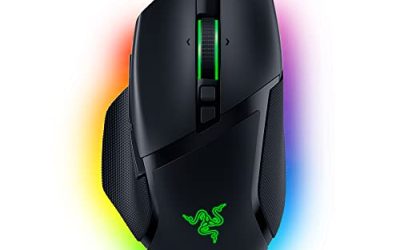
- Best for: Players who want a proven, neutral shape and strong software support at a genuinely low weight.
- Weight: 60g
- Sensor: HERO 2, up to 44,000 DPI
- Report rate: 8 kHz
- Switches: LIGHTFORCE hybrid optical-mechanical

- Best for: Players who want a light mouse that also pairs with a second machine over Bluetooth.
- Weight: 61g
- Sensor: HyperX 26K, up to 26,000 DPI
- Battery: up to 100 hours
- Connectivity: 2.4GHz wireless and Bluetooth

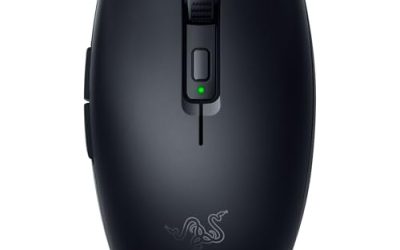
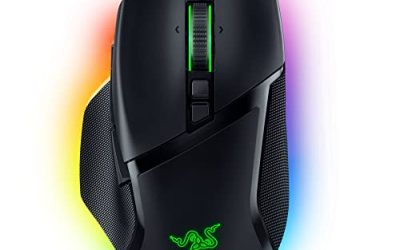
- Best for: Palm and relaxed claw players with larger hands who want ergonomic support at a low weight.
- Weight: 63g
- Sensor: Razer Focus Pro 30K optical
- Switches: Razer Optical Mouse Switches Gen-3
- Wireless: HyperSpeed Wireless
All 3 Picks at a Glance
| Product | Specs | Action |
|---|---|---|
| Logitech G PRO X SUPERLIGHT 2 |
| Check price on Amazon |
| HyperX Pulsefire Haste 2 Wireless |
| Check price on Amazon |
| Razer DeathAdder V3 Pro |
| Check price on Amazon |
Our Top Picks
- Logitech G Pro X Superlight 2 Lightspeed WirelessClassic1.57 x 2.5 x 4.92 inches0.1 poundsCheck on Amazon
Pros & cons
- 95-hour battery life reduces how often you need to charge
- 60-gram weight suits fast, low-effort mouse movement
- HERO 2 sensor tracks up to 44,000 DPI with no smoothing
- POWERPLAY wireless charging pad is sold separately
- Premium features add a more complex setup than basic mice
- Razer DeathAdder V3 Pro Wireless Gaming Mouse1000 Hz5.01 x 2.65 x 1.69 inches0.1 poundsCheck on Amazon
Choosing a lightweight gaming mouse is really a decision about how much mass your wrist has to start and stop thousands of times a session. A few grams sound trivial on a spec sheet, yet the gap between a 54 gram shell and a 63 gram shell changes how a low-sensitivity arm swipe feels in the third hour of play, and it decides whether fingertip aim stays crisp or turns heavy.
This guide is for FPS players who flick and stop on a dime, for claw and fingertip grips that punish bulky shells, and for palm players who want less weight without giving up an ergonomic shape. Every mouse below was chosen from its Amazon listing title and stated specifications, and the weight quoted is the figure the maker prints there, so you can compare like with like before anything else.
Quick Picks
As an Amazon Associate we earn from qualifying purchases.
| Product | Best for | Key spec from title |
|---|---|---|
| Razer Viper V3 Pro | Fingertip and claw FPS players chasing the lowest weight | 54g, Focus Pro 35K sensor, 8K polling |
| Logitech G PRO X SUPERLIGHT 2 | Players who want a safe, rounded shape at 60 grams | 60g, HERO 2 sensor at 44K DPI, 8 kHz report rate |
| HyperX Pulsefire Haste 2 Wireless | Players who also pair a mouse with a laptop or second PC | 61g, HyperX 26K sensor, up to 100 hours of battery |
| Razer DeathAdder V3 Pro | Palm-grip players who want an ergonomic shape that stays light | 63g ergonomic shell, Focus Pro 30K sensor, 90 hour battery |
How to Choose
Start with the gram figure, not the marketing word
Lightweight has no industry definition, so go by the number printed in the listing title. The mice here run from 54 grams to 63 grams, and that spread is easy to feel: the lightest models suit fingertip and claw players who make constant micro-corrections, while the low sixties still count as light for a full ergonomic shell. If a listing hides the weight or quotes it without the cable for a wired model, treat that as a warning sign and check the specification table on the same page before trusting the headline claim.
Match the shape to your grip before the sensor
A symmetrical shell and an ergonomic shell can weigh the same and still suit opposite hands. Symmetrical mice like the Viper V3 Pro and the PRO X SUPERLIGHT 2 let claw and fingertip players pull the mouse into the fingers from either side, while the DeathAdder V3 Pro fills the palm and supports the hand during long sessions. Measure your hand, note your grip honestly, and only then compare sensors, because a shape that fights your grip will feel slow no matter how little the mouse weighs.
Weigh polling rate against battery life
High polling is the quiet trade-off in this class. Listings here quote up to 8K polling on the flagship models, but that rate is delivered over a special dongle or a wired link on several of them, and it drains a battery far faster than the standard setting used for the headline battery figure. Decide whether your monitor and games can even show the benefit. For most players a stable standard polling rate with a battery that lasts the week beats a headline number that needs charging every few days.
Know where light mice cut their corners
Grams come out somewhere. Makers shave weight with thinner shells, smaller batteries, fewer buttons and simpler scroll wheels, and some models drop Bluetooth or onboard extras entirely. The listings here show the pattern: five or six controls instead of eleven, no tilt wheel, and charging over USB-C rather than a dock. None of that is a flaw if you play shooters, but a player who also needs media controls or multi-device pairing should read the button count and connectivity lines of the title carefully before ordering.
The 4 Best Options
Razer Viper V3 Pro
At 54 grams this is the lightest mouse in the guide, and the symmetrical shell is built for players who steer with their fingers rather than their whole hand. The listing pairs that weight with a Focus Pro 35K optical sensor, true 8K polling support and Gen-3 optical switches, which is the full competitive checklist in one body. Battery life is quoted at up to 95 hours, unusually strong for this class. It suits ranked FPS players who want the least possible mass between their hand and a flick shot.
Specs
- Weight: 54g (black version, as listed)
- Sensor: Razer Focus Pro 35K optical
- Polling: up to 8K wireless polling
- Switches: Razer Optical Mouse Switches Gen-3
- Controls: 8 programmable buttons
- Battery: up to 95 hours
- Model: RZ01-05120100-R3U1
Best for: Competitive FPS players with a fingertip or claw grip who want the lightest shell here.
Watch out for: The 8K polling figure depends on settings and drains the battery much faster than the mode behind the 95 hour figure; the white version is a separate listing at 55g, so confirm the colour variant before ordering.
ASIN: B0CW25XR5R
Logitech G PRO X SUPERLIGHT 2
- Best for: Players who want a proven, neutral shape and strong software support at a genuinely low weight.
- Weight: 60g
- Sensor: HERO 2, up to 44,000 DPI
- Report rate: 8 kHz
- Switches: LIGHTFORCE hybrid optical-mechanical
Players who want a proven, neutral shape and strong software support at a genuinely low weight.
Reaching the 8 kHz report rate needs the right receiver setup, and the five-button layout leaves nothing spare for games that want extra binds; confirm the colour, because black and white are separate ASINs.
Logitech’s entry lands at 60 grams with a conservative symmetrical shape that offends almost no grip style, which is why it is the default recommendation for players unsure about shape. The listing quotes a HERO 2 sensor at 44K DPI, an 8 kHz report rate and LIGHTFORCE hybrid switches, plus USB-C charging, which older generations lacked. Five programmable buttons keep the shell clean and light. It fits players who want one dependable mouse for several shooters rather than a specialist tool tuned to a single grip.
HyperX Pulsefire Haste 2 Wireless
- Best for: Players who want a light mouse that also pairs with a second machine over Bluetooth.
- Weight: 61g
- Sensor: HyperX 26K, up to 26,000 DPI
- Battery: up to 100 hours
- Connectivity: 2.4GHz wireless and Bluetooth
Players who want a light mouse that also pairs with a second machine over Bluetooth.
Do not confuse it with the wired Haste 2, which is a different, lighter listing at 53g, or with the Core version, which uses a different sensor; check the exact model name on the page.
The Haste 2 Wireless weighs 61 grams and adds something the two flagships above skip: dual wireless connectivity, so it can run on its 2.4GHz dongle for play and pair over Bluetooth with a laptop for everything else. The listing quotes the HyperX 26K sensor and up to 100 hours of battery life, the longest figure in this guide. Its solid shell avoids the dust-collecting holes of older ultralights. It suits players who split time between a gaming desk and a work machine and want one light mouse for both.
Razer DeathAdder V3 Pro
- Best for: Palm and relaxed claw players with larger hands who want ergonomic support at a low weight.
- Weight: 63g
- Sensor: Razer Focus Pro 30K optical
- Switches: Razer Optical Mouse Switches Gen-3
- Wireless: HyperSpeed Wireless
Palm and relaxed claw players with larger hands who want ergonomic support at a low weight.
The shape is right-handed only, and the fastest polling options rely on a separate HyperPolling dongle on some listings, so check what is actually in the box on the variant you choose.
Most ultralights are small symmetrical shells, and this is the exception: a full ergonomic shape that supports a palm grip while still weighing 63 grams. The listing quotes a Focus Pro 30K optical sensor, Gen-3 optical switches, HyperSpeed wireless and up to 90 hours of battery. Five programmable buttons keep the focus on aim rather than binds. It is the natural pick for players with medium or large hands who found the other mice here too small or too flat, and who play long sessions where a supported palm matters more than the last few grams.
Which One Fits Your Situation
You play tactical shooters with a fingertip grip
Take the Razer Viper V3 Pro. At 54 grams it asks the least of your fingers during constant micro-adjustments, and its symmetrical shell does not force a palm position. The 8K polling support is there if your setup can use it, while the standard settings still return a long battery figure for everyday ranked play.
You want one safe recommendation for any shooter
Choose the Logitech G PRO X SUPERLIGHT 2. The 60 gram shell and neutral shape work across grips and hand sizes, the HERO 2 sensor is beyond reproach on paper, and USB-C charging removes the old cable annoyance. It is the pick least likely to be returned over shape, which matters more than a few grams either way.
Your mouse has to earn its keep at work too
The HyperX Pulsefire Haste 2 Wireless is the practical choice. Bluetooth pairing lets it live with a laptop during the day, the dongle takes over for gaming at night, and the quoted 100 hour battery means charging rarely interrupts either job. The solid shell also shrugs off a commute better than a perforated design.
Light mice usually feel too small in your hand
Go with the Razer DeathAdder V3 Pro. Its ergonomic shell fills the palm and supports longer sessions, yet at 63 grams it still moves like a lightweight. Players with larger hands who rest their whole hand on the mouse will give up the least here, and the 90 hour battery keeps it out of the charging cable routine.
Common Mistakes
- Comparing weights quoted differently, such as a wired mouse listed without its cable against a wireless mouse with its battery fitted.
- Buying the lightest shell available when your palm grip actually needs a taller, supportive shape.
- Turning on the highest polling rate permanently, then blaming the mouse when the battery drains in days.
- Assuming a higher maximum DPI figure means better aim, when shape and weight decide far more.
- Ordering a colour or edition variant without checking that its ASIN and listed weight match the version you read about.
Frequently Asked Questions
How light should a gaming mouse be?
For most players the useful range sits between about 50 and 70 grams, and every mouse in this guide falls inside it. Below that band, shells can start to feel hollow and harder to stop precisely. Your grip matters more than the last few grams, so treat weight as a filter, then decide on shape.
Does a lighter mouse really improve aim?
It reduces the effort needed to start and stop a movement, which many players feel as cleaner flicks and less fatigue late in a session. It does not fix sensitivity settings or technique. Players who make large arm swipes tend to notice the change most, while high-sensitivity wrist players may feel little difference at all.
Is wireless fast enough for competitive play?
On the flagship wireless systems listed here, yes, the connection is not the limiting factor for ordinary competitive play. The bigger practical issues are keeping the receiver close, avoiding interference from other dongles, and remembering that the highest polling modes shorten battery life. A clear desk layout matters more than a cable.
Should I pay extra for 8K polling?
Only if the rest of your setup can use it and you accept the battery cost. The listings here quote 8K support on the Razer and Logitech flagships, but the benefit is subtle and the drain is real. Most players are better served by the standard rate, a shape that fits, and a battery that lasts the week.
FAQ
How light should a gaming mouse be?
Does a lighter mouse really improve aim?
Is wireless fast enough for competitive play?
Should I pay extra for 8K polling?
More from Amazon
Programs that pair well with the guide above. Offers and eligibility are set by Amazon and may change.
Free shipping on eligible items, Prime Video and more. Eligible new members can start with a free trial.
Start a Prime free trialAd-free music streaming. Eligible new subscribers can start with a free trial.
Try Music Unlimited freeA Prime membership for ages 18-24 with a trial period. Eligibility is set by Amazon.
See Prime for Young AdultsAudiobooks and podcasts to listen to on the go. Eligible new members can start with a free trial.
Try Audible freeAs an Amazon Associate we earn from qualifying purchases.