Key takeaways
- Looking for the best G502 alternative? Compare right-handed ergonomic gaming mice with many buttons, strong sensors and tilt wheels from Razer, Corsair and SteelSeries.
Disclosure: As an Amazon Associate, we earn from qualifying purchases made through links in this article, at no extra cost to you.


The Logitech G502 has defined a whole category of gaming mouse for years: a large right-handed ergonomic shell, a thumb rest, a dual-mode scroll wheel that can tilt sideways, and more buttons than most players ever map. So why look for the best G502 alternative at all? There are sensible reasons. The G502 HERO, used here as the comparison baseline, is listed at 121 grams before its optional tuning weights are added, according to Logitech specifications carried in product listings and specification summaries. That is heavy next to modern gaming mice, and adding the five included 3.6-gram weights only pushes the total higher. Some players also want to leave Logitech software behind, want wireless without moving to a different shape language, want optical switches, or simply find that the G502 shell does not suit their hand even though the button layout does.
Every pick below is an alternative, not the G502 itself, which does not appear in the product list. Each keeps the core idea: a right-handed ergonomic shape, generous programmable controls, and a sensor in the same class. The G502 baseline used throughout is the wired G502 HERO specification set from its product listing and manufacturer summaries: a HERO sensor from 100 to 25,600 DPI, 11 programmable buttons, a dual-mode scroll wheel with tilt, five onboard profiles, and 121 grams plus up to 18 grams of optional weight.
If you want a small ambidextrous esports mouse instead, none of these fits, because all preserve the larger ergonomic idea that made the G502 popular.
Quick Picks
Our Short List of 3
- Sensor: Razer Focus+ optical sensor, up to 26,000 DPI
- Buttons: 11 programmable buttons
- Scroll wheel: HyperScroll tilt wheel with tactile and free-spin modes
- Switches: Razer Optical Mouse Switches Gen-2, rated up to 70 million clicks
- Sensor: Razer Focus Pro optical sensor, up to 30,000 DPI
- Controls: 13 programmable controls, per the Amazon listing title
- Scroll wheel: HyperScroll tilt wheel
- Switches: Razer Optical Switches Gen-3

- Sensor: TrueMove Air optical sensor, up to 18,000 CPI, 400 IPS, 40G acceleration
- Buttons: 9 programmable buttons, including 5 quick-action side buttons
- Switches: SteelSeries Golden Micro IP54 mechanical switches, rated 80 million clicks
- Connection: Wired USB
All 3 Picks at a Glance
| Product | Specs | Action |
|---|---|---|
| 1. Razer Basilisk V3 |
| Check price on Amazon |
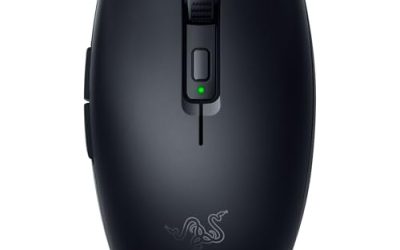
| 2. Razer Basilisk V3 Pro |
| Check price on Amazon |
| 4. SteelSeries Rival 5 |
| Check price on Amazon |
In short: the Basilisk V3 is the nearest wired replacement, the Basilisk V3 Pro adds wireless, the Dark Core RGB Pro suits grip swapping and Corsair software, and the Rival 5 suits players whose main G502 complaint is weight.
1. Razer Basilisk V3
- Sensor: Razer Focus+ optical sensor, up to 26,000 DPI
- Buttons: 11 programmable buttons
- Scroll wheel: HyperScroll tilt wheel with tactile and free-spin modes
- Switches: Razer Optical Mouse Switches Gen-2, rated up to 70 million clicks
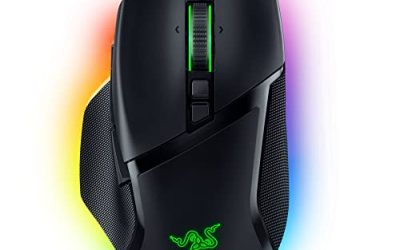
The Razer Basilisk V3 is the alternative most G502 owners will recognise immediately. It has the same broad ingredients: a right-handed ergonomic shell with a thumb rest, a scroll wheel that tilts and can switch between tactile stepping and free spinning, and a full set of programmable controls including a thumb-side clutch-style button.
The listing describes the Basilisk V3 as a customizable ergonomic gaming mouse with a Focus+ optical sensor rated up to 26,000 DPI, 11 programmable buttons, a HyperScroll tilt wheel, and 11 Chroma RGB lighting zones. Razer lists its optical mouse switches in this model as second-generation switches rated for up to 70 million clicks, with a stated actuation speed of 0.2 milliseconds. The mouse is wired over USB, is right-handed, and uses a Speedflex cable according to retailer specification summaries. Listing summaries put its weight at about 101 grams excluding the cable, which is meaningfully below the 121-gram G502 HERO baseline even before the Logitech tuning weights enter the picture.
Compared with the G502, the similarities are strong: the same 11-button count, tilt-wheel concept with free-spin mode, and right-handed thumb-rest shape, with a slightly higher sensor ceiling on the Razer listing. The differences matter too. The Basilisk V3 has no removable tuning weights, and its lighting and remapping live in Razer Synapse rather than Logitech G Hub.
Pros
Cons
Check the Razer Basilisk V3 on Amazon
2. Razer Basilisk V3 Pro
- Sensor: Razer Focus Pro optical sensor, up to 30,000 DPI
- Controls: 13 programmable controls, per the Amazon listing title
- Scroll wheel: HyperScroll tilt wheel
- Switches: Razer Optical Switches Gen-3
If the wired Basilisk V3 is the nearest match, the Basilisk V3 Pro is the version for players whose main reason for leaving the G502 is the cable. The Amazon listing for the black model describes a wireless gaming mouse with a HyperScroll tilt wheel, a Focus Pro optical sensor rated up to 30,000 DPI, third-generation optical switches, 13-zone Chroma RGB, 13 programmable controls, and three connection modes. Those modes are Razer HyperSpeed wireless, Bluetooth, and wired USB-C.
Against the G502 HERO baseline, the headline differences are connection and sensor ceiling: wired only and 25,600 DPI for the Logitech, versus 30,000 DPI and wireless for the Razer. The control count is also listed higher, at 13 programmable controls versus 11, although brands count wheel tilt and profile controls differently. The ergonomic promise is the same: right-handed shape, thumb rest, and a thumb-side control in place of the G502 sniper button idea.
It carries a battery, so it does not chase low wired weights, and its full feature set depends on Synapse configuration. Players who want the G502 experience untethered will find this the most complete alternative here.
Pros
Cons
Check the Razer Basilisk V3 Pro on Amazon
3. Corsair Dark Core RGB Pro
The Corsair Dark Core RGB Pro approaches the G502 problem from a different angle. Instead of copying the Logitech layout closely, it keeps the large right-handed ergonomic shape and the multi-button idea, then adds two things the G502 HERO does not offer: three-way connectivity as standard and interchangeable side grips. The Amazon listing describes three ways to connect, namely sub-1ms SLIPSTREAM wireless, low-latency Bluetooth, and USB wired, plus a custom PixArt PAW3392 optical sensor rated up to 18,000 DPI and adjustable in one-DPI steps. Corsair lists eight programmable buttons, hyper-polling communication at up to 2,000Hz, nine-zone dynamic RGB backlighting, onboard storage for up to three profiles, and up to 50 hours of battery life, with USB-C charging.
On sensor ceiling and button count, the Dark Core listing sits below the G502 HERO baseline of 25,600 DPI and 11 buttons. An 18,000 DPI ceiling is still far above the sensitivity most players use, and eight buttons cover shooters and MOBA titles, but MMO players who mapped all 11 G502 buttons will feel the reduction. Where the Corsair pulls ahead is flexibility: wireless or wired, a higher listed polling ceiling, swappable side grips, and iCUE software. The listing gives an item weight of 0.25 pounds, so it stays in the substantial ergonomic class. It also suits a hand that never quite settled on the G502 shell, because the interchangeable grips give a second fit option in the same box.
Specs
- Sensor: Custom PixArt PAW3392 optical sensor, up to 18,000 DPI, adjustable in 1 DPI steps
- Buttons: 8 programmable buttons
- Connection: SLIPSTREAM wireless, Bluetooth and USB wired
- Polling: Hyper-polling up to 2,000Hz, per the listing
- Battery: Up to 50 hours, with USB-C charging
- Lighting: Nine-zone dynamic RGB
- Extras: Two interchangeable side grips, onboard storage for up to three profiles
- Software: Corsair iCUE
Pros
- Three connection modes in one mouse, including low-latency wireless
- Interchangeable side grips help tailor a large ergonomic shell
- USB-C charging is convenient alongside modern laptops and phones
- Fits an existing Corsair iCUE setup neatly
Cons
- Eight buttons is a step down from the 11-button G502 baseline
- Lower listed sensor ceiling than the G502 HERO and the Razer picks
- Heavier ergonomic class, so it will not suit weight-focused players
Check the Corsair Dark Core RGB Pro on Amazon
4. SteelSeries Rival 5
- Sensor: TrueMove Air optical sensor, up to 18,000 CPI, 400 IPS, 40G acceleration
- Buttons: 9 programmable buttons, including 5 quick-action side buttons
- Switches: SteelSeries Golden Micro IP54 mechanical switches, rated 80 million clicks
- Connection: Wired USB
The SteelSeries Rival 5 is the answer for a specific kind of G502 fatigue: the shape and side buttons still work for you, but the weight does not. The Amazon listing describes an ergonomic right-handed mouse with nine programmable buttons, five of them quick-action side buttons, a TrueMove Air optical sensor rated up to 18,000 CPI with 400 IPS tracking and 40G acceleration, Golden Micro IP54 mechanical switches rated for 80 million clicks, and 10-zone RGB with PrismSync. Its listed weight is 85 grams, which is 36 grams below the 121-gram G502 HERO baseline, and that difference is large enough to change how long sessions and fast swipes feel.
The trade-offs are clear. The Rival 5 is wired only, its scroll wheel does not offer the G502-style dual-mode free-spin and tilt combination, and its sensor ceiling is 18,000 CPI rather than 25,600 DPI. What you get instead is a layout built around speed: five side controls, including a toggle-style switch, and a lighter shell that is easier to lift and reposition. Grip style is listed as claw and fingertip as well as general ergonomic use. For the battle royale, FPS, MOBA, and MMO genres named in the listing, it keeps enough inputs to preserve the thumb-command habit while removing the main physical complaint about the Logitech design. If you will miss the free-spinning wheel, pick a Basilisk instead.
Pros
Cons
Check the SteelSeries Rival 5 on Amazon
How to Choose
Start with the reason you are replacing the G502, because each alternative in this guide solves a different problem. If nothing is actually wrong with your current mouse except curiosity, the Basilisk V3 is the safest sideways move: same wired connection, same button count on the listing, same tilt wheel idea, and a lighter shell. If the cable is the problem, narrow the choice to the Basilisk V3 Pro and the Dark Core RGB Pro, then decide by layout. The Razer keeps more programmable controls and the tilt wheel, while the Corsair offers grip swapping and iCUE integration.
Weight deserves honest attention. The G502 HERO baseline is 121 grams before optional weights, per its listing specifications, and players often add weights without noticing how heavy the total becomes. Compare that figure with 85 grams for the Rival 5 and about 101 grams for the Basilisk V3 before you buy. A lighter mouse is not automatically better, since some players aim more steadily with a heavier shell, but a gap of this size will feel obvious in the first session, so choose deliberately rather than by habit.
Next, count the buttons you actually use. If you genuinely use ten or eleven controls, stay with the Basilisk models. If your real list is six to eight actions, the Dark Core RGB Pro and Rival 5 become much more attractive. Pay attention to placement too, especially the thumb-side clutch-style control, which is central to how many players use a G502 in shooters.
Then check the scroll wheel, which is easy to overlook and hard to live without once you are used to it. The G502 wheel tilts sideways and switches between stepped and free-spin scrolling. Only the two Razer alternatives here reproduce that combination closely. The Corsair and SteelSeries wheels are conventional gaming wheels, which is fine for weapon switching but less satisfying for long web pages, spreadsheets, and timelines.
Finally, think about software and shape. Every brand here uses its own configuration application, and if your desk is built around one ecosystem, that is a legitimate reason to favour its mouse. Measure your hand, note your palm, claw, or fingertip grip, and favour sellers with a straightforward return route, because no table can tell you whether a thumb rest sits in the right place for your hand.
FAQs
What is the closest alternative to the G502?
The Razer Basilisk V3 is the closest match in this guide. Its listing matches the G502 HERO baseline on the core formula: a right-handed ergonomic shell with a thumb rest, 11 programmable buttons, a tilting scroll wheel with a free-spin mode, and a high-ceiling optical sensor. The Basilisk V3 Pro adds wireless connections to a very similar idea.
Is the G502 too heavy compared with these alternatives?
Heavy is personal, but the numbers show a real gap. The G502 HERO is listed at 121 grams before its optional weights, while the SteelSeries Rival 5 is listed at 85 grams and the Razer Basilisk V3 at about 101 grams excluding its cable. If your wrist tires during long sessions, that difference is the first specification to act on.
Which G502 alternative is best for wireless play?
The Razer Basilisk V3 Pro is the most complete wireless alternative here, with three connection modes and the highest listed sensor ceiling in this guide. The Corsair Dark Core RGB Pro is the other strong wireless option, especially if you want interchangeable side grips or already use Corsair iCUE for the rest of your setup.
Do these alternatives have as many buttons as the G502?
Only the Razer models match or exceed the G502 HERO figure on their listings: 11 programmable buttons for the Basilisk V3 and 13 programmable controls for the Basilisk V3 Pro. The Dark Core RGB Pro lists eight programmable buttons and the Rival 5 lists nine. Count the actions you actually map before deciding whether that matters.
Can I keep my G502 button layout on a different brand?
You can recreate most layouts through each pick’s own software, but positions differ. The thumb-side clutch-style control exists in spirit on the Razer models, while Corsair and SteelSeries place their side buttons differently. Expect a short adjustment period.
Are these alternatives suitable for left-handed players?
No. All four alternatives in this guide are right-handed ergonomic mice, just like the G502 itself. Left-handed players, and right-handed players who prefer a symmetrical shell, should look at ambidextrous gaming mice instead of the ergonomic models collected here.
Conclusion
The best G502 alternative depends on what you want to keep. Keep almost everything, wired, with the Basilisk V3. Keep the layout and lose the cable with the Basilisk V3 Pro. Trade some buttons for grip options with the Dark Core RGB Pro. Or shed the most weight with the Rival 5. All four preserve the right-handed, button-rich ergonomic idea, and each changes the formula in a way its listing makes clear. Check the exact model and ASIN before you order.
FAQ
What is the closest alternative to the G502?
Is the G502 too heavy compared with these alternatives?
Which G502 alternative is best for wireless play?
Do these alternatives have as many buttons as the G502?
Can I keep my G502 button layout on a different brand?
Are these alternatives suitable for left-handed players?
More from Amazon
Programs that pair well with the guide above. Offers and eligibility are set by Amazon and may change.
Free shipping on eligible items, Prime Video and more. Eligible new members can start with a free trial.
Start a Prime free trialAd-free music streaming. Eligible new subscribers can start with a free trial.
Try Music Unlimited freeA Prime membership for ages 18-24 with a trial period. Eligibility is set by Amazon.
See Prime for Young AdultsAudiobooks and podcasts to listen to on the go. Eligible new members can start with a free trial.
Try Audible freeAs an Amazon Associate we earn from qualifying purchases.