Our Short List of 3

- Best for: First setups that want a keyboard, mouse, headset and mat in one box.
- Keyboard: Wired RGB backlit gaming keyboard with multimedia keys and wrist rest
- Mouse: Wired gaming mouse, 800-7200 DPI
- Lighting: RGB backlit keyboard and mouse
- Extras: Gaming headset and mouse pad included in the box
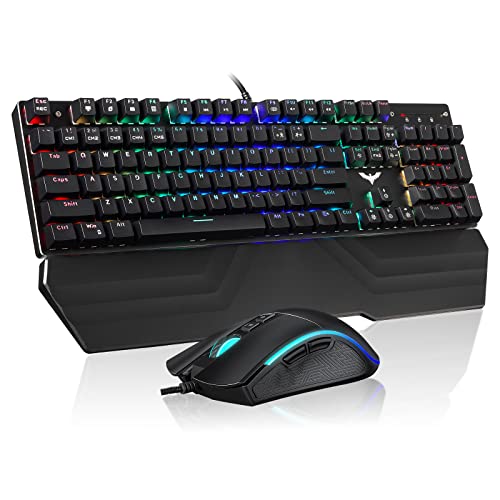
- Best for: Players who want mechanical blue-switch keys and a programmable mouse in one wired set.
- Keyboard: 104 keys, blue mechanical switches, wired USB
- Keyboard design: Floating key design with detachable wrist rest
- Lighting: RGB gaming lighting on keyboard and mouse
- Mouse: Programmable gaming mouse, wired USB

- Best for: Simple wired setups that want rainbow lighting, a wrist rest and plug-and-play use.
- Keyboard: LED rainbow backlit gaming keyboard, 104 keys
- Keyboard feature: Ergonomic wrist rest
- Mouse: LED gaming mouse with adjustable sensitivity
- Mouse buttons: 6 buttons
All 3 Picks at a Glance
| Product | Specs | Action |
|---|---|---|
| Redragon S101-3 |
| Check price on Amazon |
| Havit Mechanical Keyboard and Mouse Combo |
| Check price on Amazon |
| Havit LED Gaming Keyboard and Mouse Combo |
| Check price on Amazon |
Key takeaways
- Compare four wired gaming keyboard and mouse combos with matched lighting, membrane or mechanical keys and mice that suit a first full desk setup.
Buying a keyboard and a mouse together sounds simple, yet the real decision is whether a matched set saves effort or locks in a compromise. A combo guarantees that lighting, software and cable layout work as one set, and it removes the research needed to pair two separate devices. The risk sits on the other side, because a set can pair a strong keyboard with a basic mouse, or a good mouse with keys that feel mushy after a few weeks. Wired sets add another question, since two cables need desk space and a spare USB port each.
This guide suits first-time PC gamers who want a complete desk setup in one box, players replacing worn office peripherals, and households setting up a shared gaming computer. Picks come from names and specifications on the Amazon product page, including key type, lighting, mouse sensor figures, button counts and what each box contains, so each set can be judged on the listing rather than on a brand name alone.
Quick Picks
As an Amazon Associate we earn from qualifying purchases
| Product | Best for | Key spec from title |
|---|---|---|
| Redragon S101-3 | First setups that want keyboard, mouse, headset and mat in one box | Wired RGB Backlit, 800-7200 DPI Mouse |
| SteelSeries Apex 3 TKL and Rival 3 Bundle | Small desks that want a tenkeyless board and a light wired mouse | Apex 3 TKL, Rival 3 8,500 CPI Sensor |
| Havit Mechanical Keyboard and Mouse Combo | Players who want mechanical keys and a programmable mouse | 104 Keys Blue Switches, Programmable Gaming Mouse |
| Havit LED Gaming Keyboard and Mouse Combo | Simple wired setups that want rainbow lighting and a wrist rest | LED Gaming Keyboard and Mouse Combo Bundle |
How to Choose
Decide what the keyboard must feel like
Key feel decides whether a combo lasts or gets replaced first, so check the listing for membrane, mechanical or quiet switch wording before anything else. Membrane keys feel soft and quiet, which suits shared rooms and late sessions, while mechanical switches give a firmer press and a clearer actuation point that many gamers prefer. Some sets use a hybrid feel that sits between the two. Typing style matters too, because a player who types long documents as well as games needs keys that stay comfortable after an hour, not just during a match.
Match the mouse to the games being played
A combo mouse often looks like an afterthought, yet it carries every aim, click and camera movement, so its sensor and shape deserve a close look. Listings state a DPI or CPI ceiling, and a higher ceiling gives more room to tune sensitivity, although most players settle well below the maximum. Button count matters as well, since side buttons cover abilities, push-to-talk and weapon swaps. Check the shape against grip style, because a mouse that suits palm grips may feel wide for claw grips, and a narrow mouse may leave large hands unsupported.
Count the cables, ports and desk space
Wired combos need two USB ports, or more when a headset and mat join the box, so count the ports on the computer before buying. Cable length matters on larger desks, because a short cable forces the computer close to the keyboard or pulls the mouse toward the tower. Desk space matters too, since a full-size keyboard plus a mouse mat leaves little room for a notebook or a drink. Tenkeyless boards free space for mouse movement, while full-size boards keep the number pad for work and for games that bind items to it.
Check lighting, software and what the box holds
Lighting ties a set together visually, yet the listing should state whether lighting is single-colour, rainbow or fully customisable through software. Some sets need a program to change effects or record macros, while others switch effects from the keyboard itself. Read the box contents as well, because some combos include a headset and a mouse mat, while others hold only the keyboard and mouse. A set with extras suits a first setup, while a set without extras suits a player who already owns a headset and a mat.
The 4 Best Options
Redragon S101-3
- Best for: First setups that want a keyboard, mouse, headset and mat in one box.
- Keyboard: Wired RGB backlit gaming keyboard with multimedia keys and wrist rest
- Mouse: Wired gaming mouse, 800-7200 DPI
- Lighting: RGB backlit keyboard and mouse
- Extras: Gaming headset and mouse pad included in the box
First setups that want a keyboard, mouse, headset and mat in one box.
Confirm the listing is the four-piece S101-3 bundle, since Redragon sells keyboard and mouse only versions under similar names.
Redragon built the S101-3 as a complete starter set, because the box holds a wired RGB backlit keyboard, a wired gaming mouse, a gaming headset and a mouse pad. That combination suits a first desk setup where every peripheral needs buying at once, and the keyboard brings multimedia keys and a wrist rest for longer sessions. The mouse tracks across an 800 to 7200 DPI range in the listing, which gives room to tune sensitivity for different games, and the keyboard lighting cycles through RGB effects that match the mouse. Programmable keys and mouse buttons add macro options for players who want binds beyond the defaults.
Watch out for: Confirm the listing is the four-piece S101-3 bundle, since Redragon sells keyboard and mouse only versions under similar names.
SteelSeries Apex 3 TKL and Rival 3 Bundle
SteelSeries paired two proven peripherals in this bundle, because the Apex 3 TKL brings a compact tenkeyless layout and the Rival 3 brings a light wired mouse with a TrueMove Core sensor. The keyboard uses whisper-quiet switches rated for long use, eight-zone RGB illumination and IP32 water and dust resistance, which suits players who want a quiet board that survives spills. Dedicated media controls sit above the keys for volume and playback without leaving a game. The Rival 3 tracks up to 8,500 CPI with six programmable buttons and split trigger switches, and its 77-gram shell suits fast movement across a large mat.
Specs
- Keyboard: Apex 3 TKL, tenkeyless compact form factor, whisper-quiet switches
- Keyboard lighting: 8-zone RGB illumination, PrismSync compatible
- Keyboard durability: IP32 water and dust resistant, switches rated for 20 million keypresses
- Mouse: Rival 3, TrueMove Core optical sensor, 8,500 CPI, 300 IPS
- Mouse buttons: 6 programmable buttons, split trigger switches
- Mouse weight: 77 grams, wired USB
Best for: Small desks that want a quiet tenkeyless board and a light wired mouse.
Watch out for: Confirm the bundle listing includes both the Apex 3 TKL keyboard and the Rival 3 mouse, since each is also sold on its own.
Havit Mechanical Keyboard and Mouse Combo
- Best for: Players who want mechanical blue-switch keys and a programmable mouse in one wired set.
- Keyboard: 104 keys, blue mechanical switches, wired USB
- Keyboard design: Floating key design with detachable wrist rest
- Lighting: RGB gaming lighting on keyboard and mouse
- Mouse: Programmable gaming mouse, wired USB
Players who want mechanical blue-switch keys and a programmable mouse in one wired set.
Check that the listing is the black wired version, since Havit sells a white version and a non-mechanical rainbow version under similar names.
Havit built this combo around mechanical keys, because the 104-key keyboard uses blue switches for a firm, tactile press and a floating key design that suits fast typing and gaming. A detachable wrist rest supports the palms during long sessions, while RGB lighting covers the keyboard and the mouse in matching effects. The programmable gaming mouse adds extra buttons for macros and binds, and the wired USB connection keeps both devices ready without charging. This set fits players who tried membrane boards and want the clearer feedback of mechanical switches without buying keyboard and mouse separately.
Watch out for: Check that the listing is the black wired version, since Havit sells a white version and a non-mechanical rainbow version under similar names.
Havit LED Gaming Keyboard and Mouse Combo
- Best for: Simple wired setups that want rainbow lighting, a wrist rest and plug-and-play use.
- Keyboard: LED rainbow backlit gaming keyboard, 104 keys
- Keyboard feature: Ergonomic wrist rest
- Mouse: LED gaming mouse with adjustable sensitivity
- Mouse buttons: 6 buttons
Simple wired setups that want rainbow lighting, a wrist rest and plug-and-play use.
Confirm the listing model HV-KB104, since Havit sells several LED combos with different mouse sensors and key layouts.
Havit aimed this LED combo at simple wired setups, because the keyboard brings rainbow backlighting, 104 keys and an ergonomic wrist rest without needing software to change effects. The mouse uses an optical sensor with adjustable sensitivity and six buttons, which covers regular gaming, browsing and work without extra complexity. Both devices connect by USB cable, so the set works as soon as it plugs in, and the matching black finish suits most desks. This set fits players who want a tidy, ready-to-use keyboard and mouse pair with lighting that looks good in a dark room.
Watch out for: Confirm the listing model HV-KB104, since Havit sells several LED combos with different mouse sensors and key layouts.
Which One Fits Your Situation
You are building a first gaming desk from nothing
Choose the Redragon S101-3, because the box covers keyboard, mouse, headset and mat in one purchase, which removes four separate decisions. Set the keyboard lighting and mouse sensitivity first, then adjust the headset fit before a long session. The SteelSeries bundle suits the same situation only when a headset and mat are already owned, since it holds just the two core peripherals.
You have a small desk and want more mouse room
Choose the SteelSeries Apex 3 TKL and Rival 3 Bundle, because the tenkeyless board drops the number pad and frees space for wide mouse sweeps. The Rival 3 weighs 77 grams, which suits fast movement, and the quiet switches keep late sessions from carrying through the house. Measure the desk before buying, and keep the mouse mat clear of the keyboard edge.
You want mechanical keys without buying parts separately
Choose the Havit Mechanical Keyboard and Mouse Combo, because blue switches give a firm tactile press that membrane boards cannot match. The detachable wrist rest helps during long typing and gaming sessions, and the programmable mouse covers macros without extra software purchases. Try a blue-switch board first if possible, since the click sound carries in shared rooms.
You want a simple set that works as soon as it plugs in
Choose the Havit LED Gaming Keyboard and Mouse Combo, because both devices connect by USB and need no software to light up or track. The rainbow backlighting and wrist rest suit evening play, while the six-button mouse covers regular gaming without a learning curve. Check the model number on the listing, then keep both cables routed behind the desk to avoid tangles.
Common Mistakes
- Buying a combo for the keyboard alone, then discovering the mouse shape or sensor does not suit the games played.
- Forgetting to count USB ports, so a headset or mat in the box has nowhere to plug in.
- Choosing a full-size board for a small desk, leaving no room for wide mouse movement.
- Ignoring key type, then finding membrane keys too soft or mechanical keys too loud for the room.
- Assuming every combo includes a headset and mat, when many boxes hold only keyboard and mouse.
Frequently Asked Questions
Is a wired combo better than buying keyboard and mouse separately?
A wired combo suits players who want matched lighting, one software setup and a single purchase, while separate purchases suit players who already know the keyboard feel and mouse shape they want. Combos often pair a strong keyboard with a basic mouse, so check both devices before deciding. Separate buying gives more control, yet takes more research.
Do wired combos need software to work?
Most wired combos work as soon as they plug in, with basic typing, clicking and lighting active without extra programs. Software adds macro recording, lighting customisation and profile saving, so check the listing for a software name before buying. Players who want macros or per-game lighting should install the program first, while players who want simple use can leave it out.
What is the difference between membrane and mechanical keys in a combo?
Membrane keys use a soft rubber layer under the keys, which feels quiet and smooth, while mechanical keys use individual switches that give a firmer press and a clearer actuation point. Mechanical boards usually last longer under heavy use, yet they sound louder in shared rooms. Choose membrane for quiet shared spaces and mechanical for tactile feedback.
How do I know if a combo mouse is good enough for gaming?
Check the sensor ceiling, button count and shape in the listing, then compare those details with the games played most. A mouse with adjustable sensitivity, two side buttons and a shape that matches grip style covers most titles. Shooter players should favour a lighter mouse with a clean sensor, while MMO players should favour extra side buttons.
FAQ
Is a wired combo better than buying keyboard and mouse separately?
Do wired combos need software to work?
What is the difference between membrane and mechanical keys in a combo?
How do I know if a combo mouse is good enough for gaming?
More from Amazon
Programs that pair well with the guide above. Offers and eligibility are set by Amazon and may change.
Free shipping on eligible items, Prime Video and more. Eligible new members can start with a free trial.
Start a Prime free trialAd-free music streaming. Eligible new subscribers can start with a free trial.
Try Music Unlimited freeA Prime membership for ages 18-24 with a trial period. Eligibility is set by Amazon.
See Prime for Young AdultsAudiobooks and podcasts to listen to on the go. Eligible new members can start with a free trial.
Try Audible freeAs an Amazon Associate we earn from qualifying purchases.