Our Top Picks
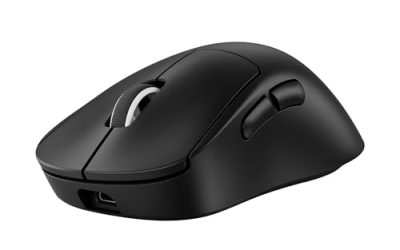
 Logitech G Pro X Superlight 2 Lightspeed WirelessClassic1.57 x 2.5 x 4.92 inches0.1 poundsCheck on Amazon
Pros & cons
- 95-hour battery life reduces how often you need to charge
- 60-gram weight suits fast, low-effort mouse movement
- HERO 2 sensor tracks up to 44,000 DPI with no smoothing
- POWERPLAY wireless charging pad is sold separately
- Premium features add a more complex setup than basic mice
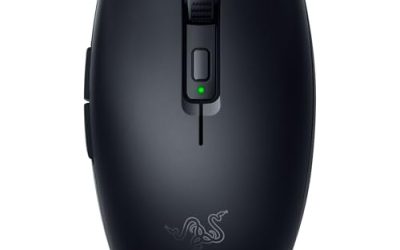
 Razer DeathAdder V3 Pro Wireless Gaming Mouse1000 Hz5.01 x 2.65 x 1.69 inches0.1 poundsCheck on Amazon
Pros & cons
- 11 programmable buttons add extensive control customization
- Adjustable weights let you fine-tune balance and feel
- LIGHTSYNC RGB syncs lighting with other Logitech gear
- Wired connection limits cable-free desk setups
- Heavier than typical lightweight esports mice at 0.27 pounds

Disclosure: As an Amazon Associate, we may earn from qualifying purchases made through links on this page, at no additional cost to you.
Precision in a gaming mouse is not a single number. It is the combination of a sensor that tracks without smoothing, acceleration or angle snapping, a tracking speed ceiling your hand can never outrun, a shape that stops where you intend it to stop, and clicks that register exactly when you press them. Marketing leads with maximum DPI, but real precision is decided by resolution accuracy at the settings you actually use, by how the sensor behaves at low speed during micro-corrections, and by whether the mouse’s weight and feet let you brake a flick on a single pixel-wide target.
This guide compares four mice built around that idea, using the specifications on their Amazon product pages: sensor model, DPI range and adjustment steps, IPS and acceleration ratings, polling rate, weight and switch type. Two are symmetrical esports designs, one is an ergonomic flagship, and one is a heavier wired classic whose sensor implementation is famously clean. The sections after the product notes explain which specifications genuinely affect accuracy, how to set DPI and polling for precision work, and the habits that quietly destroy it.
Quick Picks
Our Short List of 3
- Best for: players who want the highest sensor ceiling and per-axis DPI control.
- HERO 2 sensor rated to 44,000 DPI, 888 IPS and 88 G
- Up to 8 kHz LIGHTSPEED report rate
- Independent X and Y DPI adjustment in G HUB
- 60 gram shell with zero-additive PTFE feet
- Best for: ergonomic-grip players who refuse to trade shape comfort for sensor performance.
- Focus Pro 30K sensor with 750 IPS tracking
- Ergonomic shape refined for palm and claw precision
- Optical Switches Gen-3 with no debounce delay
- Up to 90 hours of battery life at 63 grams

- Best for: deliberate aimers who want a hardware low-sensitivity button and a planted feel.
- HERO 25K sensor with zero smoothing, filtering or acceleration
- Dedicated DPI shift button for temporary precision aiming
- More than 400 IPS tracking with 1:1 output
- Adjustable weights and onboard memory for five profiles
All 3 Picks at a Glance
| Product | Specs | Action |
|---|---|---|
| Logitech G PRO X Superlight 2 (ASIN: B09NBWL8J5) |
| Check price on Amazon |
| Razer DeathAdder V3 Pro (ASIN: B0B6XZLNHQ) |
| Check price on Amazon |
| Logitech G502 HERO (ASIN: B07GBZ4Q68) |
| Check price on Amazon |
Razer Viper V3 Pro (ASIN: B0CW25XR5R)
The Viper V3 Pro is Razer’s symmetrical esports flagship, and its sensor specification is the heart of the precision case. The Focus Pro 35K Optical Sensor Gen-2 tracks up to 35,000 DPI with 750 IPS and 70 G acceleration, and Razer quotes best-in-class resolution accuracy with tracking that works on a wide range of surfaces, including glass. Crucially for fine aim, DPI adjusts in 1-DPI steps, so your sensitivity can be set to the exact value your muscle memory is trained on rather than the nearest preset stage.
The shell weighs 54 grams in black, connects over HyperSpeed wireless with true polling up to 8,000 Hz through the included HyperPolling dongle, and uses Razer Optical Mouse Switches Gen-3 rated at a 90 million click lifecycle with 0.2 ms actuation and no debounce delay. Battery life reaches up to 95 hours at 1,000 Hz. Six programmable buttons keep the layout clean, and the symmetrical shape suits fingertip and claw grips, the two grips most associated with fine correction movements.
Highlights
- Focus Pro 35K Gen-2 sensor with 750 IPS and 70 G ratings
- DPI adjustable in precise 1-DPI steps
- True 8,000 Hz wireless polling with the included dongle
- 54 gram symmetrical shell and optical switches rated for 90 million clicks
Considerations
- Symmetrical shape offers less palm support for relaxed grips
- Highest polling rates reduce battery life significantly
- No dedicated DPI shift button for temporary low-sensitivity aiming
Best for: fingertip and claw players who want the most granular sensitivity control available.
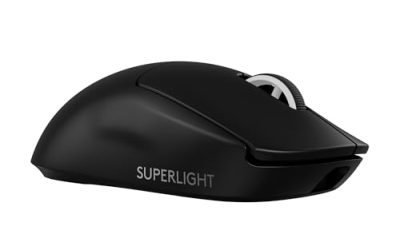
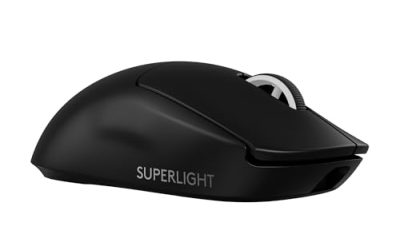
Logitech G PRO X Superlight 2 (ASIN: B09NBWL8J5)
- Best for: players who want the highest sensor ceiling and per-axis DPI control.
- HERO 2 sensor rated to 44,000 DPI, 888 IPS and 88 G
- Up to 8 kHz LIGHTSPEED report rate
- Independent X and Y DPI adjustment in G HUB
- 60 gram shell with zero-additive PTFE feet
players who want the highest sensor ceiling and per-axis DPI control.
Logitech’s precision flagship pairs the HERO 2 sensor with the highest tracking figures in this guide: up to 44,000 DPI, 888 IPS and 88 G of acceleration, with sub-micron tracking across the full range of motion. In practice those ceilings mean the sensor simply never becomes the limiting factor, whether you are making a two-millimetre correction or a full-pad flick. LIGHTSPEED wireless reports at up to 8 kHz, and G HUB allows independent X and Y axis DPI values for players who fine-tune horizontal and vertical movement separately.
The mouse weighs 60 grams, runs up to 95 hours per charge over USB-C, and uses LIGHTFORCE hybrid switches that combine optical actuation speed with a mechanical click break. Zero-additive PTFE feet give a consistent, low-friction glide that helps stopping precision, because the mouse does not grab or release unpredictably at the end of a movement. Five programmable buttons and a safe, low-profile symmetrical shape complete a package aimed at players who treat sensitivity as a science.
Highlights
Considerations
Razer DeathAdder V3 Pro (ASIN: B0B6XZLNHQ)
- Best for: ergonomic-grip players who refuse to trade shape comfort for sensor performance.
- Focus Pro 30K sensor with 750 IPS tracking
- Ergonomic shape refined for palm and claw precision
- Optical Switches Gen-3 with no debounce delay
- Up to 90 hours of battery life at 63 grams
ergonomic-grip players who refuse to trade shape comfort for sensor performance.
The DeathAdder V3 Pro brings the same class of sensor to an ergonomic shape. Its Focus Pro 30K optical sensor tracks to 30,000 DPI with 750 IPS and 70 G acceleration, and the refined right-handed shell — 128 mm long, 63 grams — was shaped with professional players for palm and claw grips. For players whose precision comes from a stable, supported hand rather than fingertip micro-movements, that shape consistency is an accuracy feature in itself: the sensor sits in the same orientation every time you grip the mouse.
Razer Optical Switches Gen-3 provide the clicks, rated for fast actuation without debounce delay, and HyperSpeed wireless connects with optional HyperPolling up to 8,000 Hz using a separate dongle configuration. Battery life is up to 90 hours, there are five programmable buttons plus the profile and DPI controls, and the smooth-touch finish keeps the shell secure without aggressive texturing. It is the precision pick for larger hands and ergonomic-grip players.
Highlights
Considerations
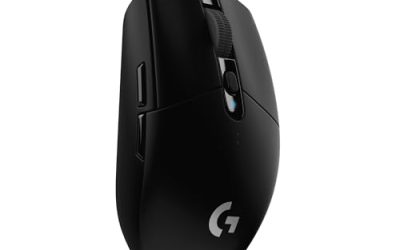
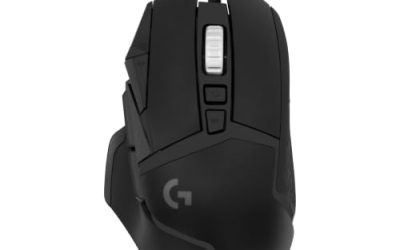
Logitech G502 HERO (ASIN: B07GBZ4Q68)
- Best for: deliberate aimers who want a hardware low-sensitivity button and a planted feel.
- HERO 25K sensor with zero smoothing, filtering or acceleration
- Dedicated DPI shift button for temporary precision aiming
- More than 400 IPS tracking with 1:1 output
- Adjustable weights and onboard memory for five profiles
deliberate aimers who want a hardware low-sensitivity button and a planted feel.
The G502 HERO earns its place in a precision guide on implementation rather than novelty. The HERO 25K sensor delivers 1:1 tracking up to 25,600 DPI with zero smoothing, filtering or acceleration across the whole range and more than 400 IPS of tracking speed, which is exactly the clean behaviour precision aiming depends on. What the G502 adds is control hardware: a dedicated DPI shift button that drops to a low sensitivity while held — built for lining up a long-range shot — then returns to your normal setting on release.
Eleven programmable buttons, a dual-mode scroll wheel and onboard memory for five profiles round out the package, and the five included 3.6 gram weights let you tune the 121 gram shell’s balance so it stops where your hand expects. The metal spring tensioning system keeps primary clicks consistent. It is wired, heavier and older than the other picks, and for players who aim with small, deliberate movements at moderate sensitivity, none of that counts against it.
Highlights
Considerations
How to Choose
Decide how you aim before you compare sensors. Fingertip and claw players make constant small corrections and benefit from light, symmetrical mice with granular DPI steps, such as the Viper V3 Pro and Superlight 2. Palm players generate precision from a stable grip and a consistent sensor angle, which is what the DeathAdder V3 Pro’s ergonomic shell is for. Players who scope, hold angles and make slow deliberate movements may value the G502 HERO’s DPI shift button more than a lower weight.
Then look past maximum DPI to the figures that describe tracking quality: IPS tells you the speed ceiling, acceleration in G tells you how violent a direction change the sensor survives, and resolution accuracy describes how faithfully counts match distance. All four sensors here are flawless-class at real sensitivities, so shape and switch feel will separate them in your hand.
Finally, consider polling rate honestly. Moving from 1,000 Hz to 8,000 Hz smooths the reported path, most visibly on high-refresh monitors, but it costs battery and adds system load. It is a finishing touch on an already precise setup, not a substitute for the right sensitivity.
Key Specifications Explained
DPI, or CPI, is counts per inch of travel. Precision comes from choosing a DPI your hand can control and leaving it there; the ability to adjust in 1-DPI steps, offered by the Viper V3 Pro, matters more than a five-figure maximum because it lets you reproduce an exact sensitivity across mice and PCs. IPS is the maximum tracking speed in inches per second before the sensor loses the surface; 750 IPS is far beyond human arm speed, which is the point — headroom equals reliability.
Acceleration, rated in G, is how fast the mouse can change velocity without the sensor slipping. Resolution accuracy describes how close the sensor’s reported counts are to true distance; high accuracy at low speed is what makes micro-corrections land where intended. Polling rate is updates per second to the PC: 1,000 Hz is the gaming standard, 8,000 Hz is the current ceiling on the Razer and Logitech flagships here.
Switch behaviour also feeds precision. Optical switches actuate with light and need no debounce delay, so the click registers at a consistent point in the press. Mechanical and hybrid switches add a tactile break some players use as timing feedback. Neither is more accurate in the sensor sense, but consistent click timing is part of shot discipline.
Setup and Settings Tips
Set one DPI value and disable acceleration everywhere: in the mouse software, in Windows pointer settings and in your game’s raw input options. Precision is a single, repeatable mapping between hand distance and cursor distance, and any layer that modifies it makes your aim a moving target.
Use the software’s surface calibration or lift-off settings if your mouse offers them, and keep lift-off distance low if you reposition the mouse often, so the cursor does not drift during lifts. If you use high polling, raise it in steps and confirm your system holds it stably in game; an unstable 8,000 Hz is worse than a locked 1,000 Hz.
Give a new sensitivity at least a week before judging it. Precision is trained, and the first days with a new mouse measure your old habits, not the hardware. Keep the sensor lens clean, use a consistent pad surface, and replace worn mouse feet when glide starts to vary across the pad.
Common Mistakes to Avoid
The biggest precision killer is changing DPI constantly — between games, between heroes, between days. Every change restarts the learning your hand was doing. A second mistake is playing at a very high DPI with low in-game sensitivity to chase smoothness; the combination can introduce its own stepping behaviour and makes desktop control twitchy. A moderate DPI with a considered in-game value is the stable configuration.
Players also chase maximum polling on battery power, then play wirelessly with a receiver placed far from the mouse, adding the very inconsistency they were trying to remove. Keep the receiver close. And do not judge a precision mouse in the first hour: shape adaptation is real, and a shell that feels strange on day one is often the one your hand thanks you for on day ten.
FAQ
What DPI is best for precision aiming?
Most precision-focused players use between 400 and 1,600 DPI, matched with in-game sensitivity for a full turn distance that suits their game. The exact number matters less than keeping it constant; mice with 1-DPI step adjustment make that number exactly reproducible.
Does a higher maximum DPI make a mouse more precise?
No. Maximum DPI is a range figure, not an accuracy figure. Precision comes from resolution accuracy, clean tracking without smoothing or acceleration, and high IPS and G ceilings — all present in the flagship sensors in this guide.
Is 8,000 Hz polling worth it for precision?
It can smooth cursor movement on high-refresh monitors and reduce reporting delay, and both Razer flagships and the Superlight 2 support it. The gains are subtle, battery cost is real, and a stable 1,000 Hz setup remains fully competitive.
Optical or mechanical switches for precise clicking?
Optical switches register without debounce delay and at a very consistent point, which suits rapid, timed clicks. Hybrid and mechanical switches give a clearer tactile break. Shot timing is a trained skill either way; consistency of the switch matters more than the technology label.
Does mouse weight affect precision?
Yes, in both directions. Lighter mice are easier to stop exactly on target after a flick, which is why the precision flagships here weigh 54 to 63 grams. Heavier mice feel steadier during slow tracking. Match the weight to your aiming style rather than to a trend.
Final Verdict
For granular control, the Razer Viper V3 Pro leads this guide with 1-DPI adjustment steps and a flawless-class sensor in a 54 gram shell. The Logitech G PRO X Superlight 2 counters with the highest tracking ceilings and per-axis DPI tuning. The DeathAdder V3 Pro is the ergonomic route to the same sensor class, and the G502 HERO remains the deliberate aimer’s wired tool, DPI shift button included. Precision is mostly a habit; these are the mice that stop standing in its way.
FAQ
What DPI is best for precision aiming?
Does a higher maximum DPI make a mouse more precise?
Is 8,000 Hz polling worth it for precision?
Optical or mechanical switches for precise clicking?
Does mouse weight affect precision?
More from Amazon
Programs that pair well with the guide above. Offers and eligibility are set by Amazon and may change.
Free shipping on eligible items, Prime Video and more. Eligible new members can start with a free trial.
Start a Prime free trialAd-free music streaming. Eligible new subscribers can start with a free trial.
Try Music Unlimited freeA Prime membership for ages 18-24 with a trial period. Eligibility is set by Amazon.
See Prime for Young AdultsAudiobooks and podcasts to listen to on the go. Eligible new members can start with a free trial.
Try Audible freeAs an Amazon Associate we earn from qualifying purchases.