Our Short List of 3

- Specs:
- Lightspeed wireless and Bluetooth multihost connection
- Romer-G tactile mechanical switches
- Six programmable G-keys
- Specs:
- Bluetooth Smart and Logitech Unifying receiver, included and pre-paired
- Easy-Switch across three devices
- Flow cross-computer control

- Specs:
- Bluetooth multi-device connection with Easy-Switch across three devices
- Ten customizable Fn shortcut keys with the Logi Options+ app
- Scooped low-profile keys
All 3 Picks at a Glance
| Product | Specs | Action |
|---|---|---|
| Logitech G613 LIGHTSPEED Wireless Mechanical Gaming Keyboard |
| Check price on Amazon |
| Logitech K780 Multi-Device Wireless Keyboard |
| Check price on Amazon |
| Logitech Pebble Keys 2 K380s |
| Check price on Amazon |
Key takeaways
- Compare the 3 best wireless keyboards under 100 for November 2026: a mechanical gaming board, a full-size multi-device keyboard and a compact travel pick.
A wireless keyboard frees your desk from cables and lets you type from the couch, the kitchen table or a second screen across the room, and the under-100 tier now covers far more than basic membrane boards. Mechanical gaming boards, full-size multi-device keyboards and compact travel boards all sit inside this tier, so the hard part is matching the board to the way you actually type and play rather than chasing the longest feature list.
This guide compares three wireless keyboards that fit the under-100 tier and suit different desks: a mechanical gaming board with a dedicated wireless link for fast play, a full-size multi-device keyboard with a cradle for a phone or tablet, and a compact Bluetooth board that slips into a bag for work on the move. Each pick below lists the specs from its Amazon listing, so you can check layout, connection and battery life before you choose.
Quick Picks
As an Amazon Associate we earn from qualifying purchases
| Product | Best for | Key spec from title |
|---|---|---|
| Logitech G613 LIGHTSPEED Wireless Mechanical Gaming Keyboard | Fast gaming sessions | Lightspeed wireless plus Bluetooth multihost connection |
| Logitech K780 Multi-Device Wireless Keyboard | Typing across a computer, phone and tablet | Easy-Switch across three devices with Flow cross-computer control |
| Logitech Pebble Keys 2 K380s | Travel and small desks | Multi-device Bluetooth keyboard with customizable shortcuts |
How to Choose
Connection type and latency
A wireless keyboard can connect over Bluetooth, a dedicated 2.4 GHz receiver or both, and the choice shapes how the board behaves in games and on shared desks. Bluetooth pairs directly with laptops, tablets and phones and lets one board hop between devices, which suits mixed setups where a cable-free desk matters more than raw speed. A dedicated receiver gives a steadier link for gaming because the board talks to its own dongle instead of sharing the Bluetooth radio with headphones and other peripherals. Boards with both options cover the most ground, since you can game over the receiver at your desk and switch to Bluetooth when you move to a tablet or a second machine.
Layout and size
Layout decides how much desk a keyboard takes and which keys sit under your fingers. A full-size board keeps the number pad, arrow keys and media controls in familiar places, which suits spreadsheets, data entry and long typing sessions, though it pushes the mouse further to the right and needs a wider desk. A tenkeyless board drops the number pad and frees space for mouse movement, which many gamers prefer, while a compact board without a number pad or function row fits a laptop bag and a small desk. Measure the space where the board will live and check whether you use a number pad daily before you trade it away for a smaller footprint.
Switch feel and noise
Switches decide how each keypress feels and how much sound the board makes. Mechanical switches give a distinct tactile bump or click and a consistent feel across the whole board, which many gamers and heavy typists prefer for long sessions, while membrane and scissor switches feel softer and quieter and suit shared rooms and late-night work. Low-profile keys shorten travel and feel closer to a laptop keyboard, whereas full-height keys give more travel and a firmer landing. If you share a room or take calls at your desk, a quiet board matters as much as the layout, so weigh sound alongside feel when you compare two boards that look similar on paper.
Battery life and power source
Battery life separates boards that you charge or swap batteries for once a year from boards that need attention every few weeks. Replaceable AA or AAA batteries last for months or years in low-power Bluetooth boards and can be swapped in seconds, while rechargeable boards need a cable nearby when the charge runs low. Backlighting drains power fast, so a board with bright lighting will run far shorter than its headline figure when the lights stay on. Check whether the listing states battery life with lighting on or off, and keep spare batteries or a charging cable in the drawer so a dead board never interrupts a game or a workday.
The 3 Best Options
Logitech G613 LIGHTSPEED Wireless Mechanical Gaming Keyboard
- Specs:
- Lightspeed wireless and Bluetooth multihost connection
- Romer-G tactile mechanical switches
- Six programmable G-keys
The Logitech G613 is the gaming pick in this group, built around a dedicated Lightspeed wireless link that keeps input steady during fast play while Bluetooth covers a second device. Its full-size layout keeps the number pad and media controls in place, and six programmable G-keys give quick access to macros and in-game commands without reaching for the mouse. Romer-G tactile switches give each keypress a clear bump, and the integrated palm rest supports long sessions at the desk. Battery life stretches across many months on two AA batteries, so the board suits a gamer who wants a cable-free desk without giving up mechanical feel.
Logitech K780 Multi-Device Wireless Keyboard
- Specs:
- Bluetooth Smart and Logitech Unifying receiver, included and pre-paired
- Easy-Switch across three devices
- Flow cross-computer control
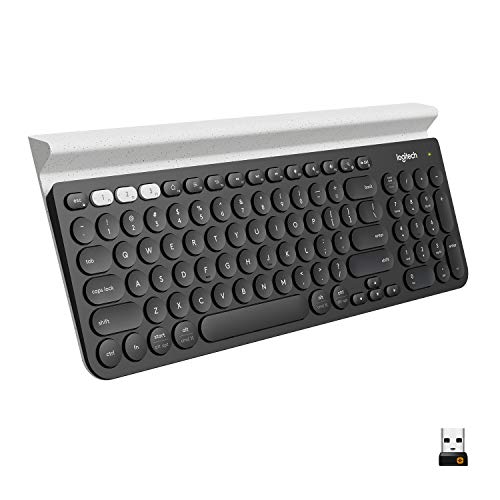
The Logitech K780 is the multi-device pick, made for a desk where a computer, a phone and a tablet all need typing at different moments. Easy-Switch keys jump between three paired devices, and the integrated cradle holds a phone or tablet upright beside the screen so messages and notes stay visible while you work. Flow cross-computer control lets the keyboard move between paired computers, and the included Unifying receiver gives a steady link when Bluetooth is busy. Quiet membrane keys keep typing discreet in shared rooms, and the full-size layout keeps the number pad for spreadsheets and data entry.
Logitech Pebble Keys 2 K380s
- Specs:
- Bluetooth multi-device connection with Easy-Switch across three devices
- Ten customizable Fn shortcut keys with the Logi Options+ app
- Scooped low-profile keys
The Logitech Pebble Keys 2 K380s is the compact pick, a slim Bluetooth board that weighs little and slips into a laptop bag without fuss. Its round, scooped keys give a quiet, laptop-like typing feel, and Easy-Switch keys move between three devices with one press, which suits a laptop, tablet and phone used through the day. Ten Fn shortcut keys can be customized through the Logi Options+ app, so frequent actions sit one key away. Battery life runs for years on the included AAA batteries, and the slim frame leaves plenty of room on a small desk or a tray table.
Which One Fits Your Situation
If you play fast-paced games
Pick the Logitech G613. Its dedicated Lightspeed link gives a steadier connection than Bluetooth alone, and the mechanical switches and programmable G-keys suit games where quick commands and a consistent key feel matter. The full-size layout keeps the number pad and media controls close, and the palm rest supports long sessions. Just make sure your desk has room for the wide frame before you settle on it.
If you type across three devices at one desk
Pick the Logitech K780. Easy-Switch moves between a computer, phone and tablet with one keypress, and the cradle keeps a mobile device upright and visible beside your monitor. The full-size layout suits spreadsheets and long documents, while the quiet keys keep the room calm. It is the strongest choice when one desk serves a computer and two mobile devices through the day.
If you carry your keyboard everywhere
Pick the Logitech Pebble Keys 2 K380s. It weighs little, takes up little space in a bag, and pairs with a laptop, tablet and phone over Bluetooth without a receiver to lose. The long battery life means the board is ready whenever you open the bag, and the quiet keys suit cafes, libraries and shared workspaces where a loud board would draw attention.
If you want a quiet board for shared rooms
Pick the Logitech K780 or the Pebble Keys 2 K380s. Both use quiet keys that keep typing discreet, and both switch between devices without extra hardware on the desk. Choose the K780 when you need a number pad and a cradle at a fixed desk, and choose the K380s when the board moves between rooms and the desk stays small.
Common Mistakes
- Choosing a compact board and then missing the number pad for spreadsheets or data entry.
- Buying a Bluetooth-only board for competitive play and then noticing input delay that a dedicated receiver would have avoided.
- Ignoring battery life figures and picking a backlit board that needs charging far more often than expected.
- Picking a board by its looks and then finding the switch feel tiring after a full day of typing.
- Forgetting to check that the board pairs with every device you own, including tablets and phones, before it arrives.
Frequently Asked Questions
Do wireless keyboards lag in games?
A wireless keyboard on a dedicated 2.4 GHz receiver responds fast enough for most games, and many gamers cannot tell it apart from a wired board in play. Bluetooth adds a little more delay, so it suits casual games and typing better than competitive shooters. If low latency matters most, choose a board with a dedicated receiver and keep the dongle close to the keyboard with a line of sight.
Can one wireless keyboard work with a computer, tablet and phone?
Yes, many wireless keyboards pair with three devices and switch between them with a dedicated key. Bluetooth boards connect directly to tablets and phones, while boards with a receiver use the dongle for the computer and Bluetooth for mobile devices. Check the listing for the number of devices and the operating systems it supports, since some boards cover Windows, macOS, Android and iPadOS while others cover a narrower set.
How long do the batteries last in a wireless keyboard?
Battery life varies widely by connection and lighting. Low-power Bluetooth boards with no backlighting can run for months or years on one set of batteries, while backlit gaming boards need charging or fresh batteries far sooner. Replaceable-battery boards can be revived in seconds with spare batteries, so keep a set nearby. Always check whether the listed figure assumes the lighting is on or off.
Do wireless keyboards need a USB receiver?
Not always. Bluetooth keyboards pair directly with a laptop, tablet or phone and need no receiver at all, which suits travel and small desks. Boards with a dedicated 2.4 GHz link include a small USB receiver that plugs into the computer, and some boards include both options. If your computer has limited USB ports, a Bluetooth board keeps a port free for other gear.
FAQ
Do wireless keyboards lag in games?
Can one wireless keyboard work with a computer, tablet and phone?
How long do the batteries last in a wireless keyboard?
Do wireless keyboards need a USB receiver?
More from Amazon
Programs that pair well with the guide above. Offers and eligibility are set by Amazon and may change.
Free shipping on eligible items, Prime Video and more. Eligible new members can start with a free trial.
Start a Prime free trialAd-free music streaming. Eligible new subscribers can start with a free trial.
Try Music Unlimited freeA Prime membership for ages 18-24 with a trial period. Eligibility is set by Amazon.
See Prime for Young AdultsAudiobooks and podcasts to listen to on the go. Eligible new members can start with a free trial.
Try Audible freeAs an Amazon Associate we earn from qualifying purchases.