Our Short List of 3
All 4 Picks at a Glance
| Product | Specs | Action |
|---|---|---|
 1. SteelSeries QcK XXL | Check price on Amazon | |
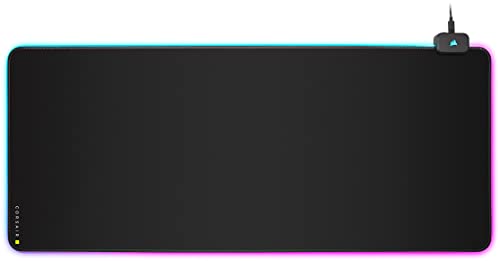 3. Corsair MM700 RGB Extended | Check price on Amazon | |
 4. Logitech G840 XL | Check price on Amazon | |
 5. HyperX Pulsefire Mat RGB XL | Check price on Amazon |
Key takeaways
- Find the best XXL mouse pad for gaming with five extended desk mats that give low-sensitivity players room to aim, track, and win every fight.
A standard mouse pad ends right where a low-sensitivity flick begins. Players who run a low DPI setting sweep their arm across the desk, and a small pad forces them to lift and reset the mouse in the middle of a fight. An XXL mouse pad solves that problem by covering the desk from the keyboard to the edge, giving the mouse a single unbroken surface to travel across. The extra width also holds the keyboard, so the whole setup sits on one level surface instead of two.
This guide covers five extended gaming mouse pads that are actually built for that job. Each one measures at least 900 mm wide, uses a cloth surface tuned for sensor tracking, and stays flat on the desk with a rubber base. If you are still choosing a mouse to pair with a bigger pad, our guide to the best wireless gaming mice explains how sensor tracking and mouse feet interact with the surface under them. The pads below are ranked for gaming first, with size, surface feel, thickness, and extra features weighed in that order.
As an Amazon Associate, we earn from qualifying purchases.
Quick Answer
The SteelSeries QcK XXL is the best XXL mouse pad for gaming, thanks to its proven micro-woven cloth surface, 900 mm width, and simple no-fuss design. The Razer Gigantus V2 XXL is the best pick for players who want a thicker, cushioned feel. The Corsair MM700 RGB Extended and HyperX Pulsefire Mat RGB XL add lighting and USB features, while the Logitech G840 XL is the thinnest option here.
1. SteelSeries QcK XXL
The QcK line has been the default desk pad in competitive gaming for years, and the XXL version is the one to buy when a standard pad feels cramped. Its micro-woven cloth surface is tuned for consistent tracking across optical sensors, with a medium glide that suits both fast flicks and slow, controlled aiming. The surface feels smooth without being slick, so the mouse stops where the hand stops instead of sliding past the target.
At 900 mm wide and 400 mm deep, the pad holds a full-size keyboard and still leaves a wide strip of free space for the mouse. The 2 mm thickness keeps the pad low on the desk, which suits players who rest their wrist on the desk edge rather than on the pad itself. A non-slip rubber base keeps the mat in place during aggressive swipes, and the stitched edge is absent on the classic version, so players who prefer a clean, unbound edge will find it here.
The QcK XXL is also easy to clean. The cloth surface tolerates a damp cloth and mild soap, and the pad dries flat without curling at the corners. That matters for a pad this size, because a large mat collects dust, snack crumbs, and drink rings faster than a small one. For players who want a proven surface with no extra features to pay for, this is the safest pick on the list.
Key specs
| Spec | Detail |
|---|---|
| Size | 900 x 400 mm |
| Thickness | 2 mm |
| Surface | Micro-woven cloth |
| Base | Non-slip rubber |
| Edge | Unbound |
| Model | QcK XXL |
2. Razer Gigantus V2 XXL
The Gigantus V2 XXL is the thickest pad in this guide, and that thickness is its main selling point. At 4 mm of high-density rubber foam, it cushions the wrist and forearm during long sessions and stays uniformly flat even on a desk with small imperfections. The textured micro-weave cloth surface is tuned for pixel-precise tracking, and Razer calibrates it for use across all mouse sensors, so optical and laser sensors track cleanly across the full width.
The pad measures 940 mm wide and 410 mm deep, which is slightly larger than the other cloth pads here. That extra width is useful for players who sit their keyboard at an angle, because the angled keyboard eats into the mouse area on a narrower pad. The green rubber foam base grips the desk firmly, and the pad does not bunch or slide when the mouse is pushed hard into a flick shot.
One practical note is that the 4 mm thickness raises the keyboard slightly above the desk surface. Most players adjust within a session or two, and the cushioning is a fair trade for the comfort. The Gigantus V2 XXL is also available in a 3XL size for players who want to cover an entire desk, but the XXL version already covers a keyboard and a full range of mouse movement for most setups.
Key specs
| Spec | Detail |
|---|---|
| Size | 940 x 410 mm |
| Thickness | 4 mm |
| Surface | Textured micro-weave cloth |
| Base | High-density rubber foam, anti-slip |
| Edge | Stitched |
| Model | RZ02-03330400-R3U1 |
3. Corsair MM700 RGB Extended
The MM700 RGB Extended is the only pad in this guide with built-in lighting and a USB hub, and it is the right choice for players who want the desk mat to be part of the setup rather than just a surface. A 360-degree RGB light strip runs around the edge of the pad with three lighting zones, and the lighting is controlled through Corsair iCUE software, where it can be synced with other Corsair gear or set to a static color for a calmer look.
The pad itself measures 930 mm wide and 400 mm deep with a 4 mm thick rubber construction. The cloth surface is smooth and consistent, with a medium glide that works for both fast-paced shooters and slower strategy games. A two-port USB hub sits at the top of the pad, which is a genuinely useful feature for a wireless mouse dongle or a headset receiver, because it keeps the receiver close to the mouse and away from interference behind the PC.
The MM700 RGB Extended connects to the PC with a detachable USB-C cable, so the pad can be unplugged and rolled up without dragging a cable across the desk. The RGB strip adds a small amount of thickness at the edge, but it does not interfere with mouse movement. Players who run a dark room setup will get the most from the lighting, while players who game in a bright room may find the feature less important than the size and surface quality.
Key specs
| Spec | Detail |
|---|---|
| Size | 930 x 400 mm |
| Thickness | 4 mm |
| Surface | Cloth |
| Base | Rubber |
| Lighting | 360-degree RGB, three zones |
| USB hub | Two ports |
| Model | CH-9417070-WW |
4. Logitech G840 XL
The Logitech G840 XL is the thinnest pad in this guide at 3 mm, and that slim profile is its defining trait. A thin pad keeps the keyboard and the mouse on nearly the same plane as the desk, which suits players who dislike the small step up that a thick pad creates. The performance-tuned cloth surface has a moderate friction level that gives the mouse a controlled glide, with enough resistance for precise micro-adjustments and enough speed for broad sweeps.
At 900 mm wide and 400 mm deep, the G840 XL covers a keyboard and a generous mouse area without dominating a smaller desk. The stable rubber base holds the pad flat during play, and the surface texture is consistent from edge to edge, so tracking does not change as the mouse moves toward the edge of the pad. The pad is also light enough to roll up and carry to a LAN event or a friend’s setup, which is harder with the thicker pads on this list.
The G840 XL keeps things simple. There is no lighting, no USB hub, and no software to install. That simplicity is the point: the pad does one job, and it does it well. Players who already have a lighting setup they are happy with, or who simply do not want another cable on the desk, will appreciate the clean design.
Key specs
| Spec | Detail |
|---|---|
| Size | 900 x 400 mm |
| Thickness | 3 mm |
| Surface | Performance-tuned cloth |
| Base | Stable rubber, non-slip |
| Edge | Stitched |
| Model | G840 XL |
5. HyperX Pulsefire Mat RGB XL
The HyperX Pulsefire Mat RGB XL pairs a large cloth surface with two zones of customizable RGB lighting, making it the most flexible lighting pad in this guide after the Corsair. The lighting is controlled through HyperX NGENUITY software, and up to three lighting profiles can be saved to the onboard memory, so the pad keeps its settings when it is moved to another PC. A touch sensor on the pad switches between profiles without opening any software.
The surface is a densely woven cloth tuned for precision, with a smooth glide that favors fast mouse movement. The pad measures 900 mm wide and 420 mm deep, which gives it the deepest mouse area of the five pads here. That extra depth matters for players who pull the mouse toward themselves during vertical flicks, because a deeper pad gives the hand more room before it runs off the edge.
The anti-slip rubber base keeps the mat anchored, and the anti-fray stitched edges protect the border from wear. The RGB strip is fed by an attached braided cable that is 1.8 m long, so the pad needs a free USB port on the PC. Players who want lighting but prefer a deeper pad than the Corsair will find this one the better fit, while players who want a USB hub will prefer the Corsair instead.
Key specs
| Spec | Detail |
|---|---|
| Size | 900 x 420 mm |
| Thickness | 4 mm |
| Surface | Densely woven cloth |
| Base | Anti-slip rubber |
| Lighting | Two RGB zones, NGENUITY software |
| Onboard memory | Three profiles |
| Cable | Attached braided, 1.8 m |
| Model | HMPM1R-A-XL |
Who It Is For
An XXL mouse pad is for players who use a low sensitivity setting and move the mouse with the whole arm. If the mouse regularly hits the edge of a standard pad, or if the keyboard and the mouse sit on different surfaces, an extended pad fixes both problems at once. It is also for players who want a clean desk, because one large mat replaces a small pad and a separate desk mat, and it hides cable clutter under a single surface.
The pads in this guide also suit players who switch between games with different aiming styles. A wide pad gives room for the broad sweeps of a tactical shooter and the short, precise movements of a strategy game without changing the setup. Streamers and content creators benefit too, because a large mat frames the keyboard and mouse in a tidy rectangle on camera.
Who Should Skip It
Players with a small desk should measure first. An XXL pad needs roughly 900 mm of clear desk width, and a pad that hangs over the edge will curl and lift. Laptop players who game on the move should also skip these pads, since a 900 mm mat does not travel well and a compact pad fits a bag better.
Players who use a very high sensitivity setting may not need the extra space at all. If the mouse barely moves during play, a large pad adds nothing except desk coverage, and a standard pad will do the same job. Finally, players who dislike cloth surfaces should look at hard pads instead, because every pad in this guide uses a cloth top.
Comparison
All five pads share the same core idea: a cloth surface at least 900 mm wide with a rubber base. The differences are thickness, depth, and extras. The SteelSeries QcK XXL is the thinnest and simplest, with a proven surface and no extra features. The Razer Gigantus V2 XXL is the thickest and widest, with the most cushioning for long sessions. The Logitech G840 XL sits between them on thickness and keeps the design clean.
The two RGB pads split on features rather than size. The Corsair MM700 RGB Extended adds a two-port USB hub and three lighting zones, while the HyperX Pulsefire Mat RGB XL is deeper and stores three lighting profiles on the pad itself. The Corsair is the better pick for players who want a dongle close to the mouse, and the HyperX is the better pick for players who want a deeper mouse area and profile switching without software.
| Pad | Size | Thickness | Surface | Standout feature |
|---|---|---|---|---|
| SteelSeries QcK XXL | 900 x 400 mm | 2 mm | Micro-woven cloth | Thinnest, simplest |
| Razer Gigantus V2 XXL | 940 x 410 mm | 4 mm | Textured micro-weave cloth | Thickest, most cushioning |
| Corsair MM700 RGB Extended | 930 x 400 mm | 4 mm | Cloth | RGB plus two-port USB hub |
| Logitech G840 XL | 900 x 400 mm | 3 mm | Performance-tuned cloth | Slim, clean design |
| HyperX Pulsefire Mat RGB XL | 900 x 420 mm | 4 mm | Densely woven cloth | Deepest pad, onboard profiles |
FAQ
How big should an XXL mouse pad be for gaming?
An XXL pad should measure at least 900 mm wide and 400 mm deep to hold a full-size keyboard and leave room for the mouse. Wider pads up to 940 mm give angled keyboards more room, and deeper pads up to 420 mm give more room for vertical mouse movement. Measure the desk before buying, since a pad that overhangs the edge will curl.
Is a cloth or hard mouse pad better for gaming?
Cloth pads give a controlled glide with more friction, which suits precise aiming and low-sensitivity play. Hard pads give a faster glide with less resistance, which suits players who favor speed over control. Most competitive players use cloth pads, and every pad in this guide uses a cloth surface for that reason.
Do XXL mouse pads work with any mouse sensor?
Yes. Modern optical sensors track cleanly on the cloth surfaces used here, and the pads in this guide are tuned for consistent tracking across sensors. A worn or dirty pad can cause tracking issues, so keeping the surface clean matters more than the brand of the sensor.
How do I clean a large gaming mouse pad?
Use a damp cloth with mild soap and wipe the surface gently, then let the pad air dry flat. Avoid soaking the pad or folding it while wet, since that can warp the rubber base. Regular light cleaning keeps the surface consistent and extends the life of the pad.
Final Verdict
The SteelSeries QcK XXL is the best XXL mouse pad for gaming for most players. It has the most proven cloth surface on this list, it is thin enough to sit almost flush with the desk, and it covers a keyboard and a full range of mouse movement without adding features that need software or cables. Players who want more cushioning should buy the Razer Gigantus V2 XXL, and players who want lighting should choose between the Corsair MM700 RGB Extended for its USB hub and the HyperX Pulsefire Mat RGB XL for its deeper surface and onboard profiles. The Logitech G840 XL is the pick for players who want a slim, simple pad with a clean design. Any of the five will fix the core problem, which is a mouse that runs out of room, and the right choice comes down to thickness, lighting, and how much desk space is available.
Product and ASIN Reference
| Product | ASIN |
|---|---|
| SteelSeries QcK XXL | B0D1T1HZCC |
| Razer Gigantus V2 XXL | B0885FJ8CB |
| Corsair MM700 RGB Extended | B08QSNNV5H |
| Logitech G840 XL | B0BHMN52LY |
| HyperX Pulsefire Mat RGB XL | B09DFBG9C1 |
FAQ
How big should an XXL mouse pad be for gaming?
Is a cloth or hard mouse pad better for gaming?
Do XXL mouse pads work with any mouse sensor?
How do I clean a large gaming mouse pad?
More from Amazon
Programs that pair well with the guide above. Offers and eligibility are set by Amazon and may change.
Free shipping on eligible items, Prime Video and more. Eligible new members can start with a free trial.
Start a Prime free trialAd-free music streaming. Eligible new subscribers can start with a free trial.
Try Music Unlimited freeA Prime membership for ages 18-24 with a trial period. Eligibility is set by Amazon.
See Prime for Young AdultsAudiobooks and podcasts to listen to on the go. Eligible new members can start with a free trial.
Try Audible freeAs an Amazon Associate we earn from qualifying purchases.