Our Short List of 3

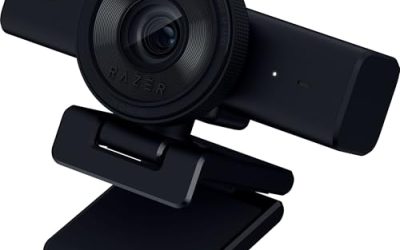
- Best for: A creator who streams or records from a fixed iMac desk and wants sharp 4K video with a physical privacy shutter.
- Ultra HD 4K webcam with 4K at 30fps or 1080p at 60fps
- Works with Windows, macOS, Chrome OS and Linux
- Show Mode for sharing notes and sketches on the desk
- Dual beamforming microphones with noise reduction

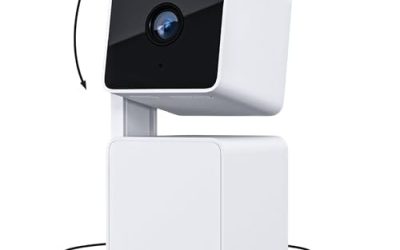
- Best for: A creator who stands, moves or demonstrates things on camera and wants the webcam to keep them framed automatically.
- 4K PTZ webcam with a 1/2-inch CMOS sensor
- 4K at 30fps or 1080p at 60fps
- AI tracking with a two-axis gimbal
- PDAF autofocus

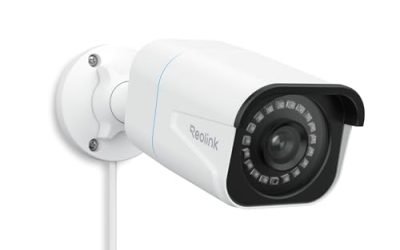
- Best for: An OBS streamer on iMac who wants smooth, uncompressed 1080p60 video with manual picture controls.
- Premium Full HD webcam for streaming, gaming, video calls and recording
- Uncompressed 1080p at 60fps video
- HDR enabled
- Sony sensor
All 5 Picks at a Glance
| Product | Specs | Action |
|---|---|---|
| Logitech MX Brio |
| Check price on Amazon |
| OBSBOT Tiny 2 Lite |
| Check price on Amazon |
| Elgato Facecam MK.2 |
| Check price on Amazon |
 Anker PowerConf C200 |
| Check price on Amazon |
 Logitech C920x HD Pro |
| Check price on Amazon |
Our Top Picks
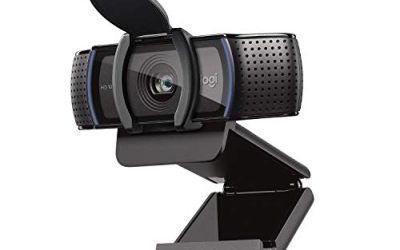
- Logitech C920x HD Pro PC Webcam with Microphone1 Pack2.8 x 1.7 x 3.7 inches0.4 poundsCheck on Amazon
An iMac creator faces a choice that has little to do with chasing the highest number on a box. The built-in camera on an iMac is convenient, but a webcam decides how sharp the picture looks in a livestream, how steady the framing stays during a long recording, and how clearly the voice comes through when no separate microphone is connected. Resolution, autofocus, field of view, microphone quality and macOS support all pull in different directions, and the camera that looks best on paper is not always the one that behaves best on a Mac desk.
This guide is for creators who stream, record videos or run live video sessions from an iMac and want a webcam that works cleanly with macOS, OBS and common video apps. The five cameras below were chosen from the names and specifications stated on their Amazon product pages, with macOS compatibility, resolution and frame rate, autofocus, microphone setup and mounting checked for each model before it made the list.
Quick Picks
As an Amazon Associate we earn from qualifying purchases.
| Product | Best for | Key spec from title |
|---|---|---|
| Logitech MX Brio | Sharp 4K streams from a fixed iMac desk | 4K webcam, 1080p at 60 FPS, Show Mode |
| OBSBOT Tiny 2 Lite | Moving around on camera while streaming | 4K PTZ webcam, AI tracking, 1/2-inch sensor |
| Elgato Facecam MK.2 | Smooth 1080p60 video for OBS streaming | Full HD webcam, HDR, Sony sensor, PTZ control |
| Anker PowerConf C200 | Flexible framing for calls and recorded video | 2K webcam, adjustable field of view, privacy cover |
| Logitech C920x HD Pro | A proven 1080p starter camera for iMac creators | Full HD 1080p/30fps webcam, stereo audio |
How to Choose
Start with macOS support, not resolution
A webcam is only useful on an iMac if macOS recognises it without a fight and the software that controls it runs on a Mac. Check the operating system line on the Amazon listing first: every camera in this guide lists macOS support, but the details differ. Some companion apps need a recent macOS version, and some advanced features, such as virtual backgrounds, need an Apple silicon Mac or a newer macOS release. A camera that works as a simple plug-and-play device in FaceTime, Zoom and OBS is the safest starting point, and any extra software should be treated as a bonus. If the listing only names Windows, keep looking, even when the resolution looks impressive.
Match resolution and frame rate to the stream
Resolution decides detail, while frame rate decides how smooth movement looks. A 4K camera at 30 frames per second gives a crisp still image and room to crop in editing, which suits recorded video and a mostly seated presenter. A 1080p camera at 60 frames per second looks smoother when the creator moves, gestures or demonstrates something with their hands. Streaming platforms and video apps often compress the outgoing feed below the camera’s capture resolution, so a 4K camera does not guarantee that viewers see 4K. Choose 4K when recording quality matters most, choose 1080p60 when smooth motion matters most, and confirm that the iMac and the USB connection can carry the chosen mode.
Check autofocus, field of view and low-light behaviour
Autofocus keeps the face sharp when the creator leans in to show a product or leans back to relax, while a fixed-focus camera can drift soft at close range. Field of view shapes the shot: a narrow view around 65 degrees frames one person tightly, a view near 78 degrees suits a normal desk setup, and a wide view near 90 degrees fits two people or a desk demonstration. Low-light correction matters because many creators stream in a room lit by a single lamp or a window, and a camera that brightens the image without turning it grainy is worth more than a higher resolution in dim light. Check these three points on the listing before deciding.
Think about sound, mounting and the iMac itself
The microphone decides whether a stream is watchable when no separate microphone is connected, so dual microphones with noise reduction are a real advantage for long talks. Mounting matters on an iMac, because the screen is thin and the camera must sit securely on top without slipping or blocking the display. A monitor clip with a tripod thread gives the most options, since the same camera can move to a tripod for a desk demonstration. Finally, check the connection: iMac models use USB-C ports, so a camera with a USB-C cable or a supplied adapter avoids an extra purchase, and a privacy shutter blocks the lens between sessions.
The 5 Best Options
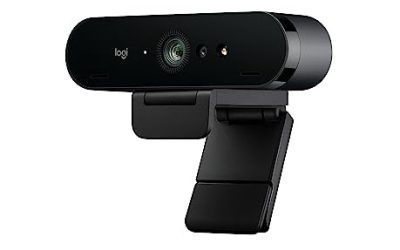
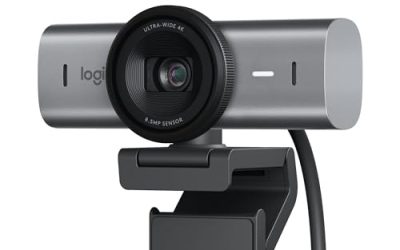
Logitech MX Brio
- Best for: A creator who streams or records from a fixed iMac desk and wants sharp 4K video with a physical privacy shutter.
- Ultra HD 4K webcam with 4K at 30fps or 1080p at 60fps
- Works with Windows, macOS, Chrome OS and Linux
- Show Mode for sharing notes and sketches on the desk
- Dual beamforming microphones with noise reduction
A creator who streams or records from a fixed iMac desk and wants sharp 4K video with a physical privacy shutter.
It has no motorised tracking, so the framing stays where it is set and will not follow the creator around the room.
The Logitech MX Brio is the strongest fixed camera in this guide for a creator who sits at an iMac desk and wants a sharp, professional picture without moving parts. Its large sensor and 4K capture give recorded video a clean, detailed look, while the 1080p60 mode keeps live motion smooth when the stream does not need full 4K. Show Mode, which tilts the camera down to show notes or objects on the desk, is a practical extra for creators who demonstrate products during a stream. The aluminium body and privacy shutter suit a desk that stays set up all day.
Watch out for: It has no motorised tracking, so the framing stays where it is set and will not follow the creator around the room.
OBSBOT Tiny 2 Lite
- Best for: A creator who stands, moves or demonstrates things on camera and wants the webcam to keep them framed automatically.
- 4K PTZ webcam with a 1/2-inch CMOS sensor
- 4K at 30fps or 1080p at 60fps
- AI tracking with a two-axis gimbal
- PDAF autofocus
A creator who stands, moves or demonstrates things on camera and wants the webcam to keep them framed automatically.
The gimbal and tracking add moving parts and software settings to learn, so a creator who only sits still gains little from them.
The OBSBOT Tiny 2 Lite is the pick for a creator who moves during a stream. Its two-axis gimbal pans and tilts to follow the presenter, while AI tracking and gesture control let the creator start or stop tracking with a hand movement instead of reaching for the mouse. The large half-inch sensor helps in rooms that are not brightly lit, and the combination of 4K at 30 frames per second and 1080p at 60 frames per second covers both detailed recording and smooth live video. OBSBOT lists macOS 11 or later in its system requirements and names iMac models among its recommended Apple computers.
Watch out for: The gimbal and tracking add moving parts and software settings to learn, so a creator who only sits still gains little from them.
Elgato Facecam MK.2
- Best for: An OBS streamer on iMac who wants smooth, uncompressed 1080p60 video with manual picture controls.
- Premium Full HD webcam for streaming, gaming, video calls and recording
- Uncompressed 1080p at 60fps video
- HDR enabled
- Sony sensor
An OBS streamer on iMac who wants smooth, uncompressed 1080p60 video with manual picture controls.
It records and streams at 1080p, so a creator who specifically needs 4K footage for editing should choose a 4K camera instead.
The Elgato Facecam MK.2 is built for creators who stream through OBS and want clean, uncompressed 1080p60 video rather than a higher resolution that their stream cannot carry. Its Sony sensor and HDR support help the picture hold up when the room light changes, and the fixed-focus lens stays sharp across a normal desk distance without hunting for focus. Camera Hub software on Mac gives control over pan, tilt, zoom, exposure and white balance, so the shot can be tuned once and left alone. The built-in privacy shutter and the monitor mount make it a straightforward fit on top of an iMac.
Watch out for: It records and streams at 1080p, so a creator who specifically needs 4K footage for editing should choose a 4K camera instead.
Anker PowerConf C200
- Best for: A creator who wants to change framing between solo streams, calls and desk demonstrations without moving the camera.
- 2K webcam for PC, laptop and Mac
- Maximum resolution 2K at 30fps
- Autofocus
- Adjustable field of view: 65, 78 or 95 degrees
A creator who wants to change framing between solo streams, calls and desk demonstrations without moving the camera.
The widest field of view can show more of a messy room than intended, and some framing options need the AnkerWork software rather than working straight out of the box.
The Anker PowerConf C200 is the flexible middle option for a creator who records video, joins calls and streams from the same iMac desk. Its 2K capture sits between 1080p and 4K, giving a sharper image than a basic 1080p camera without the heavier files of 4K recording. The adjustable field of view is the feature that sets it apart: the creator can choose a tight 65-degree frame for a solo stream, a 78-degree frame for a normal desk setup, or a wide 95-degree frame when more of the desk needs to be visible. Autofocus, low-light correction and AI noise-canceling microphones cover the everyday problems of a home studio.
Watch out for: The widest field of view can show more of a messy room than intended, and some framing options need the AnkerWork software rather than working straight out of the box.
Logitech C920x HD Pro
- Best for: A new iMac creator who wants a dependable 1080p camera for streaming and calls at a lower tier than the 4K picks.
- Full HD 1080p at 30fps video
- Autofocus
- Dual built-in stereo microphones
- HD light correction
A new iMac creator who wants a dependable 1080p camera for streaming and calls at a lower tier than the 4K picks.
It tops out at 1080p at 30 frames per second, so fast movement looks less smooth than on the 1080p60 cameras in this guide.
The Logitech C920x HD Pro is the proven starter camera for a creator who wants reliable 1080p video on an iMac without learning new software. It has been a standard choice for video calls and starter streams, and its autofocus, dual stereo microphones and HD light correction handle the basics well: the face stays in focus, the voice stays clear, and the picture stays usable in uneven room light. The Amazon listing names Mac support in the title, and the camera works with Teams, Google Meet and Zoom. It is the simplest camera in this guide to set up, which matters when the stream is the priority.
Watch out for: It tops out at 1080p at 30 frames per second, so fast movement looks less smooth than on the 1080p60 cameras in this guide.
Which One Fits Your Situation
You stream for hours from one desk
Choose the Logitech MX Brio. A fixed desk rewards a fixed camera with a large sensor, and the MX Brio gives the sharpest still image in this guide, a privacy shutter for breaks between sessions, and a 1080p60 mode when smooth motion matters more than 4K detail. Show Mode is a genuine help when the stream includes notes, sketches or small products on the desk.
You move around while you stream
Choose the OBSBOT Tiny 2 Lite. Its gimbal and AI tracking keep the creator in frame while standing, stepping back or moving across the room, which a fixed camera cannot do. The 4K30 and 1080p60 modes cover both recorded video and live streaming, and OBSBOT explicitly lists macOS support and iMac models in its requirements.
You stream through OBS and want the cleanest 1080p feed
Choose the Elgato Facecam MK.2. Uncompressed 1080p60 video, HDR and Camera Hub controls on Mac give an OBS streamer a stable, tunable picture without the file sizes and bandwidth demands of 4K. The fixed-focus lens also avoids the focus hunting that can distract viewers during a long stream, which matters most in sessions that run for hours.
You are starting out and want the simplest setup
Choose the Logitech C920x HD Pro. It plugs in, works with the main video apps on Mac, and covers autofocus, stereo sound and light correction without extra software to learn. If the channel grows and 4K recording becomes a priority later, the MX Brio or the OBSBOT Tiny 2 Lite is the natural next step.
Common Mistakes
- Buying a webcam that only lists Windows support and discovering on arrival that its software does not run on macOS.
- Choosing 4K for a stream that the platform compresses to 1080p anyway, while ignoring frame rate and low-light performance.
- Picking a wide field of view for a solo stream and showing a cluttered room behind the creator instead of a clean frame.
- Relying on the camera’s built-in microphone in a noisy room instead of checking its noise reduction or adding a separate microphone.
- Mounting the camera loosely on the thin top edge of an iMac, where it can slip, tilt or block part of the display during a live session.
Frequently Asked Questions
Do these webcams work with an iMac?
Yes, all five list macOS support on their Amazon pages. The Logitech MX Brio lists Windows, macOS, Chrome OS and Linux, the OBSBOT Tiny 2 Lite needs macOS 11 or later, the Elgato Facecam MK.2 works with Mac through Camera Hub, the Anker PowerConf C200 needs macOS 10.11 or later, and the Logitech C920x names Mac in its title. Check the exact macOS version before ordering.
Is a 4K webcam worth it for streaming from an iMac?
It depends on what the creator does with the footage. A 4K camera is worth it for recorded video, because the extra detail survives editing and cropping. For live streaming, many platforms compress the feed below 4K, so a smooth 1080p60 camera such as the Elgato Facecam MK.2 often looks better in motion than a 4K camera running at 30 frames per second.
Can I use these webcams with OBS on a Mac?
Yes. All five work as video sources in OBS on macOS, and the Elgato Facecam MK.2 and OBSBOT Tiny 2 Lite have Mac companion software for extra controls. Connect the camera directly to the iMac or through a powered USB hub, select it as the video capture source in OBS, and confirm the resolution and frame rate in the OBS source settings before going live.
Do I still need a separate microphone?
Not always, but it depends on the room. The dual microphones on the MX Brio, OBSBOT Tiny 2 Lite, Anker PowerConf C200 and Logitech C920x are clear enough for calls and casual streams in a quiet room. In a noisy room, or for a polished recorded show, a separate microphone placed close to the creator gives cleaner sound than any built-in webcam microphone.
FAQ
Do these webcams work with an iMac?
Is a 4K webcam worth it for streaming from an iMac?
Can I use these webcams with OBS on a Mac?
Do I still need a separate microphone?
More from Amazon
Programs that pair well with the guide above. Offers and eligibility are set by Amazon and may change.
Free shipping on eligible items, Prime Video and more. Eligible new members can start with a free trial.
Start a Prime free trialAd-free music streaming. Eligible new subscribers can start with a free trial.
Try Music Unlimited freeA Prime membership for ages 18-24 with a trial period. Eligibility is set by Amazon.
See Prime for Young AdultsAudiobooks and podcasts to listen to on the go. Eligible new members can start with a free trial.
Try Audible freeAs an Amazon Associate we earn from qualifying purchases.