Our Top Picks

The phrase “best webcams United States” can be read more than one way, so here is the reading this guide uses: webcams that are sold and available in the United States, through Amazon US, for buyers who want a camera that works with the software and services people actually use here. The real decision is not which camera has the longest spec sheet. It is which camera matches the way you spend your time on video: long work calls in a dim room, live streaming where smooth motion matters, or recorded videos where sharp detail carries the result.

This guide is for remote workers who live on video calls, streamers who need steady 60 frames per second, and creators who record lessons or videos from a desk. Every camera below is picked from the name and specifications shown on its Amazon listing, with the resolution, frame rate, connection, and microphone details that decide whether it fits your setup.
Quick Picks
As an Amazon Associate we earn from qualifying purchases
| Product | Best for | Key spec from title |
|---|---|---|
| Logitech MX Brio Ultra HD 4K Webcam | Sharp 4K work calls and recorded video | 4K Ultra HD, 1080p at 60 fps |
| Elgato Facecam 1080p60 Webcam | Smooth streaming and live video calls | 1080p60 True Full HD, Sony sensor |
How to Choose
Match resolution to what you actually do
Resolution decides how much detail the other side sees, but more is not always better. A 4K camera keeps text on a whiteboard and facial detail crisp in recorded video, which matters if you present slides or record lessons. A 1080p camera is enough for everyday calls, because most meeting software compresses the stream well below what the camera captures. Compression hides much of the difference on a typical call. Streamers who broadcast at 1080p gain nothing from a 4K sensor unless they also record locally. Before paying for 4K, ask whether your calls, recordings, or streams ever show the extra detail, and whether your computer and connection can carry it.
Treat frame rate as a streaming decision
Frame rate decides how smooth motion looks. At 30 frames per second, a talking head looks fine, because little moves. At 60 frames per second, hand gestures, head turns, and anything you hold up to the camera move without the stutter that makes a stream feel cheap. That is why 1080p60 is the working standard for live streaming. If your main use is meetings, 60 frames per second is a nice bonus rather than a requirement. If you stream games, demonstrate products live, or move around on camera, put 60 frames per second near the top of your list and check that your streaming software is set to use it.
Check the connection and the mount before you buy
Most good webcams connect over USB, but the connector type and cable length still cause surprises. A USB-C camera needs a free USB-C port or an adapter, while a USB-A camera plugs into the ports most desktops still have in abundance. The mount matters just as much: a clip that grips a thin laptop lid may wobble on a thick curved gaming monitor, and a camera without a tripod thread cannot move to a desk stand. Measure your monitor thickness, look at where your USB ports sit, and confirm the camera can sit at eye level. A camera that points up your nose wastes every other feature it has.
Do not ignore the microphone and the privacy shutter
A webcam microphone will never replace a dedicated USB microphone, but it decides whether you sound acceptable when you have no other mic. Dual microphones with noise reduction keep keyboard clicks and room echo from dominating the call, which is enough for most meetings. For streaming or recorded video, plan on a separate microphone and treat the built-in mic as a backup. A privacy shutter is the other detail buyers forget until they need it. A built-in shutter or a clip-on cover lets you block the lens in one motion when a call ends, which beats tape, sticky notes, or unplugging the camera every time.
The 2 Best Options
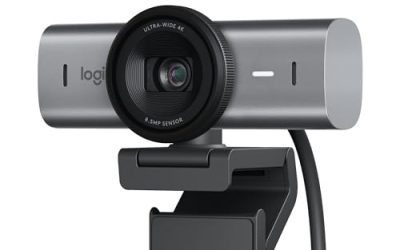
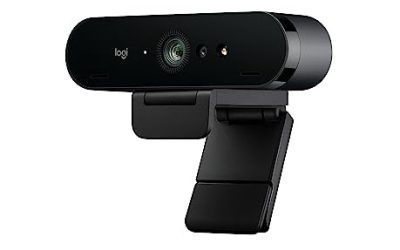
Logitech MX Brio Ultra HD 4K Webcam
The MX Brio is the pick for buyers who want the sharpest image on a work call or in a recorded video. It records 4K at 30 frames per second and drops to 1080p at 60 frames per second when smooth motion matters more, so one camera covers both meeting days and recording sessions. The Show Mode lets you tilt the camera down to show documents or objects on your desk, which is useful for teachers, designers, and anyone who walks a client through physical work. Its dual beamforming microphones with noise reduction keep your voice clear on calls.
Specs
- 4K Ultra HD video at 30 frames per second
- 1080p video at 60 frames per second
- 8.5MP sensor
- Dual beamforming microphones with noise reduction
- Built-in privacy shutter
- Show Mode for tilting down to show desk items
- USB-C connection
- Works with Microsoft Teams, Zoom, and Google Meet
Best for: Remote workers and creators who want the sharpest 4K image for calls and recordings.
Watch out for: 4K needs good lighting and enough upload bandwidth to look its best, so check your room light and connection before expecting a dramatic jump over 1080p.
Elgato Facecam 1080p60 Webcam
The Elgato Facecam is built for one job: smooth, clean 1080p video at 60 frames per second for streaming and live calls. Its Sony sensor and advanced light correction keep the image steady when room light changes, and the DSLR-style controls in the companion software let you adjust exposure, white balance, and zoom instead of relying on automatic mode. Because it is a fixed-focus camera, there is no hunting for focus mid-sentence, which keeps the picture stable during long streams. It works with OBS, Zoom, and Teams, so it fits a streaming setup or a work desk.
Specs
- 1080p60 True Full HD video
- Sony sensor
- Advanced light correction
- DSLR-style control through companion software
- Fixed-focus lens with no focus hunting
- USB Type-C connection
- Works with OBS, Zoom, and Teams
Best for: Streamers and frequent callers who want smooth 60 frames per second video and steady focus.
Watch out for: This model has no built-in privacy shutter, so plan on a separate lens cover or unplugging the camera when you want the lens blocked.
Which One Fits Your Situation
You spend the day on work calls
Pick the Logitech MX Brio. Its 4K image keeps you sharp when you present, its noise-reducing microphones handle calls without extra gear, and the built-in privacy shutter closes the lens the moment a meeting ends. The 1080p60 mode is there when you want smoother motion, so the camera adapts to the call rather than forcing you to adapt to it. The shutter closes in one motion when the meeting ends.
You stream live several times a week
Pick the Elgato Facecam. Uncompressed-feeling 1080p60 video, a Sony sensor, and DSLR-style controls give your stream a consistent look, and fixed focus means the picture never drifts while you talk. Pair it with a separate microphone and a key light and you have a streaming setup that holds up for long sessions. The fixed focus keeps the picture stable while you talk, gesture, or hold products up to the lens.
You record lessons, demos, or videos from your desk
Pick the Logitech MX Brio. The 4K mode captures the detail that recorded video rewards, and Show Mode lets you tilt down to a notebook, a product, or a sketch without moving the whole camera. Record in 4K, edit at your leisure, and export at the resolution your audience actually watches. The 1080p60 mode is there for the moments when you demonstrate something live on camera.
You want the simplest setup that just works
Pick the Elgato Facecam. Plug it in over USB-C, open your meeting or streaming app, and you are on camera with smooth 1080p60 video and no focus adjustments to think about. It asks little of your computer and little of you, which is exactly what a daily driver should do. A separate lens cover is the only extra item worth keeping nearby, since this model has no built-in shutter.
Common Mistakes
- Buying a 4K webcam for calls that your meeting software compresses to 1080p or lower, then wondering why nothing looks different on the other side of the call.
- Choosing a camera without checking whether your computer has the right USB port free, then discovering you need an adapter or a hub before your first meeting.
- Mounting the camera below eye level or on a wobbling monitor clip, which makes even a good sensor look unprofessional and distracts everyone on the call.
- Ignoring lighting and expecting any webcam to fix a dark room, when a single lamp placed in front of you does more than a sensor upgrade ever will.
- Forgetting the privacy question entirely, then scrambling for tape or a cover when a call ends and the lens stays open for the rest of the day.
Frequently Asked Questions
Do I need a 4K webcam for video calls in the United States?
No, not for most calls. Meeting software compresses video heavily, so a good 1080p camera usually looks the same to the other side. A 4K webcam earns its place when you record video, present detailed work, or want the sharpest possible image on a large screen. If you join team calls, spend the difference on lighting.
Is 1080p60 better than 4K30 for streaming?
For live streaming, usually yes. Most streams go out at 1080p, so the extra pixels of 4K never reach viewers, while 60 frames per second makes motion visibly smoother. Choose 4K30 when you record and edit video, and 1080p60 when you broadcast live. The smoother motion also makes hand gestures and product demos easier to follow on a live broadcast.
Will these webcams work with Zoom, Teams, and OBS?
Yes. Both cameras in this guide list compatibility with Zoom and Teams, and the Elgato Facecam also works with OBS. They connect over USB and appear as standard video devices, so no special capture hardware is needed to use them with common meeting and streaming software. Setup is quick because both cameras appear as standard USB video devices.
What should I check before ordering a webcam from Amazon US?
Confirm the exact model name and color on the listing, check that the seller and shipping details match a US delivery, and confirm the connection type fits your computer. Also check the mount style against your monitor and whether the camera has a privacy shutter, so nothing about the setup surprises you after delivery.
FAQ
Do I need a 4K webcam for video calls in the United States?
Is 1080p60 better than 4K30 for streaming?
Will these webcams work with Zoom, Teams, and OBS?
What should I check before ordering a webcam from Amazon US?
More from Amazon
Programs that pair well with the guide above. Offers and eligibility are set by Amazon and may change.
Free shipping on eligible items, Prime Video and more. Eligible new members can start with a free trial.
Start a Prime free trialAd-free music streaming. Eligible new subscribers can start with a free trial.
Try Music Unlimited freeA Prime membership for ages 18-24 with a trial period. Eligibility is set by Amazon.
See Prime for Young AdultsAudiobooks and podcasts to listen to on the go. Eligible new members can start with a free trial.
Try Audible freeAs an Amazon Associate we earn from qualifying purchases.