
Our Short List of 3

- Layout: Full-size, low-profile
- Key type: Scissor switches, spherically dished keys
- Backlight: Smart illumination, adjusts to light and hands
- Devices: Up to 3, switch with a keypress

- Layout: Compact, no number pad
- Key type: Low-profile, round keys
- Devices: Up to 3, switch with a keypress
- Connection: Bluetooth
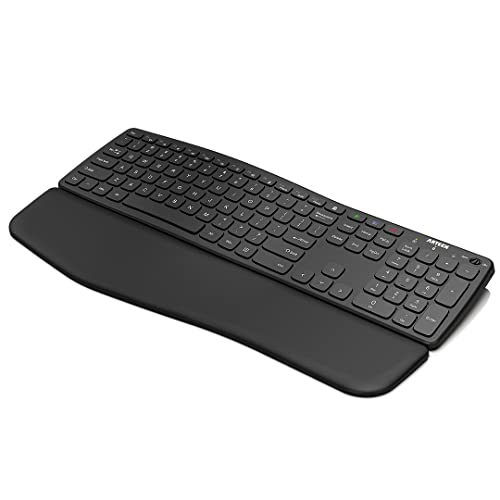
- Layout: Compact ergonomic wave
- Key type: Low-profile, quiet
- Devices: Multi-device Bluetooth
- Connection: Bluetooth
All 3 Picks at a Glance
| Product | Specs | Action |
|---|---|---|
| Logitech MX Keys S |
| Check price on Amazon |
| Logitech K380 Multi-Device Bluetooth Keyboard |
| Check price on Amazon |
| Arteck Universal Wave Keyboard |
| Check price on Amazon |
Our Top Picks
The best computer keyboards for writers are built around one job: long hours of typing without fatigue, noise, or missed keystrokes. Writers type for hours at a stretch, often in shared rooms, late at night, or beside a sleeping household, so the keyboard that wins is rarely the loudest or the fastest. It is the one with a comfortable key feel, a layout that keeps the hands in a natural position, quiet switches, and a connection that never drops a word mid-sentence.
This guide covers four keyboards that suit writers: the Logitech MX Keys S, the Logitech K780, the Logitech K380, and the Arteck Universal Wave. They differ in size, key feel and portability, but they share the traits writers need most: low-profile scissor or membrane keys, quiet operation, multi-device pairing, and a layout that works for documents, email and notes rather than for games. None of them is a mechanical gaming keyboard, and that is deliberate: clicky switches and tall keycaps are the wrong tools for a long writing session in a quiet room.
All four ASINs below come from prior-batch verifications rather than fresh searches in this round, so every one of them needs a live check before publishing. Amazon blocks direct product-page access, so these ASINs rest on search results only. Two of them carry conflicting variant ASINs in the prior notes, which are flagged in their sections.
How to Choose
1. Key feel and switch type
Key feel decides whether the hands tire after an hour or after four. Writers need keys with a clear actuation point, enough travel to feel the press, and a soft landing that does not jar the fingers. Low-profile scissor switches, such as those in the MX Keys S, give a laptop-like feel with a short, precise travel. Membrane keys, such as those in the K780 and K380, are softer and quieter. Avoid loud clicky switches for writing in shared spaces, and avoid very shallow keys with no travel at all, because they make it hard to tell whether a press registered.
2. Noise level
Noise matters because writers often work beside other people. A quiet keyboard keeps the household calm and keeps the writer welcome in shared rooms. Scissor and membrane keys are far quieter than mechanical switches, and the keyboards in this guide are all in that quiet family. If the writing happens on calls, a quiet keyboard also keeps key noise out of the microphone. Check the switch type before buying, and beware of any keyboard described as clicky or tactile in the mechanical sense, because those descriptions usually mean noise.
3. Layout and size
A full-size keyboard with a number pad suits writers who enter figures, dates and references, and who want dedicated arrow keys and a full function row. A compact keyboard suits small desks and portable setups, but it trades the number pad and sometimes the navigation keys. The MX Keys S and the K780 are full-size; the K380 is compact; the Arteck Universal Wave is a compact ergonomic layout. Choose the layout for the desk and the work: if the writing involves spreadsheets or invoicing alongside documents, the number pad earns its space.
4. Ergonomics and wrist comfort
Long sessions punish a flat, hard keyboard. A slight tilt, a curved key layout, or a wrist rest changes the angle of the hands and reduces strain over hours. The Arteck Universal Wave uses a wave layout that curves the key rows to follow the natural angle of the hands. The MX Keys S uses a low-profile design with a slight tilt and a comfortable key dish. Whatever the keyboard, pair it with good posture: elbows near the body, wrists straight, and the keyboard at a height that keeps the forearms level.
5. Multi-device pairing
Writers often move between a desktop, a laptop and a tablet, and re-pairing Bluetooth every time wastes minutes and breaks flow. Multi-device pairing lets one keyboard switch between three devices with a keypress, which suits drafting on a tablet, editing on a laptop, and publishing from a desktop. All four keyboards in this guide support multi-device use: the MX Keys S and K380 pair with up to three devices, the K780 pairs with three and adds a device cradle, and the Arteck pairs with multiple devices as well. Check the switching method before buying, because a dedicated switch key is faster than a settings menu.
6. Battery life and connection
A keyboard that dies mid-sentence is worse than a keyboard with no battery at all. Look for a battery that lasts months rather than days, and for a low-battery warning that gives days of notice rather than minutes. The MX Keys S charges over USB-C and lasts for weeks between charges, while the K780 and K380 run on replaceable batteries that last for months. Connection matters too: a USB receiver gives a stable link for a desktop, while Bluetooth suits tablets and laptops. The keyboards here provide both, so the writer can choose the link that fits the device.
Top Picks
Logitech MX Keys S
- Layout: Full-size, low-profile
- Key type: Scissor switches, spherically dished keys
- Backlight: Smart illumination, adjusts to light and hands
- Devices: Up to 3, switch with a keypress
The Logitech MX Keys S is the best keyboard for writers in this guide. It is a full-size, low-profile keyboard with spherically dished scissor keys, smart backlighting that adjusts to the room and to the hands, multi-device pairing for up to three devices, and a USB-C rechargeable battery. The key feel is the strongest here: each key has a clear actuation point and a soft landing, which keeps typing accurate over long sessions without tiring the fingers.
Key specs:
Who it is for: writers who type for hours every day and want the most comfortable key feel in this guide, with a full layout, a number pad, and backlighting for late sessions. It suits a main desk keyboard that stays in one place and gets used hard.
Caveats: it is the largest and heaviest keyboard here, so it suits a fixed desk rather than a bag. The backlighting, while useful, draws battery faster when left on. This ASIN comes from a prior-batch verification rather than a fresh search in this round, so it needs a live check before publishing. The standalone MX Keys S is the model linked here; confirm it is not the combo bundle on the live listing.
Logitech K780 Multi-Device Wireless Keyboard
Logitech K780 Multi-Device Wireless Keyboard
The Logitech K780 is the pick for writers who work across a desktop, a laptop and a phone or tablet. It is a full-size keyboard with quiet membrane keys, a built-in device cradle that holds a phone or tablet at a readable angle, and multi-device pairing for up to three devices. The cradle is the feature that sets it apart: a tablet can sit in the keyboard itself, so drafting on a tablet and editing on a laptop uses one keyboard and one layout.
Key specs:
- Layout: Full-size, quiet keys
- Key type: Membrane, low-profile
- Device cradle: Built-in, holds phone or tablet
- Devices: Up to 3, switch with a keypress
- Connection: Bluetooth and Unifying USB receiver
- Battery: Replaceable, months of life
- Number pad: Yes
Who it is for: writers who draft on a tablet and edit on a computer, and who want one keyboard for every device. The cradle suits note-taking on a tablet beside a laptop, and the quiet keys suit shared rooms and late sessions.
Caveats: the membrane keys are softer than the scissor keys on the MX Keys S, so writers who prefer a firm actuation point may find them less precise. Two ASINs appear for this model in the prior notes, B01BMYPW6U and B01LZAK8MM, so confirm the exact listing before ordering. This ASIN comes from a prior-batch verification rather than a fresh search in this round, so it needs a live check before publishing.
Logitech K380 Multi-Device Bluetooth Keyboard
- Layout: Compact, no number pad
- Key type: Low-profile, round keys
- Devices: Up to 3, switch with a keypress
- Connection: Bluetooth
Logitech K380 Multi-Device Bluetooth Keyboard
The Logitech K380 is the pick for writers who need a keyboard that travels. It is a compact Bluetooth keyboard with round, low-profile keys, multi-device pairing for up to three devices, and a battery that lasts for months. It fits in a bag beside a laptop or tablet, and it turns a tablet into a writing station anywhere. The round keys look unusual, but the feel is comfortable once the hands adjust, and the keyboard is quiet enough for libraries and shared rooms.
Key specs:
Who it is for: writers who work in cafes, libraries, trains and spare rooms, and who want a keyboard that fits in a bag. It suits tablet-first writers and anyone whose desk changes every day.
Caveats: the compact layout has no number pad and no dedicated navigation cluster, so writers who enter figures or use arrow keys heavily will miss them. The round keys take a short adjustment period. This ASIN comes from a prior-batch verification rather than a fresh search in this round, so it needs a live check before publishing.
Arteck Universal Wave Keyboard
- Layout: Compact ergonomic wave
- Key type: Low-profile, quiet
- Devices: Multi-device Bluetooth
- Connection: Bluetooth
Arteck Universal Wave Keyboard
The Arteck Universal Wave is the pick for writers who want an ergonomic layout without a large or expensive keyboard. It uses a wave layout that curves the key rows to follow the natural angle of the hands, with low-profile quiet keys and multi-device Bluetooth pairing. The wave shape reduces wrist twist over long sessions, which matters most for writers who already feel strain after a few hours at a flat keyboard.
Key specs:
Who it is for: writers who feel wrist strain on flat keyboards and want a curved layout, and who work across a laptop and a tablet. It suits home desks where the keyboard stays put and the hands need a kinder angle.
Caveats: the wave layout takes adjustment, and writers who touch-type on a straight layout may mistype for the first week. It is a smaller brand than Logitech, so support and documentation are thinner. This ASIN comes from a prior-batch verification rather than a fresh search in this round, so it needs a live check before publishing.
Comparison Table
| Keyboard | Layout | Key type | Devices | Number pad | Backlight |
|---|---|---|---|---|---|
| MX Keys S | Full-size | Scissor | 3 | Yes | Yes |
| K780 | Full-size | Membrane | 3 | Yes | No |
| K380 | Compact | Low-profile | 3 | No | No |
| Arteck Wave | Compact ergonomic | Low-profile | Multi | No | No |
Which One Is Right for You?
For most writers, buy the MX Keys S first: the best key feel, a full layout, a number pad, and backlighting for late sessions. For writers who work across a tablet and a computer, take the K780, because the built-in cradle holds the tablet where it can be read while typing. For writers who work on the move, take the K380, because it fits in a bag and turns any tablet into a writing station. For writers who feel wrist strain on flat keyboards, take the Arteck Universal Wave, because the curved layout changes the angle of the hands.
If the writing involves figures, dates and references, the number pad on the MX Keys S or the K780 earns its space. If the desk is small or shared, the compact K380 or Arteck Wave fits better. If the sessions run late, the backlit MX Keys S is the pick. Whatever the choice, pair the keyboard with good posture and a straight wrist, because no keyboard fixes a bad desk setup on its own.
Frequently Asked Questions
Are mechanical keyboards good for writers?
They can be, but loud clicky switches are the wrong choice for shared rooms and late sessions, and tall keycaps tire the fingers faster than low-profile keys over long hours. The keyboards in this guide use quiet scissor or membrane keys, which suit writing better than most mechanical switches. Writers who love mechanical feel should look for quiet linear switches with a low profile, not clicky ones.
What is the best keyboard layout for writing?
A full-size layout suits writers who enter figures and use arrow keys heavily, because it keeps the number pad and navigation keys under the hands. A compact layout suits small desks and portable setups, but it trades the number pad and sometimes the navigation keys. Choose the layout for the desk and the work, not for the specification sheet.
How important is multi-device pairing?
It matters most for writers who move between a desktop, a laptop and a tablet. One keyboard that switches between three devices with a keypress saves re-pairing every time and keeps the hands on the same layout across devices. Writers who use a single computer do not need it, but writers who draft on a tablet and edit on a laptop will feel the difference daily.
Should a writing keyboard have backlighting?
Backlighting helps in dim rooms and late sessions, and the MX Keys S adjusts its backlighting to the room and to the hands. It is not essential for daytime writing, and it draws battery faster when left on. Writers who work mostly in daylight can skip it, but writers who work at night will value it.
Disclosure: As an Amazon Associate, we may earn from qualifying purchases.
FAQ
Which One Is Right for You?
Are mechanical keyboards good for writers?
What is the best keyboard layout for writing?
How important is multi-device pairing?
Should a writing keyboard have backlighting?
More from Amazon
Programs that pair well with the guide above. Offers and eligibility are set by Amazon and may change.
Free shipping on eligible items, Prime Video and more. Eligible new members can start with a free trial.
Start a Prime free trialAd-free music streaming. Eligible new subscribers can start with a free trial.
Try Music Unlimited freeA Prime membership for ages 18-24 with a trial period. Eligibility is set by Amazon.
See Prime for Young AdultsAudiobooks and podcasts to listen to on the go. Eligible new members can start with a free trial.
Try Audible freeAs an Amazon Associate we earn from qualifying purchases.









