Our Short List of 3
All 5 Picks at a Glance
| Product | Specs | Action |
|---|---|---|
 Logitech K380 Multi-Device Bluetooth Keyboard | Check price on Amazon | |
 Logitech MX Keys S | Check price on Amazon | |
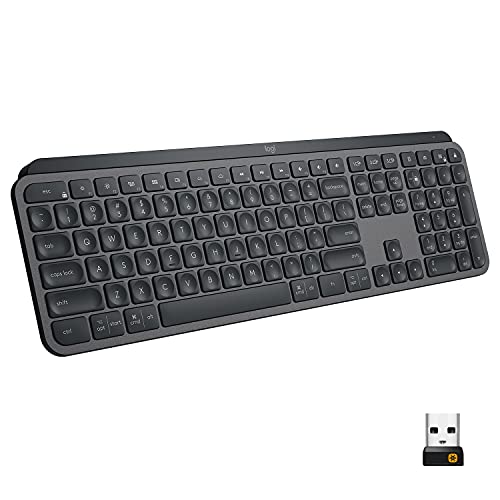 Logitech MX Keys | Check price on Amazon | |
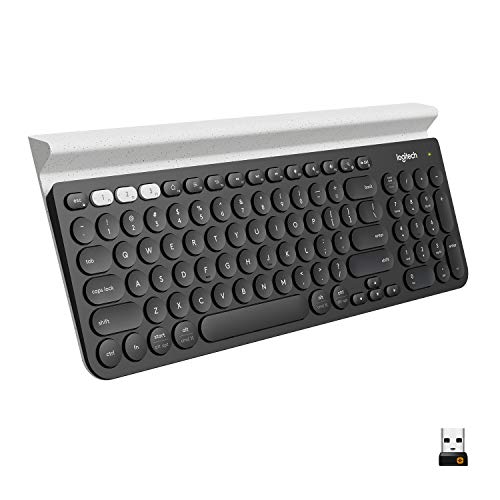 Logitech K780 Multi-Device Wireless Keyboard | Check price on Amazon | |
 Arteck HB030B Universal Bluetooth Keyboard | Check price on Amazon |
Our Top Picks
- Arteck Universal Backlit Wireless Bluetooth Keyboard for iPad9.72 x 0.24 x 5.91 inches0.4 poundsCheck on Amazon
The best blue tooth wireless keyboards free your desk from cables and let one keyboard serve several devices. Bluetooth keyboards connect to laptops, tablets, phones, and desktops without a dongle, and most can switch between three devices at the touch of a key. That makes them a natural fit for a desk shared between a work laptop, a personal tablet, and a phone.
This guide covers the main shapes of the Bluetooth keyboard market: a compact multi-device board, a full-size keyboard with a number pad, a premium low-profile board, and a budget option for a second desk. Read the buying criteria first, since Bluetooth version, battery life, and multi-device support matter more than the key layout alone.
How to Choose
Bluetooth version and stability
Newer Bluetooth versions connect faster, hold the connection better, and use less battery. Bluetooth 5.0 and above is the standard to look for, since older versions can drop the connection when the keyboard sleeps. Check that the keyboard supports the Bluetooth version your devices use, and favour boards that reconnect quickly after waking.
Multi-device pairing
Multi-device pairing lets one keyboard serve a laptop, a tablet, and a phone, with a key or switch to change between them. Three-device support is the usual maximum and suits most desks. Check how the switching works: a dedicated key is faster than a switch on the underside, and a keyboard that remembers all three devices saves time every day.
Battery life and charging
Bluetooth keyboards run on disposable batteries or a rechargeable cell. Disposable batteries last for months and are easy to replace, while rechargeable keyboards need a cable every few weeks but never need new batteries. Check the stated battery life and whether the keyboard warns you before the battery runs out, since a dead keyboard in the middle of a workday is a needless interruption.
Key feel and layout
Bluetooth keyboards range from low-profile laptop-style keys to full-travel desktop keys. Low-profile keys suit typing on the move and quiet rooms, while full-travel keys suit long typing sessions. Check the layout too: compact boards save desk space, while full-size boards keep the number pad and navigation keys that some users need daily.
Compatibility
A Bluetooth keyboard should work with the devices you own. Most boards support Windows, macOS, Android, and iOS, but the key legends and shortcuts differ between platforms. A keyboard designed for one platform may have keys that do nothing on another, so check the compatibility list before buying and favour boards that support your main device first.
Latency
Bluetooth adds a small delay compared with a wired connection, but modern Bluetooth keyboards keep it low enough for typing and everyday use. Gamers should still favour a wired or 2.4GHz wireless board, since Bluetooth latency can show in fast-paced games. For typing, browsing, and office work, Bluetooth latency is not an issue.
Build and portability
A Bluetooth keyboard often travels with a tablet or laptop, so weight and durability matter. A slim, sturdy board survives a bag better than a thin, flexible one. Check the frame material and the keycap quality, since a keyboard that flexes under typing will feel cheap within weeks.
Top Picks
Logitech K380 Multi-Device Bluetooth Keyboard
View the Logitech K380 Multi-Device Bluetooth Keyboard on Amazon
The Logitech K380 is a compact multi-device Bluetooth keyboard that pairs with three devices and switches between them at the touch of a key. It is the most popular Bluetooth keyboard in this guide and the clearest choice for a desk shared between a laptop, a tablet, and a phone.
The K380 uses a compact layout with round, low-profile keys that are quiet and comfortable for long typing sessions. It pairs with three devices over Bluetooth and switches between them with the yellow Easy-Switch keys. The keyboard runs on two AAA batteries for up to two years, and it works with Windows, macOS, Android, iOS, and ChromeOS. Its small size and light weight make it easy to carry in a bag.
Who it is for: anyone who works across a laptop, a tablet, and a phone and wants one keyboard for all three. It suits students, home workers, and travellers who need a compact, reliable board.
Caveats: the compact layout has no number pad and no dedicated function row in the usual sense, so heavy number work needs a separate keypad. The round keys take a short adjustment period if you are used to square keys.
Logitech MX Keys S
View the Logitech MX Keys S on Amazon
The Logitech MX Keys S is a full-size low-profile Bluetooth keyboard with backlit keys, multi-device pairing, and a comfortable typing feel. It is the premium choice in this guide for users who type all day and want a board that feels as good as it looks.
The MX Keys S uses low-profile keys with a scooped shape that guides the fingers, and the backlight adjusts automatically to the ambient light. It pairs with three devices over Bluetooth or Logitech’s Bolt receiver, and it switches between them with a dedicated key. The keyboard is rechargeable over USB-C, and it works with Windows and macOS. Smart Actions let you automate common tasks with a single key press.
Who it is for: professionals and writers who type for hours and want a premium, quiet keyboard. It suits a home office, a studio, and anyone who values typing comfort above all.
Caveats: the full-size layout needs a wide desk, and the rechargeable battery needs a cable every few weeks. The backlight is useful in dim rooms but adds little in a bright office.
Logitech MX Keys
View the Logitech MX Keys on Amazon
The Logitech MX Keys is the earlier version of the MX Keys S, with the same low-profile design, backlit keys, and multi-device pairing. It remains a strong choice for users who want a premium Bluetooth keyboard and do not need the newest features.
The MX Keys uses the same scooped low-profile keys as the MX Keys S, with backlighting that adjusts to the room and a solid, stable frame. It pairs with three devices over Bluetooth or Logitech’s Unifying receiver, and it switches between them with a dedicated key. The keyboard is rechargeable over USB-C and works with Windows and macOS.
Who it is for: users who want the MX Keys typing experience and are happy with the earlier model. It suits a home office and a desk where a full-size, quiet keyboard is the priority.
Caveats: the MX Keys S adds a few refinements, such as Smart Actions and a newer receiver, so the MX Keys is best bought when it is the better value of the two. The full-size layout needs a wide desk.
Logitech K780 Multi-Device Wireless Keyboard
View the Logitech K780 Multi-Device Wireless Keyboard on Amazon
The Logitech K780 is a full-size Bluetooth keyboard with a built-in device cradle, a number pad, and multi-device pairing. Its cradle sets it apart: it holds a phone or tablet upright above the keyboard, so the screen stays visible while you type.
The K780 uses quiet, low-profile keys in a full-size layout with a number pad, and it pairs with three devices over Bluetooth or Logitech’s Unifying receiver. The rubber cradle holds a phone or tablet at a comfortable viewing angle, and the keyboard runs on two AAA batteries for up to two years. It works with Windows, macOS, Android, iOS, and ChromeOS.
Who it is for: users who type on a tablet or phone as well as a computer and want the screen held upright while they work. It suits a home office, a kitchen desk, and anyone who answers messages on a phone while working on a laptop.
Caveats: the cradle adds bulk, so the keyboard is larger and heavier than the K380. Confirm the listing is the K780 rather than a similar Logitech model, since several codes circulate for this keyboard family.
Arteck HB030B Universal Bluetooth Keyboard
View the Arteck HB030B Universal Bluetooth Keyboard on Amazon
The Arteck HB030B is a compact universal Bluetooth keyboard with a slim design, backlit keys, and multi-device pairing. It is the budget choice in this guide for a second desk, a tablet, or a travel bag.
The HB030B uses a compact layout with low-profile keys and seven backlight colours, and it pairs with three devices over Bluetooth. The keyboard is rechargeable over USB, and its slim stainless steel frame is light enough to carry anywhere. It works with Windows, macOS, Android, and iOS, and its low price makes it easy to keep one on every desk.
Who it is for: users who want a slim, portable Bluetooth keyboard for a tablet, a second desk, or a travel bag. It suits students, travellers, and anyone who needs a spare keyboard.
Caveats: the compact layout has no number pad, and the key feel is lighter than the Logitech boards above. The backlight is a useful extra, but it drains the battery faster when left on.
Comparison Table
| Keyboard | Layout | Devices | Power | Standout Feature |
|---|---|---|---|---|
| Logitech K380 | Compact | 3 | 2 AAA batteries | Easy-Switch keys |
| Logitech MX Keys S | Full-size | 3 | Rechargeable USB-C | Backlit, Smart Actions |
| Logitech MX Keys | Full-size | 3 | Rechargeable USB-C | Premium low-profile keys |
| Logitech K780 | Full-size | 3 | 2 AAA batteries | Built-in device cradle |
| Arteck HB030B | Compact | 3 | Rechargeable USB | Slim, backlit, portable |
Which One Is Right for You?
Choose the Logitech K380 if you want a compact, reliable keyboard for three devices and a long battery life. Choose the Logitech MX Keys S if you type all day and want the best typing feel with backlighting. Choose the Logitech MX Keys if you want the same experience and find it at the better value. Choose the Logitech K780 if you type on a tablet or phone and want the screen held upright. Choose the Arteck HB030B if you want a slim, portable keyboard for a second desk or a travel bag.
If you are unsure, think about how many devices you use. A single-device user can choose any Bluetooth keyboard, but a user with a laptop, a tablet, and a phone should favour a board with three-device pairing and a dedicated switch key.
Frequently Asked Questions
Does Bluetooth add lag when typing?
Modern Bluetooth keyboards keep the delay low enough for typing, browsing, and office work. The delay is only noticeable in fast-paced games, where a wired or 2.4GHz wireless keyboard is the better choice. For everyday use, Bluetooth latency is not an issue.
How do I switch between devices on a Bluetooth keyboard?
Most multi-device keyboards have a dedicated key or switch for each device. Press the key for the device you want, and the keyboard connects to it within a second or two. The keyboard remembers all paired devices, so you do not need to pair them again.
Can a Bluetooth keyboard work with a tablet?
Yes. Most Bluetooth keyboards support Android and iOS tablets, and many are designed with tablets in mind. Check the compatibility list before buying, and note that some keyboard shortcuts differ between tablets and computers.
How long does a Bluetooth keyboard battery last?
A keyboard on disposable batteries can last for months or longer, while a rechargeable keyboard needs charging every few weeks. Backlighting drains the battery faster, so a backlit keyboard will need charging more often than a plain one. Check the stated battery life and whether the keyboard warns you before it runs out.
Disclosure: As an Amazon Associate, we may earn from qualifying purchases.
FAQ
Which One Is Right for You?
Does Bluetooth add lag when typing?
How do I switch between devices on a Bluetooth keyboard?
Can a Bluetooth keyboard work with a tablet?
How long does a Bluetooth keyboard battery last?
More from Amazon
Programs that pair well with the guide above. Offers and eligibility are set by Amazon and may change.
Free shipping on eligible items, Prime Video and more. Eligible new members can start with a free trial.
Start a Prime free trialAd-free music streaming. Eligible new subscribers can start with a free trial.
Try Music Unlimited freeA Prime membership for ages 18-24 with a trial period. Eligibility is set by Amazon.
See Prime for Young AdultsAudiobooks and podcasts to listen to on the go. Eligible new members can start with a free trial.
Try Audible freeAs an Amazon Associate we earn from qualifying purchases.