Our Short List of 3
All 5 Picks at a Glance
| Product | Specs | Action |
|---|---|---|
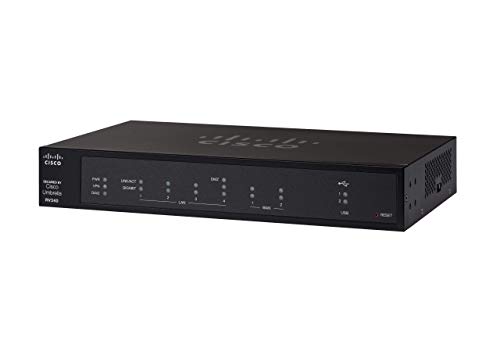 Cisco RV340 Dual WAN Gigabit VPN Router | Check price on Amazon | |
 Cisco RV345P Dual WAN Gigabit PoE VPN Router | Check price on Amazon | |
 TP-Link ER605 V2 Omada Gigabit VPN Router | Check price on Amazon | |
 TP-Link ER7206 Omada Gigabit VPN Router | Check price on Amazon | |
 Ubiquiti EdgeRouter X | Check price on Amazon |
Key takeaways
- Compare the best dual port WAN routers for small business, with failover, load balancing, VPN, and the ports a small office actually needs.
The best dual port WAN routers for small business keep the office online when one internet connection fails. A dual WAN router has two internet inputs, so it can switch to a backup line automatically or spread traffic across both lines. For a small business, that redundancy is the difference between a minor hiccup and a lost day of work.
Dual WAN routers also bring business features that home routers skip: VPN tunnels for remote workers, VLANs to separate guest and staff traffic, and quality of service to protect calls and video meetings. The five routers below all offer two WAN ports and a business feature set, from compact units for a handful of staff to larger models for a growing office. Read the buying criteria first, since the way a router handles its two WAN ports matters more than the headline speed.
How to Choose
Failover and load balancing
Failover switches all traffic to the backup line when the main line drops, while load balancing spreads traffic across both lines at once. Failover is simpler and suits most small offices, since it keeps the backup line idle until it is needed. Load balancing suits offices with two fast lines that both need to work. Check that the router supports the mode you want and that the switch happens automatically, without manual intervention.
WAN port types
Dual WAN ports can be dedicated or configurable. Some routers have two fixed WAN ports, while others let you reassign a LAN port as a second WAN port. Fixed ports are simpler, but configurable ports give flexibility when the office grows. Check the port count and the speed of each port, since a gigabit WAN port is the minimum for modern lines.
VPN support
Remote work needs VPN, so check the number of tunnels and the protocols supported. IPsec suits site-to-site links between offices, while OpenVPN and L2TP suit remote workers connecting from home. Hardware VPN acceleration keeps speeds up when the tunnel is active. A router that supports only a handful of tunnels will limit a growing team.
Throughput and capacity
Check the router’s throughput with VPN active, since that figure is often far lower than the headline routing speed. A router that routes a gigabit with VPN off may only manage a fraction of that with VPN on. Match the VPN throughput to your line speed and your team’s remote access needs, and check the number of concurrent sessions the router supports.
VLAN and network segmentation
VLANs let you split the network into separate segments, such as staff, guests, and checkout terminals. This keeps guest traffic away from business systems and limits the spread of a security problem. Even a small office benefits from a guest VLAN, so treat VLAN support as a core requirement rather than a luxury.
Management and monitoring
A small business rarely has a full-time network administrator, so the router’s management interface matters. Cloud-managed routers can be monitored and updated from anywhere, while locally managed routers need someone on site. Check whether the router supports remote management, alerts, and firmware updates, since those features save time when something goes wrong.
Power over Ethernet
Power over Ethernet lets the router power access points and cameras over the same cable that carries data. This removes the need for separate power adapters and makes it easier to place access points on ceilings and walls. If your office uses wireless access points, a router with PoE ports simplifies the whole setup.
Top Picks
Cisco RV340 Dual WAN Gigabit VPN Router
View the Cisco RV340 Dual WAN Gigabit VPN Router on Amazon
The Cisco RV340 is a dual WAN gigabit VPN router built for small offices that need reliable failover and Cisco’s business feature set. It has four LAN ports, two WAN ports, and support for IPsec, SSL, and OpenVPN tunnels.
The RV340 handles failover and load balancing across its two WAN ports, so the office stays online when a line drops. It supports a generous number of VPN tunnels for a router of its size, and its firewall, VLAN, and quality-of-service features cover the standard needs of a small office. The web interface is straightforward, and the router can be managed locally or through Cisco’s cloud tools.
Who it is for: small offices that want Cisco’s reliability and VPN features with dual WAN redundancy. It suits offices with two internet lines and a team that works remotely part of the time.
Caveats: the RV340 is an older model, so check its firmware support status before buying and confirm the listing is the current hardware revision. It has no built-in wireless, so a separate access point is needed for Wi-Fi.
Cisco RV345P Dual WAN Gigabit PoE VPN Router
View the Cisco RV345P Dual WAN Gigabit PoE VPN Router on Amazon
The Cisco RV345P is the PoE version of the RV340, adding power over Ethernet to the same dual WAN gigabit VPN platform. It has sixteen LAN ports, eight of which supply PoE, plus two WAN ports and the same VPN and firewall features.
The RV345P suits offices that run wireless access points and cameras, since the PoE ports power those devices over the network cable. Its sixteen LAN ports also remove the need for a separate switch in a small office. Failover and load balancing work across the two WAN ports, and the VPN support covers remote workers and site-to-site links.
Who it is for: small offices that need dual WAN, VPN, and PoE in one box. It suits offices with several access points and a wired device count that would otherwise need a separate switch.
Caveats: the RV345P is also an older model, so confirm firmware support and the hardware revision before buying. It has no built-in wireless, so access points are still needed for Wi-Fi.
TP-Link ER605 V2 Omada Gigabit VPN Router
View the TP-Link ER605 V2 Omada Gigabit VPN Router on Amazon
The TP-Link ER605 V2 is a compact dual WAN gigabit VPN router from TP-Link’s Omada range, built for small offices that want business features at a modest outlay. It has five gigabit ports that can be assigned as WAN or LAN, with two WAN ports in a standard dual WAN setup.
The ER605 V2 supports failover and load balancing, IPsec, OpenVPN, and L2TP VPN, and it integrates with TP-Link’s Omada cloud management for remote monitoring. Its compact size and fanless design suit a small office or a branch site, and the Omada app makes it easy to manage without networking expertise.
Who it is for: small offices and branch sites that want dual WAN and VPN with cloud management. It suits teams that need remote access and a router that can be managed from anywhere.
Caveats: the hardware version matters, since V1 and V2 have different port-role maps. Confirm the listing is the V2 version before ordering. The ER605 has no built-in wireless and no PoE, so access points and a switch are separate purchases.
TP-Link ER7206 Omada Gigabit VPN Router
View the TP-Link ER7206 Omada Gigabit VPN Router on Amazon
The TP-Link ER7206 is a larger dual WAN gigabit VPN router from the Omada range, built for offices that need more ports and more VPN capacity than the ER605 offers. It has six gigabit ports, including a dedicated SFP WAN port for fibre, and support for a larger number of VPN tunnels.
The ER7206 handles failover and load balancing, IPsec, OpenVPN, and L2TP VPN, and it integrates with Omada cloud management. The SFP port lets it connect directly to a fibre line, which removes the need for a separate fibre modem in some setups. Its higher session count suits offices with more devices and more simultaneous connections.
Who it is for: growing small offices that need more ports, more VPN tunnels, and a fibre-ready WAN port. It suits offices with a fibre line and a team that relies on remote access.
Caveats: confirm the listing is the US version before ordering, since conflicting codes circulate for this model. Like the ER605, it has no built-in wireless and no PoE, so access points are separate.
Ubiquiti EdgeRouter X
View the Ubiquiti EdgeRouter X on Amazon
The Ubiquiti EdgeRouter X is a compact five-port gigabit router with dual WAN support, built for small offices and advanced users who want flexible routing at a low outlay. It runs Ubiquiti’s EdgeOS, which gives detailed control over failover, load balancing, and firewall rules.
The EdgeRouter X supports dual WAN with failover and load balancing, and its five ports can be assigned to suit the office layout. It has a passive PoE output on one port for powering an access point, and its small, fanless design suits a desk or a wall mount. The EdgeOS interface is powerful but assumes more networking knowledge than the other routers in this guide.
Who it is for: small offices with someone comfortable configuring a router, and advanced users who want detailed control. It suits branch sites, home offices, and teams that need dual WAN on a tight budget.
Caveats: the EdgeRouter X needs manual configuration for dual WAN, so it is not a plug-and-play choice. Confirm the listing is the standard EdgeRouter X rather than the SFP variant, since several similar codes circulate.
Comparison Table
| Router | WAN Ports | VPN | PoE | Standout Feature |
|---|---|---|---|---|
| Cisco RV340 | 2 | IPsec, SSL, OpenVPN | No | Cisco business feature set |
| Cisco RV345P | 2 | IPsec, SSL, OpenVPN | 8 PoE ports | 16 LAN ports with PoE |
| TP-Link ER605 V2 | 2 configurable | IPsec, OpenVPN, L2TP | No | Omada cloud management |
| TP-Link ER7206 | 2 plus SFP | IPsec, OpenVPN, L2TP | No | Fibre-ready SFP WAN port |
| Ubiquiti EdgeRouter X | 2 configurable | IPsec, OpenVPN | 1 PoE out | Flexible EdgeOS routing |
Which One Is Right for You?
Choose the Cisco RV340 if you want Cisco’s business features and dual WAN in a compact router. Choose the Cisco RV345P if you also need PoE for access points and more LAN ports. Choose the TP-Link ER605 V2 if you want cloud management and a compact dual WAN router. Choose the TP-Link ER7206 if you need more ports, more VPN tunnels, and a fibre-ready WAN port. Choose the Ubiquiti EdgeRouter X if you are comfortable configuring a router and want the most flexibility for the money.
If you are unsure, count your devices and your remote workers first. A small office with a handful of staff and one remote worker is well served by the ER605 or the RV340, while a growing office with access points and a fibre line should look at the RV345P or the ER7206.
Frequently Asked Questions
Do I need two internet lines for a dual WAN router?
A dual WAN router works with one line, but its main benefit appears with two. With a single line, the second WAN port sits idle. With two lines from different providers, failover keeps the office online when one provider has an outage, and load balancing spreads traffic across both.
What is the difference between failover and load balancing?
Failover keeps the backup line idle until the main line fails, then switches all traffic to it. Load balancing spreads traffic across both lines at once, so both are always in use. Failover is simpler and suits most small offices, while load balancing suits offices with two fast lines that both need to work.
Can a dual WAN router improve my internet speed?
Load balancing can use the combined capacity of two lines, but a single download still travels over one line, so it will not exceed that line’s speed. The main benefit of dual WAN is reliability rather than raw speed: the office stays online when one line fails.
Do dual WAN routers have Wi-Fi?
Most business dual WAN routers have no built-in wireless, since they are designed to work with separate access points. This gives better coverage and more flexibility, but it means a separate access point is needed for Wi-Fi. Check the router’s ports and plan the access points as part of the same purchase.
Disclosure: As an Amazon Associate, we may earn from qualifying purchases.
FAQ
Which One Is Right for You?
Do I need two internet lines for a dual WAN router?
What is the difference between failover and load balancing?
Can a dual WAN router improve my internet speed?
Do dual WAN routers have Wi-Fi?
More from Amazon
Programs that pair well with the guide above. Offers and eligibility are set by Amazon and may change.
Free shipping on eligible items, Prime Video and more. Eligible new members can start with a free trial.
Start a Prime free trialAd-free music streaming. Eligible new subscribers can start with a free trial.
Try Music Unlimited freeA Prime membership for ages 18-24 with a trial period. Eligibility is set by Amazon.
See Prime for Young AdultsAudiobooks and podcasts to listen to on the go. Eligible new members can start with a free trial.
Try Audible freeAs an Amazon Associate we earn from qualifying purchases.