Our Short List of 3
All 4 Picks at a Glance
| Product | Specs | Action |
|---|---|---|
 XGIMI MoGo 2 Pro | Check price on Amazon | |
 NEBULA Capsule 3 Laser | Check price on Amazon | |
 ViewSonic M1 | Check price on Amazon | |
 NEBULA Capsule 3 | Check price on Amazon |
Key takeaways
- Find the best portable projectors for small business use, with bright images, quick setup, and battery or plug-in power for meetings anywhere.
The best portable projectors for small business use turn any room into a meeting room. A compact projector that fits in a bag lets a small team present in a client office, a rented space, or a corner of the shop floor without installing fixed equipment. The key is choosing a model that is bright enough for a lit room, quick to set up, and easy to connect to the laptop or phone that holds the presentation. A portable model earns its place when meetings move between rooms, client offices, and temporary spaces, so weight, battery run time, and fast setup matter as much as image quality.
Small business projectors face different demands from home cinema models. A business projector needs readable text and charts more than deep blacks, and it needs to work in rooms where the lights stay on. Battery power helps when outlets are scarce, while a built-in speaker saves carrying an extra device. The four projectors below cover that range, from pocket-size units to brighter portable models that handle larger rooms. Each one was chosen for small-business use: readable text, quick setup, and connections that work with the laptops and phones a small team already carries.
How to Choose
Brightness for lit rooms
Brightness decides whether slides stay readable with the lights on. Look for a model that holds contrast in a normally lit meeting room, not just in a darkened space. Small portable projectors are dimmer than fixed office units, so treat brightness as the first filter: a projector that washes out under office lighting will frustrate every meeting it attends.
Resolution and text clarity
Text and spreadsheets need sharp edges. A 1080p projector keeps small fonts readable, while lower resolutions can blur fine detail in charts and tables. Check the native resolution rather than the supported input resolution, since a projector that accepts a 4K signal but displays at a lower resolution will not show the extra detail.
Portability and weight
A portable projector should fit in a laptop bag with its cable and still leave room for the laptop. Weight matters less than bulk: a flat, compact unit packs better than a tall one of the same weight. Built-in battery power is a bonus when meetings happen away from outlets, but it adds weight and limits run time.
Setup speed
Meetings run on tight schedules, so fast setup matters. Auto-focus and auto-keystone correction straighten the image without manual adjustment, and a projector that connects quickly to a laptop saves awkward minutes at the head of the table. Models with built-in streaming apps can present without a laptop at all.
Connectivity
HDMI is the standard connection for laptops, and USB-C video input is increasingly useful for modern machines. Wireless screen mirroring helps when several people need to share their screens in turn. Check that the projector has the ports your team’s devices actually use, since adapters add friction to every meeting.
Sound
A built-in speaker is enough for a small meeting room, but it will not fill a large space. Check the speaker size and whether the projector has an audio output for an external speaker. For video calls and recorded presentations, a headphone or line-out jack is worth having.
Battery life and power
Battery-powered projectors usually run for one to three hours on a charge, which covers most meetings but not a full day of sessions. Plug-in models run indefinitely but need an outlet. Match the power source to your meeting habits: battery for short client visits, plug-in power for all-day workshops.
Top Picks
XGIMI MoGo 2 Pro
View the XGIMI MoGo 2 Pro on Amazon
The XGIMI MoGo 2 Pro is a compact portable projector with 1080p resolution, auto-focus, and auto-keystone correction, built to be carried to meetings and set up in minutes. It is one of the most practical portable projectors for small business use because it handles the setup work itself.
The MoGo 2 Pro projects a 1080p image with enough brightness for a small, normally lit room, and its auto-focus and keystone systems straighten the picture as soon as it is switched on. It runs on battery power for short sessions and connects over HDMI, USB-C, and wireless mirroring. Built-in speakers handle audio for a small group, and the compact cylindrical body fits easily in a bag.
Who it is for: small teams that present in different rooms and client offices. It suits short meetings, pitches, and training sessions where setup speed matters more than maximum brightness.
Caveats: the brightness suits small rooms rather than large halls, and battery run time covers a meeting rather than a full day. Larger rooms and bright daylight will wash the image out, so keep the audience small and the room dimmed where possible.
NEBULA Capsule 3 Laser
View the NEBULA Capsule 3 Laser on Amazon
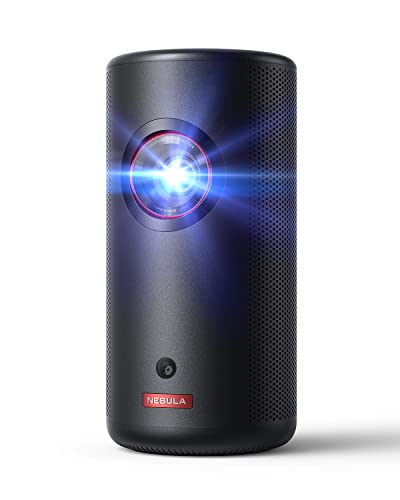
The NEBULA Capsule 3 Laser is a soda-can-size projector with a laser light source, 1080p resolution, and built-in streaming apps. It is the smallest projector in this guide and the easiest to carry to a client meeting.
The laser light source gives a sharper image and a longer light-source life than lamp-based portable models, and the 1080p resolution keeps text and charts readable. Auto-focus and keystone correction handle setup, and the built-in apps let you present from the projector itself without a laptop. The battery covers a typical meeting, and the built-in speaker is adequate for a small room.
Who it is for: client-facing staff who present on the move and want the smallest possible projector. It suits one-to-one pitches, small client meetings, and impromptu presentations.
Caveats: the tiny size limits brightness, so it works best in dimmed rooms and small groups. The built-in speaker is modest, and the battery will not cover a full day of back-to-back meetings.
ViewSonic M1
View the ViewSonic M1 on Amazon
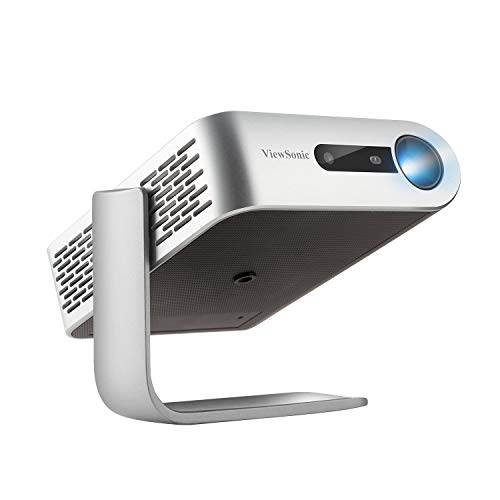
The ViewSonic M1 is a palm-size portable projector with a built-in stand, 360-degree projection, and a battery that covers a meeting. Its stand design sets it apart: the projector pivots on its base, so it can aim at a wall, a ceiling, or a screen without extra hardware.
The M1 projects a sharp image for its size, with auto keystone correction and a built-in speaker tuned by Harman Kardon. It connects over HDMI and USB-C, and its battery supports a typical meeting length. The pivoting stand is genuinely useful in rooms where table space is tight, since the projector can sit at the edge of a table and aim upward at the wall.
Who it is for: small businesses that present in varied spaces, from client lounges to temporary meeting rooms. It suits short presentations, product demos, and training clips.
Caveats: the resolution and brightness suit small groups and dimmed rooms rather than large audiences. It is a compact projector, so it cannot match the brightness of larger portable models in a lit room.
NEBULA Capsule 3
View the NEBULA Capsule 3 on Amazon
The NEBULA Capsule 3 is a compact portable projector with 1080p resolution, built-in Google TV, and a battery for on-the-go meetings. It is the most self-contained projector in this guide, since it can run presentations and video from its own apps without a connected device.
The Capsule 3 projects a 1080p image with auto-focus and keystone correction, and the built-in Google TV system gives access to streaming and presentation apps directly. It connects over HDMI and USB-C, mirrors screens from phones and laptops, and its built-in speaker handles audio for a small room. The soda-can form factor slips into a bag pocket.
Who it is for: small businesses that want a projector that works standalone, without a laptop. It suits client visits, pop-up presentations, and teams that share content from phones.
Caveats: like other pocket projectors, it is clearest in dimmed rooms and small groups. The built-in speaker is modest, and heavy use of the built-in apps will drain the battery faster than a wired presentation.
Comparison Table
| Projector | Resolution | Power | Standout Feature | Best For |
|---|---|---|---|---|
| XGIMI MoGo 2 Pro | 1080p | Battery or plug-in | Auto-focus and keystone | Varied meeting rooms |
| NEBULA Capsule 3 Laser | 1080p | Battery | Laser light source | Smallest carry size |
| ViewSonic M1 | 720p class | Battery | Pivoting stand | Tight table spaces |
| NEBULA Capsule 3 | 1080p | Battery | Built-in Google TV | Standalone presenting |
Which One Is Right for You?
Choose the XGIMI MoGo 2 Pro if you want the most capable all-rounder for varied meeting rooms. Choose the NEBULA Capsule 3 Laser if you want the smallest projector that still shows a sharp 1080p image. Choose the ViewSonic M1 if you present in tight spaces where a pivoting stand helps. Choose the NEBULA Capsule 3 if you want to present without a laptop.
If your meetings are mostly in one room, consider a brighter fixed projector instead: portable models trade brightness for size, and a fixed unit will serve a dedicated meeting room better. Portable projectors earn their keep when the meeting moves.
Match the projector to your longest meeting, not your shortest one. A battery that covers a one-hour pitch will not cover a three-hour workshop, so check the run time against the longest session on your calendar and keep the charger in the bag for anything that runs long.
Frequently Asked Questions
How bright does a business projector need to be?
It depends on the room. A small, dimmed meeting room works with a modest portable projector, while a large room with windows needs a much brighter fixed unit. As a rule, if the lights stay on and the audience is more than a handful of people, a portable projector will struggle and a brighter office projector is the better choice.
Can a portable projector replace a TV in a meeting room?
For presentations and video, yes, in a small room. A projector gives a larger image than a TV of the same cost, but it needs a suitable wall or screen and dimmer lighting. For rooms with strong daylight, a TV is usually the more practical screen.
Do portable projectors work with laptops?
Yes. Most portable projectors connect over HDMI, and many also accept USB-C video and wireless screen mirroring. Check that your laptop has the right output, and carry the cable that matches it, since adapters are easy to forget.
How long does a portable projector battery last?
Most portable projectors run for one to three hours on battery, which covers a typical meeting. Longer sessions need mains power, so check the battery run time against your longest meeting and bring the charger for anything that runs over two hours.
Disclosure: As an Amazon Associate, we may earn from qualifying purchases.
FAQ
Which One Is Right for You?
How bright does a business projector need to be?
Can a portable projector replace a TV in a meeting room?
Do portable projectors work with laptops?
How long does a portable projector battery last?
More from Amazon
Programs that pair well with the guide above. Offers and eligibility are set by Amazon and may change.
Free shipping on eligible items, Prime Video and more. Eligible new members can start with a free trial.
Start a Prime free trialAd-free music streaming. Eligible new subscribers can start with a free trial.
Try Music Unlimited freeA Prime membership for ages 18-24 with a trial period. Eligibility is set by Amazon.
See Prime for Young AdultsAudiobooks and podcasts to listen to on the go. Eligible new members can start with a free trial.
Try Audible freeAs an Amazon Associate we earn from qualifying purchases.