Our Short List of 3
All 5 Picks at a Glance
| Product | Specs | Action |
|---|---|---|
 HP 24mh | Check price on Amazon | |
 Sceptre E248W-FPT | Check price on Amazon | |
 Sceptre E255B-1658A | Check price on Amazon | |
 Dell S3221QS | Check price on Amazon | |
 LG 27UP850-W | Check price on Amazon |
Key takeaways
- Find the best monitors for home use, from compact 24 inch screens to large 32 inch displays for browsing, streaming, work, and family computing.
The best monitors for home use cover a wide range of jobs: browsing, video calls, homework, streaming, and the occasional work-from-home day. A home monitor does not need the extreme refresh rates of a gaming display or the colour accuracy of a professional screen. It needs a clear image, comfortable viewing, and the right size for the desk it sits on.
The five monitors below cover the main shapes of the home market: a compact 24 inch screen for small desks, a sharp 27 inch display for general use, a large 32 inch curved screen for shared viewing, and two versatile mid-size options. Read the buying criteria first, since size and panel type matter more for home use than any single specification.
How to Choose
Screen size
Size is the first decision. A 24 inch monitor suits a small desk and a single user, while a 27 inch screen gives more room for side-by-side windows. A 32 inch monitor suits a shared family computer and a living-room setup, but it needs a deep desk so it does not dominate the field of view. Measure the desk and the viewing distance before choosing.
Resolution
Resolution sets how sharp text and images look. A 1080p screen is fine at 24 inches, while a 27 inch screen benefits from 1440p, which keeps text crisp. A 32 inch screen should be 4K to avoid visible pixels. Higher resolution also gives more usable space for windows, which helps when the same monitor handles work and browsing.
Panel type
IPS panels give wide viewing angles and accurate colours, which suits a monitor that several people watch from different seats. VA panels give deeper blacks and stronger contrast, which suits video and films in a dim room. TN panels are faster but have narrower viewing angles, so they are a poor fit for a shared home monitor. For most homes, IPS is the safer choice.
Brightness and eye comfort
A home monitor should be bright enough for a sunlit room and comfortable for long sessions. Look for a flicker-free backlight and a low blue light mode, which reduce eye strain during evening use. An adjustable stand helps too, since the top of the screen should sit at eye level.
Connectivity
Check the ports on the rear panel. HDMI suits most laptops and consoles, while DisplayPort suits desktop computers. USB-C input is useful for modern laptops, since it carries video and charging over one cable. Built-in speakers are a bonus for video calls and casual viewing, but they will not match a separate speaker set.
Adjustability
A monitor that tilts, swivels, and adjusts in height is easier to share between family members of different heights. A VESA mount lets you attach the monitor to an arm or a wall, which frees desk space. Check the stand before buying, since a fixed stand can force an awkward viewing angle.
Extra features
A built-in webcam and microphone suit a family computer used for video calls, while a USB hub keeps peripherals tidy. Curved screens suit large monitors by wrapping the image around the viewer, but they matter less at 24 or 27 inches. Treat these features as tiebreakers rather than reasons to choose a monitor on their own.
Top Picks
HP 24mh
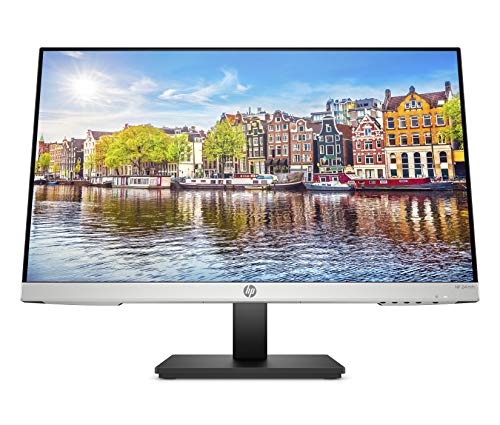
The HP 24mh is a 24 inch Full HD IPS monitor with a slim design, wide viewing angles, and a built-in speaker. It is the most compact monitor in this guide and the clearest choice for a small desk or a shared family computer.
The 24mh uses an IPS panel with a 1080p resolution, which keeps text sharp and colours accurate from any seat. The slim bezel and compact stand suit a small desk, and the built-in speakers handle video calls and casual viewing without extra hardware. HDMI and VGA inputs cover older and newer computers, and the tilt-adjustable stand lets you set a comfortable viewing angle.
Who it is for: families and home users with a small desk who want a clear, compact monitor for browsing, homework, and video calls. It suits a first computer, a study desk, and a shared family setup.
Caveats: the 1080p resolution suits 24 inches but would look soft on a larger screen, and the built-in speakers are modest. Confirm the listing is the standard 24mh rather than a renewed unit before ordering.
Sceptre E248W-FPT
View the Sceptre E248W-FPT on Amazon
The Sceptre E248W-FPT is a 24 inch Full HD IPS monitor with a slim frame, wide viewing angles, and a straightforward design. It is a practical choice for a home desk where the monitor needs to do a bit of everything.
The E248W-FPT uses an IPS panel with a 1080p resolution, giving accurate colours and a clear image from the side as well as head-on. The slim bezel keeps the footprint small, and the HDMI and DisplayPort inputs cover laptops and desktops. The tilt-adjustable stand and VESA mount support give flexibility for different desks.
Who it is for: home users who want a simple, affordable 24 inch monitor for everyday computing. It suits a study, a spare room, and a desk shared between family members.
Caveats: the built-in speakers are basic, so a separate speaker set or headphones will sound better for films and music. The stand adjusts tilt only, so a monitor arm is needed for height adjustment.
Sceptre E255B-1658A
View the Sceptre E255B-1658A on Amazon
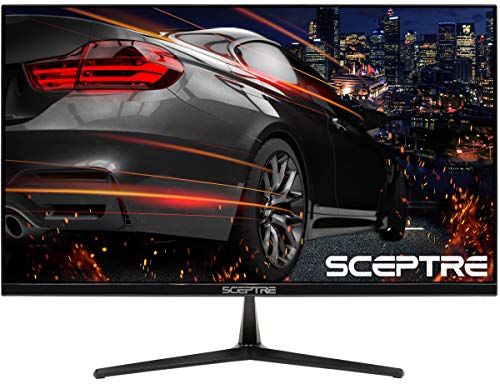
The Sceptre E255B-1658A is a 24.5 inch Full HD monitor with a high refresh rate, which makes it a good fit for a home computer that also handles gaming. It is the most versatile monitor in this guide, covering everyday use and play in one screen.
The E255B-1658A uses a fast panel with a 165Hz refresh rate, which makes motion smoother in games and in video. The 1080p resolution keeps text sharp at this size, and the DisplayPort and HDMI inputs cover desktops and laptops. The slim design and VESA mount support suit a range of desks.
Who it is for: home users who want one monitor for browsing, homework, and gaming. It suits a teenager’s desk, a shared family computer, and anyone who plays games as well as working from home.
Caveats: the high refresh rate is a bonus rather than a necessity for home use, so it should not outweigh size or resolution in the decision. The built-in speakers are modest, and the stand adjusts tilt only.
Dell S3221QS
View the Dell S3221QS on Amazon
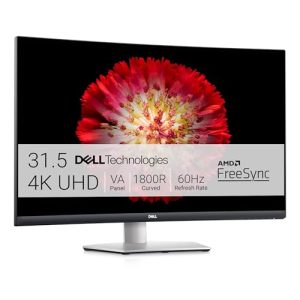
The Dell S3221QS is a 32 inch curved 4K monitor with a VA panel, built-in speakers, and a large, immersive screen. It is the biggest monitor in this guide and the clearest choice for a shared family computer or a living-room setup.
The S3221QS uses a curved VA panel with a 4K resolution, which gives deep blacks and a sharp image across a wide screen. The curve wraps the image around the viewer, which suits video and films, and the built-in speakers handle audio for casual viewing. HDMI and DisplayPort inputs cover laptops, desktops, and consoles, and the height-adjustable stand helps set a comfortable viewing position.
Who it is for: families and home users who want a large screen for shared viewing, streaming, and light work. It suits a living room, a large desk, and a computer that several people use.
Caveats: the 32 inch size needs a deep desk, since a curved screen this large can dominate a small room. The VA panel has narrower viewing angles than IPS, so the best seat is directly in front of the screen.
LG 27UP850-W
View the LG 27UP850-W on Amazon
The LG 27UP850-W is a 27 inch 4K IPS monitor with USB-C input, wide colour coverage, and a height-adjustable stand. It is the sharpest monitor in this guide and the best fit for a home desk that handles work, study, and media.
The 27UP850-W uses an IPS panel with a 4K resolution, which keeps text crisp and colours accurate. The USB-C input carries video and charging over one cable, which suits modern laptops, and the HDMI and DisplayPort inputs cover other devices. The height, tilt, and pivot adjustments make it easy to share between users, and the built-in speakers handle video calls.
Who it is for: home workers and students who want a sharp, versatile 27 inch monitor for work, study, and streaming. It suits a dedicated home office desk and a laptop-based setup.
Caveats: the 4K resolution needs a computer that can drive it, and older laptops may struggle at full resolution. Check that your device supports 4K output before buying, and note that newer LG models have replaced this one in some regions.
Comparison Table
| Monitor | Size | Resolution | Panel | Standout Feature |
|---|---|---|---|---|
| HP 24mh | 24 inch | 1080p | IPS | Compact, built-in speakers |
| Sceptre E248W-FPT | 24 inch | 1080p | IPS | Slim frame, VESA mount |
| Sceptre E255B-1658A | 24.5 inch | 1080p | Fast panel | 165Hz refresh rate |
| Dell S3221QS | 32 inch | 4K | VA curved | Large immersive screen |
| LG 27UP850-W | 27 inch | 4K | IPS | USB-C input, sharp image |
Which One Is Right for You?
Choose the HP 24mh if you want a compact, clear monitor for a small desk. Choose the Sceptre E248W-FPT if you want a simple 24 inch monitor with a slim frame. Choose the Sceptre E255B-1658A if the same computer also handles gaming. Choose the Dell S3221QS if you want a large screen for shared viewing and streaming. Choose the LG 27UP850-W if you want the sharpest image and a USB-C connection for a laptop.
If you are unsure, measure your desk first. A 24 inch monitor suits a small desk, a 27 inch screen suits a standard desk, and a 32 inch monitor needs a deep desk and a larger room. Size is the decision that is hardest to change later, so get it right before worrying about other features.
Frequently Asked Questions
What size monitor is best for home use?
A 24 inch monitor suits a small desk and a single user, while a 27 inch screen suits a standard desk and side-by-side windows. A 32 inch monitor suits a shared computer and a living room, but it needs a deep desk. The right size depends on the desk and the viewing distance, not on the specification sheet.
Is 4K worth it for a home monitor?
At 27 inches and above, 4K keeps text sharp and gives more usable space for windows. At 24 inches, 1080p is usually enough, since the smaller screen hides the difference. A 4K monitor also needs a computer that can drive it, so check your device before buying.
Do I need built-in speakers?
Built-in speakers are convenient for video calls and casual viewing, but they are modest in most monitors. If you watch films or listen to music often, a separate speaker set or a pair of headphones will sound better. Treat built-in speakers as a bonus rather than a deciding feature.
IPS or VA for a home monitor?
IPS suits a monitor that several people watch from different seats, since it keeps colours accurate at wide angles. VA suits a monitor used mainly for video in a dim room, since it gives deeper blacks. For a shared family computer, IPS is usually the safer choice.
Disclosure: As an Amazon Associate, we may earn from qualifying purchases.
FAQ
Which One Is Right for You?
What size monitor is best for home use?
Is 4K worth it for a home monitor?
Do I need built-in speakers?
IPS or VA for a home monitor?
More from Amazon
Programs that pair well with the guide above. Offers and eligibility are set by Amazon and may change.
Free shipping on eligible items, Prime Video and more. Eligible new members can start with a free trial.
Start a Prime free trialAd-free music streaming. Eligible new subscribers can start with a free trial.
Try Music Unlimited freeA Prime membership for ages 18-24 with a trial period. Eligibility is set by Amazon.
See Prime for Young AdultsAudiobooks and podcasts to listen to on the go. Eligible new members can start with a free trial.
Try Audible freeAs an Amazon Associate we earn from qualifying purchases.