Our Short List of 3
All 5 Picks at a Glance
| Product | Specs | Action |
|---|---|---|
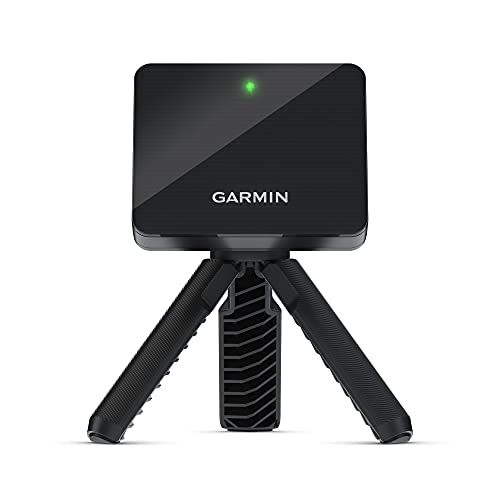 Garmin Approach R10 | Check price on Amazon | |
 Rapsodo MLM2PRO | Check price on Amazon | |
 FlightScope Mevo+ | Check price on Amazon | |
 Voice Caddie SC4 PRO | Check price on Amazon | |
 Voice Caddie SC200 Plus | Check price on Amazon |
Key takeaways
- Compare the best home launch monitors for golf practice. Find radar and camera-based golf launch monitors for home simulators and indoor practice.
The best home launch monitors bring golf practice indoors. A launch monitor is a device that measures ball flight and club data every time a shot is hit, reporting numbers such as carry distance, ball speed, club speed, launch angle, and spin. Instead of guessing whether a swing change is working, a golfer gets a number after every shot, and that feedback turns a garage, a spare room, or a backyard hitting net into a practice space that actually teaches something.
This guide covers home golf launch monitors, which are small radar or camera-based devices built for indoor and backyard use, not the large systems found at professional fitting studios. The five monitors below span the range from a simple voice-readout unit that calls out carry distance after each shot to full simulator-capable devices that pair with a phone or tablet and render virtual courses.
How to Choose
Radar versus camera tracking
Most home launch monitors use Doppler radar, which sits behind the ball and tracks it as it leaves the clubface, or a camera system, which photographs the ball at impact and just after. Radar units work well indoors and outdoors, need a clear space behind the ball, and usually measure club data as well as ball data. Camera-based units measure spin and launch angle directly from images of the ball, which can be more accurate for spin, but they need good lighting and a clear view of the ball.
Metrics measured
Entry-level monitors report carry distance, ball speed, club speed, smash factor, and launch angle, which is enough to work on distance control and contact. Mid-range units add spin rate, spin axis, apex height, and club path, which matter for shaping shots and diagnosing a slice or a hook. The most capable home units add face angle, angle of attack, and shot dispersion, which suit golfers working on specific swing changes.
Simulator compatibility
Some launch monitors work only as practice devices, showing numbers on a built-in screen or a phone app. Others connect to simulator software and render virtual courses, driving ranges, and skills games on a screen or projector. If the goal is playing virtual rounds at home, check which simulator apps the monitor supports and what the ongoing software cost looks like before buying.
Space requirements
Every launch monitor needs a minimum room size, and the numbers matter more than the marketing. Radar units typically need several feet of clear space behind the ball and eight to ten feet of ball flight to a net or screen, plus enough ceiling height for a full swing with the longest club. Camera units that sit beside the ball need less depth but still need room for the swing and a safe landing zone.
Screen, voice, and app
Monitors differ in how they show data. Some have a built-in screen that displays the numbers right on the device, which suits a range session or a simple net setup. Some call out the carry distance by voice after each shot, which suits golfers who do not want to look at a screen between swings. Others rely entirely on a phone or tablet app, which shows more data and stores shot history but means a device must be charged and within range. A built-in screen plus a companion app covers the most situations, while an app-only unit keeps the hardware smaller and simpler.
Subscription and ongoing cost
The hardware cost is only part of the picture. Some monitors include full simulator access and course libraries with no ongoing fee, while others charge a monthly or annual subscription for simulator play, advanced metrics, or cloud storage of shot history. A subscription can add up to a large sum over a few years, so check what works without paying: basic metrics, shot history, and practice modes should work without a subscription on most units, but full course play often does not. Factor the subscription into the decision, not just the hardware.
Battery life and portability
Home practice often moves between the garage, the backyard, and the range, so battery life and size matter. Small monitors with ten or more hours of battery life can cover a full day of practice without a charger, while larger units may need mains power or a shorter session. A monitor that fits in a golf bag pocket and sets up in under a minute gets used more often than one that needs a stand, a power cable, and a laptop.
Top Picks
Garmin Approach R10
Garmin Approach R10 Portable Golf Launch Monitor
The Garmin Approach R10 is a small radar launch monitor that mounts on a compact tripod and sits behind the ball, tracking carry distance, ball speed, club speed, launch angle, spin, and more. It pairs with a phone or tablet through the Garmin Golf app, which shows shot data, dispersion charts, and video recording with shot tracer overlays. The app also opens up simulator play, with access to tens of thousands of virtual courses through a Garmin Golf membership, so the same device that measures practice shots can host a full virtual round at home.
Battery life runs up to ten hours, which covers long practice sessions without a charger, and the unit is small enough to carry in a golf bag, so it moves easily between the garage, the backyard net, and the driving range. The R10 suits golfers who want solid data and simulator play in a portable package, and its app-based approach keeps the hardware simple while the phone screen shows the detail.
Who it is for: golfers who want a portable radar monitor with simulator play, especially those who already use Garmin devices or want one unit for both home practice and range sessions.
Caveats: the R10 has no built-in screen, so a phone or tablet is needed to see shot data. Full simulator course access requires a Garmin Golf membership, which is an ongoing cost beyond the hardware. Radar accuracy depends on correct placement and enough ball flight, so follow the setup guidance for distance behind the ball and room to the net.
Rapsodo MLM2PRO
Rapsodo MLM2PRO Mobile Launch Monitor + Golf Simulator
The Rapsodo MLM2PRO is a mobile launch monitor that combines radar and camera tracking, using two cameras plus radar to measure ball and club data, including spin rate and spin axis, which radar-only units estimate rather than measure directly. It reports carry distance, ball speed, club speed, launch angle, spin, and shot shape, and it pairs with the Rapsodo app for shot tracer video, swing video capture, and simulator play with virtual courses. The dual-camera design helps it measure spin more directly than radar alone, which suits golfers working on shot shape and spin control.
The MLM2PRO sits on a small tripod behind the ball and connects to a phone or tablet, which displays the data and the simulator. It works indoors into a net or screen and outdoors on the range, and its compact size keeps it portable. The app includes practice modes, skills challenges, and simulator rounds, giving a home setup both measurement and entertainment in one device.
Who it is for: golfers who want measured spin data and simulator play in a portable unit, especially those working on shot shape or dialing in wedge distances at home.
Caveats: the MLM2PRO relies on a phone or tablet for its display and simulator, so a charged device is part of every session. Full simulator access and some advanced features require a subscription, so check what is included without one. Camera-based tracking needs a clear view of the ball, so lighting and placement matter more than with a pure radar unit.
FlightScope Mevo+
FlightScope Mevo+ GPS Launch Monitor and Golf Simulator
The FlightScope Mevo+ is a radar launch monitor and golf simulator that reports more than twenty swing data parameters, including carry distance, ball speed, club speed, smash factor, launch angle, spin, apex height, and club path. It connects to iOS and PC apps and includes simulator software with a set of virtual courses and practice ranges, so a home setup can move from measuring shots to playing full rounds on a screen or projector. The Mevo+ uses Fusion Tracking, which combines radar with image processing for its data, and it works indoors into a net or screen as well as outdoors on the range.
The Mevo+ suits a dedicated home simulator bay more than a casual net setup, because its data depth rewards golfers who study their numbers and its simulator software supports a proper projected display. The unit’s range of parameters covers both ball data and club data, which gives a fuller picture of the swing than entry-level monitors provide.
Who it is for: golfers building a dedicated home simulator space who want deep data and full simulator play, and players working with a coach who can use the detailed numbers.
Caveats: the Mevo+ is sold in several bundle configurations with different included software and accessories, and the ASINs differ between them, so confirm the exact bundle and what is included before ordering. Some simulator features and course packs require additional software purchases or subscriptions. The unit needs adequate room behind the ball and to the net for accurate radar readings, so check the space requirements against the room.
Voice Caddie SC4 PRO
Voice Caddie SC4 PRO Golf Launch Monitor & 3D Driving Range Simulator
The Voice Caddie SC4 PRO is a small radar launch monitor with a built-in screen, voice readout, and a remote control, which makes it one of the most self-contained home monitors available. It measures carry distance, ball speed, swing speed, smash factor, launch angle, and spin, and it shows the numbers on its own display without needing a phone. The voice output calls out the carry distance after each shot, so a golfer can practice without looking at a screen, and the included 3D driving range simulator renders a virtual range on a connected phone or tablet for a more visual session.
The SC4 PRO needs no subscription for its core features, which sets it apart from rivals that charge ongoing fees for simulator access. It works indoors and outdoors, runs on battery power, and its compact triangular body sits on a stand behind the ball. The built-in screen plus voice output suits a simple home net setup where the goal is quick feedback between shots rather than deep data analysis.
Who it is for: golfers who want a simple, self-contained monitor with a built-in screen and voice readout, and buyers who want simulator features without an ongoing subscription.
Caveats: the SC4 PRO is the current version of the SC4 line, and older SC4 listings carry different ASINs, so confirm the listing is the PRO version before ordering. Its data list is shorter than the Mevo+ or MLM2PRO, with no club path or face angle measurement, so golfers chasing deep swing data may outgrow it. The simulator is a driving range rather than a full course library, so full virtual rounds need a different system.
Voice Caddie SC200 Plus
Voice Caddie SC200 Plus Portable Golf Launch Monitor and Swing Analyzer
The Voice Caddie SC200 Plus is the simplest monitor in this group, and its simplicity is the point. It measures carry distance, ball speed, swing speed, smash factor, and launch angle, and it shows the numbers on a bright orange LCD screen built into the unit, with voice output calling out the carry distance after each shot. There is no app to pair, no account to create, and no subscription: turn it on, place it behind the ball, and start hitting. A practice swing mode measures club speed on swings without a ball, which suits speed training, and a target mode helps with distance control.
Battery life runs up to twelve hours, and the unit is small and light enough to carry anywhere, from a backyard net to the range. The SC200 Plus suits golfers who want basic, trustworthy feedback without the complexity of a simulator or a phone app, and it works well as a first launch monitor for a home practice setup.
Who it is for: golfers who want the simplest possible launch monitor, beginners building a first home practice setup, and players who value voice readout and a built-in screen over simulator play.
Caveats: the SC200 Plus measures no spin, no club path, and no face angle, and it stores no shot history, since there is no app. It cannot run a simulator or play virtual courses, so golfers who want those features should look at the other monitors in this guide. Its data list is basic by design, and it suits distance and speed practice rather than detailed swing analysis.
Comparison Table
| Monitor | Tracking | Key Metrics | Built-in Screen | Simulator | Subscription for Core Features |
|---|---|---|---|---|---|
| Garmin Approach R10 | Radar | Carry, ball speed, club speed, launch, spin | No, app-based | Yes, via app | Membership for full courses |
| Rapsodo MLM2PRO | Radar + camera | Carry, ball speed, club speed, launch, spin, spin axis | No, app-based | Yes, via app | Subscription for full access |
| FlightScope Mevo+ | Radar + image processing | 20+ parameters incl. club path, apex | No, app-based | Yes, included software | Extra packs may apply |
| Voice Caddie SC4 PRO | Radar | Carry, ball speed, swing speed, launch, spin | Yes, plus voice | 3D driving range | No, core features included |
| Voice Caddie SC200 Plus | Radar | Carry, ball speed, swing speed, smash factor | Yes, plus voice | No | No |
Which One Is Right for You?
For the simplest home practice, the Voice Caddie SC200 Plus gives carry distance and speed numbers with no app, no account, and no subscription, and its voice readout suits a net setup where the golfer does not want to look at a screen. For a step up with a built-in screen and a simulator mode that costs nothing extra, the Voice Caddie SC4 PRO adds spin measurement and a 3D driving range while staying self-contained.
For golfers who want simulator play with virtual courses, the choice is between the Garmin Approach R10 and the Rapsodo MLM2PRO, both portable units that pair with a phone or tablet. The R10 is the more portable of the two and suits golfers who move between home and the range, while the MLM2PRO adds camera-measured spin for golfers working on shot shape. For a dedicated home simulator bay with the deepest data, the FlightScope Mevo+ reports the longest list of parameters and supports a proper projected setup, but it costs more and needs more room.
Frequently Asked Questions
How much room does a home launch monitor need?
Most radar monitors need several feet of clear space behind the ball and eight to ten feet of ball flight to a net or screen, plus enough ceiling height for a full swing with a driver. Check the published space requirements for the specific model and measure the room before ordering, because a monitor that cannot see the ball properly will not report data. A hitting net with a proper backstop and a mat that suits the monitor’s placement guidance completes the setup.
Do launch monitors work into a hitting net?
Yes, radar monitors work well into a net, because they track the ball in the first few feet after impact, before it reaches the net. The net needs to sit far enough from the ball to give the monitor enough flight to measure, and the mat should be level with the monitor’s position. Camera-based monitors also work into a net, as long as lighting is good and the camera has a clear view of the ball.
Is a subscription required to use a launch monitor?
Basic measurement usually works without a subscription on most monitors, including carry distance, ball speed, and club speed. Simulator play, virtual courses, and advanced features often require a subscription or a separate software purchase, and the terms differ by brand. The Voice Caddie models in this guide include their core features without a subscription, while the app-based monitors tie their full course libraries to a membership. Check what works without paying before buying.
Can one launch monitor serve both home practice and the driving range?
Yes, and portability is the deciding factor. Small battery-powered monitors such as the Garmin Approach R10, the Rapsodo MLM2PRO, and the Voice Caddie models travel easily and set up in under a minute, so they work at home and at the range. Larger simulator-focused units such as the FlightScope Mevo+ also travel, but they suit a fixed home bay better because their software and display setup take more time to arrange.
Disclosure: As an Amazon Associate, we may earn from qualifying purchases.
FAQ
Which One Is Right for You?
How much room does a home launch monitor need?
Do launch monitors work into a hitting net?
Is a subscription required to use a launch monitor?
Can one launch monitor serve both home practice and the driving range?
More from Amazon
Programs that pair well with the guide above. Offers and eligibility are set by Amazon and may change.
Free shipping on eligible items, Prime Video and more. Eligible new members can start with a free trial.
Start a Prime free trialAd-free music streaming. Eligible new subscribers can start with a free trial.
Try Music Unlimited freeA Prime membership for ages 18-24 with a trial period. Eligibility is set by Amazon.
See Prime for Young AdultsAudiobooks and podcasts to listen to on the go. Eligible new members can start with a free trial.
Try Audible freeAs an Amazon Associate we earn from qualifying purchases.