Key takeaways
- Compare the best DSL modems routers by Cisco, from legacy 800 series units to modern setups, and learn what to check before buying one.
As an Amazon Associate we earn from qualifying purchases.
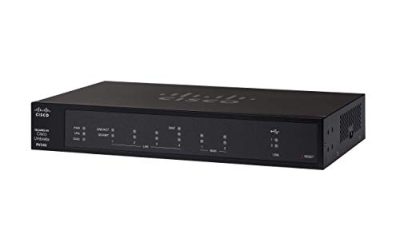
The best DSL modems routers by Cisco are a niche worth understanding before you buy, because Cisco’s strength has always been business networking rather than the home modem market. A DSL modem router combines two jobs in one box: it speaks the DSL language of your phone line and it routes traffic to every device on your network. Cisco built a small number of such units, mostly in its 800 series, and most of them now circulate as legacy hardware rather than current products.
This guide explains which Cisco models fit the DSL modem router role, how they differ from the standalone routers Cisco sells today, and what to check before buying one. It also covers the practical alternative most buyers end up choosing: a modern Cisco router paired with a separate DSL modem. Read the buying criteria first, since DSL compatibility is unforgiving — a router with the wrong DSL standard simply will not connect.
How to Choose
DSL standard and line type
The first check is always the DSL standard your line uses. ADSL2+ and VDSL2 are different technologies, and a modem built for one will not work on the other. Ask your internet provider which standard and profile your line uses, and match the modem to it exactly. Annex A and Annex B variants also matter in some regions, so confirm the annex before ordering any unit.
Modem and router in one box
A combined DSL modem router saves space and removes one device from the chain, but it also ties the two functions together. If the modem side becomes outdated, the whole box needs replacing. Separate devices let you upgrade the router while keeping the modem, which is one reason many small offices now split the two roles.
Throughput and WAN speed
DSL lines are slower than fibre, so raw routing speed is rarely the bottleneck. Still, check that the router side can handle your line speed plus the traffic of every connected device. A unit rated well above your line speed leaves headroom for local traffic, VPN use, and future line upgrades.
VPN and business features
Cisco’s appeal for small offices is its business feature set: VPN tunnels, firewall rules, VLAN support, and quality of service. If you need remote workers to connect securely, look for a model with hardware VPN support and enough tunnels for your team. Home users can skip most of this, but small offices should treat it as a core requirement.
Firmware and support status
Many Cisco DSL units are end of life, which means no new firmware and no security patches. A unit that still receives updates is worth far more than one with a longer feature list but frozen firmware. Check the model’s support status on Cisco’s site before buying, and avoid units whose last firmware is several years old.
Ports and wireless
Count the Ethernet ports and check the wireless standard. A small office needs at least four LAN ports and dual-band wireless to keep wired and wireless devices happy. Older Cisco DSL units often have slower wireless than modern routers, so weigh the convenience of an all-in-one box against the wireless speed of a separate modern router.
Availability and condition
New Cisco DSL modem routers are scarce, so most buyers face the second-hand market. Check the unit’s condition, confirm it includes the power adapter, and ask whether it has been reset to factory defaults. A locked or password-protected unit can be difficult to recover without the previous owner’s credentials.
Cisco DSL Modem Router Models
Cisco 887VA
The Cisco 887VA is the best-known Cisco DSL modem router, built around an integrated VDSL2 and ADSL2+ modem with a four-port switch and wireless options. It was designed for small offices that needed a single box to connect a DSL line and serve a small team. The 887VA supports VPN, firewall, and quality-of-service features from Cisco’s IOS software, which gives it a business-grade feature set in a compact chassis.
The 887VA suits a small office on a VDSL2 or ADSL2+ line that wants Cisco’s routing features without a separate modem. Its main weakness today is age: the model is legacy hardware, so firmware support has ended and its wireless is older than current standards. Buy it only after confirming your line type matches and the unit has been factory reset.
Cisco 867VAE
The Cisco 867VAE is a smaller sibling of the 887VA, with an integrated ADSL2+ and VDSL2 modem and a compact design aimed at very small offices and branch sites. It carries the same IOS feature set in a lighter package, with fewer ports and a smaller footprint. It is a reasonable fit for a one-room office or a home office with a handful of devices.
The 867VAE suits buyers who want Cisco’s business features in the smallest possible box. Its limits are the same as the 887VA: legacy status, ended firmware support, and older wireless. It is also harder to find than the 887VA, so expect to search the second-hand market and to verify the exact variant before buying.
Cisco 888EA
The Cisco 888EA is an Ethernet-focused member of the 800 series with an integrated DSL modem option in some variants. It was aimed at small offices that needed a robust wired router with Cisco’s security features. The 888EA is less common than the 887VA, and its variants differ enough that the exact model number matters more than the family name.
The 888EA suits a wired small office that values Cisco’s firewall and VPN features and does not need strong wireless. Its main drawback is scarcity and the need to confirm the variant: some 888 units are Ethernet-only routers with no DSL modem at all, so a careless purchase can leave you with the wrong box.
Cisco 881
The Cisco 881 is a widely deployed small-office router, but it is important to be clear about what it is: most 881 units are Ethernet routers without a built-in DSL modem. They appear in this guide because buyers often confuse them with the DSL-equipped 887VA. If your line is DSL and you choose an 881, you will still need a separate DSL modem in front of it.
The 881 suits a small office that already has a DSL modem or a fibre connection and wants Cisco’s routing, VPN, and firewall features. It is a strong router in its own right, but it does not solve the DSL modem problem on its own. Treat it as the router half of a two-box setup rather than an all-in-one answer.
Cisco 886VA
The Cisco 886VA is another 800 series unit with an integrated DSL modem, aimed at small offices that need ADSL2+ connectivity with Cisco’s business feature set. It sits between the 867VAE and the 887VA in size and capability, with a four-port switch and wireless options on some variants.
The 886VA suits a small office on an ADSL2+ line that wants a single-box Cisco setup. Like the rest of the family, it is legacy hardware with ended firmware support, so it is best viewed as a short-term or budget solution rather than a long-term investment. Confirm the annex and line standard before buying, since an Annex B unit will not work on an Annex A line.
Comparison Table
| Model | DSL Modem | Line Types | Ports | Best For |
|---|---|---|---|---|
| Cisco 887VA | Yes, integrated | VDSL2, ADSL2+ | 4 LAN | Small office, single box |
| Cisco 867VAE | Yes, integrated | VDSL2, ADSL2+ | Fewer LAN | Very small office |
| Cisco 888EA | Varies by variant | DSL on some variants | 4 LAN | Wired small office |
| Cisco 881 | No, Ethernet only | Needs separate modem | 4 LAN | Router half of a two-box setup |
| Cisco 886VA | Yes, integrated | ADSL2+ | 4 LAN | Small ADSL2+ office |
Which One Is Right for You?
Choose the Cisco 887VA if you want the most capable single-box Cisco DSL modem router and your line is VDSL2 or ADSL2+. Choose the Cisco 867VAE if your office is very small and you want the same idea in a lighter box. Choose the Cisco 886VA if your line is ADSL2+ and you find one in good condition. Choose the Cisco 881 only if you already have a DSL modem and want Cisco’s routing features behind it.
If none of these fits, the practical alternative is a modern Cisco small-business router paired with a separate DSL modem from your provider or a third-party modem that matches your line. That two-box setup costs more up front and takes more space, but it gives you current firmware, modern wireless, and a router you can keep when your line technology changes. For most buyers, that flexibility outweighs the tidiness of a single legacy box.
Before you buy any Cisco DSL unit, confirm three things with your provider: the DSL standard, the annex, and whether the provider allows customer-owned modems on your line. Some providers lock their lines to approved equipment, and a modem that is technically compatible can still be refused at the network level.
Frequently Asked Questions
Does Cisco still sell DSL modem routers?
Cisco’s current small-business range focuses on Ethernet and fibre routers rather than integrated DSL modems. The DSL modem router models in this guide are legacy hardware, which is why most of them are found second-hand rather than new. A modern Cisco router plus a separate DSL modem is the current way to build the same setup.
What is the difference between ADSL2+ and VDSL2?
ADSL2+ is an older DSL standard used on many copper phone lines, while VDSL2 is a faster standard used on shorter copper runs, often as the last leg of a fibre-to-the-cabinet service. A modem built for one standard will not connect on the other, so matching the standard to your line is the first step in any DSL purchase.
Can I use a Cisco DSL router on a fibre connection?
A DSL modem router can still work as a router behind a fibre modem, using its Ethernet WAN port if it has one. The DSL modem inside becomes unused, which wastes part of the box. A dedicated Ethernet router is usually a better fit for fibre, since it is designed for that job.
Why is firmware support important for a router?
Routers face the internet directly, so unpatched firmware leaves the network exposed to known flaws. A router that still receives updates gets fixes for new vulnerabilities, while a legacy unit keeps whatever flaws it had when support ended. For a business network, that difference alone can justify choosing a current model over a cheaper legacy one.
FAQ
Which One Is Right for You?
Does Cisco still sell DSL modem routers?
What is the difference between ADSL2+ and VDSL2?
Can I use a Cisco DSL router on a fibre connection?
Why is firmware support important for a router?
More from Amazon
Programs that pair well with the guide above. Offers and eligibility are set by Amazon and may change.
Free shipping on eligible items, Prime Video and more. Eligible new members can start with a free trial.
Start a Prime free trialAd-free music streaming. Eligible new subscribers can start with a free trial.
Try Music Unlimited freeA Prime membership for ages 18-24 with a trial period. Eligibility is set by Amazon.
See Prime for Young AdultsAudiobooks and podcasts to listen to on the go. Eligible new members can start with a free trial.
Try Audible freeAs an Amazon Associate we earn from qualifying purchases.