Our Short List of 3
All 5 Picks at a Glance
| Product | Specs | Action |
|---|---|---|
 Dell S3221QS | Check price on Amazon | |
 Sceptre E325B-QPN168 | Check price on Amazon | |
 LG 27UP850-W | Check price on Amazon | |
 Dell UltraSharp U2723QE | Check price on Amazon | |
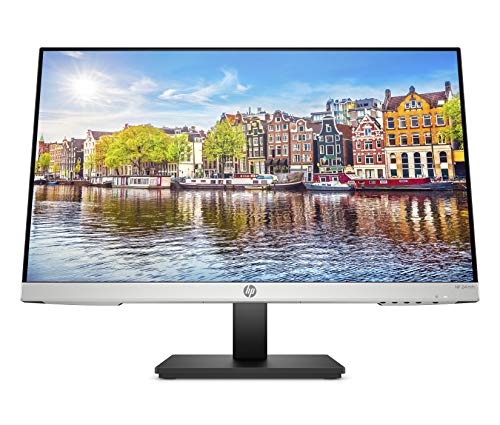 HP 24mh | Check price on Amazon |
Key takeaways
- Find the best monitors for watching TV, with large screens, deep contrast, built-in speakers, and the inputs your streaming devices need.
The best monitors for watching TV give you a large, clear screen for films, shows, and streaming without the bulk of a television. A monitor works well as a TV in a bedroom, a study, or a small living room, especially when it doubles as a computer display during the day. The key is choosing a screen that is large enough to watch from a sofa, with good contrast, decent built-in speakers, and the right inputs for a streaming stick or console.
TV watching asks different things from a monitor than office work does. Contrast and black levels matter more than colour accuracy, a wide screen matters more than a high refresh rate, and built-in speakers matter more than a USB hub. The five monitors below cover the main shapes of the TV-as-monitor market, from a compact 24 inch screen for a bedroom to a large 32 inch curved display for a living room. Read the buying criteria first, since size and panel type shape the viewing experience more than any other choice.
How to Choose
Screen size and viewing distance
Size is the first decision. A 24 inch monitor suits a bedroom where the viewer sits close, while a 27 inch screen suits a small living room. A 32 inch monitor suits a sofa at a normal distance and gives the closest feel to a small television. Measure the viewing distance before choosing: a screen that is too small at your distance will strain your eyes, while one that is too large will dominate the room.
Resolution
Resolution sets how sharp the picture looks at your viewing distance. A 1080p screen is fine at 24 inches, while a 27 inch screen benefits from 1440p. A 32 inch screen should be 4K to keep the image sharp from a sofa. Streaming services offer 4K content, so a 4K monitor makes the most of a good connection.
Panel type and contrast
VA panels give deeper blacks and stronger contrast than IPS panels, which suits films and shows watched in a dim room. IPS panels give wider viewing angles and more accurate colours, which suits a room where several people watch from different seats. For a bedroom or a dark living room, VA is often the better choice. For a bright room with viewers spread across a sofa, IPS wins.
Brightness and glare
A monitor used for TV needs to stay visible in a lit room as well as a dark one. Look for a bright panel and a matte coating that reduces glare from windows and lamps. A glossy screen looks vivid in a dark room but reflects every light source in a bright one, so a matte finish is the safer choice for most rooms.
Built-in speakers
Built-in speakers matter more for TV watching than for office work, since they carry the dialogue and the soundtrack. Check the speaker size and wattage, and look for a monitor with an audio output for a soundbar or external speakers. A monitor with weak speakers will need extra audio hardware, which adds cost and clutter.
Connectivity
A monitor used as a TV needs HDMI inputs for a streaming stick, a console, or a set-top box. Two HDMI ports let you connect two devices without swapping cables. A headphone jack or audio output lets you add a soundbar, and USB-C input suits a laptop that doubles as a media source. Check the ports before buying, since a monitor with only one HDMI input will frustrate a multi-device setup.
Extra features
A remote control is rare on monitors but useful for TV use, so check whether one is included or whether the monitor supports HDMI-CEC. A height-adjustable stand helps set a comfortable viewing angle from a sofa or a bed. A curved screen suits large monitors by wrapping the image around the viewer, but it matters less at 24 or 27 inches.
Top Picks
Dell S3221QS
View the Dell S3221QS on Amazon
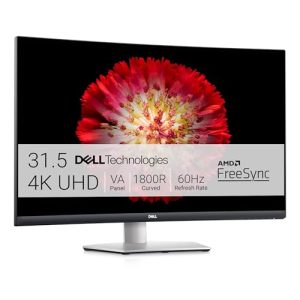
The Dell S3221QS is a 32 inch curved 4K monitor with a VA panel and built-in speakers, and it is the closest thing in this guide to a small television. Its large curved screen and deep blacks suit films and shows watched from a sofa.
The S3221QS uses a curved VA panel with a 4K resolution, which gives strong contrast and a sharp image across a wide screen. The curve wraps the picture around the viewer, which suits a living room, and the built-in speakers handle dialogue and soundtracks for casual viewing. HDMI and DisplayPort inputs cover streaming sticks, consoles, and laptops, and the height-adjustable stand helps set a comfortable viewing angle.
Who it is for: viewers who want a large screen for a living room or a bedroom and who watch films and shows from a sofa. It suits a shared family room and a monitor that doubles as a computer display.
Caveats: the 32 inch size needs a deep desk or a sturdy stand, since a curved screen this large dominates a small room. The VA panel has narrower viewing angles than IPS, so the best seat is directly in front of the screen.
Sceptre E325B-QPN168
View the Sceptre E325B-QPN168 on Amazon
The Sceptre E325B-QPN168 is a 32 inch QHD IPS monitor with wide viewing angles and a large, clear screen. It is a good fit for a room where several people watch from different seats, since the IPS panel keeps colours accurate from the side.
The E325B-QPN168 uses an IPS panel with a QHD resolution, which gives a sharp image and accurate colours across a wide viewing angle. The large screen suits films and shows, and the DisplayPort and HDMI inputs cover streaming sticks, consoles, and laptops. The slim design and VESA mount support suit a range of rooms, from a bedroom to a living room.
Who it is for: viewers who watch with family or friends and need a large screen that looks good from the side as well as head-on. It suits a shared living room and a bedroom with a wide seating area.
Caveats: the QHD resolution is less sharp than 4K at 32 inches, so viewers who sit close may notice softer text. The built-in speakers are modest, so a soundbar will improve the experience for films.
LG 27UP850-W
View the LG 27UP850-W on Amazon
The LG 27UP850-W is a 27 inch 4K IPS monitor with USB-C input, wide colour coverage, and a height-adjustable stand. It is the sharpest monitor in this guide and the best fit for a bedroom or study where the viewer sits close.
The 27UP850-W uses an IPS panel with a 4K resolution, which keeps the picture crisp and colours accurate. The USB-C input carries video and charging over one cable, which suits a laptop used as a media source, and the HDMI and DisplayPort inputs cover streaming sticks and consoles. The height, tilt, and pivot adjustments make it easy to set a comfortable viewing angle from a bed or a chair.
Who it is for: viewers who watch in a bedroom or study and want a sharp, versatile screen that also works as a computer display. It suits a laptop-based setup and a room where the viewer sits close.
Caveats: the 4K resolution needs a device that can output 4K, and older streaming sticks may not. Check that your source device supports 4K output before buying, and note that newer LG models have replaced this one in some regions.
Dell UltraSharp U2723QE
View the Dell UltraSharp U2723QE on Amazon
The Dell UltraSharp U2723QE is a 27 inch 4K IPS monitor with a USB-C hub, wide colour coverage, and a fully adjustable stand. It is the most versatile monitor in this guide, covering TV watching, work, and study in one screen.
The U2723QE uses an IPS panel with a 4K resolution, giving a sharp image and accurate colours from any seat. The USB-C hub carries video, data, and charging over one cable, which keeps a laptop setup tidy, and the HDMI and DisplayPort inputs cover streaming devices and consoles. The height, tilt, swivel, and pivot adjustments make it easy to share between users and viewing positions.
Who it is for: viewers who want one monitor for TV, work, and study, with a sharp image and a tidy laptop connection. It suits a home office that doubles as a viewing room and a desk shared between family members.
Caveats: the UltraSharp range is built for work first, so its speakers are modest and a soundbar will improve films. The 4K resolution needs a capable source device, and the monitor is larger than a basic 24 inch screen.
HP 24mh
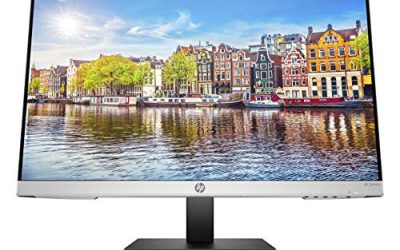
The HP 24mh is a 24 inch Full HD IPS monitor with a slim design, wide viewing angles, and a built-in speaker. It is the most compact monitor in this guide and the clearest choice for a bedroom where the viewer sits close to the screen.
The 24mh uses an IPS panel with a 1080p resolution, which keeps the picture sharp and colours accurate at this size. The slim bezel and compact stand suit a bedside table or a small desk, and the built-in speakers handle dialogue and soundtracks for casual viewing. HDMI and VGA inputs cover streaming sticks and older devices, and the tilt-adjustable stand lets you set a comfortable angle from a bed.
Who it is for: viewers who want a compact screen for a bedroom or a study and who sit close to the monitor. It suits a first TV for a bedroom, a student room, and a small space where a large screen would dominate.
Caveats: the 24 inch size is too small for a living room sofa, and the built-in speakers are modest. Confirm the listing is the standard 24mh rather than a renewed unit before ordering.
Comparison Table
| Monitor | Size | Resolution | Panel | Standout Feature |
|---|---|---|---|---|
| Dell S3221QS | 32 inch | 4K | VA curved | Large immersive screen |
| Sceptre E325B-QPN168 | 32 inch | QHD | IPS | Wide viewing angles |
| LG 27UP850-W | 27 inch | 4K | IPS | USB-C input, sharp image |
| Dell U2723QE | 27 inch | 4K | IPS | USB-C hub, fully adjustable |
| HP 24mh | 24 inch | 1080p | IPS | Compact, built-in speakers |
Which One Is Right for You?
Choose the Dell S3221QS if you want a large curved screen for a living room and deep blacks for films. Choose the Sceptre E325B-QPN168 if several people watch from different seats and you need wide viewing angles. Choose the LG 27UP850-W if you watch in a bedroom or study and want the sharpest image. Choose the Dell U2723QE if the same monitor also handles work and study. Choose the HP 24mh if you want a compact screen for a bedroom where the viewer sits close.
If you are unsure, measure your viewing distance first. A 24 inch monitor suits a bedside table, a 27 inch screen suits a small room, and a 32 inch monitor suits a sofa. Size is the decision that is hardest to change later, so get it right before worrying about other features.
Frequently Asked Questions
Can a monitor replace a TV?
Yes, in a bedroom or a small living room. A monitor gives a large, clear picture and doubles as a computer display, but it usually lacks a TV tuner and a remote control. A streaming stick covers the tuner, and a monitor with HDMI-CEC can be controlled from the stick’s remote in some setups.
What size monitor is best for watching TV?
A 24 inch monitor suits a bedroom where the viewer sits close, while a 27 inch screen suits a small room. A 32 inch monitor suits a sofa at a normal distance and gives the closest feel to a small television. The right size depends on the viewing distance, not on the specification sheet.
Do I need built-in speakers?
Built-in speakers are convenient for casual viewing, but they are modest in most monitors. If you watch films often, a soundbar or a pair of external speakers will sound better. Check whether the monitor has an audio output for a soundbar before buying.
Is 4K worth it for watching TV on a monitor?
At 27 inches and above, 4K keeps the picture sharp from a sofa and makes the most of 4K streaming content. At 24 inches, 1080p is usually enough, since the smaller screen hides the difference. A 4K monitor also needs a source device that can output 4K, so check your streaming stick or console before buying.
Disclosure: As an Amazon Associate, we may earn from qualifying purchases.
FAQ
Which One Is Right for You?
Can a monitor replace a TV?
What size monitor is best for watching TV?
Do I need built-in speakers?
Is 4K worth it for watching TV on a monitor?
More from Amazon
Programs that pair well with the guide above. Offers and eligibility are set by Amazon and may change.
Free shipping on eligible items, Prime Video and more. Eligible new members can start with a free trial.
Start a Prime free trialAd-free music streaming. Eligible new subscribers can start with a free trial.
Try Music Unlimited freeA Prime membership for ages 18-24 with a trial period. Eligibility is set by Amazon.
See Prime for Young AdultsAudiobooks and podcasts to listen to on the go. Eligible new members can start with a free trial.
Try Audible freeAs an Amazon Associate we earn from qualifying purchases.