Our Short List of 3
All 5 Picks at a Glance
| Product | Specs | Action |
|---|---|---|
 1. Razer Huntsman Mini | Check price on Amazon | |
 2. HyperX Alloy Origins 65 | Check price on Amazon | |
 3. Logitech G PRO X 60 LIGHTSPEED | Check price on Amazon | |
 4. SteelSeries Apex Pro Mini | Check price on Amazon | |
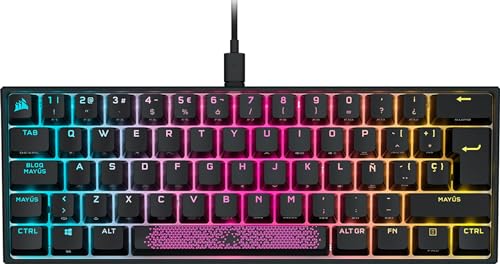 5. Corsair K65 RGB MINI | Check price on Amazon |
Key takeaways
- Best backlight gaming keyboards: RGB and backlit 60 and 65 percent boards with bright keys, fast switches and solid build quality.
The best backlight gaming keyboards keep every key readable in a dark room, with bright, even lighting that makes late-night gaming easier and a desk setup look sharp. Backlighting is not just decoration: it helps you find the right key without looking away from the screen, and it marks game-specific keys, macros and profiles with colour that you can read at a glance.
A good backlit gaming keyboard pairs bright lighting with fast switches, a solid build and software that lets you control the lighting without fuss. Per-key RGB lighting is the most flexible, letting you set colours per key and build profiles for each game, while single-colour backlighting is simpler and often brighter for the same cost. The picks below are all compact 60 percent and 65 percent boards with per-key RGB lighting, which suits a gaming desk where space is tight and the mouse needs room to move.
This guide explains how to judge a backlit gaming keyboard, then covers five compact RGB boards. Every pick is a complete keyboard, not a part or an accessory, and each one is still listed on Amazon US.
How to Choose
1. Per-key RGB or single-colour backlight
Per-key RGB lighting lets you set each key to its own colour, build game profiles and sync effects across devices. Single-colour backlighting is simpler and usually costs less, but it cannot highlight individual keys. For gaming, per-key RGB is worth the extra cost, because it turns the keyboard into a visual aid for key binds and profiles.
2. Brightness and evenness
A backlight should be bright enough to read in a dark room and even across the whole board, without dim keys at the edges or hot spots under the spacebar. Check the lighting in photos and in user impressions, because a keyboard with uneven lighting looks cheap no matter how good its switches are. Shine-through keycaps matter here: they let the light pass through the legend, while solid caps block it.
3. Switch type and feel
Linear switches are smooth and fast, which suits gaming, while tactile switches give a small bump that helps typing accuracy. Clicky switches are loud and are best avoided when others are nearby. Optical switches are faster than mechanical ones and resist dust better, while hot-swappable boards let you change switches later without soldering.
4. Size and layout
A 60 percent board has no function row, no arrow keys and no navigation cluster, which saves desk space for mouse movement. A 65 percent board adds arrow keys and a few navigation keys, which is more practical for daily use. Choose 60 percent for maximum mouse space and 65 percent when you also type and work on the same keyboard.
5. Connection and polling rate
A wired connection gives the lowest latency and the most stable performance, while a wireless connection with a 2.4 GHz dongle is nearly as fast and keeps the desk tidy. Check the polling rate, because a 1000 Hz polling rate is the standard for gaming and a lower rate can feel sluggish in fast games. Bluetooth is useful for a second device but is not the best choice for competitive play.
6. Build quality and keycaps
A keyboard with an aluminium case and double-shot PBT keycaps will feel solid and resist wear far longer than a plastic board with ABS caps. PBT caps keep their texture and do not shine with use, while double-shot legends never fade. Check the case material and the keycap type before buying, because they decide how the board feels after a year of use.
7. Software and profiles
Good software lets you set lighting, remap keys, build macros and save profiles to the board itself. On-board memory matters, because it lets the keyboard keep your lighting and macros when you move it to another computer. Check whether the software needs an account, whether it runs on your operating system, and whether the board stores profiles on the device.
Top Picks
1. Razer Huntsman Mini
The Razer Huntsman Mini is a 60 percent gaming keyboard with Razer Optical Purple switches and per-key RGB lighting, and it is the best all-round pick in this group. Its optical switches actuate faster than mechanical ones, its per-key RGB is bright and even across the board, and its compact layout leaves maximum room for mouse movement.
It has on-board memory for profiles, a detachable USB-C cable and double-shot PBT keycaps that keep their texture. It suits a competitive gamer who wants a fast, compact board with bright lighting and a clean desk. Confirm the variant on the listing, because a Mercury White version with a different code also exists.
The main caveat is its 60 percent layout, which has no arrow keys, so daily typing and navigation need a function layer. It is also a wired-only board in this configuration, so users who want wireless should look at a different model. Its lighting software is strong but needs an account for cloud features.
2. HyperX Alloy Origins 65
The HyperX Alloy Origins 65 is a 65 percent gaming keyboard with HyperX Red linear switches and per-key RGB lighting, and it is the best pick for users who want arrow keys without giving up desk space. Its aluminium body feels solid, its RGB lighting is bright and even, and its 65 percent layout adds the arrows and navigation keys that a 60 percent board lacks.
It has on-board memory, a detachable USB-C cable and a compact design that fits a small desk. It suits a gamer who also types and works on the same keyboard, and who wants a board that feels premium without a premium cost.
The caveat is its linear switches, which are fast for gaming but can feel too light for typing, with accidental key presses when resting fingers on the keys. It is a wired board, so users who want wireless will need a different model.
3. Logitech G PRO X 60 LIGHTSPEED
The Logitech G PRO X 60 LIGHTSPEED is a 60 percent wireless gaming keyboard with GX Optical switches and per-key RGB lighting, and it is the best wireless pick in this group. Its LIGHTSPEED wireless connection is fast enough for competitive play, and it also offers Bluetooth and a wired USB-C connection for flexibility.
It has on-board memory, a compact layout and bright, even RGB lighting that can be set through the Logitech software. It suits a competitive gamer who wants a wireless board without giving up speed, and a user who moves the keyboard between a desktop and a laptop. Confirm the switch and colour variant on the listing, because several configurations exist.
The caveat is its cost, which sits above the wired picks, and its 60 percent layout, which lacks arrow keys. Its battery needs charging during heavy use, although the battery life is generous for a wireless gaming board.
4. SteelSeries Apex Pro Mini
The SteelSeries Apex Pro Mini is a 60 percent gaming keyboard with OmniPoint 2.0 adjustable switches and per-key RGB lighting, and it is the most customisable pick in this group. Its switches let you adjust the actuation point per key, so the same board can feel fast for gaming and deliberate for typing.
It has an aluminium frame, double-shot PBT keycaps and on-board memory, and its RGB lighting is bright and even. It suits a gamer who wants to tune the switch feel for each game and who values build quality. Confirm the wired configuration on the listing, because a wireless version with a different code also exists.
The caveat is its cost and its software, which is powerful but takes time to learn. The adjustable actuation is a genuine advantage, but it only helps when you take the time to set it up for your games.
5. Corsair K65 RGB MINI
The Corsair K65 RGB MINI is a 60 percent gaming keyboard with Cherry MX Red switches and per-key RGB lighting, and it is the budget pick in this group. Its Cherry switches are smooth and reliable, its RGB lighting is bright, and its compact layout leaves plenty of room for the mouse.
It has on-board memory, a detachable USB-C cable and a solid build for its cost. It suits a gamer who wants a proven Cherry MX board with bright RGB lighting at a lower cost than the optical and adjustable picks above. It has the thinnest verification in this group, with fewer sources behind its listing, so it is the top live-check priority in this article.
The caveat is its 60 percent layout, which lacks arrow keys, and its older design, which does not offer the adjustable switches or wireless options of the newer picks. For a wired gaming board with bright lighting at a fair cost, it remains a solid choice.
Comparison Table
| Keyboard | Size | Switches | Lighting | Connection | Best For |
|---|---|---|---|---|---|
| Razer Huntsman Mini | 60 percent | Optical Purple | Per-key RGB | Wired USB-C | Competitive gaming |
| HyperX Alloy Origins 65 | 65 percent | HyperX Red | Per-key RGB | Wired USB-C | Gaming and typing |
| Logitech G PRO X 60 | 60 percent | GX Optical | Per-key RGB | Wireless, Bluetooth, wired | Wireless play |
| SteelSeries Apex Pro Mini | 60 percent | OmniPoint 2.0 | Per-key RGB | Wired USB-C | Adjustable actuation |
| Corsair K65 RGB MINI | 60 percent | Cherry MX Red | Per-key RGB | Wired USB-C | Budget RGB |
Which One Is Right for You?
For competitive gaming on a wired board, the Razer Huntsman Mini is the best all-round pick, with fast optical switches and bright, even RGB lighting. For a board that also handles daily typing, the HyperX Alloy Origins 65 adds arrow keys without giving up desk space. For wireless play, the Logitech G PRO X 60 is the pick. For a gamer who wants to tune the switch feel per key, the SteelSeries Apex Pro Mini is the most customisable board here. For a proven Cherry MX board at a lower cost, the Corsair K65 RGB MINI is the budget choice.
Whatever you choose, set the lighting to a comfortable brightness rather than the maximum, because a very bright board in a dark room causes eye strain during a long session. Use a single colour or a simple profile for competitive play, and save the animated effects for showing off the desk.
Frequently Asked Questions
Is per-key RGB lighting worth it for gaming?
Yes, for most gamers. Per-key RGB lets you highlight the keys you use in each game, set different colours for different profiles, and read your key binds at a glance in a dark room. Single-colour backlighting is enough when you only need to see the keys, but per-key RGB adds real function as well as style.
Do backlit keyboards use a lot of power?
No. A backlit keyboard draws little power, and the lighting can be dimmed or turned off when it is not needed. Wireless boards use more battery with the lighting at full brightness, so dimming the lights extends battery life noticeably on a wireless keyboard.
What is the difference between 60 percent and 65 percent keyboards?
A 60 percent keyboard has no function row, no arrow keys and no navigation cluster, which saves the most desk space. A 65 percent keyboard adds arrow keys and a few navigation keys, which makes it more practical for daily typing and work while still saving space compared with a full-size board.
Can I change the switches on a backlit gaming keyboard?
It depends on the board. A hot-swappable keyboard lets you pull out the switches and fit new ones without soldering, while a soldered board needs tools and skill to change switches. Check whether the board is hot-swappable before buying when you plan to try different switch types later.
Disclosure: As an Amazon Associate, we may earn from qualifying purchases.
FAQ
Which One Is Right for You?
Is per-key RGB lighting worth it for gaming?
Do backlit keyboards use a lot of power?
What is the difference between 60 percent and 65 percent keyboards?
Can I change the switches on a backlit gaming keyboard?
More from Amazon
Programs that pair well with the guide above. Offers and eligibility are set by Amazon and may change.
Free shipping on eligible items, Prime Video and more. Eligible new members can start with a free trial.
Start a Prime free trialAd-free music streaming. Eligible new subscribers can start with a free trial.
Try Music Unlimited freeA Prime membership for ages 18-24 with a trial period. Eligibility is set by Amazon.
See Prime for Young AdultsAudiobooks and podcasts to listen to on the go. Eligible new members can start with a free trial.
Try Audible freeAs an Amazon Associate we earn from qualifying purchases.