Our Short List of 3
All 5 Picks at a Glance
| Product | Specs | Action |
|---|---|---|
 ARRIS SURFboard G36 | Check price on Amazon | |
 Motorola MG8702 | Check price on Amazon | |
 NETGEAR Nighthawk C7800 | Check price on Amazon | |
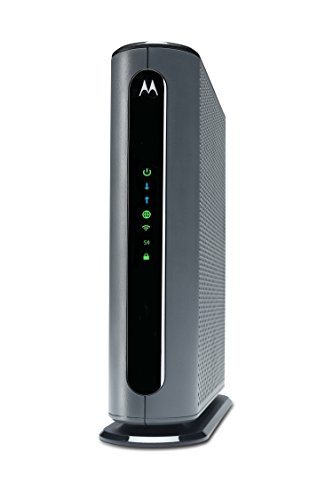 Motorola MG7700 | Check price on Amazon | |
 NETGEAR Nighthawk CAX30 | Check price on Amazon |
Our Top Picks
- NETGEAR Nighthawk DOCSIS 3.1 Modem Router Combo CAX30Pack of 111.93 x 5.39 x 9.92 inchesCheck on Amazon
The best high speed modem and routers combine two boxes into one: a modem that talks to the internet provider, and a router that shares that connection around the home. Buying them as a single unit has two clear advantages. It removes a device, a power cable, and an Ethernet cable from the shelf, and it ends the monthly rental charge that many cable providers add for their own gateway. Over a year or two, that saving alone can cover much of the purchase.
Every pick in this guide is a cable modem router combo, which means it works with cable internet from providers such as Xfinity, Spectrum, and Cox. These units are not compatible with fibre, DSL, or satellite services, and they do not include phone jacks for bundled voice plans, so check the connection type before buying. It is also worth checking the provider’s approved-device list for the exact model, since approval varies by plan speed and by region.
The five combos here span the range from a Wi-Fi 6 DOCSIS 3.1 flagship to a simple DOCSIS 3.0 unit for slower plans. Two carry the newest DOCSIS 3.1 modem standard with Wi-Fi 6, two pair DOCSIS 3.1 with fast Wi-Fi 5, and one is a DOCSIS 3.0 unit for plans up to 800 Mbps. The right choice depends on the plan speed first, then on the size of the home and the number of devices.
How to Choose
1. DOCSIS version: 3.0 or 3.1
DOCSIS is the standard a cable modem uses to talk to the provider. DOCSIS 3.1 is the current standard and supports the fastest cable plans, including gigabit and multi-gig tiers, with 32 downstream and 8 upstream channels. DOCSIS 3.0 is older and caps out lower, but it is fine for plans up to 800 Mbps. Buy DOCSIS 3.1 if the plan might get faster later, since the modem standard is fixed in hardware and cannot be upgraded.
2. Plan speed and provider approval
Match the combo to the subscribed plan, not to the fastest plan available. A unit rated for 2 Gbps is wasted on a 300 Mbps plan, while a unit rated for 800 Mbps will throttle a gigabit plan. Check the provider’s approved-device list for the exact model number before ordering, and confirm the plan speed the provider has certified it for, since that figure can differ from the manufacturer’s headline number.
3. Wi-Fi standard and speed
Wi-Fi 6 combos handle crowded homes better than Wi-Fi 5, thanks to better handling of many devices at once. Wi-Fi 5 combos are still fast enough for most homes, and the AC3200 models here are genuinely quick. Look at the combined wireless figure, such as AX3000 or AC3200, and remember it is spread across bands rather than available to a single device.
4. Coverage and device capacity
Coverage figures assume open rooms and thin walls. A combo rated for 2,500 square feet suits a medium home, while one rated for 1,800 square feet suits a flat or a small house. Device capacity matters too: a unit rated for 45 devices will stay responsive in a smart home, while a unit rated for 25 devices can struggle once phones, tablets, televisions, and smart gadgets all connect.
5. Wired ports
Count the Ethernet ports before buying. Four gigabit ports cover a PC, a console, a television, and one spare, which is enough for most desks. A 2.5 Gbps port is useful for a multi-gig plan or a fast wired machine, and port aggregation can combine two gigabit ports into a faster link for network storage. USB ports are a bonus for shared storage or a printer.
6. Cable-only limits
Every combo here works only with cable internet. None of them works with fibre, DSL, satellite, or fixed wireless, and none includes telephone jacks. If the household moves to a fibre provider later, the combo becomes a router only, and a new modem or gateway will be needed. That is the main long-term trade-off of the all-in-one design.
7. Setup and security
Activation usually means connecting the coax cable, plugging in the power, and either calling the provider or following an on-screen setup to register the modem’s MAC address. Look for a companion app that covers setup, guest networks, and parental controls, and check whether the security suite is free for the life of the product or runs on a trial that later asks for a subscription.
Top Picks
ARRIS SURFboard G36
The ARRIS SURFboard G36 is the most modern combo in this guide: a DOCSIS 3.1 cable modem paired with a Wi-Fi 6 router rated AX3000, approved for plans up to 1.2 Gbps with major cable providers including Xfinity, Cox, and Spectrum. It is the pick for a household on a fast cable plan that wants the newest modem standard and the newest Wi-Fi in a single box.
The modem side uses DOCSIS 3.1 with 32 downstream and 8 upstream channels, and the wired side is genuinely multi-gig: a dedicated 2.5 Gbps Ethernet port plus four 1 Gbps ports, with combined wired speeds up to 6.5 Gbps across the ports. The Wi-Fi 6 radio covers up to 2,500 square feet, and the SURFboard Central app handles setup, parental controls, and network monitoring. A two-year limited warranty is included.
One note needs care: cached copies of the Amazon listing have shown the text “No featured offers available” at times, while other listings of the same model show it in stock, so check the live listing carefully before ordering and confirm the seller. The G36 is also available as a renewed unit under a separate listing, which is not the same as the new unit linked here.
Who it is for: cable customers on plans up to 1.2 Gbps who want DOCSIS 3.1 and Wi-Fi 6 in one box, with a 2.5 Gbps wired port. Caveats: cable only, no phone jacks, and the listing needs a live availability check before ordering. Confirm the model is the standard G36, not the renewed G36-RB.
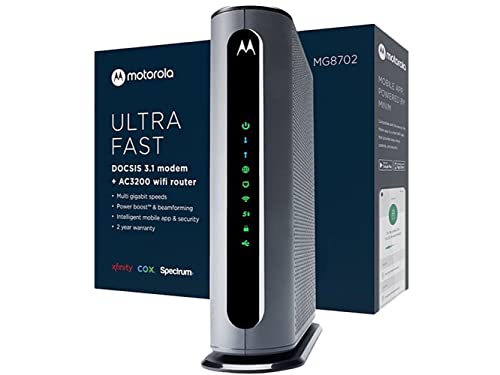
Motorola MG8702
The Motorola MG8702 pairs a DOCSIS 3.1 cable modem with a built-in AC3200 Wi-Fi 5 router, and it is the strongest all-rounder here for homes that do not need Wi-Fi 6. Comcast has certified it for speeds up to 1 Gbps, and it is approved for Xfinity, Cox, and Spectrum. Power Boost amplifiers and AnyBeam beamforming push the wireless signal further into the home, and the unit covers a large area for a single box.
The modem uses DOCSIS 3.1 with 32 downstream and 8 upstream channels, backwards compatible with DOCSIS 3.0 services. The router side runs dual-band Wi-Fi 5 at up to 1000 Mbps on 2.4 GHz and up to 2167 Mbps on 5 GHz, with four gigabit Ethernet ports, one USB 3.0 port, and MU-MIMO for handling several devices at once. Setup runs through the Minim app, which covers guest access, parental controls, and usage monitoring. A two-year manufacturer warranty is included.
The main limitation is the Wi-Fi 5 radio: it is fast, but it lacks the efficiency features Wi-Fi 6 brings to a home with dozens of connected gadgets. For a household whose devices are mostly Wi-Fi 5 and Wi-Fi 6 mixed, that hardly matters. Do not use the renewed listing for this model; the link here is the new unit.
Who it is for: cable customers on plans up to 1 Gbps who want a proven DOCSIS 3.1 combo with strong range and no Wi-Fi 6 premium. Caveats: Wi-Fi 5 only, no 2.5 Gbps port, and no phone jacks. Confirm the listing is the new MG8702, not a renewed unit.
NETGEAR Nighthawk C7800
The NETGEAR Nighthawk C7800 is the performance pick among the Wi-Fi 5 combos: a DOCSIS 3.1 modem with 32 downstream and 8 upstream channels, paired with an AC3200 Wi-Fi 5 router, and rated for cable plans up to 2 Gbps on the modem side, with Xfinity certification up to 800 Mbps and Spectrum and Cox certification up to 1 Gbps. That spread of figures is worth reading carefully, since the provider’s certified speed is the one that matters in practice.
Wireless coverage reaches up to 3,000 square feet for up to 45 devices, which is the widest coverage in this guide. The wired side includes four gigabit Ethernet ports and two USB 3.0 ports for storage and printers. Amplified antennas and beamforming focus the signal toward connected devices rather than spreading it evenly in all directions, which helps in larger homes. The Nighthawk app handles setup and management.
The C7800 is a 2019 model, and it has been around long enough that some trackers have flagged availability at times, so check the live listing before ordering. It is also a large unit that needs a solid shelf. Confirm the listing is the C7800-200NAS model.
Who it is for: larger homes on cable plans up to 1 Gbps that need wide coverage and many connected devices from a single box. Caveats: Wi-Fi 5 only, an older model with varying availability, and the certified plan speed differs by provider. Check the live listing and the provider’s approved list before ordering.
Motorola MG7700
The Motorola MG7700 is the value pick in this guide: a DOCSIS 3.0 cable modem with a built-in AC1900 Wi-Fi 5 router, approved for Xfinity, Cox, and Spectrum on cable plans up to 800 Mbps. It suits a household on a mid-tier plan that wants to stop paying rental charges without buying modem capacity it will never use.
The modem uses 24 downstream and 8 upstream channels, and the router side runs dual-band Wi-Fi 5 at up to 1900 Mbps combined, with Power Boost amplifiers for stronger coverage and AnyBeam beamforming. Four gigabit Ethernet ports cover wired devices, and the Minim app handles setup, guest networks, and parental controls. A two-year manufacturer warranty is included, and the unit is compact enough to sit on a crowded shelf.
The limits are honest ones: DOCSIS 3.0 caps the plan speed at 800 Mbps, and there is no Wi-Fi 6, no 2.5 Gbps port, and no phone jack. Cached copies of the Amazon listing have shown the text “No featured offers available” at times, so this is another listing that needs a live check before ordering. The renewed version of this model is a separate listing and is not linked here.
Who it is for: cable customers on plans up to 800 Mbps who want the lowest-cost way to own their modem and router in one box. Caveats: DOCSIS 3.0 only, so it cannot grow with a faster plan, and the listing needs a live availability check. Confirm the listing is the new MG7700, not a renewed unit.
NETGEAR Nighthawk CAX30
The NETGEAR Nighthawk CAX30 is the Wi-Fi 6 value pick: a DOCSIS 3.1 cable modem paired with a dual-band Wi-Fi 6 router rated AX2700, with combined wireless speeds up to 2.7 Gbps. Comcast’s own compatibility list rates it at up to 949 Mbps wired and carries its Recommended tag, which is the strongest provider endorsement in this guide.
The modem uses DOCSIS 3.1 with 32 downstream and 8 upstream channels, and the router side splits its speed across 2.4 GHz and 5 GHz radios with three streams each. Four gigabit Ethernet ports are included, two of which support link aggregation for a combined wired link to network storage or a desktop. Coverage reaches up to 2,000 square feet for up to 25 devices, which suits a flat or a small to medium home. Setup runs through the Nighthawk app, and a trial of NETGEAR Armor security is included.
The CAX30 is sold in two hardware variants, the CAX30-100NAS and the CAX30-200NAS, and the listing linked here is the CAX30-200NAS. Coverage is the smallest in this guide, so a large home should look at the C7800 or the G36 instead. The Armor trial becomes a paid subscription after it ends, so factor that into the long-term cost.
Who it is for: cable customers on plans up to 1 Gbps who want DOCSIS 3.1 and Wi-Fi 6 with a provider Recommended tag, in a flat or a small home. Caveats: coverage up to 2,000 square feet only, Armor security needs a subscription after the trial, and cable only. Confirm the listing is the CAX30-200NAS variant.
Comparison Table
| Combo | Modem | Wi-Fi | Combined wireless | Coverage | Ethernet ports |
|---|---|---|---|---|---|
| ARRIS SURFboard G36 | DOCSIS 3.1 | Wi-Fi 6, AX3000 | 3000 Mbps | 2,500 sq. ft. | 1x 2.5 Gbps, 4x 1 Gbps |
| Motorola MG8702 | DOCSIS 3.1 | Wi-Fi 5, AC3200 | 3200 Mbps | Large home | 4x 1 Gbps |
| NETGEAR Nighthawk C7800 | DOCSIS 3.1 | Wi-Fi 5, AC3200 | 3200 Mbps | 3,000 sq. ft. | 4x 1 Gbps |
| Motorola MG7700 | DOCSIS 3.0 | Wi-Fi 5, AC1900 | 1900 Mbps | Extensive | 4x 1 Gbps |
| NETGEAR Nighthawk CAX30 | DOCSIS 3.1 | Wi-Fi 6, AX2700 | 2700 Mbps | 2,000 sq. ft. | 4x 1 Gbps |
Which One Is Right for You?
Start with the plan speed and the provider’s approved list, since those two facts narrow the choice fast. On a gigabit or faster cable plan, the ARRIS G36 is the pick: DOCSIS 3.1, Wi-Fi 6, and a 2.5 Gbps port cover the fastest tiers, and the provider approvals are broad. On a plan up to 1 Gbps in a flat or a small home, the NETGEAR CAX30 gives the same modem standard and Wi-Fi 6 with a provider Recommended tag at a lower cost, though its coverage is smaller.
For a larger home on a plan up to 1 Gbps, the choice is between the Motorola MG8702 and the NETGEAR C7800. The MG8702 is the newer design with the Minim app and strong range, while the C7800 covers up to 3,000 square feet and 45 devices, which is the widest reach here. Both are Wi-Fi 5, so neither is the pick for a household full of Wi-Fi 6 gadgets.
On a plan up to 800 Mbps, the Motorola MG7700 is the sensible buy: it covers the plan fully, it costs less than the DOCSIS 3.1 models, and it still replaces both boxes and ends the rental charge. Just remember its ceiling is fixed. If the plan might rise past 800 Mbps later, buy DOCSIS 3.1 now rather than replacing the whole unit later.
Frequently Asked Questions
Will a modem router combo work with fibre internet?
No. The combos in this guide are cable modem router combos, and they work only with cable internet from providers such as Xfinity, Spectrum, and Cox. Fibre, DSL, satellite, and fixed wireless connections need different hardware, and none of these units includes a phone jack for bundled voice plans.
Do I need to call my provider to activate a new modem router combo?
Usually yes. Activation means connecting the coax cable and power, then registering the modem with the provider, either by phone or through an on-screen setup flow. Have the account details and the MAC address from the label on the unit ready before starting, since the provider will ask for both.
Is DOCSIS 3.1 worth it over DOCSIS 3.0?
For plans above 800 Mbps, yes, DOCSIS 3.1 is required. For slower plans, DOCSIS 3.0 works fine and costs less. The reason to buy DOCSIS 3.1 on a slower plan is future-proofing: the modem standard is fixed in hardware, so a faster plan later would mean buying a new unit.
Can I use a modem router combo with a mesh Wi-Fi system?
Yes, in most cases. The combo can run in bridge mode, which turns off its own Wi-Fi and lets the mesh system handle wireless, while the combo keeps working as the modem. Check the combo’s settings for a bridge mode option before buying a mesh system to pair with it.
Disclosure: As an Amazon Associate, we may earn from qualifying purchases.
FAQ
Which One Is Right for You?
Will a modem router combo work with fibre internet?
Do I need to call my provider to activate a new modem router combo?
Is DOCSIS 3.1 worth it over DOCSIS 3.0?
Can I use a modem router combo with a mesh Wi-Fi system?
More from Amazon
Programs that pair well with the guide above. Offers and eligibility are set by Amazon and may change.
Free shipping on eligible items, Prime Video and more. Eligible new members can start with a free trial.
Start a Prime free trialAd-free music streaming. Eligible new subscribers can start with a free trial.
Try Music Unlimited freeA Prime membership for ages 18-24 with a trial period. Eligibility is set by Amazon.
See Prime for Young AdultsAudiobooks and podcasts to listen to on the go. Eligible new members can start with a free trial.
Try Audible freeAs an Amazon Associate we earn from qualifying purchases.