Our Short List of 3

- Best for: A fixed meeting room or classroom where the lights stay on and slides are dense with text and charts.
- Native resolution: 1920 x 1080
- Brightness: 480 ANSI lumens
- Contrast ratio: 20000:1
- Connectivity: 5G WiFi, Bluetooth 5.2, HDMI, USB, AV, 3.5mm audio output

- Best for: Teachers and trainers who carry the projector between classrooms and present from a phone or a laptop.
- Native resolution: 1920 x 1080
- Brightness: 3000 lumens
- Contrast ratio: 10000:1
- Lamp life: 50,000 hours
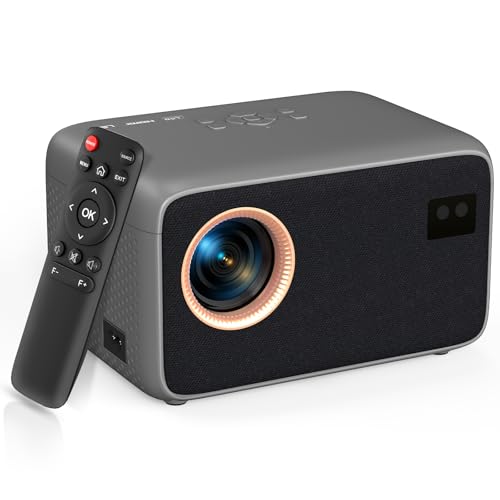
- Best for: Mobile presenters who mirror slides from a phone and want focus and framing handled quickly.
- Native resolution: 1920 x 1080
- Brightness: 180 ANSI lumens
- 4K input support
- Connectivity: 5G WiFi 6, Bluetooth
All 3 Picks at a Glance
| Product | Specs | Action |
|---|---|---|
| WiMiUS S26 |
| Check price on Amazon |
| ELEPHAS W13 |
| Check price on Amazon |
| TMY P28 |
| Check price on Amazon |
Key takeaways
- Three projectors for presentations in the under-200 tier, compared on brightness, native 1080p sharpness, keystone correction, and laptop connections.
A presentation projector in the under-200 tier is bought for one job: putting slides on a wall where everyone in the room can read them. The buyer is usually a teacher, a trainer, or a small-team lead who needs a machine that connects to a laptop without fuss and stays readable in a lit room. Brightness and text sharpness matter far more than cinema features, and a projector that looks fine in a dark living room can wash out badly under ceiling lights. The three models below were chosen from their Amazon listings for the traits that keep slides legible.
The portable pick with its tripod and carry bag moves easiest between classrooms, while a fixed meeting room suits the brightest model, whose four-corner keystone and zoom frame the screen without moving the unit. Mobile presenters who mirror slides from a phone get a wireless model with fast WiFi. Each pick states its resolution, brightness, and connections on its Amazon listing.
Quick Picks
As an Amazon Associate we earn from qualifying purchases
| Product | Best for | Key spec from title |
|---|---|---|
| WiMiUS S26 | Brightest pick for a fixed meeting room | Native 1080p, 480 ANSI lumens, 4P/6D keystone |
| ELEPHAS W13 | Mobile presenting between rooms | Native 1080p, tripod and carry bag included |
| TMY P28 | Wireless presenting from a phone | Native 1080p, 5G WiFi 6, electric focus |
How to Choose
Brightness for Lit Rooms
Brightness decides whether the audience reads the slide or squints at a washed-out glow. A projector used with the lights on needs enough output to hold contrast against ceiling lights and daylight from windows, and the figure to compare is the brightness stated on the listing, not a number from a different measurement scale. The WiMiUS S26 states 480 ANSI lumens, the brightest figure among the three picks here, while the ELEPHAS W13 states 3000 lumens on its own scale and the TMY P28 states 180 ANSI lumens. Figures from different scales cannot be compared directly, so treat the ANSI lumen numbers as the honest yardstick and plan on dimming the room a little for the dimmer models.
Native Resolution and Text Sharpness
Resolution decides whether small text and spreadsheet cells stay legible from the back row. A native Full HD image at 1920 x 1080 keeps fine detail crisp, which is exactly what dense slides, charts, and tables demand. All three picks here state a native 1920 x 1080 resolution on their Amazon listings, so none of them downscales slides the way a native 720p machine does. Watch the wording on any listing you compare: a projector that says a resolution is supported can accept that signal without displaying it natively. If your slides are mostly charts and tables, native resolution is the single most important line on the listing.
Keystone, Zoom, and Setup Speed
A projector rarely sits dead centre in front of the screen in a real room, so keystone correction decides whether the image comes out rectangular or trapezoidal. The WiMiUS S26 states 4P and 6D keystone correction, which adjusts each corner independently, plus a zoom that shrinks the image by half without moving the unit. The TMY P28 adds electric focus, so sharpening the image takes seconds from the remote instead of a fiddly lens ring. Before you buy, picture your usual room: a table at the back, a shelf to one side, or a tripod in a corner. The faster a projector squares the image from an awkward spot, the less time the audience waits.
Connections and Wireless Presenting
A projector that cannot take your laptop is a paperweight, so check the ports before anything else. HDMI is the connection most modern laptops provide, and all three picks here state HDMI, while the WiMiUS S26 and ELEPHAS W13 also state USB and AV inputs. Wireless presenting changes the routine further: the ELEPHAS W13 and TMY P28 both state WiFi screen mirroring, so slides can go up from a phone or tablet without a cable at all. The TMY P28 states 5G WiFi 6 and Bluetooth, which keeps that wireless link stable in a busy room. Carry the adapter your phone needs, since a Lightning or USB-C to HDMI adapter is not in the box.
The 3 Best Options
WiMiUS S26
- Best for: A fixed meeting room or classroom where the lights stay on and slides are dense with text and charts.
- Native resolution: 1920 x 1080
- Brightness: 480 ANSI lumens
- Contrast ratio: 20000:1
- Connectivity: 5G WiFi, Bluetooth 5.2, HDMI, USB, AV, 3.5mm audio output
A fixed meeting room or classroom where the lights stay on and slides are dense with text and charts.
The 4K wording on the listing refers to 4K input that is shown at native 1080p, and the unit is larger and heavier than the two portables here.
The WiMiUS S26 is the brightest of the three picks and the natural choice for a room that stays lit during the meeting. Its listing states a native 1920 x 1080 resolution with 4K input support, so dense slides render with sharp edges, and its 480 ANSI lumens give text enough punch to survive ceiling lights that a dimmer portable cannot. Four-corner keystone and a zoom that shrinks the image by half mean the projector can sit off to one side and still frame the screen cleanly. WiFi 6 and Bluetooth 5.2 cover wireless presenting from a phone, while HDMI, USB, and AV ports cover laptops and media sticks.
Watch out for: The 4K wording on the listing refers to 4K input that is shown at native 1080p, and the unit is larger and heavier than the two portables here.
ELEPHAS W13
- Best for: Teachers and trainers who carry the projector between classrooms and present from a phone or a laptop.
- Native resolution: 1920 x 1080
- Brightness: 3000 lumens
- Contrast ratio: 10000:1
- Lamp life: 50,000 hours
Teachers and trainers who carry the projector between classrooms and present from a phone or a laptop.
Its brightness figure uses a different scale from the ANSI lumen figures of the other two picks, so compare it on native resolution and portability rather than lumens alone.
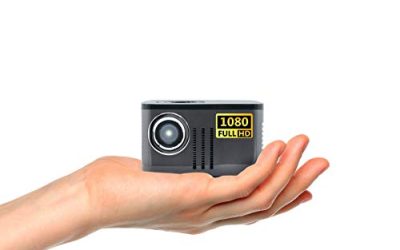
The ELEPHAS W13 is built around moving between rooms, and it arrives with the kit that makes that practical: a tripod and a carry bag are in the box. Its listing states a native 1920 x 1080 resolution and a 200-inch maximum display, so a full slide deck stays sharp from the back of a classroom. WiFi mirroring lets a phone or tablet put slides on the wall without a cable, and HDMI, USB, and AV ports cover laptops and media sticks when a wired connection is simpler. The built-in HiFi stereo speaker handles narration in a small room, and the compact body fits in a bag alongside a laptop.
Watch out for: Its brightness figure uses a different scale from the ANSI lumen figures of the other two picks, so compare it on native resolution and portability rather than lumens alone.
TMY P28
- Best for: Mobile presenters who mirror slides from a phone and want focus and framing handled quickly.
- Native resolution: 1920 x 1080
- Brightness: 180 ANSI lumens
- 4K input support
- Connectivity: 5G WiFi 6, Bluetooth
Mobile presenters who mirror slides from a phone and want focus and framing handled quickly.
At 180 ANSI lumens it is the dimmest of the three picks, so it needs a dimmed room for the best image, and some sources cite a different brightness figure for this model.
The TMY P28 suits a presenter who wants the fastest possible setup and a cable-free link to a phone. Its listing states a native 1920 x 1080 resolution with 4K input support, and electric focus sharpens the image from the remote in seconds, which matters when the meeting starts in a minute and the projector has just come out of a bag. WiFi 6 and Bluetooth keep wireless mirroring steady, and the zoom function frames the picture without moving the unit. HDMI and USB ports cover laptops and media sticks, and the compact desktop body sits on a table, a tripod, or a ceiling mount.
Watch out for: At 180 ANSI lumens it is the dimmest of the three picks, so it needs a dimmed room for the best image, and some sources cite a different brightness figure for this model.
Which One Fits Your Situation
A Teacher Moving Between Classrooms
The ELEPHAS W13 fits this routine because the tripod and carry bag travel with it, and WiFi mirroring puts slides up from a phone without hunting for a cable in each room. Its native 1080p image keeps text readable from the back row, and the compact body leaves room in the bag for a laptop and handouts. Set the tripod, aim at the wall, and the lesson is running in a minute.
A Fixed Meeting Room With Dense Slides
The WiMiUS S26 fits a room where the projector stays put and the lights stay on. Its 480 ANSI lumens hold contrast under ceiling lights, and four-corner keystone plus the zoom frame the screen from a side table or shelf without moving furniture. Dense spreadsheets and charts stay sharp at native 1080p, and the wired ports keep the laptop connection simple and reliable.
Presenting From a Phone or Tablet
The TMY P28 fits a presenter who walks in with only a phone. WiFi 6 mirroring connects quickly, electric focus sharpens the image from the remote, and the zoom frames the picture without shifting the unit. Keep the room dimmed, since this is the dimmest pick here, and bring the right adapter as a backup in case the wireless link is crowded.
A Community Hall or Training Room
The WiMiUS S26 fits a larger shared space because its brightness and 300-inch maximum display cover a bigger wall and a longer throw. Four-corner keystone handles a projector placed off centre, and the wired connections suit a laptop that stays plugged in for a long session. The ELEPHAS W13 is the fallback when the hall has no fixed mount and the kit must pack away after each session.
Common Mistakes
- Comparing a supported resolution with a native resolution: only the native figure decides how sharp slides look.
- Comparing lumen figures from different scales: ANSI lumens and LED lumens are not the same measurement, so a bigger number can mean a dimmer image.
- Placing the projector far off centre and relying on heavy keystone correction, which softens the corners of the image.
- Relying on the built-in speaker in a large room: a small speaker cannot carry narration to the back row, so plan on external audio for bigger audiences.
- Assuming wireless mirroring works with every app: protected video apps can block mirroring, so keep an HDMI cable and a media stick as a backup.
Frequently Asked Questions
Is a native 1080p projector necessary for presentation slides?
Native 1080p is the sensible baseline for slides: text, tables, and charts stay sharp from the back row. A native 720p projector accepts a 1080p signal and downscales it, which softens small text and fine lines. All three picks state a native 1920 x 1080 resolution, so dense slides render cleanly. Slides with only large headings can pass on lower native resolution, but text-heavy decks deserve the sharper panel.
Can these projectors work with the lights on?
They can, with limits that depend on brightness. The WiMiUS S26 states 480 ANSI lumens and holds up best under ceiling lights, while the dimmer TMY P28 needs the room dimmed for a crisp image. Closing blinds and switching off the lights nearest the screen helps every model in this tier. For a bright room with large windows, the brightest pick here is the safe choice.
Do I need WiFi to present from a phone?
WiFi mirroring is one way, not the only way. The ELEPHAS W13 and TMY P28 both state WiFi screen mirroring, so slides can go up from a phone without a cable. Without WiFi, a wired adapter from the phone to HDMI does the same job, and all three picks state HDMI. Bring the adapter that matches your phone, since it is not in the box.
What should I bring to a presentation besides the projector?
Bring an HDMI cable, the adapter your laptop or phone needs, and a power cable long enough to reach the nearest socket. A small tripod or a stable table position matters, since a wobbly image distracts the room. For a large audience, bring an external speaker, because built-in speakers suit small rooms only. Check focus and keystone before the audience arrives.
FAQ
Is a native 1080p projector necessary for presentation slides?
Can these projectors work with the lights on?
Do I need WiFi to present from a phone?
What should I bring to a presentation besides the projector?
More from Amazon
Programs that pair well with the guide above. Offers and eligibility are set by Amazon and may change.
Free shipping on eligible items, Prime Video and more. Eligible new members can start with a free trial.
Start a Prime free trialAd-free music streaming. Eligible new subscribers can start with a free trial.
Try Music Unlimited freeA Prime membership for ages 18-24 with a trial period. Eligibility is set by Amazon.
See Prime for Young AdultsAudiobooks and podcasts to listen to on the go. Eligible new members can start with a free trial.
Try Audible freeAs an Amazon Associate we earn from qualifying purchases.