Our Short List of 3
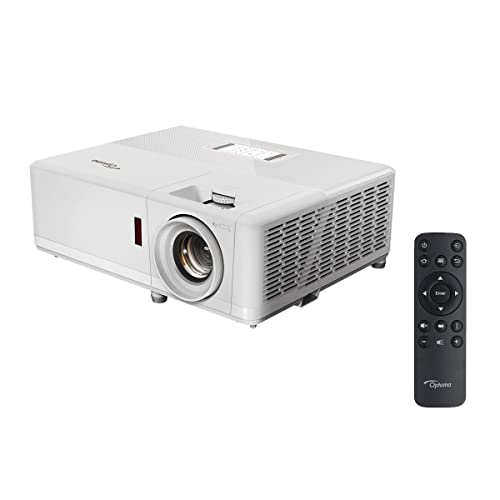
- Specs:
- 4K UHD with 8.3 million pixels, DLP
- DuraCore laser light source, up to 30,000 hours
- 3,000 lumens, contrast ratio 2,000,000 to 1

- Specs:
- 4K PRO-UHD with pixel-shifting resolution enhancement
- True 3-chip 3LCD, 2,800 lumens color and white brightness
- Maximum resolution 3840 x 2160

- Specs:
- 4K PRO-UHD with pixel-shifting resolution enhancement
- True 3-chip 3LCD, 3,000 lumens color and white brightness
- Contrast ratio up to 100,000 to 1
All 5 Picks at a Glance
| Product | Specs | Action |
|---|---|---|
| Optoma UHZ50 |
| Check price on Amazon |
| Epson Home Cinema 2350 |
| Check price on Amazon |
| Epson Home Cinema 3800 |
| Check price on Amazon |
 BenQ TK700STi |
| Check price on Amazon |
 Optoma UHD38 |
| Check price on Amazon |
Key takeaways
- Compare five 4K home theater projectors that fit a Hi-Fi setup, with eARC, ARC and optical audio, brightness, contrast and throw distance explained.
A projector in a Hi-Fi setup plays a different role than a projector in an ordinary living room. The amplifier and the speakers carry the sound, so the projector is there to deliver the picture while staying out of the audio chain. That changes the buying decision: the connection that matters most is the one between the projector and the receiver, whether that is a return channel that sends app audio back to the amplifier, an optical output that feeds an older DAC, or simply an HDMI input that accepts a clean signal from the receiver.
This guide is for film watchers who already own an AV receiver and speakers, music-first households adding a large screen to a listening room, and console gamers whose picture and sound both pass through a receiver. Every projector below was picked from its Amazon listing, using the resolution, brightness, contrast, and audio connectivity the listing itself states, so you can match the model to your room and amplifier before you order.
Quick Picks
As an Amazon Associate we earn from qualifying purchases
| Product | Best for | Key spec from title |
|---|---|---|
| Optoma UHZ50 | A laser home theater built around eARC | 4K UHD laser, 3000 lumens |
| Epson Home Cinema 2350 | A streaming-ready room with ARC audio | 4K PRO-UHD, Android TV |
| Epson Home Cinema 3800 | A dark dedicated room with Bluetooth audio | 4K PRO-UHD, 3000 lumens |
| BenQ TK700STi | A small room needing short throw and streaming | 4K HDR short throw |
| Optoma UHD38 | A bright room needing optical audio out | True 4K UHD, 4000 lumens |
How to Choose
Start with the audio path, not the picture
In a Hi-Fi room, sound never starts at the projector. It starts at the source, passes through the receiver, and reaches the speakers, while the projector only has to show the image. When every source plugs into the receiver, the projector needs little more than an HDMI input that accepts the receiver output. The return channel matters only when the projector itself is the source, which happens with built-in streaming apps. Then eARC carries full-quality audio back to the receiver, ARC carries a narrower version, and an optical output covers amplifiers that predate both. Trace the path your sound will take, then check that the projector lists the matching connection.
Match brightness and contrast to the room
Brightness decides whether the picture survives with lamps on, while contrast decides whether dark scenes keep their depth once the lights go off. A living room that stays lit during evening viewing needs a higher lumen figure than a dedicated room with blackout curtains, and a laser source holds its brightness steadier over years than a lamp that dims with age. Contrast matters most for films, where shadow detail separates a cinema image from a flat gray wash. Look at both numbers together rather than chasing one of them, because a very bright projector with weak contrast still looks washed out in a dark room, and a high-contrast projector with modest output still struggles beside a window.
Weigh resolution, HDR, and color for films
Most home theater projectors in this class present a 4K image, but they arrive there by different routes. Some use pixel shifting to build the image from a smaller panel, while others use a native 4K panel with millions of pixels. Either route can look sharp from a normal seat, so the differences sit in HDR support and color coverage. HDR10 and HLG cover most films and broadcasts, while Dolby Vision adds another layer on the models that list it. Color figures such as Rec.709 and DCI-P3 describe how much of the intended palette the projector can reproduce. If films are the priority, favor the model whose listing states the widest color and the HDR formats your sources output.
Check throw, lens shift, and fan noise
A projector has to fit the room before it can impress anyone in it. Throw distance decides how far back the unit must sit for a given screen size, and a short-throw lens suits a small room where the projector sits close to the wall. Lens shift and zoom forgive a shelf that is off center, while a model without them demands precise placement or a ceiling mount. Fan noise deserves the same attention in a Hi-Fi room, because a loud fan intrudes on quiet dialogue and soft music. Weigh the light source: a laser runs for tens of thousands of hours with no lamp to replace, while a lamp model asks for a replacement after its listed hours.
The 5 Best Options
Optoma UHZ50
- Specs:
- 4K UHD with 8.3 million pixels, DLP
- DuraCore laser light source, up to 30,000 hours
- 3,000 lumens, contrast ratio 2,000,000 to 1
The UHZ50 is the most complete Hi-Fi fit in this group because its listing states eARC support over HDMI, which lets the projector send full-quality audio from its built-in sources back to a modern receiver. Its DuraCore laser source lists 3,000 lumens and up to 30,000 hours of life, so there is no lamp to replace. The listing states 8.3 million pixels with a high contrast figure, plus four HDR picture modes with an adjustable brightness setting. A 1.3x zoom, vertical lens shift, and keystone correction make setup forgiving, while Enhanced Gaming Mode lists input lag as low as 4 milliseconds.
Epson Home Cinema 2350
- Specs:
- 4K PRO-UHD with pixel-shifting resolution enhancement
- True 3-chip 3LCD, 2,800 lumens color and white brightness
- Maximum resolution 3840 x 2160
The Home Cinema 2350 suits a household that wants a 4K PRO-UHD picture with streaming already inside the box. Its Android TV system means films and shows start without a separate stick or console, and one of its two HDMI inputs carries ARC, so sound from those built-in apps can travel back to a receiver or soundbar over a single cable. The 2,800-lumen output holds up in a dimmed living room, and vertical lens shift of plus or minus 60 percent makes placement forgiving on a shelf or bookcase. Bluetooth audio lets you send sound to a soundbar or headphones, and the low-latency mode keeps casual gaming playable.
Epson Home Cinema 3800
- Specs:
- 4K PRO-UHD with pixel-shifting resolution enhancement
- True 3-chip 3LCD, 3,000 lumens color and white brightness
- Contrast ratio up to 100,000 to 1
The Home Cinema 3800 is the pick for a dedicated room where the lights go off and the screen does the work. Its 3,000-lumen output for both color and white brightness keeps the image punchy, and the contrast ratio of up to 100,000 to 1 gives dark scenes real depth instead of a gray haze. Full 10-bit HDR with HLG support handles modern films, while 18 Gbps HDMI 2.0 carries 4K HDR at 60 frames per second from consoles and media players. Dual 10 W rear-firing speakers with aptX Bluetooth cover casual viewing, and glass optics with vertical and horizontal lens shift ease a ceiling mount or shelf.
BenQ TK700STi
- Specs:
- 4K resolution with short-throw lens
- Android TV built in for streaming
- 3,000 lumens brightness
The TK700STi answers the small-room problem with a short-throw lens that throws a large 4K image from close to the wall, which keeps the projector out of the seating area and away from the listener. Android TV is built in, so streaming starts without an extra box, and the 3,000-lumen output suits evening viewing with some lamps on. Gaming-tuned low input lag keeps console play responsive on the big screen. In a Hi-Fi setup it works best as a display fed by the receiver, with the receiver handling every source and the speakers carrying all of the sound.
Optoma UHD38
- Specs:
- True 4K UHD, 3840 x 2160, DLP, 8.3 million pixels
- 4,000 lumens brightness, contrast ratio 1,000,000 to 1
- HDR10 and HLG compatible
The UHD38 is the brightest pick here and the only one whose Amazon listing states an S/PDIF optical output, which makes it the natural partner for an older amplifier or DAC that has no HDMI return channel. Its true 4K UHD image carries 8.3 million distinct pixels with HDR10 and HLG, and the 4,000-lumen output holds up in a room that never gets fully dark. Dual HDMI 2.0 inputs take a console and a media player at once, while the audio-out jack covers headphones or a powered speaker. Enhanced Gaming Mode lists input lag down to 4.2 milliseconds at 1080p with a 240 Hz refresh rate.
Which One Fits Your Situation
A dedicated dark room with a receiver
Choose the Epson Home Cinema 3800 when films are the priority and the room goes dark, because its contrast and 10-bit HDR give shadow detail room to breathe while the receiver handles every source over HDMI. Pick the Optoma UHZ50 instead when the same room also hosts daytime sport, since its laser holds brightness steadier and its eARC link returns app audio to the receiver without a second cable.
A living room where the projector streams itself
Choose the Epson Home Cinema 2350 when built-in streaming is the main source, because its Android TV system starts films without an extra box and its ARC input sends that sound back to a receiver or soundbar. The BenQ TK700STi fits the same situation in a smaller room, where its short-throw lens keeps the projector close to the wall and out of the walkway.
A bright room shared by films, sport, and games
Choose the Optoma UHD38 when the room never gets fully dark, because its 4,000-lumen output keeps the image visible with lamps on and its fast response suits console play. Its optical output also suits households whose amplifier predates HDMI return channels, since the sound can travel to the amplifier on a separate cable.
An older amplifier with no return channel
Choose the Optoma UHD38 when your amplifier or DAC takes optical audio, because its S/PDIF output is stated on the listing and covers exactly that connection. If the amplifier only takes analog input, use the 3.5mm audio-out on the same model, and keep the projector behind the seating so its fan stays out of the listening position.
Common Mistakes
- Judging a projector by lumens alone and ignoring contrast, which is what keeps dark film scenes from turning into a flat gray wash.
- Buying before measuring throw distance, then finding the projector cannot fill the chosen screen from the only shelf or mount available.
- Treating the built-in speaker as the Hi-Fi, when the whole point of the setup is letting the amplifier and speakers carry the sound.
- Forgetting to check whether the projector has ARC, eARC, or an optical output before using its built-in apps as the audio source.
- Running long HDMI cables that are not rated for 4K HDR, then blaming the projector when the picture drops out or flickers.
Frequently Asked Questions
Do I still need a receiver with a home theater projector?
Yes, in a Hi-Fi setup the receiver remains the hub. Sources such as a console, media player, or disc player plug into the receiver, which sends video to the projector over HDMI and sound to the speakers. The projector only needs an HDMI input that accepts that signal, plus a return channel or optical output when its own built-in apps are the source.
What is eARC and does it matter for Hi-Fi?
eARC is an enhanced audio return channel carried over HDMI, and it matters when the projector itself plays the content. It sends full-quality audio from the projector back to the receiver, so films streamed through built-in apps still reach the speakers without a second cable. If every source already plugs into the receiver, eARC is a convenience rather than a requirement.
Can I send projector sound to my amplifier with an optical cable?
Yes, when the projector lists an optical output. The Optoma UHD38 in this guide states an S/PDIF optical output on its Amazon listing, which connects directly to an amplifier or DAC that takes optical input. Optical carries a narrower set of formats than eARC, so it suits stereo and standard surround setups better than the newest object-based formats.
Does a projector with built-in speakers work in a Hi-Fi room?
It works for casual viewing, but the built-in speaker is a fallback rather than the main system. In a Hi-Fi room the amplifier and speakers should carry the sound, with the projector muted or connected to the receiver. The built-in speaker earns its keep only for a quick late-night session or a room where the full system stays switched off.
FAQ
Do I still need a receiver with a home theater projector?
What is eARC and does it matter for Hi-Fi?
Can I send projector sound to my amplifier with an optical cable?
Does a projector with built-in speakers work in a Hi-Fi room?
More from Amazon
Programs that pair well with the guide above. Offers and eligibility are set by Amazon and may change.
Free shipping on eligible items, Prime Video and more. Eligible new members can start with a free trial.
Start a Prime free trialAd-free music streaming. Eligible new subscribers can start with a free trial.
Try Music Unlimited freeA Prime membership for ages 18-24 with a trial period. Eligibility is set by Amazon.
See Prime for Young AdultsAudiobooks and podcasts to listen to on the go. Eligible new members can start with a free trial.
Try Audible freeAs an Amazon Associate we earn from qualifying purchases.