Our Short List of 3
All 5 Picks at a Glance
| Product | Specs | Action |
|---|---|---|
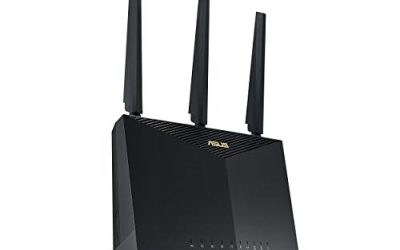
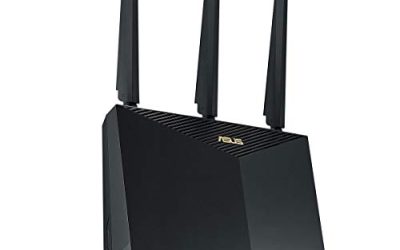
 ASUS RT-AX86U | Check price on Amazon | |
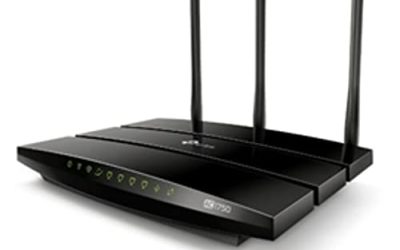
 TP-Link Archer AX55 | Check price on Amazon | |
 TP-Link Archer AX73 | Check price on Amazon | |
 TP-Link Archer AXE75 | Check price on Amazon | |
 NETGEAR Nighthawk RAX50 | Check price on Amazon |
Our Top Picks
- TP-Link AXE5400 Tri-Band WiFi 6E RouterWiFi 6E, Tri-Band AXE540012.91 x 10.43 x 4.72 inches1.5 poundsCheck on Amazon
The best gaminmg routers are, to read the keyword plainly, the best gaming routers, and this guide treats the phrase exactly that way. The spelling in the keyword is a typo for gaming, and the routers below are chosen for what a gaming router has to do: keep latency low, keep game traffic ahead of downloads, and keep the connection steady when the whole house is online. Whether you play on a console or a PC, the right router is the one that makes the network disappear, so the only thing you notice is the game.
A gaming router earns its name through traffic handling, not through looks or lights. The picks below all bring gigabit wired ports, quality-of-service controls, and wireless that can serve several devices at once, and each one is a full router with its own Amazon listing. They range from a focused mid-range pick to a tri-band Wi-Fi 6E model, so there is a sensible answer here for a small flat, a busy family home, and a house full of consoles.
Read the buying criteria first if you are choosing your first gaming router, then match your home to the pick that fits it. The comparison table at the end lines the five routers up side by side, and the final section points each kind of household at its best match.
How to Choose
Start with latency, not headline speed
Gaming cares about latency far more than raw download speed, because a match sends small packets constantly and every millisecond of delay shows up on screen. A router that keeps latency low under load is worth more than a router with a bigger headline speed number, and the way to get low latency is wired play plus traffic prioritisation. Look for a router with QoS, a gaming mode, or a dedicated gaming port, and wire your console or PC whenever you can.
Do not judge a router by its wireless speed class alone. Those numbers describe lab-perfect conditions, and no real house matches them. Judge it by whether it can keep a game smooth while someone else streams video and another device downloads an update.
Count the gigabit ports
Four gigabit LAN ports are the standard to look for, because they let you wire a console, a PC, and a streaming box without adding a switch. A single wired console already plays better than a wireless one, and every device you wire is one less device competing for the airwaves. Check that the WAN port is gigabit too, so the full speed of your internet plan reaches the router.
If your gaming setup lives far from the router, plan the cable run before you buy. A long Ethernet cable is the cheapest performance upgrade in this whole guide, and it often matters more than the difference between two routers.
Look for gaming traffic controls
Quality of service is the feature that separates a gaming router from an ordinary one. It lets the router recognise game packets and send them first, so a download or a video stream cannot choke a match. Look for adaptive or dynamic QoS that works with minimal setup, or a gaming preset you can switch on once and leave alone. A dedicated gaming port is a bonus, because it gives your main console permanent priority over the other wired ports.
Some routers add a game acceleration mode that trims the route to the game server. It is a welcome extra, but it is not a substitute for QoS and a wired connection, so treat it as a bonus rather than a deciding factor.
Match the wireless to your household
Wi-Fi 6 routers serve many devices at once far better than older wireless, which matters when a console, several phones, a laptop, and a smart TV all share the airwaves. OFDMA and MU-MIMO let the router talk to several devices in the same transmission, keeping latency steadier when the house is busy. Wi-Fi 6E adds a 6 GHz band for newer devices, which frees the older bands for consoles and other gear.
Choose the wireless standard for the whole household, not just for the console. The console may use older wireless or a cable, but the phones and laptops around it will thank you for Wi-Fi 6.
Check coverage for your floor plan
A router that lives in a cupboard at one end of the house will struggle to serve a bedroom at the other end, however strong its radios are. Look for a router with enough antennas and transmit power for your floor plan, place it centrally and out in the open, and consider a mesh-ready model if your home is large or spread over several floors. One node near the gaming setup can turn a patchy room into a solid one.
Mesh-ready routers give you an escape route without replacing the whole network. If one room always has a weak signal, an added node fixes it, and a wired link between nodes is the best arrangement of all.
Keep firmware and security current
A gaming router is also the front door to your home network, so its security features matter. Look for a router with built-in network protection, automatic firmware updates, and a brand that still supports the model. A router that has not seen an update in years will slowly fall behind on security and on compatibility with new devices, and no gaming feature makes up for that.
Think about the app
Most modern routers are managed from a phone app, and a good app makes the gaming features usable. Look for an app that handles setup in minutes, shows live bandwidth per device, and puts QoS and device controls within easy reach. A router with a clumsy app is a router whose gaming features will never get switched on, however good they look on the box.
Top Picks
ASUS RT-AX86U
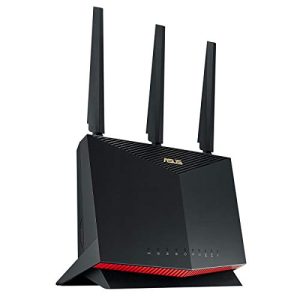
The ASUS RT-AX86U is a dual-band Wi-Fi 6 gaming router with an AX5700 wireless class, a dedicated gaming port, adaptive QoS, and a mobile game mode, plus four gigabit LAN ports for wired consoles and PCs. Its AiMesh support lets you add a node later for larger homes, and its AiProtection security suite guards the network without a subscription.
Who it is for: players who want a focused gaming router without stepping up to flagship hardware. The gaming port and adaptive QoS keep the main console smooth even while another device downloads, and the router suits a console, a PC, and a busy household sharing one connection.
Caveats: the gaming features need a few minutes of setup in the router interface before they help, and the router is a single unit, so a very large house may need a mesh node for the far rooms. Confirm the listing shows the RT-AX86U, since ASUS sells several similar models.
TP-Link Archer AX55
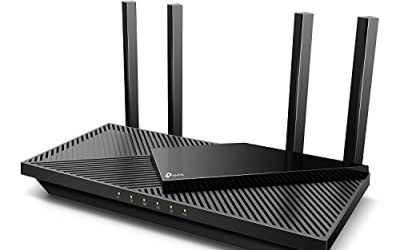
The TP-Link Archer AX55 is a dual-band Wi-Fi 6 router with an AX3000 wireless class, four gigabit LAN ports, a USB port, and OneMesh support for extending coverage later. Its QoS controls and HomeShield security are managed through the Tether app, which keeps setup and device management phone-first and straightforward.
Who it is for: households that want solid Wi-Fi 6 gaming performance with a friendly app and no steep learning curve. The AX55 handles a console, a PC, and a shelf of phones at once, and its mesh-ready design leaves room to grow if the house needs more coverage.
Caveats: the AX55 is a general-purpose router with gaming-friendly features rather than a dedicated gaming router, so it lacks a dedicated gaming port. Its QoS needs to be switched on and pointed at the console to do its best work.
TP-Link Archer AX73
The TP-Link Archer AX73 is a dual-band Wi-Fi 6 router with an AX5400 wireless class, six antennas, four gigabit LAN ports, and a USB port for shared storage. Its HomeShield security suite and QoS controls prioritise gaming traffic, and its OneMesh support means a compatible extender can join the network later without a rebuild.
Who it is for: larger homes that need coverage as well as capacity. The six-antenna design pushes signal further than compact routers, and the AX5400 wireless class gives a busy household room to breathe when consoles, phones, and streaming boxes all compete at once.
Caveats: the router is large and needs a clear shelf rather than a cramped media cabinet, and its QoS controls take a little digging in the app or web interface to set up well. Make sure the listing is the AX73 and not a similarly named Archer model.
TP-Link Archer AXE75
The TP-Link Archer AXE75 is a tri-band Wi-Fi 6E router with an AXE5400 wireless class, a dedicated 6 GHz band, four gigabit LAN ports, and a USB port. The extra band gives newer phones, laptops, and streaming devices a clear lane of their own, leaving the 2.4 GHz and 5 GHz bands freer for consoles, and its QoS controls keep game traffic first in line.
Who it is for: homes with many modern devices alongside their consoles, where the wireless airwaves are crowded. The 6 GHz band moves the newest gear out of the way, the router handles a full household with ease, and OneMesh support leaves room to extend coverage later.
Caveats: consoles themselves cannot use the 6 GHz band, so the benefit lands on the rest of the household rather than directly on the console, and the router needs a clear, central spot to make the most of its radios. Confirm the listing shows the AXE75.
NETGEAR Nighthawk RAX50
The NETGEAR Nighthawk RAX50 is a dual-band Wi-Fi 6 router with an AX5400 wireless class, four gigabit LAN ports, and Dynamic QoS that automatically recognises gaming and streaming traffic and gives it priority. Its Nighthawk app handles setup, device monitoring, and bandwidth checks from a phone, and its four wired ports cover consoles and PCs without extra hardware.
Who it is for: players who want strong gaming performance with minimal setup. Dynamic QoS works out of the box, the app makes it easy to see what is using bandwidth, and the router suits a household that wants the network to just work.
Caveats: some advanced security features sit behind a subscription after the included trial period, so read what is included before you rely on them. The router is a single unit, so very large homes may need an extender or a mesh add-on for the far corners.
Comparison Table
| Router | Wi-Fi Standard | Bands | Key Strength |
|---|---|---|---|
| ASUS RT-AX86U | Wi-Fi 6 | Dual-band | Gaming port, adaptive QoS |
| TP-Link Archer AX55 | Wi-Fi 6 | Dual-band | Tether app, OneMesh |
| TP-Link Archer AX73 | Wi-Fi 6 | Dual-band | Six antennas, OneMesh |
| TP-Link Archer AXE75 | Wi-Fi 6E | Tri-band | 6 GHz band, OneMesh |
| NETGEAR Nighthawk RAX50 | Wi-Fi 6 | Dual-band | Dynamic QoS, Nighthawk app |
Which One Is Right for You?
If you play competitive matches and want a router built around that job, start with the ASUS RT-AX86U. Its gaming port and adaptive QoS are the most focused gaming features in this guide, and its four wired ports cover a console and a PC with room to spare. If you would rather set the router up once and forget it, the NETGEAR Nighthawk RAX50 is the simplest choice here, because its Dynamic QoS handles prioritisation automatically and its app makes the network easy to watch.
For a larger home, the TP-Link Archer AX73 leans hardest on coverage with its six antennas, while the Archer AXE75 is the pick for a household full of newer devices that can use its 6 GHz band. The Archer AX55 sits in the middle as the friendly all-rounder, with solid Wi-Fi 6 performance and the straightforward Tether app. Whichever pick you choose, wire the console, switch on QoS, and keep the firmware current, because those three habits matter more than any single feature on the box.
Frequently Asked Questions
What makes a router a gaming router?
A gaming router prioritises game traffic, keeps latency low under load, and gives you wired ports and controls built for play. QoS, a gaming mode, or a dedicated gaming port are the features that matter, along with enough wireless capacity for the rest of the household.
Should I wire my console or use wireless?
Wire it whenever you can. A cable removes wireless interference entirely and gives the console the steadiest connection the router can provide. Wireless is fine for a second device or a casual session, but wired is the better choice for competitive play.
Do I need Wi-Fi 6E for gaming?
No, Wi-Fi 6 is enough for most homes, and consoles themselves do not use the 6 GHz band. Wi-Fi 6E helps when the household has many newer devices, because it moves them onto a clear band and leaves the older bands freer for the consoles.
How many devices can a gaming router handle?
A modern Wi-Fi 6 gaming router handles a console, a PC, several phones, a laptop, and a TV at once without strain. If your household has many smart home devices as well, favour the picks with the strongest processors and wire as many devices as you can to free the wireless.
Disclosure: As an Amazon Associate, we may earn from qualifying purchases.
FAQ
Which One Is Right for You?
What makes a router a gaming router?
Should I wire my console or use wireless?
Do I need Wi-Fi 6E for gaming?
How many devices can a gaming router handle?
More from Amazon
Programs that pair well with the guide above. Offers and eligibility are set by Amazon and may change.
Free shipping on eligible items, Prime Video and more. Eligible new members can start with a free trial.
Start a Prime free trialAd-free music streaming. Eligible new subscribers can start with a free trial.
Try Music Unlimited freeA Prime membership for ages 18-24 with a trial period. Eligibility is set by Amazon.
See Prime for Young AdultsAudiobooks and podcasts to listen to on the go. Eligible new members can start with a free trial.
Try Audible freeAs an Amazon Associate we earn from qualifying purchases.