Key takeaways
- True pico projectors for office presenting: two models under half a kilo by maker specs, with HDMI, batteries and keystone for huddle rooms and small desks.
As an Amazon Associate, we earn from qualifying purchases made through links on this page.

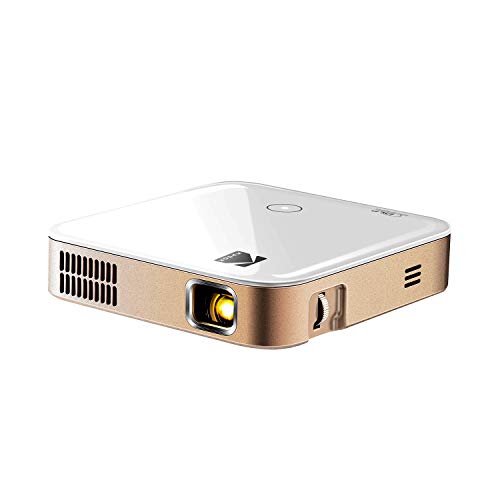
Pico is a size class, not a synonym for small. A pico projector is the machine that rides in a jacket pocket or a laptop sleeve and comes out when a huddle room, a borrowed desk, or a one-to-one meeting needs a picture on the wall. This guide holds that class to a hard line drawn from the makers’ own specification sheets: a documented net weight of half a kilo or less, a pocket footprint, a full-size HDMI input for a laptop, a built-in battery, and keystone correction for the off-centre placements that real offices force on you. Every model below clears all five conditions on figures its maker publishes.
That line separates this guide from the broader mini projector coverage already on this site. The mini projectors in the site’s business guide weigh between 0.85 and 1.2 kg, and the portable business picks are built around brighter 1080p images for small groups. Those are the right machines for a scheduled meeting with an audience. The pico class answers a narrower office problem: the unscheduled one, where the projector has to already be in your bag, set up in under a minute, and throw a readable deck for two or three people across a desk. The trade is honest and steep. Output in this class runs to a few hundred lumens, native resolution is 854 by 480 on both picks, and a bright boardroom defeats either machine. Buy a pico for proximity and presence, not for power.
Two current models clear every condition above with a verifiable Amazon US listing, and they are the picks below. A third genuine pico, the AAXA P8, is named in its own short section without a purchase link, because no live Amazon US listing for it could be verified during research and projector databases list the model as discontinued. One near miss is worth naming here: the Kodak Luma 450 is a native 1080p pocket model, but Kodak’s own manual puts its weight at 530 grams, which places it in the mini class rather than the pico class this guide covers.
What to Look for in a Pico Projector for Office Use
The weight line, from the maker’s own sheet. Pico begins at half a kilo. Both picks sit under that line with room to spare, at 410 grams and about 340 grams, and both makers publish the figure on their specification pages rather than leaving it to listing copy. Weight is the spec that decides whether a projector lives in the bag permanently or gets left behind on busy days, so it is the first filter here and the one that removed every larger mini model from contention.
Brightness, and the scale it is quoted on. Makers quote output as ANSI lumens, ISO lumens, or LED lumens, and the three figures come from different test methods, so a higher number under one method does not always beat a lower number under another. The two picks quote 300 LED lumens and 200 ANSI lumens respectively. Either figure belongs to a dimmed room and a modest image. For slides, keep the picture near 40 to 60 inches, where text stays dense enough to read; the maximum sizes in the makers’ literature assume darkness that offices rarely provide.
Native resolution, not accepted resolution. Both picks render a native 854 by 480 picture. Each accepts a 1080p input signal, and each downscales that signal to its own panel, so a listing headline about high-definition input says nothing about the sharpness of the projected text. At huddle distances with bold slide design, 854 by 480 holds up well. Dense spreadsheets, small footnotes, and fine chart labels soften, and no setting on either machine changes that. If your decks live in small type, the larger mini class is the honest answer.
A wired path for the laptop. Both picks carry a full-size HDMI input, which is the connection that works on any office laptop without an adapter hunt. Wireless mirroring is the second path, useful when the laptop stays in the bag, but guest networks and corporate Wi-Fi can block casting without warning. Treat mirroring as a convenience layered on top of the cable, never as the only route into the projector.
Battery figures and their fine print. Both picks carry an internal cell, 6,000 milliamp hours in one and 7,500 in the other, and both makers quote runtimes of up to four hours and about two hours respectively. Those figures come from low-power picture modes, so a full-brightness session runs shorter. The battery’s real office value is placement freedom: the projector can sit on the one table corner that faces a blank wall, with no cable crossing the room to a socket.
Keystone correction and placement help. Desks are rarely square to a wall. One pick corrects the vertical angle automatically across a plus or minus 40 degree range, which rescues most side-table placements on its own. The other applies digital keystone correction and adds a tripod thread in the base, so a small desk tripod can aim it precisely. Digital correction trims a little of the image, so a near-square placement still beats a corrected extreme angle.
Sound for a huddle, not a hall. Built-in speakers here are a 5-watt unit and a 3-watt unit. Either covers voices and video clips for two or three listeners at desk distance. Neither fills a room, and if your presenting regularly involves audio for a larger group, a small external speaker belongs in the same bag.
The Best Pico Projectors for Office Settings
ASUS ZenBeam E2
The ASUS ZenBeam E2 is the output pick of this pair and the one built most plainly for presenting. ASUS lists an LED light source rated for 30,000 hours, brightness of 300 LED lumens, and a native 854 by 480 DLP picture that accepts input up to 1920 by 1080. The body measures 110 by 39.5 by 107 millimetres and weighs 410 grams net, a palm-size slab that stands upright on a desk edge. ASUS documents a Presentation picture preset among its modes, which is a small detail that matters in this class: the tuning is aimed at slides and documents rather than cinema.
Setup help is the E2’s strongest office trait. Vertical keystone correction is automatic across plus or minus 40 degrees, so a projector placed low on a side table squares its own picture without a menu dig. Focus is manual, by a wheel, which is the one practical step left. The built-in 6,000 milliamp hour battery is listed for up to four hours of video playback, and the USB-A port doubles as a power output that can top up a phone during a long session. Connections cover the full-size HDMI input, that USB-A port, and wireless mirroring from a phone or laptop. Sound comes from a single 5-watt speaker. The throw ratio is 1.3 to 1, with a listed image range of 30 to 100 inches.
The limitations follow from the spec sheet. The documented contrast figure is 400 to 1, low even for this class, so dark slide backgrounds and shadow detail wash toward grey under any ambient light. The WVGA panel softens small text exactly as described above, and the 300 LED lumen figure is an LED-scale number rather than an ANSI measurement, so it should be read as modest output for dim rooms rather than compared head-to-head with ANSI figures from larger machines. Choose the E2 when you want the brighter pico of the two, automatic squaring, and a battery that outlasts a long workshop session.
Kodak Luma 350
The Kodak Luma 350 is the smallest machine in this guide and the purest pocket tool of the pair. Kodak’s manual specifications list a DLP engine with a native 854 by 480 picture, brightness of 200 ANSI lumens, an LED light source rated for 30,000 hours, and a contrast figure of 3,500 to 1. The body measures 4.4 by 4.4 by 0.89 inches and weighs about 12 ounces, roughly 340 grams, which is closer to a thick phone than to a piece of meeting-room hardware. Kodak rates the image up to 150 inches, though the brightness guidance above applies: office slides belong at the small end of that range.
The Luma 350 earns its office place on source flexibility. Alongside the full-size HDMI input, it plays files directly from a USB drive, so a presenter can walk in with a stick in a pocket and no laptop at all. An Android system is built in with its own app access, and wireless paths cover Wi-Fi mirroring by Miracast and DLNA plus Bluetooth for audio. Digital keystone correction handles angled placement, and a tripod thread in the base pairs with any small desk tripod for precise aiming. The internal battery is a 7,500 milliamp hour cell, and a 3-watt speaker covers sound for a desk-side audience.
The limits are plain. The built-in Android version is 6.0.1, an old release, so the app catalogue it can reach is narrower than a current platform’s, and the wired HDMI path or a USB drive is the dependable route for work material. At 200 ANSI lumens it is the dimmer pick here, suited to blinds-down huddle rooms and evening sessions. The native panel is the same 854 by 480 as its partner, with the same softness in fine text. Choose the Luma 350 when the smallest possible body, laptop-free presenting from a USB drive, and a tripod thread matter more than raw output.
Also in This Class: AAXA P8 (Named Without a Link)
The AAXA P8 is a genuine pico by any measure: AAXA documents a body of 3.9 by 3.4 by 1.4 inches at under 0.3 kilos, a maker figure of 430 LED lumens, a native 960 by 540 picture, HDMI and USB-C video inputs, and a tripod in the box. On paper it fits this guide well. It is named here without a purchase link because no live Amazon US listing for the model could be verified during research, and projector databases list the P8 as a discontinued model. Remaining units in circulation are uncertain stock, so it is recorded for completeness rather than linked as a pick.
Comparison Table
| Model | Net weight | Body size | Brightness (maker figure) | Native resolution | Battery | Keystone | Speaker |
|---|---|---|---|---|---|---|---|
| ASUS ZenBeam E2 | 410 g | 110 x 39.5 x 107 mm | 300 LED lumens | 854 x 480 | 6,000 mAh, up to 4 hours playback | Automatic vertical, plus or minus 40 degrees | 5 W |
| Kodak Luma 350 | About 340 g (12 oz) | 4.4 x 4.4 x 0.89 in | 200 ANSI lumens (manual spec) | 854 x 480 | 7,500 mAh | Digital correction, tripod thread | 3 W |
Brightness figures use the scale each maker names, and LED lumens and ANSI lumens come from different test methods, so the two numbers describe modest output in the same broad range rather than a precise ranking.
FAQ
Can a pico projector handle a lit meeting room?
Not a bright one. The makers’ figures here are 300 LED lumens and 200 ANSI lumens, and output at that level needs dimmed lights and a modest image to stay readable. For a sunlit boardroom, the larger mini and full-size business projectors on this site, with figures in the thousands of lumens, are the right class.
Why are the site’s mini business projectors not in this guide?
Weight. The mini models in the existing business guide run from 0.85 to 1.2 kg, and the portable business picks are similar. They are brighter and sharper, and they are the better choice for scheduled group meetings. This guide covers the class below half a kilo, the machines that stay in a bag every day for unscheduled presenting.
Can I present from a laptop with either pick?
Yes. Both carry a full-size HDMI input, so a standard cable connects any office laptop with no adapter. Carry the cable even if you plan to mirror wirelessly, because guest networks can block casting and the cable removes that failure mode entirely.
Can I present without a laptop at all?
With the Kodak Luma 350, yes: it plays files from a USB drive and runs its own built-in Android system. The ASUS ZenBeam E2 is a laptop-and-phone machine; its USB-A port is documented as a power output for charging a phone, not as a media input, so the deck has to arrive by HDMI or by mirroring.
Is 854 by 480 sharp enough for spreadsheets?
For bold headings, large figures, and charts built with big labels, yes, at desk distances. For dense tables and small footnotes, the panel softens detail. Design decks for the class: fewer words per slide, larger type, and high contrast between text and background.
Conclusion
The pico class for office work comes down to two verifiable machines, and they split on a simple question. If you want the stronger output, automatic keystone correction, a documented Presentation preset, and the longer battery, the ASUS ZenBeam E2 is the pick. If you want the smallest body in the class, laptop-free presenting from a USB drive, and a tripod thread for precise desk placement, the Kodak Luma 350 is the pick. Either way, keep the image small, dim the room, and carry an HDMI cable. Confirm the exact model name on the listing before ordering, since both makers sell larger mini projectors under similar names, and those machines belong to a different class than the one this guide set out to cover.
More from Amazon
Programs that pair well with the guide above. Offers and eligibility are set by Amazon and may change.
Free shipping on eligible items, Prime Video and more. Eligible new members can start with a free trial.
Start a Prime free trialAd-free music streaming. Eligible new subscribers can start with a free trial.
Try Music Unlimited freeA Prime membership for ages 18-24 with a trial period. Eligibility is set by Amazon.
See Prime for Young AdultsAudiobooks and podcasts to listen to on the go. Eligible new members can start with a free trial.
Try Audible freeAs an Amazon Associate we earn from qualifying purchases.