Our Short List of 3
All 3 Picks at a Glance
| Product | Specs | Action |
|---|---|---|
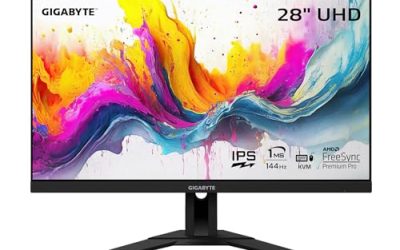
 Gigabyte M28U | Check price on Amazon | |
 Gigabyte M32U | Check price on Amazon | |
 LG UltraGear 27GP950-B | Check price on Amazon |
Key takeaways
- Find the best 4k monitors for xbox one s with sharp 4K panels, HDR support, and low input lag for smooth console gaming at 60Hz.
The best 4k monitors for xbox one s turn a console that is often paired with a television into a proper desk setup. The Xbox One S outputs games at 4K resolution with HDR support, and a good 4K monitor shows that off with sharper text, cleaner edges, and richer colour than a 1080p screen ever could. On a desk, a 27-inch or 28-inch panel also sits closer to the player, which makes the extra detail easier to notice than it is from across a living room.
There is one fact worth knowing before choosing. The Xbox One S caps its output at 4K and 60Hz, and it connects over HDMI 2.0, not HDMI 2.1. That means a monitor with a 144Hz panel and HDMI 2.1 will still run at 60Hz on this console. Those faster panels are not wasted, because they also work with a gaming PC or a newer console later, but they are not needed for the One S itself. The most important qualities for this console are a true 3840 x 2160 panel, HDR support, low input lag, and a screen size that suits the desk.
This guide covers five 4K monitors that fit the One S well. There is a straightforward 60Hz HDR panel that matches the console exactly, a large 32-inch option for players who want a bigger image, and three faster gaming panels that add high refresh rates and HDMI 2.1 for future hardware. All five use IPS-type panels with wide viewing angles, which matters when a second person watches from the side of the desk.
How to Choose
1. True 4K resolution
Every pick in this guide is a native 3840 x 2160 panel. That is the resolution the Xbox One S outputs for 4K content, and a native panel shows it without scaling tricks. Avoid any screen marketed with 4K in the name that lists a lower native resolution in its specifications, and confirm the panel is 3840 x 2160 before ordering.
2. Refresh rate and the 60Hz ceiling
The One S runs at 60Hz, so a 60Hz panel is a perfect match and costs less. A 144Hz panel only shows its extra speed with a PC or a newer console, which makes it a future-proofing choice rather than a One S necessity. If the monitor will only ever serve the One S, put the money into panel quality and HDR instead of refresh rate.
3. HDR support
HDR makes the biggest visible difference after resolution. Look for HDR10 support at minimum, and check the brightness figure: panels rated around 400 nits or higher show HDR highlights more clearly than dimmer screens. DisplayHDR 400 and DisplayHDR 600 are useful guideposts, though neither turns a monitor into a television-grade HDR display.
4. HDMI ports and version
The One S needs a single HDMI input, and HDMI 2.0 handles 4K at 60Hz with HDR without any trouble. HDMI 2.1 only matters for newer consoles running 4K at 120Hz. Count the ports anyway: a second HDMI input keeps a PC or a streaming stick connected without cable swapping, and a DisplayPort input is useful for a PC.
5. Input lag and response time
Input lag is the delay between pressing a button and seeing the result, and it matters more than refresh rate on this console. Gaming monitors with a dedicated game mode and 1 ms to 5 ms response times keep controls feeling immediate. A general-purpose office monitor with the same resolution can feel sluggish by comparison, even when its picture looks identical in a still image.
6. Panel type and colour
IPS panels give wide viewing angles and accurate colour, which suits both games and media. Check colour coverage figures such as sRGB and DCI-P3: 99 percent sRGB is a good baseline, while 90 percent DCI-P3 or higher gives richer colour in HDR games and films. Nano IPS and SuperSpeed IPS are LG and Gigabyte variants of the same idea, with faster pixel response.
7. Size and desk space
A 27-inch or 28-inch 4K panel is the sweet spot for a desk, because text stays readable and the screen fills the field of view at arm’s length. A 32-inch panel is more immersive but needs a deeper desk, since sitting too close to a large screen means turning the head to see the corners. Measure the desk before choosing the larger size.
Top Picks
LG 27UK650-W
The LG 27UK650-W is the most natural match for the Xbox One S in this guide, because its specifications line up with the console almost exactly. It is a 27-inch 4K UHD IPS display at 3840 x 2160 with a 60Hz refresh rate, HDR10 support, 99 percent sRGB colour coverage, and AMD FreeSync. There is nothing here the One S cannot use, and nothing missing that it needs.
Connectivity covers the console well: two HDMI 2.0 ports with HDCP 2.2 for 4K content, plus a DisplayPort input for a PC. The panel is rated at 350 nits typical brightness with 450 nits peak, which is enough for HDR highlights to read clearly in a normal room. A 5 ms response time and LG’s Dynamic Action Sync game mode keep input lag low, and the height-adjustable stand with tilt and pivot makes it easy to set the screen at eye level.
The design is a clean white and silver finish with a three-side borderless frame, which looks at home on a desk rather than in a living room. There are no built-in speakers, so the console’s audio needs headphones or external speakers, and there is no USB hub. Those are fair trade-offs at this level, and neither affects picture quality.
Who it is for: Xbox One S owners who want a 4K HDR screen matched exactly to the console, with no unused high-refresh hardware. Caveats: it is an older model from 2018, it has no speakers and no USB hub, and the 60Hz panel cannot show higher frame rates from a PC. Confirm the listing is still active before ordering, since older models can disappear from stock without notice.
Gigabyte M28U
The Gigabyte M28U is the 4K gaming panel in this guide, and the pick for a desk that serves both the One S and a gaming PC. It is a 28-inch SuperSpeed IPS display at 3840 x 2160 with a 144Hz refresh rate, 1 ms response time, 94 percent DCI-P3 colour, and VESA DisplayHDR 400. On the One S it runs at 4K and 60Hz like any other panel here; on a PC it opens up to 144Hz over DisplayPort.
Connectivity is a strength: two HDMI 2.1 ports, one DisplayPort 1.4 with DSC, one USB-C port, and a built-in KVM switch that shares one keyboard and mouse between two machines. That makes it genuinely useful as a shared screen for a console and a laptop. AMD FreeSync Premium Pro handles variable refresh on the PC side, and the panel’s 300-nit brightness is the weakest in this guide, so HDR highlights are softer than on the brighter LG panels.
The stand adjusts for height and tilt only, with no swivel or pivot, and the built-in speakers are small 3 W units that suit menu sounds better than game audio. Even so, the combination of 4K, HDMI 2.1, USB-C, and KVM at this size is hard to match, and the M28U is the most versatile screen here for a mixed console and PC desk.
Who it is for: players who use the One S now and a gaming PC or a newer console later, and who want one screen for all of it. Caveats: the One S cannot use the 144Hz refresh rate, brightness is modest for HDR, and the stand has limited adjustment. Confirm the listing is the standard M28U-SA model, not the Arm Edition.
Gigabyte M32U
The Gigabyte M32U is the big-screen pick: a 32-inch SuperSpeed IPS display at 3840 x 2160 with a 144Hz refresh rate, 1 ms response time, 90 percent DCI-P3 colour, and VESA DisplayHDR 400. At this size, 4K games on the One S look genuinely cinematic, and the extra screen area also helps for split-screen multiplayer, where two players share the display.
Like its smaller sibling, the M32U carries two HDMI 2.1 ports, one DisplayPort 1.4, one USB-C port, and a KVM switch, so a console and a PC can share the screen without swapping cables. The stand is fully ergonomic with height, tilt, pivot, and swivel adjustment, which matters at 32 inches, since the screen needs to sit at the right height and angle to avoid neck strain. Brightness is rated at 350 nits, a step above the M28U, and FreeSync Premium Pro covers variable refresh.
The trade-off is desk depth. A 32-inch screen at arm’s length fills the whole field of view, and players who sit close may find themselves turning their heads to check the corners of the screen. It also weighs more and takes up more desk space, so measure first. On the One S it runs at 60Hz, with the 144Hz panel waiting for a PC or a newer console.
Who it is for: players with a deep desk who want the largest, most immersive 4K image for the One S and future hardware. Caveats: needs a deep desk, the One S cannot use the 144Hz panel, and HDR is DisplayHDR 400 rather than a brighter standard. Confirm the listing is the standard M32U-SA model.
ASUS TUF Gaming VG28UQL1A
The ASUS TUF Gaming VG28UQL1A is a 28-inch Fast IPS gaming monitor at 3840 x 2160 with a 144Hz refresh rate, 1 ms response time, 90 percent DCI-P3 colour, and DisplayHDR 400. It is built for players who want a fast panel now and a console upgrade later, with two HDMI 2.1 ports that support native 4K at 120Hz on newer consoles, plus DisplayPort 1.4 with DSC for PC gaming.
ASUS adds its own gaming features: Extreme Low Motion Blur Sync, which runs motion blur reduction and variable refresh together, G-SYNC compatibility, FreeSync Premium, and a variable overdrive mode. Two small built-in speakers are included, and the stand adjusts for height, tilt, pivot, and swivel. Brightness is rated at 300 nits, which is modest, so HDR on this panel is present but not dramatic.
Availability needs attention: some trackers have shown this model out of stock at times, and one aggregator flagged it unavailable, so check the live listing carefully before ordering and confirm it is the VG28UQL1A rather than a similar ASUS model. When it is in stock, it is a strong all-rounder for a desk that mixes console and PC play.
Who it is for: players who want ASUS gaming features and HDMI 2.1 for a future console, with the One S as the current machine. Caveats: availability varies, brightness is modest for HDR, and the One S runs at 60Hz on this panel. This is the top live-check priority in this article.
LG UltraGear 27GP950-B
The LG UltraGear 27GP950-B is the premium 27-inch pick in this guide. It is a 27-inch Nano IPS display at 3840 x 2160 with a 144Hz refresh rate that overclocks to 160Hz over DisplayPort, a 1 ms response time, 98 percent DCI-P3 colour, and VESA DisplayHDR 600. That HDR 600 certification and 400-nit typical brightness make it the best HDR performer here, with brighter highlights than the DisplayHDR 400 panels.
Connectivity includes two HDMI 2.1 ports with 4K variable refresh up to 120Hz, one DisplayPort 1.4 with DSC, and two USB 3.0 ports. G-SYNC compatibility and FreeSync Premium Pro cover both graphics card brands on the PC side. The four-side borderless design and hardware calibration support suit players who also use the screen for photo or video work, where colour accuracy matters as much as speed.
It is an older premium model, so availability varies and the listing should be checked carefully. It is also the most expensive panel here, and much of what it offers, the 144Hz refresh rate, the overclock, and HDMI 2.1, sits unused while the One S is the only machine connected. Buy it for the colour and HDR quality, or for the PC that will join the desk later, rather than for the One S alone.
Who it is for: players who want the best colour and HDR in a 27-inch 4K panel, and who also game on a PC. Caveats: premium cost for features the One S cannot use, older model with varying availability, and no built-in speakers. Confirm the listing is the 27GP950-B and not the 27GN950-B.
Comparison Table
| Monitor | Size | Panel | Refresh rate | HDR | HDMI |
|---|---|---|---|---|---|
| LG 27UK650-W | 27-inch | IPS | 60Hz | HDR10 | 2x HDMI 2.0 |
| Gigabyte M28U | 28-inch | SuperSpeed IPS | 144Hz | DisplayHDR 400 | 2x HDMI 2.1 |
| Gigabyte M32U | 32-inch | SuperSpeed IPS | 144Hz | DisplayHDR 400 | 2x HDMI 2.1 |
| ASUS TUF Gaming VG28UQL1A | 28-inch | Fast IPS | 144Hz | DisplayHDR 400 | 2x HDMI 2.1, 2x HDMI 2.0 |
| LG UltraGear 27GP950-B | 27-inch | Nano IPS | 144Hz (160Hz OC) | DisplayHDR 600 | 2x HDMI 2.1 |
Which One Is Right for You?
If the Xbox One S is the only machine on the desk, the LG 27UK650-W is the straightforward answer. Its 60Hz panel, HDR10 support, and HDMI 2.0 ports match the console exactly, and nothing in the cost goes toward speed the console cannot use. It is also the easiest screen here to set up and live with.
If a gaming PC shares the desk, or a newer console is on the way, the Gigabyte M28U is the best balance of size, speed, and connectivity. The 144Hz panel, HDMI 2.1 ports, USB-C input, and KVM switch make it a genuine two-machine screen, and the 28-inch size suits a normal desk. Players with a deep desk who want maximum immersion should step up to the M32U instead, accepting the extra size and weight.
The ASUS VG28UQL1A suits players who prefer ASUS gaming features and want a second pair of HDMI 2.0 ports for older hardware, while the LG 27GP950-B suits players who care most about colour accuracy and HDR brightness, and who will use the panel for creative work as well as games. In every case, remember that the One S runs at 4K and 60Hz, so judge these screens on picture quality first and on refresh rate second.
Frequently Asked Questions
Does the Xbox One S support 4K at 120Hz?
No. The Xbox One S outputs 4K at up to 60Hz over HDMI 2.0. A 120Hz or 144Hz monitor will work with it, but the console will run at 60Hz. Higher refresh rates only come into play with a gaming PC or a newer console that supports them.
Do I need HDMI 2.1 for the Xbox One S?
No. HDMI 2.0 handles 4K at 60Hz with HDR without any trouble. HDMI 2.1 is worth having if a newer console will join the setup later, since it carries 4K at 120Hz, but it adds nothing for the One S itself.
Is HDR worth it on a monitor for the Xbox One S?
Yes, within limits. HDR10 support and a brighter panel make games and films look richer, with more visible detail in bright and dark scenes. A monitor will not match a large HDR television for impact, but the difference over a non-HDR screen is easy to see at desk distance.
Should I choose a 27-inch or 32-inch 4K monitor?
A 27-inch or 28-inch panel suits most desks and keeps text sharp at arm’s length. A 32-inch panel is more immersive for games and split-screen play, but it needs a deeper desk, since sitting too close to a large screen means turning your head to see the edges. Measure the desk depth before choosing the larger size.
Disclosure: As an Amazon Associate, we may earn from qualifying purchases.
FAQ
Which One Is Right for You?
Does the Xbox One S support 4K at 120Hz?
Do I need HDMI 2.1 for the Xbox One S?
Is HDR worth it on a monitor for the Xbox One S?
Should I choose a 27-inch or 32-inch 4K monitor?
More from Amazon
Programs that pair well with the guide above. Offers and eligibility are set by Amazon and may change.
Free shipping on eligible items, Prime Video and more. Eligible new members can start with a free trial.
Start a Prime free trialAd-free music streaming. Eligible new subscribers can start with a free trial.
Try Music Unlimited freeA Prime membership for ages 18-24 with a trial period. Eligibility is set by Amazon.
See Prime for Young AdultsAudiobooks and podcasts to listen to on the go. Eligible new members can start with a free trial.
Try Audible freeAs an Amazon Associate we earn from qualifying purchases.