Our Short List of 3
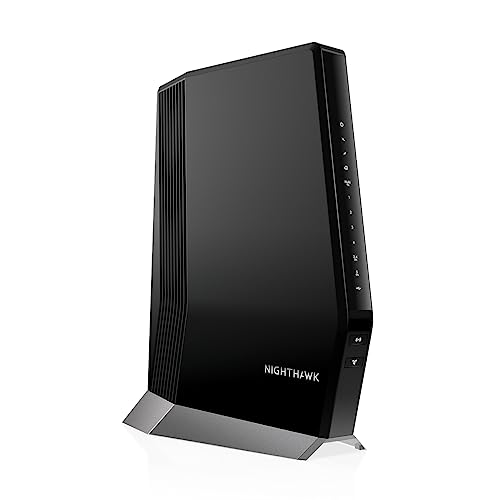
- Best for: gigabit and multi-gigabit Xfinity plans, and homes with many devices and heavy streaming or gaming.
- Model: CAX80-100NAS
- Modem: DOCSIS 3.1, 32×8 channel bonding, two OFDM channels
- Wi-Fi: Wi-Fi 6, AX6000, eight-stream, up to 6 Gbps combined wireless speed
- Coverage: up to 2,500 square feet, up to 30 devices
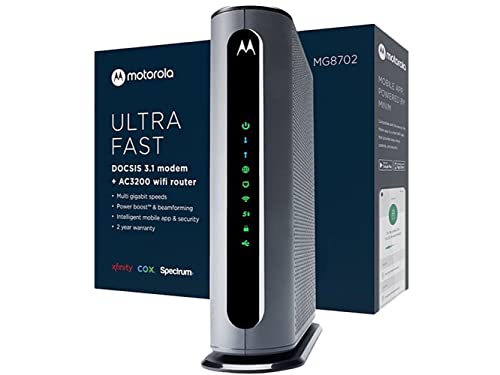
- Best for: households on gigabit Xfinity plans that want to stop renting equipment without paying for Wi-Fi 6 speeds they may not use.
- Model: MG8702
- Modem: DOCSIS 3.1, 32×8 channel bonding, two OFDM channels
- Wi-Fi: Wi-Fi 5, AC3200, four antennas, 4×4 MU-MIMO
- Coverage: whole-home coverage for medium to large homes, four gigabit Ethernet ports

- Best for: most Xfinity households on gigabit plans that want Wi-Fi 6 without paying for the fastest combo available.
- Model: G34
- Modem: DOCSIS 3.1, 32×8 channel bonding, two OFDM channels
- Wi-Fi: Wi-Fi 6, AX3000, up to 3 Gbps combined wireless speed
- Coverage: up to 2,500 square feet
All 3 Picks at a Glance
| Product | Specs | Action |
|---|---|---|
| 1. NETGEAR Nighthawk CAX80 |
| Check price on Amazon |
| 2. Motorola MG8702 |
| Check price on Amazon |
| 3. ARRIS SURFboard G34 |
| Check price on Amazon |
Key takeaways
- Find the best customer provided modems routers for Xfinity in 2026, with DOCSIS 3.1 combos that stop rental fees and cover gaming, streaming and busy homes.
Introduction
The best customer provided modems routers for Xfinity let you stop paying the monthly rental fee for the gateway Xfinity ships you, and they often deliver faster, more reliable Wi-Fi than that rented box at the same time. Xfinity allows customers to bring their own equipment, as long as the device is on the provider’s approved list and supports the speed tier on your plan. A modem-router combo, also called a gateway, packs the cable modem and the Wi-Fi router into a single box, so setup is one device, one app, and one set of cables.
That simplicity is exactly why combos are popular, but it also means the buying decision matters more: if either half of the box is weak, the whole network suffers. This guide explains what to check before you buy, then compares three customer-provided modem-router combos that are approved for Xfinity and still selling on Amazon US. Every pick below is a DOCSIS 3.1 combo, which is the standard you want for gigabit plans and for headroom as Xfinity raises speeds.
How to Choose a Customer-Provided Modem Router for Xfinity
Check the Xfinity Approved Device List First
Xfinity publishes an approved device list, and it is the final word on compatibility. A modem that is not on the list will not activate, no matter how good its specs look. Before ordering, search the list for the exact model number, and confirm that the list covers the speed tier you pay for. Some devices are approved only up to a certain tier, for example gigabit service but not the faster multi-gigabit tiers. If you plan to upgrade your plan later, buy a device approved for the faster tier now so you do not have to replace it again.
Pick DOCSIS 3.1, Not DOCSIS 3.0
DOCSIS is the standard that carries internet over the coaxial cable line into your home. DOCSIS 3.1 is the current standard, and it supports gigabit and multi-gigabit download speeds with 32 downstream and 8 upstream bonded channels, plus two OFDM channels. Older DOCSIS 3.0 devices top out well below gigabit speeds and are a poor buy in 2026. Every combo in this guide is DOCSIS 3.1, so all three are ready for gigabit plans.
Match Wi-Fi Speed and Coverage to Your Home
Wi-Fi 6 is the sensible minimum for a new combo in 2026. It handles many connected devices at once, which matters in homes full of phones, laptops, game consoles, smart TVs and smart home gear. Look at the rated Wi-Fi speed, usually written as AX3000, AX6000 or similar, and at the coverage figure. A small apartment is fine with a modest combo, while a larger home needs stronger antennas and higher rated speeds. If your home has thick walls or several floors, plan on adding a mesh extender later rather than expecting one box to cover everything.
Count the Ethernet Ports
Most combos have four gigabit Ethernet ports, and some add a faster multi-gigabit port for a wired PC, console or network storage drive. Wired connections are still the most stable option for competitive gaming and for a desktop that never moves, so four ports is a good baseline. A USB port is a useful extra for sharing a printer or an external drive on the network, though not every combo includes one.
Remember What a Combo Cannot Do
Two limitations apply to nearly every customer-provided combo. First, they do not support Xfinity Voice, the bundled home phone service. If your plan includes a phone line, you need Xfinity’s own voice-capable gateway or a separate voice adapter. Second, they only work on cable internet. They do not work with fiber, DSL or satellite service, and they cannot replace a fiber gateway. Check both points before you buy.
Activation Is Usually Simple
Activating a customer-provided modem on Xfinity is normally done through the Xfinity app. You plug in the coax cable and power, open the app, and follow the activation flow, which registers the modem’s MAC address on your account. Keep the modem’s MAC address, printed on the label on the bottom of the device, handy before you start. After activation, return the rented gateway to Xfinity and confirm the rental fee is removed from your bill, since the fee sometimes keeps appearing until the return is processed.
Top Picks
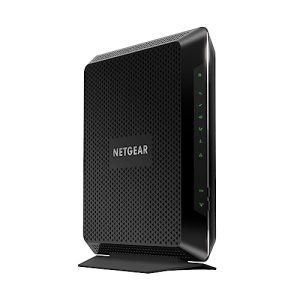
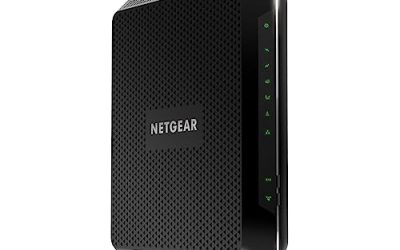
1. NETGEAR Nighthawk CAX80
- Best for: gigabit and multi-gigabit Xfinity plans, and homes with many devices and heavy streaming or gaming.
- Model: CAX80-100NAS
- Modem: DOCSIS 3.1, 32×8 channel bonding, two OFDM channels
- Wi-Fi: Wi-Fi 6, AX6000, eight-stream, up to 6 Gbps combined wireless speed
- Coverage: up to 2,500 square feet, up to 30 devices
gigabit and multi-gigabit Xfinity plans, and homes with many devices and heavy streaming or gaming.
NETGEAR Nighthawk CAX80 on Amazon
The CAX80 is the strongest all-round pick in this guide, and the one to buy if your plan is gigabit or faster. Its DOCSIS 3.1 modem supports cable plans up to 6 Gbps, and the AX6000 Wi-Fi 6 radio gives it the headroom to feed a house full of 4K streams, game downloads and video calls at once. The 2.5 Gbps Ethernet port is genuinely useful for a gaming PC or a network drive, and link aggregation across the gigabit ports adds flexibility for wired setups.
Setup runs through the Nighthawk app, and activation with Xfinity follows the standard app flow. NETGEAR Armor security software is included on a trial basis, with parental controls and threat protection that can be continued on a subscription if you want them. The main trade-offs are size and cost: this is a large, tall unit that needs shelf space and airflow, and it is the most expensive combo here. It also has no phone jack, so it cannot carry Xfinity Voice.
Pros: fastest modem and Wi-Fi in this guide; 2.5 Gbps wired port; strong coverage for larger homes; Xfinity certified.
Cons: large footprint; premium price tier; no voice support; Armor features need a subscription after the trial.
2. Motorola MG8702
- Best for: households on gigabit Xfinity plans that want to stop renting equipment without paying for Wi-Fi 6 speeds they may not use.
- Model: MG8702
- Modem: DOCSIS 3.1, 32×8 channel bonding, two OFDM channels
- Wi-Fi: Wi-Fi 5, AC3200, four antennas, 4×4 MU-MIMO
- Coverage: whole-home coverage for medium to large homes, four gigabit Ethernet ports
households on gigabit Xfinity plans that want to stop renting equipment without paying for Wi-Fi 6 speeds they may not use.
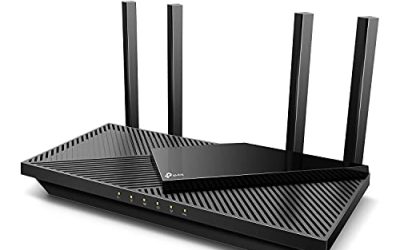
The MG8702 is the value pick for gigabit Xfinity plans. It pairs the same DOCSIS 3.1 modem class as the CAX80 with an AC3200 Wi-Fi 5 router, which is more than enough for most homes: four antennas and 4×4 MU-MIMO keep streams stable, and the Intelligent Power Boost feature prioritizes traffic to reduce lag during gaming and video calls. A two-year warranty is longer than most rivals offer, which is reassuring for a device you expect to run for years.
The trade-off is the Wi-Fi generation. Wi-Fi 5 is older than Wi-Fi 6, so in a home with dozens of connected devices the MG8702 will not manage congestion as elegantly as a Wi-Fi 6 combo. In practice, for a typical household on a gigabit plan, that difference is small, and the lower cost more than compensates. It also lacks a multi-gigabit Ethernet port, so wired speeds top out at gigabit per port.
Pros: DOCSIS 3.1 gigabit modem at a lower cost than Wi-Fi 6 rivals; four antennas with MU-MIMO; two-year warranty; USB 3.0 port for shared storage.
Cons: Wi-Fi 5 rather than Wi-Fi 6; no 2.5 Gbps port; no voice support.
3. ARRIS SURFboard G34
- Best for: most Xfinity households on gigabit plans that want Wi-Fi 6 without paying for the fastest combo available.
- Model: G34
- Modem: DOCSIS 3.1, 32×8 channel bonding, two OFDM channels
- Wi-Fi: Wi-Fi 6, AX3000, up to 3 Gbps combined wireless speed
- Coverage: up to 2,500 square feet
most Xfinity households on gigabit plans that want Wi-Fi 6 without paying for the fastest combo available.
The G34 sits between the other two picks: it has the modern Wi-Fi 6 radio of the CAX80 at a mid-range size and cost. Its AX3000 wireless speed is ample for gigabit plans, and its DOCSIS 3.1 modem supports download speeds up to 4 Gbps on the cable side, so the modem will not bottleneck a faster plan upgrade. Setup and management run through the SURFboard Central app, which covers parental controls, device management and guest networks.
Compared with the CAX80, the G34 gives up the 2.5 Gbps port, the USB port and some top-end wireless speed. Compared with the MG8702, it gains Wi-Fi 6 and its better handling of many simultaneous devices. That balance makes it the easiest recommendation for most buyers: modern wireless, gigabit-ready modem, and a compact box that fits on a shelf without dominating it.
Pros: Wi-Fi 6 with DOCSIS 3.1 at a mid-range cost; approved for Xfinity gigabit tiers; compact design; app-based parental controls.
Cons: no 2.5 Gbps or USB port; AX3000 wireless ceiling is lower than the CAX80; no voice support.
Comparison Table
| Combo | Modem | Wi-Fi | Wired Ports | Coverage | Best For |
|---|---|---|---|---|---|
| NETGEAR Nighthawk CAX80 | DOCSIS 3.1, up to 6 Gbps plans | Wi-Fi 6, AX6000 | 1 x 2.5 Gbps, 4 x 1 Gbps, USB 3.0 | Up to 2,500 sq ft | Fastest plans, heavy use |
| Motorola MG8702 | DOCSIS 3.1, gigabit plans | Wi-Fi 5, AC3200 | 4 x 1 Gbps, USB 3.0 | Medium to large homes | Best value on gigabit |
| ARRIS SURFboard G34 | DOCSIS 3.1, up to 4 Gbps | Wi-Fi 6, AX3000 | 4 x 1 Gbps | Up to 2,500 sq ft | Balanced Wi-Fi 6 pick |
FAQ
Do I need to tell Xfinity I am using my own modem?
Yes. The modem must be activated on your account before it will work. Activation is normally done in the Xfinity app, which registers the modem’s MAC address. After activation, return the rented gateway and check that the rental fee is gone from your next bill.
Will any DOCSIS 3.1 modem work with Xfinity?
No. The modem must be on Xfinity’s approved device list for your speed tier. All three combos in this guide are approved for Xfinity, but always confirm the exact model number on the list before ordering, since approval can vary by plan tier.
Can I use a customer-provided modem with Xfinity Voice?
No. Customer-provided modem-router combos do not include the telephony adapter needed for Xfinity Voice. If your bundle includes a home phone line, you need Xfinity’s voice-capable gateway or a separate voice adapter.
Is a modem-router combo better than a separate modem and router?
A combo is simpler and cheaper, with one device to set up and one app to manage. Separate devices give you more flexibility to upgrade the router later without replacing the modem, and usually offer stronger Wi-Fi. For most homes, a good combo is the simpler choice; enthusiasts who want the fastest Wi-Fi may prefer separates.
How much can I save by buying my own modem?
The exact saving depends on the rental fee on your bill, which Xfinity charges every month for its gateway. A combo typically pays for itself in well under a year of avoided rental fees, and it keeps saving you money for as long as you use it. The precise payback depends on your bill, so check the rental line item before you buy.
Conclusion
The best customer provided modems routers for Xfinity balance three things: a DOCSIS 3.1 modem approved for your speed tier, Wi-Fi strong enough for your home, and a cost that pays back the rental fee quickly. The NETGEAR Nighthawk CAX80 is the pick for the fastest plans and the busiest homes. The Motorola MG8702 is the value pick for gigabit service, with a proven modem and a long warranty. The ARRIS SURFboard G34 is the balanced middle ground, bringing Wi-Fi 6 to a gigabit-ready modem at a mid-range cost. Whichever you choose, confirm the model on Xfinity’s approved list, activate it in the Xfinity app, and return the rented gateway so the rental fee stops. Re-check the live Amazon listing for stock and the exact model number before ordering.
Disclosure: As an Amazon Associate, we earn from qualifying purchases.
FAQ
Do I need to tell Xfinity I am using my own modem?
Will any DOCSIS 3.1 modem work with Xfinity?
Can I use a customer-provided modem with Xfinity Voice?
Is a modem-router combo better than a separate modem and router?
How much can I save by buying my own modem?
More from Amazon
Programs that pair well with the guide above. Offers and eligibility are set by Amazon and may change.
Free shipping on eligible items, Prime Video and more. Eligible new members can start with a free trial.
Start a Prime free trialAd-free music streaming. Eligible new subscribers can start with a free trial.
Try Music Unlimited freeA Prime membership for ages 18-24 with a trial period. Eligibility is set by Amazon.
See Prime for Young AdultsAudiobooks and podcasts to listen to on the go. Eligible new members can start with a free trial.
Try Audible freeAs an Amazon Associate we earn from qualifying purchases.