Our Short List of 3

- Best for: Households on gigabit cable plans that want the fastest AC modem router available.
- DOCSIS 3.1 cable modem with 32×8 channel bonding
- AC3200 dual-band Wi-Fi, up to 3.2 Gbps combined wireless speed
- Cable plans up to 1 Gigabit
- Four Gigabit Ethernet ports
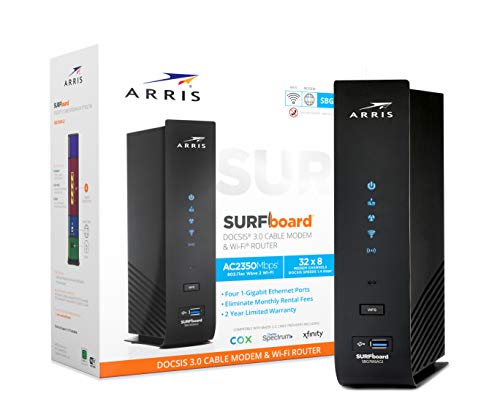
- Best for: Family homes on mid-tier cable plans that need strong Wi-Fi and four wired ports.
- DOCSIS 3.0 cable modem with 32×8 channel bonding
- AC2350 Wave 2 dual-band Wi-Fi
- 800 Mbps maximum internet speeds
- Four 1 Gbps Ethernet ports

- Best for: Apartments and smaller homes on modest cable plans that want a compact combo.
- 16×4 DOCSIS 3.0 cable modem, 686 Mbps maximum DOCSIS speed
- AC1900 dual-band Wi-Fi with Power Boost
- DFS channel support for clearer 5 GHz connections
- Cable plans up to 300 Mbps
All 3 Picks at a Glance
| Product | Specs | Action |
|---|---|---|
| NETGEAR Nighthawk C7800 |
| Check price on Amazon |
| ARRIS SURFboard SBG7600AC2 |
| Check price on Amazon |
| Motorola MG7550 |
| Check price on Amazon |
Key takeaways
- Compare three AC modem router combos for cable internet: Wi-Fi 5 speeds from AC1900 to AC3200, DOCSIS 3.0 and 3.1 modems, and guidance for every plan size.
An AC modem router puts a cable modem and a Wi-Fi 5 router in one box, so a single device can replace the rented gateway from your cable company and the separate router beside it. That matters because the gateway most providers hand out is built for average use, while a dedicated combo gives you control over the Wi-Fi standard, the number of wired ports, and the modem channels behind your connection. If your household streams, games, and video calls at once, the right AC combo keeps every device moving without adding another box to the shelf.
This guide covers three AC modem router combos that suit different cable plans and home sizes, from a DOCSIS 3.1 unit built for gigabit service to a compact AC1900 combo for modest plans. Each pick below is a genuine modem and router in one device, with AC Wi-Fi, a DOCSIS cable modem, and wired Gigabit ports. Read the buying guidance first, then match one of the three to your plan speed and provider.
Quick Picks
As an Amazon Associate we earn from qualifying purchases
| Product | Best for | Key spec from title |
|---|---|---|
| NETGEAR Nighthawk C7800 | Gigabit cable plans | AC3200 WiFi Speed, DOCSIS 3.1 |
| ARRIS SURFboard SBG7600AC2 | Most homes on mid-tier plans | AC2350 WiFi, DOCSIS 3.0 |
| Motorola MG7550 | Smaller homes on modest plans | AC1900 WiFi Speed, DOCSIS 3.0 |
How to Choose
Match the modem to your cable plan
The modem half of a combo decides the fastest cable plan it can handle, so check it before you look at Wi-Fi speeds. DOCSIS 3.0 modems with 16×4 or 32×8 channel bonding suit plans up to a few hundred megabits, while a DOCSIS 3.1 modem with 32×8 bonding and OFDM channels is the safer pick for gigabit service. A modem rated below your plan becomes a bottleneck no router setting can fix, and a modem rated far above your plan adds capability you may never use. Look at the plan ceiling in the listing title, compare it with the speed tier on your bill, and leave headroom for the faster tier you might move to next.
Read the AC number for what it really means
An AC1900, AC2350, or AC3200 label is a combined figure for both Wi-Fi bands added together, not the speed any single device will reach. The 2.4 GHz band carries the smaller share and reaches further through walls, while the 5 GHz band carries the larger share and moves data faster over short distances. A higher AC number usually brings more antennas, wider channels, and better handling of many devices at once, but it does not raise your internet speed above what your cable plan provides. Judge the AC rating against the number of devices in your home and the size of the rooms the signal must cross.
Check provider approval before you buy
Cable modem routers only work with cable internet, and each provider keeps an approved device list that changes over time. A combo approved for Xfinity, Cox, and Spectrum covers most cable households, but approval for one provider does not guarantee approval for another, and some regional cable companies run their own lists. Confirm the exact model number on your provider approval page before ordering, and note that these combos do not work with DSL, fiber, or satellite service. Activation usually takes a call or a visit to the provider activation page, so keep your account details nearby when the box arrives.
Count the ports and plan the placement
A modem router combo lives where the coaxial outlet is, so its wired ports and antenna layout matter more than they do on a standalone router. Four Gigabit Ethernet ports let you wire a gaming PC, a console, a streaming box, and a work computer without adding a switch, while a USB port lets the whole household reach an attached drive or printer. External antennas help the signal reach distant rooms, but they need clearance and airflow around the unit. Measure the shelf or desk space near your coax outlet, leave room for cables at the back, and avoid tucking the unit inside a closed cabinet where heat builds up.
The 3 Best Options
NETGEAR Nighthawk C7800
- Best for: Households on gigabit cable plans that want the fastest AC modem router available.
- DOCSIS 3.1 cable modem with 32×8 channel bonding
- AC3200 dual-band Wi-Fi, up to 3.2 Gbps combined wireless speed
- Cable plans up to 1 Gigabit
- Four Gigabit Ethernet ports
Households on gigabit cable plans that want the fastest AC modem router available.
The tall body and external antennas need generous shelf space and clearance.
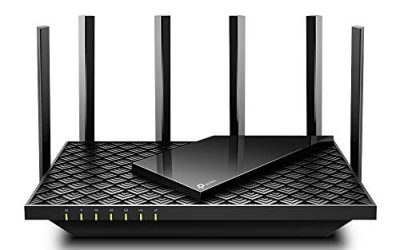
The Nighthawk C7800 is the strongest AC modem router in this lineup, pairing a DOCSIS 3.1 modem with AC3200 Wi-Fi in a single tall unit. Its 32×8 channel bonding and OFDM channels suit cable plans up to a gigabit, and the four external antennas with Beamforming+ push the signal across large homes. Two USB 3.0 ports add storage and printer sharing, and the 1.5 GHz dual-core processor keeps the connection steady when dozens of devices compete for bandwidth. It is the pick for households that want one box to handle fast cable service, heavy streaming, and wired gaming at the same time.
ARRIS SURFboard SBG7600AC2
- Best for: Family homes on mid-tier cable plans that need strong Wi-Fi and four wired ports.
- DOCSIS 3.0 cable modem with 32×8 channel bonding
- AC2350 Wave 2 dual-band Wi-Fi
- 800 Mbps maximum internet speeds
- Four 1 Gbps Ethernet ports
Family homes on mid-tier cable plans that need strong Wi-Fi and four wired ports.
DOCSIS 3.0 limits it below gigabit plans, so check your plan ceiling first.
The ARRIS SURFboard SBG7600AC2 sits in the middle of this lineup, combining a DOCSIS 3.0 modem with AC2350 Wave 2 Wi-Fi for cable plans up to 800 Mbps. Its 32×8 channel bonding gives it more modem headroom than most mid-tier combos, and the four Gigabit Ethernet ports cover wired consoles, streaming boxes, and desktop PCs without extra hardware. The upright design takes up little desk space, and the two-year warranty matches the longest cover in this group. It is the balanced choice for a family home that streams in several rooms and wants one tidy box by the television.
Motorola MG7550
- Best for: Apartments and smaller homes on modest cable plans that want a compact combo.
- 16×4 DOCSIS 3.0 cable modem, 686 Mbps maximum DOCSIS speed
- AC1900 dual-band Wi-Fi with Power Boost
- DFS channel support for clearer 5 GHz connections
- Cable plans up to 300 Mbps
Apartments and smaller homes on modest cable plans that want a compact combo.
The 300 Mbps plan ceiling makes it a poor match for faster cable tiers.
The Motorola MG7550 is the compact pick in this lineup, pairing a 16×4 DOCSIS 3.0 modem with an AC1900 dual-band Wi-Fi router and Power Boost. It suits cable plans up to 300 Mbps, which covers the modest tiers many apartments and smaller homes actually use, and its DFS channel support helps the 5 GHz band find a clear channel in crowded buildings. Four Gigabit Ethernet ports handle wired devices, and the upright tower shape fits a narrow shelf beside a television or desk. It is the sensible choice when you want to stop renting a gateway without paying for modem capacity your plan cannot use.
Which One Fits Your Situation
You have a gigabit cable plan
Choose the NETGEAR Nighthawk C7800 when your cable plan reaches gigabit speeds, because it is the only pick here with a DOCSIS 3.1 modem. Its AC3200 Wi-Fi and four external antennas also suit large homes where the signal must cross several rooms. Give it open shelf space for airflow, wire your gaming PC or console to one of its Gigabit ports, and confirm the model on your provider approval list before ordering.
You want one box for a busy family home
Choose the ARRIS SURFboard SBG7600AC2 when several people stream, game, and video call on a mid-tier cable plan. Its AC2350 Wi-Fi and 32×8 modem bonding handle many devices at once, and the four Gigabit ports cover the wired gear in the living room. It keeps the setup to a single upright unit, which suits a television stand or a home office shelf.
You live in an apartment on a modest plan
Choose the Motorola MG7550 when your cable plan sits at 300 Mbps or below and your home is compact. Its AC1900 Wi-Fi is enough for streaming and browsing in a smaller space, and DFS support helps in buildings where neighbouring networks crowd the airwaves. The slim tower fits tight shelves, and four Gigabit ports still leave room for a wired console or desktop.
You want wired connections for gaming
Choose the NETGEAR Nighthawk C7800 when low-latency wired play matters most, since its DOCSIS 3.1 modem and four Gigabit Ethernet ports give every console and PC a direct wired path. A wired connection avoids the interference and congestion that wireless play can suffer in busy households. Keep the unit near your gaming setup, use short Ethernet cables, and leave the 5 GHz band for phones and tablets.
Common Mistakes
- Buying a cable modem router for DSL or fiber service, where it cannot connect at all, instead of checking the service type first.
- Treating the AC speed number as internet speed, when it only describes the Wi-Fi link inside your home.
- Skipping the provider approval list and finding out the exact model is not approved after the box arrives.
- Hiding the combo inside a closed cabinet, where heat builds up and the signal struggles to reach distant rooms.
- Forgetting to return the rented gateway to your cable company, so the monthly rental charge keeps appearing on the bill.
Frequently Asked Questions
What does AC mean in a modem router?
AC means the router uses Wi-Fi 5, the 802.11ac wireless standard, which runs on the 2.4 GHz and 5 GHz bands at the same time. The number after AC, such as AC1900 or AC3200, is the combined wireless speed of both bands added together. Wi-Fi 5 remains a solid match for cable internet, since most cable plans sit well below the speeds these radios can carry inside the home.
Will an AC modem router work with my cable provider?
It will work only if your provider approves the exact model, so check the provider approval page before you buy. The three picks here are approved for major cable providers such as Xfinity, Cox, and Spectrum, but regional cable companies may run different lists. These combos do not work with DSL, fiber, or satellite service, and activation usually needs a call or a visit to the provider activation page.
Do I still need a separate router with a modem router combo?
No, a modem router combo already contains both a cable modem and a Wi-Fi router, so one box connects your home to the internet and shares it wirelessly. You only need extra hardware if the Wi-Fi signal cannot reach a distant room, in which case an extender or a mesh node can fill the gap. Keep the combo near the centre of your home for the best coverage.
Can I use an AC modem router for gaming?
Yes, an AC modem router suits gaming well, especially when you connect the console or PC with an Ethernet cable for a steady wired link. Wi-Fi 5 handles online play, voice chat, and game downloads without trouble on most cable plans. For the fastest tiers, a DOCSIS 3.1 model such as the C7800 keeps the modem from limiting your connection during busy evenings.
FAQ
What does AC mean in a modem router?
Will an AC modem router work with my cable provider?
Do I still need a separate router with a modem router combo?
Can I use an AC modem router for gaming?
More from Amazon
Programs that pair well with the guide above. Offers and eligibility are set by Amazon and may change.
Free shipping on eligible items, Prime Video and more. Eligible new members can start with a free trial.
Start a Prime free trialAd-free music streaming. Eligible new subscribers can start with a free trial.
Try Music Unlimited freeA Prime membership for ages 18-24 with a trial period. Eligibility is set by Amazon.
See Prime for Young AdultsAudiobooks and podcasts to listen to on the go. Eligible new members can start with a free trial.
Try Audible freeAs an Amazon Associate we earn from qualifying purchases.