Our Short List of 3

- Best for: Small flats and spare rooms, plus stretching Wi-Fi as an access point.
- Wireless N, 802.11b/g/n
- Up to 300Mbps
- 2 x 5dBi antennas
- 4 Fast Ethernet LAN ports
- Best for: Single-floor homes where the signal must reach the far rooms.
- Wireless N, 802.11n
- Up to 300Mbps
- High-gain antennas with amplifier
- 4 Fast Ethernet ports

- Best for: Desks with several wired devices alongside basic Wi-Fi.
- Wireless N, 802.11n
- Up to 300Mbps
- 5dBi external antennas
- Wi-Fi 4
All 4 Picks at a Glance
| Product | Specs | Action |
|---|---|---|
| 1. TP-Link TL-WR841N N300 |
| Check price on Amazon |
| 2. TP-Link TL-WR841HP N300 |
| Check price on Amazon |
| 3. NETGEAR WNR2020v2 N300 |
| Check price on Amazon |
 4. Linksys E1700 N300+ |
| Check price on Amazon |
Key takeaways
- Wireless-N routers still cover basic home Wi-Fi. Compare four N300 picks with 300Mbps speeds, 2.4GHz coverage, Ethernet ports and easy setup for older devices.
Wireless-N is a legacy standard, and that is exactly why it still makes sense for some homes. If your internet plan is modest, your devices are older, and your daily use is browsing, email, video calls and standard streaming, a 300Mbps router covers it without the cost or complexity of a newer standard. The buying decision is not about chasing the fastest number on the box. It is about matching the router to the connection you already pay for and the rooms you actually need to cover.
This guide is for households with older laptops, printers and smart devices, and for anyone replacing a dead router on a basic connection. The four routers below are the four clean 802.11n models found still listed on Amazon US after searching more than ten N-router models. Each one is a single-band 2.4GHz N300 router, and each was chosen from its own Amazon listing, not from a roundup of newer standards.
Quick Picks
As an Amazon Associate we earn from qualifying purchases
| Product | Best for | Key spec from title |
|---|---|---|
| TP-Link TL-WR841N N300 | Small flats and spare rooms, plus access-point use | 300Mbps, 2 x 5dBi antennas |
| TP-Link TL-WR841HP N300 | Single-floor homes with far rooms to reach | 300Mbps, high-gain antennas with amplifier |
| NETGEAR WNR2020v2 N300 | Desks with wired devices beside the router | 300Mbps, 4-port switch, 32MB RAM |
| Linksys E1700 N300+ | Homes moving files between wired computers | 300Mbps, Gigabit ports, MIMO |
How to Choose
Match the router to your connection first
An N300 router tops out at 300Mbps on paper, and real-world speeds run lower once walls, distance and shared devices take their share. That is plenty for a basic broadband plan, a household that streams in standard definition, and older devices that cannot use faster Wi-Fi anyway. It is not enough for a gigabit fibre plan, where the router itself becomes the bottleneck and you would pay for speed you never see. Before you compare models, check the speed your plan actually delivers. If it sits below 300Mbps, an N router fits. If it sits above, put your money toward a newer standard instead.
Coverage comes from antennas and placement
All four routers in this guide run on the 2.4GHz band, which travels through walls better than 5GHz and suits flats and single-floor homes. External antennas help the signal reach further, and models with high-gain antennas or a built-in amplifier stretch that reach a little more. Placement matters at least as much as the hardware: set the router in a central spot, up off the floor, clear of thick walls and metal objects, and away from microwaves and thick masonry. A well-placed basic router often beats a stronger one hidden in a cupboard. If your home spans two floors, one N300 router may still leave dead spots, and that is a placement problem no antenna fully solves.
Count the wired ports before you buy
A router is not only a Wi-Fi box. Desktops, printers, smart TVs and older consoles often connect better with a cable, and each of these routers carries four wired LAN ports. The difference sits in the port speed: Fast Ethernet ports handle internet traffic fine, since most basic plans run well below their ceiling, while Gigabit ports move files between computers on your own network much faster. Think about what you will plug in. A printer and a smart TV need any port. A desktop that swaps large files with a laptop benefits from Gigabit. Buy the ports for the devices you own, not for a network you might build one day.
Weigh the extras you will actually use
Beyond speed and ports, the useful extras are small and practical. WPS lets you connect a printer or a smart device without typing a long password. Access-point mode turns a spare router into a second Wi-Fi source for a far room. MIMO spreads the signal across several devices at once, which helps when phones, tablets and laptops all compete for the same network. None of these features needs a manual the size of a phone book, and none of them replaces the basics: a stable 2.4GHz signal, enough ports, and a setup screen you can understand. Ignore extras tied to standards this hardware does not support, and judge each router on the features its own listing actually states.
The 4 Best Options
1. TP-Link TL-WR841N N300
- Best for: Small flats and spare rooms, plus stretching Wi-Fi as an access point.
- Wireless N, 802.11b/g/n
- Up to 300Mbps
- 2 x 5dBi antennas
- 4 Fast Ethernet LAN ports
Small flats and spare rooms, plus stretching Wi-Fi as an access point.
The listing’s part number reads “TL-WR841N (UK)” — no region is claimed here. Its title also calls it a “Wireless Extender”, but it is a router with access-point mode.
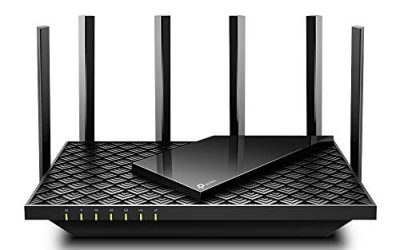
TP-Link’s WR841N is the plain, dependable pick of this group, and its most useful trick is the access-point mode stated in its listing. Run it as a router for a small flat, or switch it to access-point mode to stretch Wi-Fi into a room the main signal barely reaches. Two 5dBi antennas push the 2.4GHz signal through interior walls, and four Fast Ethernet ports cover a desktop, a printer and a smart TV with a cable. WPS keeps setup short. This is the router to buy when the job is simple coverage for basic devices, and the household has no need for faster wired transfers or a second band.
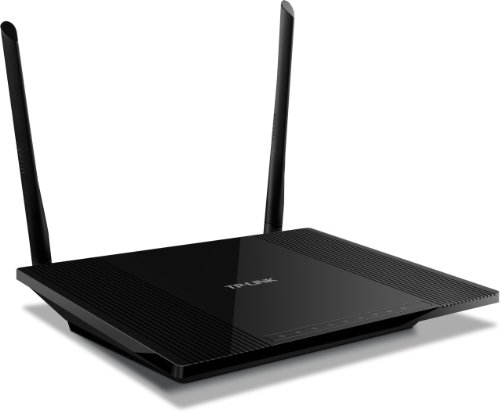
2. TP-Link TL-WR841HP N300
- Best for: Single-floor homes where the signal must reach the far rooms.
- Wireless N, 802.11n
- Up to 300Mbps
- High-gain antennas with amplifier
- 4 Fast Ethernet ports
Single-floor homes where the signal must reach the far rooms.
The listing states no 5GHz band, so do not expect one. One spec-table field reads “Wifi Router” as the model number — use TL-WR841HP from the title.
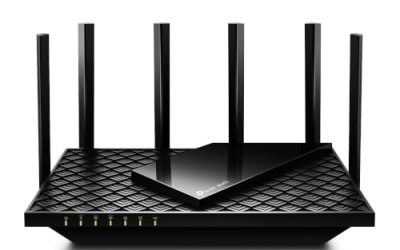
When the signal has to travel further, the WR841HP earns its place. Its high-gain antennas and built-in amplifier are the listing’s answer to long hallways and thick interior walls, pushing the same 300Mbps N300 signal further than the standard model in this guide. Four Fast Ethernet ports handle wired devices, WPS keeps new devices joining simple, and the 2.4GHz band holds its reach better than a higher band would. This router suits a single-floor home where the far bedroom or the kitchen sits at the edge of the signal, and where buying a newer standard would add speed nobody in the house can use.
3. NETGEAR WNR2020v2 N300
- Best for: Desks with several wired devices alongside basic Wi-Fi.
- Wireless N, 802.11n
- Up to 300Mbps
- 5dBi external antennas
- Wi-Fi 4
Desks with several wired devices alongside basic Wi-Fi.
Single-band 2.4GHz only — the listing’s “Dual-Band” field is wrong, and its “54 Mbps” upstream figure conflicts with the 300Mbps stated in the description. Use 300Mbps.
NETGEAR’s WNR2020v2 is the pick for households that still wire things in. Its four-port switch and 32MB of RAM give the wired side of the network a firmer footing, so a desktop, a printer and a streaming box can all sit on cables while phones and tablets use the 300Mbps Wi-Fi. The 5dBi external antennas carry the 2.4GHz signal across a flat, and the Wi-Fi 4 badge marks it as the same generation as the rest of this guide. Buy this one when the router will sit beside a desk full of devices, and when a stable wired connection matters as much as the wireless one.
4. Linksys E1700 N300+
- Best for: Homes that move files between wired computers and still need basic Wi-Fi.
- Wireless-N
- Up to 300Mbps
- Gigabit ports
- 2 adjustable external antennas
Homes that move files between wired computers and still need basic Wi-Fi.
Single-band 2.4GHz only — the listing’s “Dual-Band” field is wrong, and its “54 Mbps” figure conflicts with the 300Mbps stated in the description. Use 300Mbps.
The E1700 is the only router in this guide with Gigabit wired ports, and that single detail sets it apart. Two adjustable external antennas and MIMO spread the 300Mbps wireless signal across several devices at once, while the Gigabit ports move files between wired computers far faster than Fast Ethernet allows. That combination suits a home where a desktop and a laptop swap large files, or where a wired media setup sits next to the router. The wireless side stays plain N300 on 2.4GHz, so the E1700 is not a speed upgrade for Wi-Fi itself — it is a wired upgrade wrapped around a basic wireless router.
Which One Fits Your Situation
You need Wi-Fi in a small flat or a spare room
Pick the TP-Link TL-WR841N. Its two 5dBi antennas cover a small space without fuss, and the access-point mode lets it stretch an existing network into a room the main router barely reaches. Four Fast Ethernet ports handle a desktop and a printer, and WPS keeps setup short. Nothing here is wasted on speed the household will never use.
Your signal has to cross a long hallway or thick walls
Pick the TP-Link TL-WR841HP. The high-gain antennas and built-in amplifier exist for exactly this problem, carrying the 2.4GHz signal further than the standard model manages. Set it centrally, keep it off the floor, and let the amplifier do its work. The wired ports stay Fast Ethernet, so pair it with Wi-Fi devices rather than a wired file server.
You have several wired devices and one Wi-Fi network
Pick the NETGEAR WNR2020v2. The four-port switch and 32MB of RAM are built for a desk where a desktop, a printer and a streaming box all want cables, while the 5dBi antennas keep phones and tablets on the same network. Everything runs on one box, and the wired side stays steady even when several devices are online at once.
You move files between computers at home
Pick the Linksys E1700. Its Gigabit ports are the reason: files travel between wired computers far faster than Fast Ethernet allows, while MIMO keeps the 300Mbps wireless side shared fairly across phones, tablets and laptops. The Wi-Fi itself is plain N300, so this pick is for a home where the wired network does the heavy lifting.
Common Mistakes
- Buying an N300 router for a gigabit fibre plan and expecting the full plan speed — the router caps the connection at 300Mbps.
- Assuming every N router is dual-band. All four routers in this guide are single-band 2.4GHz; the stray “Dual-Band” fields on two listings are errors.
- Trusting a stray 54 Mbps figure in a spec table. The listings state 300Mbps, and that is the figure to use.
- Choosing a router with no spare wired port, then needing a cable for a desktop or a printer.
- Hiding the router in a cupboard or behind the TV, then blaming the antennas for a weak signal.
Frequently Asked Questions
Is a Wireless-N router still worth buying in 2026?
Yes, for basic use. If your plan runs below 300Mbps and your devices are older laptops, printers and smart gadgets, an N300 router covers browsing, email, video calls and standard streaming without fuss. It is not the right buy for a gigabit plan, heavy 4K streaming on several screens, or a house full of new Wi-Fi 6 devices.
What does N300 actually mean?
N300 means the router’s wireless standard is 802.11n with a top speed of 300Mbps on the 2.4GHz band. Real-world speed runs lower, because walls, distance and other devices all take a share, and the 300Mbps is shared across everything connected. Treat it as a ceiling for basic use, not a speed you will see on every device at once.
Can I use one of these routers as an access point?
The TP-Link TL-WR841N states access-point mode in its listing, so it can extend an existing network into a far room. The other three are routers first, and their listings do not state an access-point mode. Check the listing for the feature before you buy, and do not assume a router can act as an access point just because it has an Ethernet port.
Do any of these routers support 5GHz Wi-Fi?
No. All four are single-band 2.4GHz routers, and the 2.4GHz band is part of why they reach through walls well. A “Dual-Band” field appears on two of the listings, but it is a data error — neither router has a 5GHz radio. If you need 5GHz, choose a router from a newer standard, such as AC or AX, instead of any model in this guide.
FAQ
Is a Wireless-N router still worth buying in 2026?
What does N300 actually mean?
Can I use one of these routers as an access point?
Do any of these routers support 5GHz Wi-Fi?
More from Amazon
Programs that pair well with the guide above. Offers and eligibility are set by Amazon and may change.
Free shipping on eligible items, Prime Video and more. Eligible new members can start with a free trial.
Start a Prime free trialAd-free music streaming. Eligible new subscribers can start with a free trial.
Try Music Unlimited freeA Prime membership for ages 18-24 with a trial period. Eligibility is set by Amazon.
See Prime for Young AdultsAudiobooks and podcasts to listen to on the go. Eligible new members can start with a free trial.
Try Audible freeAs an Amazon Associate we earn from qualifying purchases.