Our Short List of 3

- Best for: Households that want the highest wireless capacity in one router
- WiFi standard: WiFi 7, quad-band
- Channels: supports 320 MHz
- Wired ports: dual 10G ports
- Mesh: AiMesh supported

- Best for: Homes with a NAS, a gaming PC and other wired gear sharing multi-gig ports
- WiFi standard: WiFi 7, tri-band, BE19000 class
- Design: 12-stream
- Wired ports: 2x 10G plus 4x 2.5G
- USB: USB 3.0 port

- Best for: Large single-router homes on gigabit-or-faster internet plans
- WiFi standard: WiFi 7, tri-band, BE19000 class
- Wireless speed: up to 19 Gbps
- Wired ports: 10 Gig internet port
- Coverage: up to 3,500 sq. ft.
All 4 Picks at a Glance
| Product | Specs | Action |
|---|---|---|
| ASUS ROG Rapture GT-BE98 Pro |
| Check price on Amazon |
| TP-Link Archer GE800 |
| Check price on Amazon |
| NETGEAR Nighthawk RS700S |
| Check price on Amazon |
 ASUS RT-BE88U |
| Check price on Amazon |
Our Top Picks
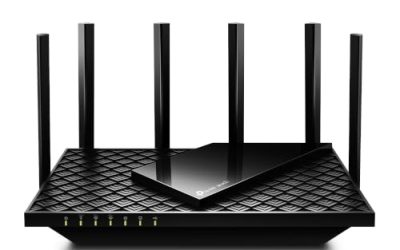
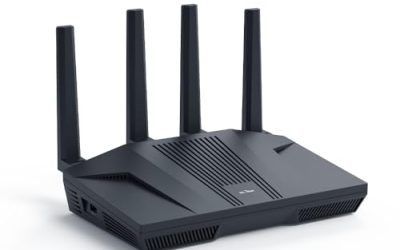
- ASUS ROG Rapture GT-BE98 Pro WiFi 7 GamingQuad-Band13.7 x 8.6 x 13.7 inches4.4 poundsCheck on Amazon
Buying a router for performance is really a decision about where your network slows down first. For some homes it is the wireless link between rooms; for others it is a gigabit internet plan squeezed through a single gigabit port, or a NAS and a gaming PC fighting over one wired connection. The headline speed class on the box only matters once you know which of those bottlenecks is yours.
This guide is for buyers with fast fiber or cable plans, wired gaming PCs, home servers and households where several people stream, download and play at the same time. Every router below was picked from its Amazon listing, and the comparison leans on the figures the listings themselves state: WiFi standard, band count, aggregate speed class and the speed of the wired ports.
Quick Picks
As an Amazon Associate we earn from qualifying purchases.
| Product | Best for | Key spec from title |
|---|---|---|
| ASUS ROG Rapture GT-BE98 Pro | Maximum wireless throughput | Quad-band WiFi 7, dual 10G ports |
| TP-Link Archer GE800 | Tri-band speed with many multi-gig ports | BE19000, 2x10G + 4×2.5G ports |
| NETGEAR Nighthawk RS700S | Large homes that want one fast router | BE19000, covers up to 3,500 sq. ft. |
| ASUS RT-BE88U | Wired performance first | Dual 10G ports, 34G WAN/LAN capacity |
How to Choose
Read the speed class as a sum, not a promise
The class in a router name, such as BE19000 or BE7200, is the combined theoretical rate of every band added together, not the speed any single device will see. A tri-band BE19000 design splits that total across 6 GHz, 5 GHz and 2.4 GHz radios, so one laptop connects to one band at a time. The number is still useful for comparing routers against each other, because a higher class usually means wider channels and more radios sharing the load. Treat it as a capacity figure for the whole household rather than a speed test result for your room.
Count the bands and check for 6 GHz
Band count decides how well a router performs when the house is busy. Dual-band models share one 5 GHz radio between every fast device, while tri-band designs add a 6 GHz band that WiFi 6E and WiFi 7 clients can use away from older traffic. Quad-band routers split the load further still. If your phones, laptops and consoles are recent, a 6 GHz band is the single biggest performance upgrade in this list. If most of your devices are WiFi 5 or early WiFi 6, extra bands help far less, and port speed matters more.
Match the ports to your internet plan and wired gear
A router cannot pass more wired speed than its ports allow. A gigabit WAN port caps a faster fiber plan before WiFi even enters the picture, and a gaming PC or NAS on a gigabit LAN port is limited to that rate for local transfers too. Look for a 10G or 2.5G WAN port when your plan runs above a gigabit, and count the multi-gig LAN ports if you have a server, a switch or more than one wired workstation. The strongest performers here pair their wireless class with several multi-gig ports for exactly this reason.
Treat gaming and security extras as tiebreakers
Features such as game acceleration modes, dedicated gaming ports and built-in security suites sit on top of the hardware rather than replacing it. They can prioritize a console’s traffic or save a separate security subscription, but they do not raise the router’s throughput ceiling. Compare the radios and ports first, then let these extras settle a tie between two routers with similar hardware. Also check whether headline security or parental-control features need a paid plan after an included period ends, since that changes the long-term cost of owning the router.
The 4 Best Options
ASUS ROG Rapture GT-BE98 Pro
- Best for: Households that want the highest wireless capacity in one router
- WiFi standard: WiFi 7, quad-band
- Channels: supports 320 MHz
- Wired ports: dual 10G ports
- Mesh: AiMesh supported
Households that want the highest wireless capacity in one router
Quad-band hardware is wasted if your devices are mostly older WiFi 5 clients, so check your device list first
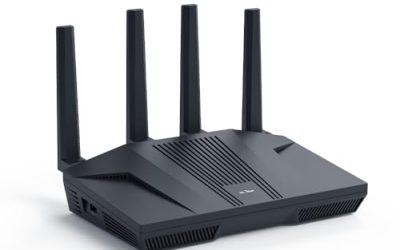
The GT-BE98 Pro is the pick for buyers who want the largest wireless ceiling in a single unit. Its listing describes a quad-band WiFi 7 design with 320 MHz channels, which spreads demanding devices across more spectrum than any tri-band model here. Two 10G ports keep a fast fiber plan and a wired gaming rig from becoming the bottleneck, and AiMesh support means the unit can later anchor a mesh setup instead of being replaced. It suits large, device-heavy homes that would rather overspec once than upgrade in stages.
TP-Link Archer GE800
- Best for: Homes with a NAS, a gaming PC and other wired gear sharing multi-gig ports
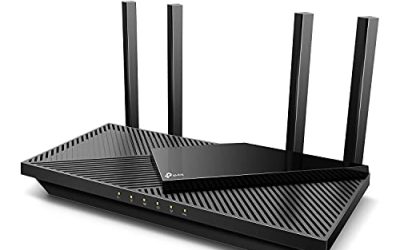
- WiFi standard: WiFi 7, tri-band, BE19000 class
- Design: 12-stream
- Wired ports: 2x 10G plus 4x 2.5G
- USB: USB 3.0 port
Homes with a NAS, a gaming PC and other wired gear sharing multi-gig ports
Some HomeShield features sit behind a paid plan, so confirm which controls are included before relying on them
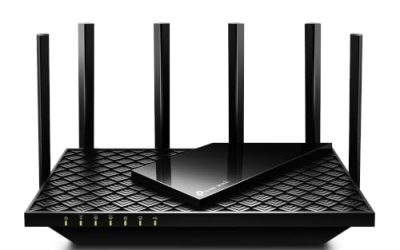
The Archer GE800 takes a tri-band route to nearly the same wired flexibility. The listing rates it at BE19000 with a 12-stream design and pairs that with two 10G ports and four 2.5G ports, the widest spread of multi-gig LAN in this group. A dedicated gaming port and the router’s game acceleration features target players who wire in, while EasyMesh support leaves room to extend coverage later. Choose it when several wired devices need multi-gig speed at once, not just the internet connection itself.
NETGEAR Nighthawk RS700S
- Best for: Large single-router homes on gigabit-or-faster internet plans
- WiFi standard: WiFi 7, tri-band, BE19000 class
- Wireless speed: up to 19 Gbps
- Wired ports: 10 Gig internet port
- Coverage: up to 3,500 sq. ft.
Large single-router homes on gigabit-or-faster internet plans
Armor protection runs for the included year, after which it becomes a paid decision, so note the renewal date
The RS700S is the straightforward performance pick for a larger home that wants one box and minimal fuss. Its listing claims BE19000 tri-band WiFi 7 speed of up to 19 Gbps, a 10 Gig internet port for fast fiber plans and coverage of up to 3,500 sq. ft. from the single unit. There is no mesh bundle to configure and no gaming-specific hardware to pay for; the performance budget goes into the radios and the fast WAN port instead. It fits buyers upgrading from an older single router who want headroom for years of device growth.
ASUS RT-BE88U
- Best for: Wired-first setups with servers, switches and several Ethernet devices
- WiFi standard: WiFi 7, dual-band, up to 7.2 Gbps
- Wired ports: dual 10G ports with SFP+, 4x 2.5G ports, 4x 1G ports
- Wired capacity: 34G WAN/LAN total stated on the listing
- WiFi 7 features: MLO and 4K-QAM
Wired-first setups with servers, switches and several Ethernet devices
There is no 6 GHz band, so WiFi 7 clients lose the cleanest spectrum the tri-band models offer
The RT-BE88U argues that performance is not only wireless. It is a dual-band WiFi 7 router, so its wireless class is lower than the tri-band models above, but the listing leads with wired capacity: dual 10G ports including SFP+, four 2.5G ports, four gigabit ports and a stated 34G of total WAN/LAN capacity. WiFi 7 features such as MLO and 4K-QAM still apply to the bands it has. Pick it when your heaviest traffic moves between wired machines, a switch and a server, and wireless clients are the secondary load.
Which One Fits Your Situation
You have a faster-than-gigabit fiber plan
Start with the WAN port, not the WiFi class. The GT-BE98 Pro, Archer GE800 and RS700S all accept a multi-gig connection through a 10G port, so the plan you pay for reaches the router intact. Between them, choose the GT-BE98 Pro for the most wireless headroom, or the RS700S if you prefer a simpler single-unit setup for a big floor plan.
Your gaming PC and NAS are wired
The Archer GE800 and RT-BE88U are built for you. The GE800 spreads six multi-gig ports across its back panel, while the BE88U adds an SFP+ connection and the highest stated wired capacity here. Either keeps local transfers off the gigabit ceiling; the GE800 is the better choice if wireless clients also need feeding at the same time.
Your house is big and the far rooms struggle
A single powerful router still obeys physics, so placement matters as much as power. The RS700S states the largest single-unit coverage figure in this group, which makes it the natural first try for a sprawling single-story home. If walls still win, the GT-BE98 Pro and RT-BE88U can both grow into AiMesh systems, and the GE800 supports EasyMesh, so none of them becomes a dead end.
Most of your devices are a few years old
Older WiFi 5 and WiFi 6 clients cannot use 6 GHz or WiFi 7 channel widths, so the flagship quad-band hardware buys you less today. The RT-BE88U covers current devices well and puts its money into wired ports you will use immediately. You still gain a modern platform for future phones and laptops, without paying for spectrum nothing in the house can touch yet.
Common Mistakes
- Comparing routers by the speed class alone, without checking how that total splits across bands.
- Feeding a faster-than-gigabit internet plan into a gigabit WAN port and blaming the WiFi.
- Buying a quad-band flagship when every client device in the house is WiFi 5 or WiFi 6.
- Ignoring which security and parental-control features need a paid plan after the included period.
- Placing a high-performance router inside a cabinet or behind a TV, then judging it by the weakened signal.
Frequently Asked Questions
Does a higher BE number mean faster WiFi on my laptop?
Not directly. The class figure adds every band together, while your laptop connects to a single band at one moment. A higher class usually brings wider channels and more capacity for the whole house, which helps when many devices are active, but a single device sees only its own band’s share of that total.
Do I need WiFi 7 if my devices are WiFi 6?
A WiFi 7 router still serves WiFi 6 devices at their full speed, and it adds headroom for the next phone or laptop you buy. The performance case is strongest when you also have a fast internet plan or heavy local traffic. If neither applies, the same money often works harder spent on better placement or a mesh node.
Is a 10G port worth it on a home router?
It is worth it in two situations: your internet plan runs faster than a gigabit, or you move large files between wired devices such as a PC and a NAS. For a sub-gigabit plan and an all-wireless household, a 10G port sits idle, and a 2.5G port covers the realistic upgrade path for less.
Router or mesh system for a large home?
One performing router placed centrally covers many homes, and the picks here state coverage up to 3,500 sq. ft. in the RS700S listing. Long, split-level or masonry-heavy houses usually do better with a mesh system or an AiMesh or EasyMesh expansion later. Buying a router that can join a mesh keeps that door open without committing today.
FAQ
Does a higher BE number mean faster WiFi on my laptop?
Do I need WiFi 7 if my devices are WiFi 6?
Is a 10G port worth it on a home router?
Router or mesh system for a large home?
More from Amazon
Programs that pair well with the guide above. Offers and eligibility are set by Amazon and may change.
Free shipping on eligible items, Prime Video and more. Eligible new members can start with a free trial.
Start a Prime free trialAd-free music streaming. Eligible new subscribers can start with a free trial.
Try Music Unlimited freeA Prime membership for ages 18-24 with a trial period. Eligibility is set by Amazon.
See Prime for Young AdultsAudiobooks and podcasts to listen to on the go. Eligible new members can start with a free trial.
Try Audible freeAs an Amazon Associate we earn from qualifying purchases.