Our Top Picks



As an Amazon Associate I earn from qualifying purchases.
The Short Answer
If you want a router you actually control, buy the GL.iNet Flint 2 (GL-MT6000). It is the strongest home pick here: Wi-Fi 6, two 2.5G Ethernet ports, and OpenWrt-based firmware preinstalled, giving you package management, VPN clients and servers, and ad blocking without flashing anything yourself. For travel, the GL.iNet Beryl AX (GL-MT3000) makes the most sense, packing Wi-Fi 6 and a 2.5G WAN port into a pocket-sized body. If your budget is tighter, the GL.iNet Opal (GL-SFT1200) covers the basics, while the GL.iNet Slate AX (GL-AXT1800) adds stronger VPN throughput and more ports. Every router here ships with open-source firmware already installed, and none requires you to flash firmware before first use. That matters, because flashing a router yourself can void its warranty and, if interrupted, can leave the device unusable. We say so plainly for each pick below.
Our Top Picks
- Best overall for home: GL.iNet Flint 2 (GL-MT6000) — Wi-Fi 6, dual 2.5G ports, OpenWrt preinstalled.
- Best travel router: GL.iNet Beryl AX (GL-MT3000) — pocket-sized Wi-Fi 6 with a 2.5G WAN port.
- Best for VPN-heavy travel: GL.iNet Slate AX (GL-AXT1800) — Wi-Fi 6, three gigabit ports, strong VPN throughput.
- Best budget pick: GL.iNet Opal (GL-SFT1200) — compact Wi-Fi 5 travel router with OpenWrt-based firmware.
Quick Comparison
| Router | Wi-Fi | Ethernet | Firmware out of the box | Best for |
|---|---|---|---|---|
| GL.iNet Flint 2 (GL-MT6000) | Wi-Fi 6, dual-band, 8-stream | 2 x 2.5G ports | OpenWrt-based, preinstalled | Home and gaming |
| GL.iNet Beryl AX (GL-MT3000) | Wi-Fi 6, dual-band | 2.5G WAN port | OpenWrt-based, preinstalled | Travel |
| GL.iNet Slate AX (GL-AXT1800) | Wi-Fi 6, dual-band, up to 1800 Mbps combined | 3 gigabit ports | OpenWrt-based, preinstalled | VPN-heavy travel |
| GL.iNet Opal (GL-SFT1200) | Wi-Fi 5, dual-band, AC1200 | Gigabit Ethernet | OpenWrt-based, preinstalled | Budget travel |
How to Choose
Where the router will live
A home router and a travel router solve different problems. A home router needs enough ports and wireless capacity to serve a whole household at once: consoles, PCs, phones, and smart home gear. A travel router needs to be small and light, and able to turn hotel or public Wi-Fi into your own private network, usually with a VPN running for protection. Pick the form factor first.
What “open source” means for each router
People mean two different things when they call a router open source. The first ships with open-source firmware already installed, usually an OpenWrt-based build from the manufacturer. The second can be flashed with a community build, such as vanilla OpenWrt or DD-WRT, after you buy it. Every pick in this guide is in the first group: the firmware on the box is open-source based, and advanced features work from day one. Flashing a vanilla build is optional and carries real risk: a failed flash can brick a router, and some manufacturers treat a flash as the end of warranty coverage. If you plan to flash, confirm on the OpenWrt wiki that an official build exists for your exact hardware revision.
Ports against your internet connection
A 2.5G WAN port only helps if your modem and your internet plan can feed it. On a standard gigabit line, gigabit ports are enough; focus on wireless coverage and VPN speed instead. With multi-gigabit fiber, a 2.5G WAN port is the difference between using your full connection and leaving much of it unused. Count your wired devices, too: one LAN port means adding a switch once you wire up a PC, a console, and a network drive.
VPN throughput, not just VPN support
Almost every modern router lists VPN support, but speed while the VPN is running varies enormously. The processor decides how fast encrypted traffic moves, and a weak chip can cut a fast connection to a fraction of its normal speed. If you plan to run a VPN all the time, favor a stronger processor and a published VPN throughput figure.
Wi-Fi generation against your devices
Wi-Fi 6 routers handle crowded networks better than Wi-Fi 5 routers, because they manage many connected devices more efficiently. A Wi-Fi 5 router is fine for a single traveler, but a weaker choice as the main router for a busy home, so treat Wi-Fi 6 as the baseline when most of your devices support it.
How much tinkering you want to do
Open-source routers reward curiosity, but they also demand it. You will get the most from one if you are willing to learn its interface, install packages, and occasionally troubleshoot. If you want a router you can set up once and forget, the stock firmware on the picks below is friendly enough for everyday use. Do not buy a bare development board when what you really want is a finished router with antennas, a case, and a power adapter in the box.
The Picks in Detail
1. GL.iNet Flint 2 (GL-MT6000) — Best Overall for Home
The Flint 2 is the router to buy if you want one open-source router to run your whole home. It is a Wi-Fi 6 router with 8-stream wireless, listed at up to 1148 Mbps on the 2.4 GHz band and up to 4804 Mbps on the 5 GHz band, with two 2.5G Ethernet ports to fit multi-gigabit fiber. Inside is a quad-core 2.0 GHz processor, 1 GB of DDR4 memory, and 8 GB of eMMC storage, leaving room for VPN services, ad blocking, and other packages. It ships with OpenWrt-based firmware preinstalled, including OpenVPN and WireGuard support and AdGuard Home built in, so the open-source features are available from the first setup screen. The listing notes a two-year warranty; confirm warranty terms on the listing, since they can change.
For a gaming household, the Flint 2 is a strong fit: the 2.5G ports keep wired PCs and consoles from sharing a single gigabit bottleneck, and the OpenWrt base lets you shape traffic and prioritize gaming traffic. It also works as a home VPN server or as a VPN client protecting every device behind it.
Pros:
– Ships with OpenWrt-based firmware preinstalled; no flashing required
– Two 2.5G Ethernet ports for multi-gigabit connections
– 1 GB of DDR4 memory and 8 GB of eMMC storage for packages and services
– OpenVPN and WireGuard built in, plus AdGuard Home
– Strong fit for gaming households and whole-home use
Cons:
– Larger and less portable than the travel picks in this guide
– More router than a single traveler needs
– Advanced features reward a willingness to learn the interface
2. GL.iNet Beryl AX (GL-MT3000) — Best Travel Router
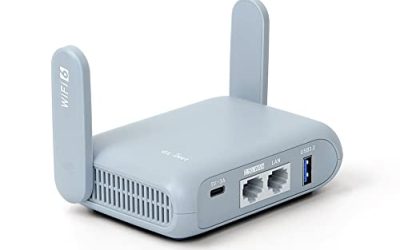
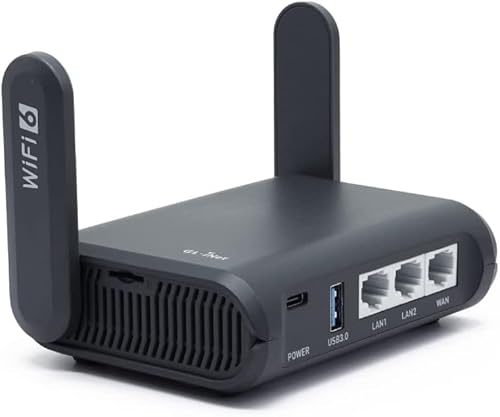
The Beryl AX is the travel router most people should buy. It is a pocket-sized Wi-Fi 6 router with a 2.5G WAN port, unusual in a device this small, weighing around 196 grams, so it disappears into a laptop bag. It ships with OpenWrt-based firmware preinstalled, with OpenVPN and WireGuard clients and servers, so you can connect to hotel, cruise, or public Wi-Fi and put your own encrypted network in front of it. It also works as a wireless access point or repeater, useful at home for a room with weak coverage. Confirm the memory and storage figures on the listing.
What makes the Beryl AX stand out is that it does not ask you to give up modern wireless to gain portability. Wi-Fi 6 keeps it useful in crowded hotels and airports, and the 2.5G WAN port keeps up with fast wired connections where they exist.
Pros:
– Ships with OpenWrt-based firmware preinstalled; no flashing required
– Pocket-sized Wi-Fi 6 router with a 2.5G WAN port
– OpenVPN and WireGuard clients and servers built in
– Works as a router, access point, or repeater
– Light enough to carry every day
Cons:
– Fewer Ethernet ports than a home router, so wired setups need a switch
– Small size means less wireless range than the Flint 2
– Confirm memory and storage figures on the listing before ordering
3. GL.iNet Slate AX (GL-AXT1800) — Best for VPN-Heavy Travel
The Slate AX is the travel router for people who run a VPN constantly. It is a pocket-sized Wi-Fi 6 travel router with dual-band wireless at a combined 1800 Mbps, split as 600 Mbps on the 2.4 GHz band and 1200 Mbps on the 5 GHz band, and it carries three gigabit Ethernet ports, more wired connectivity than most travel routers provide. Its IPQ6000 quad-core processor runs at 1.2 GHz, and the manufacturer lists VPN throughput of up to 550 Mbps over WireGuard and 560 Mbps over OpenVPN-DCO; confirm both figures on the listing. It also includes a USB 3.0 port and a TF card slot, and can connect up to 120 devices at once. It ships with OpenWrt-based firmware preinstalled, with OpenVPN and WireGuard support and AdGuard Home, and it has an official vanilla OpenWrt build for the current stable release, giving enthusiasts a supported path to a pure community build. Flashing is still optional: a failed flash can brick the device and can void the warranty, so read the OpenWrt device page for your exact hardware revision before you begin.
The Slate AX earns its place over the Beryl AX when VPN speed is the priority. If you work from hotels, route all traffic through a VPN, or share the travel router with a partner, the stronger VPN throughput keeps video calls and file transfers usable while the tunnel runs. If you rarely use a VPN, the Beryl AX is the simpler, more compact choice.
Pros:
– Ships with OpenWrt-based firmware preinstalled; no flashing required
– Strong VPN throughput for a travel router
– Three gigabit Ethernet ports, more than most travel routers
– USB 3.0 port and TF card slot for local storage
– Official vanilla OpenWrt build available for enthusiasts
Cons:
– Larger than the Beryl AX and the Opal
– Needs a capable USB-C power supply
– Wi-Fi 6, not the newest wireless generation
4. GL.iNet Opal (GL-SFT1200) — Best Budget Pick
The Opal is the most budget-friendly way into an open-source router that still feels like a finished product. It is a compact Wi-Fi 5 travel router with dual-band AC1200 wireless, listed at 300 Mbps on the 2.4 GHz band and 867 Mbps on the 5 GHz band, with gigabit Ethernet, a USB 2.0 port, and 128 MB of memory. It ships with OpenWrt-based firmware preinstalled, including OpenVPN and WireGuard clients and servers and encrypted DNS support, covering the core travel-router job: turning an untrusted public network into your own private network. It is small and light enough to keep in a bag permanently, and can also serve as a small home access point or repeater.
There is one honest limitation to know before you buy. The Opal runs the manufacturer’s OpenWrt-based firmware well, but vanilla OpenWrt support for its chipset is limited, and community discussion notes the manufacturer has moved on from this model. That does not stop the stock firmware from working, but it does mean the Opal is a weaker choice if your plan is to replace the firmware with a pure community build. Buy the Opal for what it ships with, not for what you might flash onto it later.
Pros:
– Ships with OpenWrt-based firmware preinstalled; no flashing required
– Very compact and easy to carry
– OpenVPN and WireGuard clients and servers built in
– Gigabit Ethernet and USB 2.0 in a pocket-sized body
– The lowest-cost pick in this guide
Cons:
– Wi-Fi 5, not Wi-Fi 6, so it handles crowded networks less well
– 128 MB of memory limits how many packages you can run at once
– Vanilla OpenWrt support is limited; buy it for the stock firmware
Who Should Choose What
- Whole-home use, gaming, or multi-gigabit fiber: Choose the Flint 2. Its 2.5G ports, strong processor, and generous memory make it the only pick here built for a full household.
- Frequent travel with a laptop and a phone: Choose the Beryl AX, the best balance of size, modern wireless, and VPN support in a pocket-sized body.
- Travel with a VPN running all the time: Choose the Slate AX; its stronger VPN throughput and extra Ethernet ports justify the slightly larger size.
- A tight budget or a first open-source router: Choose the Opal. It covers the essentials, costs the least, and lets you learn the OpenWrt-based interface before a larger purchase.
- Tinkerers who want a pure community build: The Flint 2, Beryl AX, and Slate AX all have official vanilla OpenWrt builds. The Opal is the one to avoid for that purpose.
Common Mistakes
Buying for the firmware you plan to flash, not the firmware it ships with. A router that ships with open-source firmware is usable on day one. A router you plan to flash is a project, and projects can go wrong. Buy for the stock experience first, and treat flashing as a bonus.
Flashing without checking the exact hardware revision. Router makers revise hardware silently, and a firmware image built for one revision can fail on another. Confirm the model number and hardware revision against the OpenWrt device page before you flash, and never flash over an unstable connection.
Ignoring VPN throughput. A router can support WireGuard and still be slow with it running. If you plan to use a VPN constantly, check the published VPN throughput on the listing and make sure it fits your connection.
Assuming every listing of a model is the same. Routers are sold in different bundles and regional variants, and the plug type, accessories, and firmware version can differ between listings. Confirm the model number, plug type, and included accessories on the exact listing you order from, and confirm any specification that matters on that same listing.
FAQ
What is an open source router?
An open source router is a router whose firmware is built on open-source software, most often OpenWrt or a firmware based on it. The software running your network can be inspected, modified, and extended with community packages. The picks in this guide all ship with OpenWrt-based firmware preinstalled.
Do I need to flash firmware to use one of these routers?
No. Every router in this guide works with open-source firmware from the moment you set it up, because the manufacturer ships it with an OpenWrt-based build already installed. Flashing a vanilla OpenWrt or DD-WRT build is optional: it gives you a pure community build and the newest packages, but it can void the warranty and can brick the router if the process fails, so only do it after reading the device page for your exact hardware revision.
Which open source router is best for home use?
The GL.iNet Flint 2 (GL-MT6000) is the best home pick here. Its Wi-Fi 6 wireless, two 2.5G Ethernet ports, and 1 GB of DDR4 memory give it the capacity to serve a whole household, and its preinstalled OpenWrt-based firmware includes VPN services and ad blocking without any flashing.
Which open source router is best for travel?
The GL.iNet Beryl AX (GL-MT3000) is the best travel pick here. It is pocket-sized, runs Wi-Fi 6, carries a 2.5G WAN port, and ships with OpenVPN and WireGuard support, so it can turn hotel or public Wi-Fi into your own private network. The Slate AX is better if you run a VPN all the time, and the Opal is better if your budget is tight.
Can I install vanilla OpenWrt on these routers?
The Flint 2, Beryl AX, and Slate AX all have official vanilla OpenWrt builds, so a careful owner can replace the stock firmware with a community build. The Opal is the exception: vanilla OpenWrt support for its chipset is limited, so use it with the firmware it ships with. Before flashing any router, confirm an official build exists for your exact hardware revision, and accept that flashing can void the warranty and can brick the device if interrupted.
Is an open source router safe for someone who is not technical?
Yes, with a reasonable expectation. The routers in this guide ship with a friendly setup interface, and everyday use does not require command-line work. The open-source side becomes valuable gradually: add a VPN, block ads network-wide, or shape traffic when you are ready. If you never touch the advanced settings, the router still works as a normal router.
Conclusion
The best open source routers give you control without demanding a firmware project before your first connection. The Flint 2 leads this guide for home use, with Wi-Fi 6, dual 2.5G ports, and OpenWrt-based firmware ready out of the box. The Beryl AX is the travel pick for most people, the Slate AX is the travel pick for heavy VPN users, and the Opal is the budget pick that proves you do not need to spend much to own your network. Whichever you choose, confirm the model number and specifications on the listing before you order, and if you decide to flash a community build, read the device page for your exact hardware revision first.
FAQ
What is an open source router?
Do I need to flash firmware to use one of these routers?
Which open source router is best for home use?
Which open source router is best for travel?
Can I install vanilla OpenWrt on these routers?
Is an open source router safe for someone who is not technical?
More from Amazon
Programs that pair well with the guide above. Offers and eligibility are set by Amazon and may change.
Free shipping on eligible items, Prime Video and more. Eligible new members can start with a free trial.
Start a Prime free trialAd-free music streaming. Eligible new subscribers can start with a free trial.
Try Music Unlimited freeA Prime membership for ages 18-24 with a trial period. Eligibility is set by Amazon.
See Prime for Young AdultsAudiobooks and podcasts to listen to on the go. Eligible new members can start with a free trial.
Try Audible freeAs an Amazon Associate we earn from qualifying purchases.